2026 Shopify Support Playbook: How to Automate Refunds and Edit Orders in Gorgias and Zendesk
Learn how to automate Shopify refunds and order edits using Gorgias AI Agent 2.0 and Zendesk Advanced AI in this 2026 ecommerce support automation tutorial.
In 2026, the definition of "customer support" has fundamentally shifted from reactive ticket-solving to proactive agentic commerce. According to recent data, 77.2% of ecommerce professionals now use AI daily, a significant leap from just two years ago (Gorgias 2026 Trends). For high-volume Shopify brands, the goal is no longer just "deflection"—it is autonomous resolution. If your team is still manually processing Where Is My Order (WISMO) requests or editing shipping addresses, you are operating at a massive competitive disadvantage. This playbook outlines the exact technical steps to ground your AI agents and automate the messy back-office tasks that eat up 60% of your support team's time.
While platforms like Gorgias and Zendesk handle the customer-facing chat, an AI ecommerce employee like Stormy AI handles the deeper operational loops in the background—monitoring inventory levels, flagging stockout risks to your suppliers, and ensuring that automated refunds don't accidentally trigger for out-of-stock items.
Setting Up Agentic AI: Grounding Gorgias AI Agent 2.0 vs. Zendesk Advanced AI
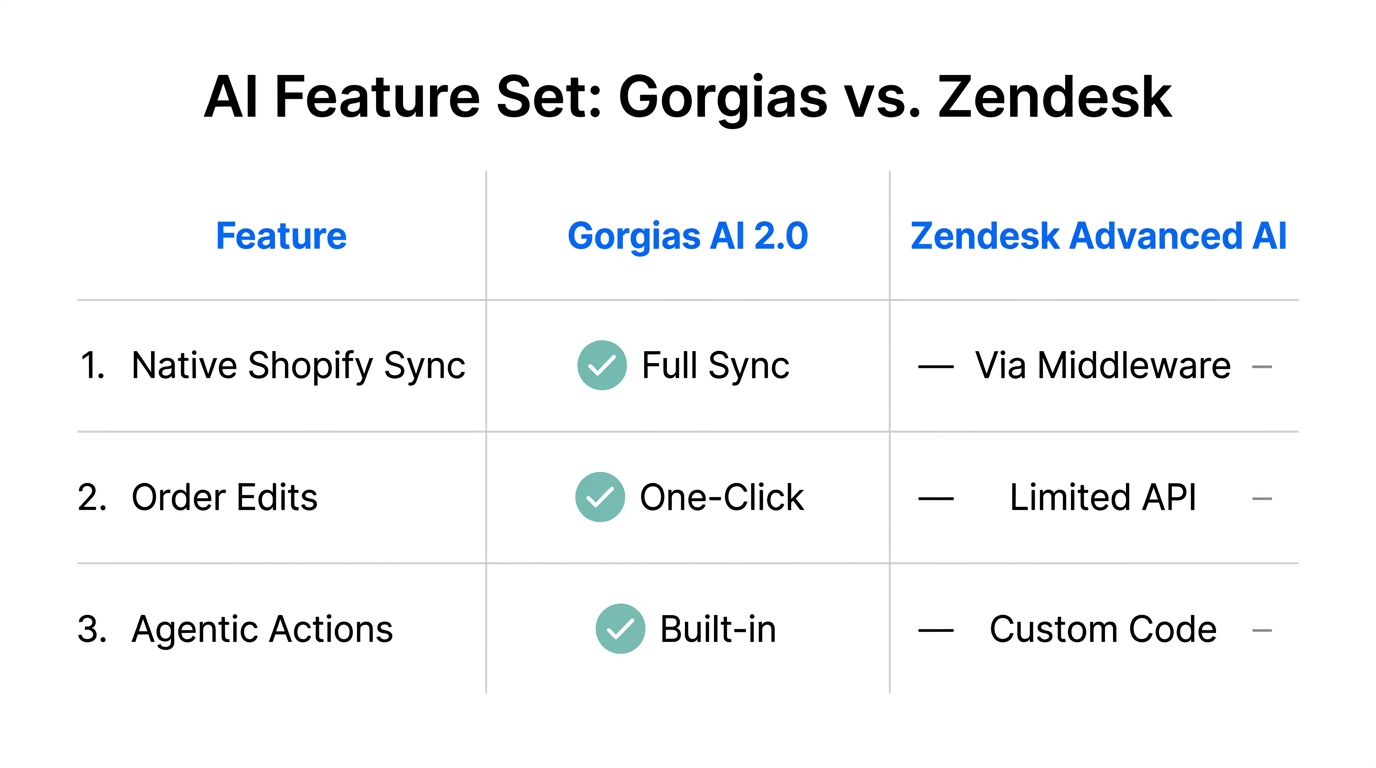
The core of "Agentic AI" is grounding—the process of giving an LLM access to your specific brand policies and real-time store data so it doesn't hallucinate. In 2026, both Gorgias and Zendesk have released updated architectures to handle this, but the setup varies significantly.
Gorgias AI Agent 2.0 Setup
Gorgias remains the most "ecommerce-native" choice, specifically built to live inside the Shopify ecosystem. Their AI Agent 2.0 model focuses on outcome-based resolutions rather than just drafted replies (Sacra).
- Sync Shopify Data: Navigate to Settings > Integrations > Shopify and ensure you are pulling at least 24 months of order history. This allows the AI to recognize VIP customers and past return behavior.
- Knowledge Base Grounding: Upload your PDF or URL-based shipping and return policies. The AI Agent uses these as its "source of truth."
- Task-Based Rules: Enable "Automated Actions." In 2026, you can now toggle "Autonomous Refunds" for orders under a specific dollar threshold (e.g., <$50) if the tracking status shows "Returned to Sender."
Zendesk Advanced AI Setup
Zendesk is the enterprise heavyweight, scaling across 173,600+ paid accounts. Its 2026 "Advanced AI" suite requires more configuration but offers deeper logic.
- Intelligent Triage: Enable Intent and Sentiment detection to automatically prioritize "Angry" customers who are asking for refunds.
- Content Cues: Use the AI to scan your existing Help Center for gaps. If your AI agent doesn't know your policy on international return shipping, it will fail to resolve the ticket.
- Zendesk Copilot: Activate the agent-facing assistant to help your human staff double-check the AI's automated edits before they go live in Shopify.
"AI should be more than just another technology... it's a way to bring companies and customers closer... redefining relationships." — Tom Eggemeier, CEO of Zendesk
Automating the 'WISMO' (Where Is My Order) Workflow
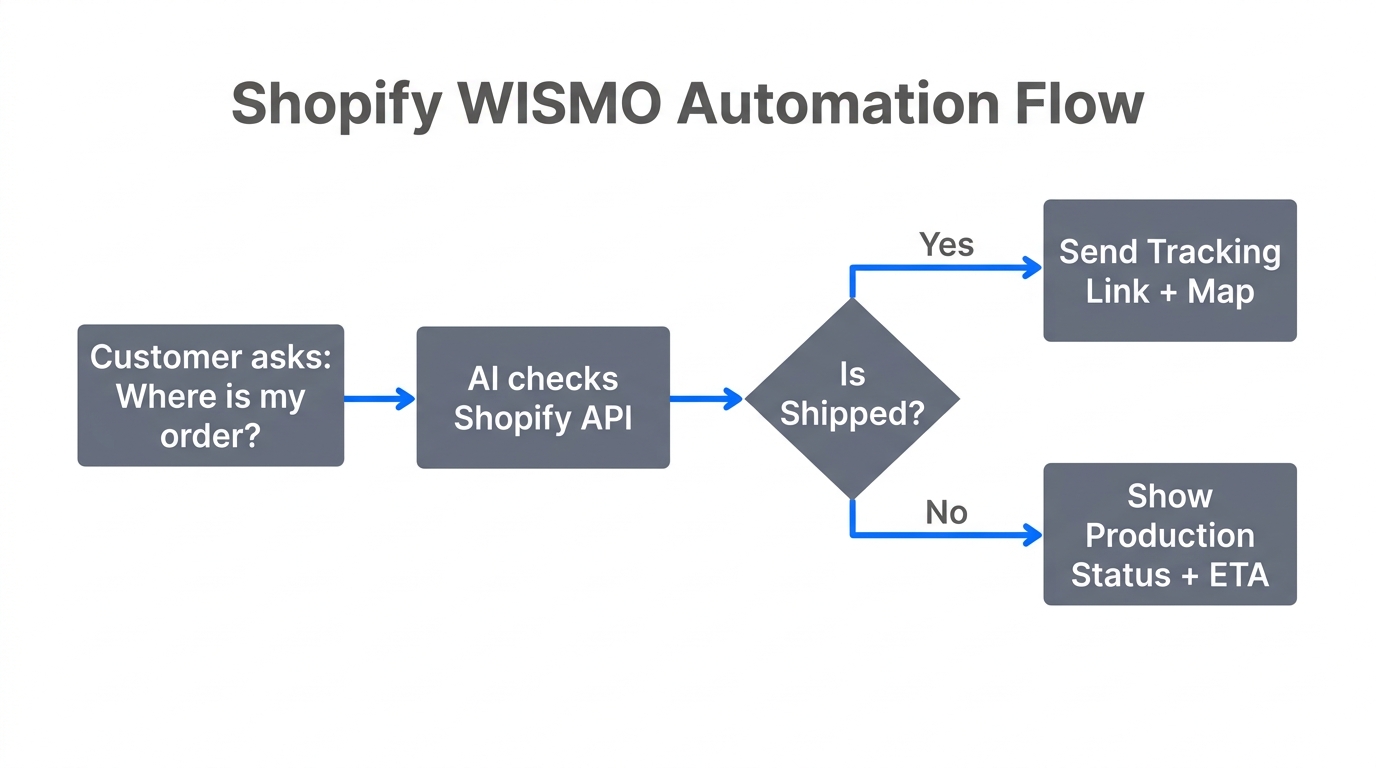
WISMO remains the #1 ticket category for most Amazon and Shopify merchants. Automating this requires a bi-directional sync between your support tool and your shipping carrier data.
In a modern 2026 setup, you shouldn't just provide a tracking link. You should autonomously update the customer based on carrier delays. Stormy AI can be tasked to monitor your ShipStation or ShipBob dashboard, detect a shipment that hasn't moved in 48 hours, and then trigger a proactive message via Gorgias or Zendesk before the customer even asks.
The 'Revenue Recovery' Workflow: Turning Returns into Exchanges
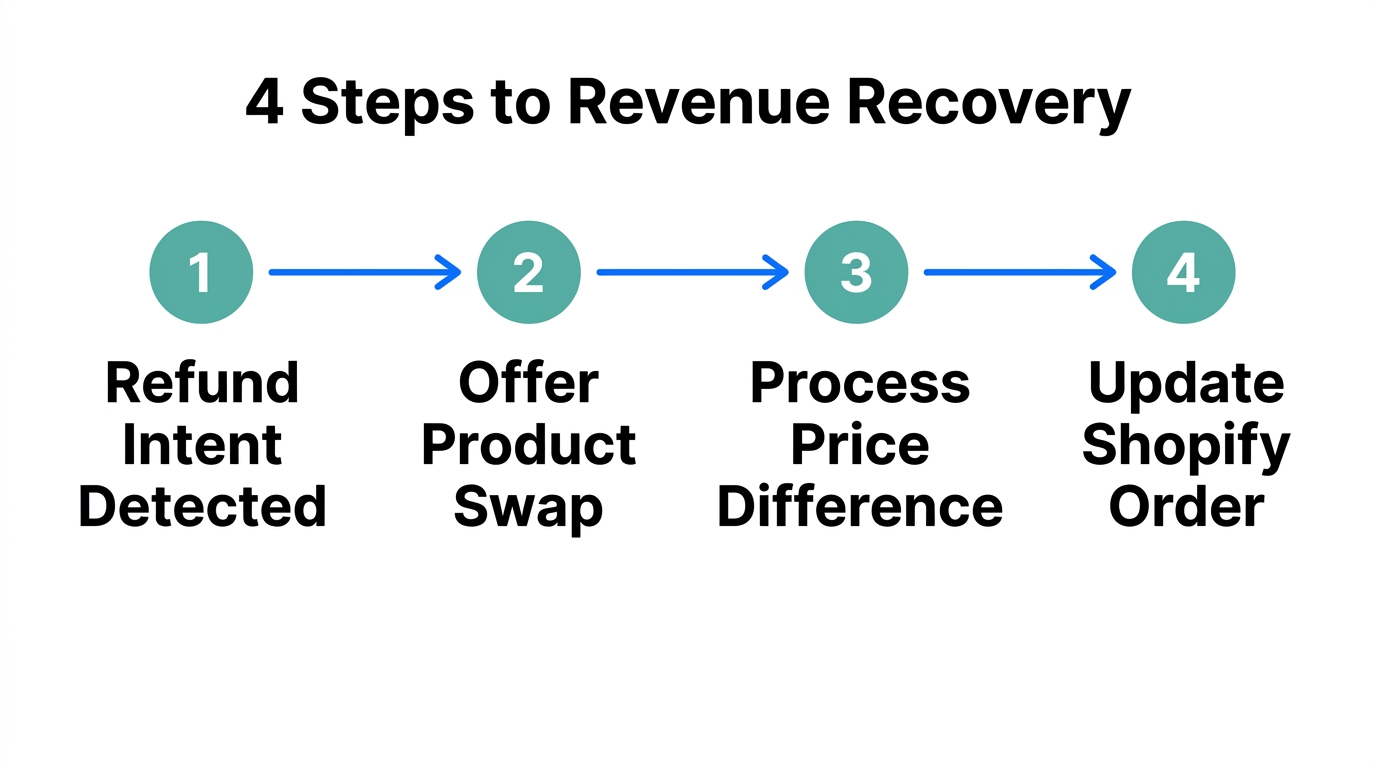
A return request is often a failed sales opportunity. In 2026, the best brands use Gorgias Convert or Zendesk Sales Skills to apply dynamic discounts in real-time to save the sale.
How to set up the 'Save-the-Sale' Trigger:
- The Trigger: Customer types "I want a refund" or "The size is too small."
- The AI Action: The agent checks the Shopify catalog for the correct size and offers a 15% one-time discount if they choose an exchange instead of a refund.
- The Result: Brands like TUSHY have seen a 15% conversion rate on these AI-led interactions, driving 2x more sales than human agents alone (Gorgias Case Study).
By treating support as a "Growth Team," you move away from being a cost center. 93% of purchases resulting from AI recommendations in 2026 occur within 48 hours of the interaction.
"The future of support is not just answering questions; it is executing checkouts and recoveries directly in the chat thread using the Universal Commerce Protocol."
Handling the 'Gorgias Paradox': Boosting Automation Above 50%
Many merchants hit a ceiling with native helpdesk AI. This is known as the "Gorgias Paradox": the platform is excellent for infrastructure, but the native AI often plateaus at a 30-40% resolution rate. To reach 80%+ automation, brands often layer specialized AI agents like Siena AI or Yuma AI on top of their helpdesk.
For example, EvryJewels achieved an 89% automation rate on Tier 1 tickets by using Yuma AI to handle the heavy lifting of Shopify order edits and complex tracking inquiries (Yuma.ai). These layers act as the "brain" that instructs the helpdesk on what to do, while Stormy AI acts as the "hands" that ensure the inventory is updated and the supplier is notified of the return.
Technical Audit: Managing the '429 Wall' and API Rate Limits
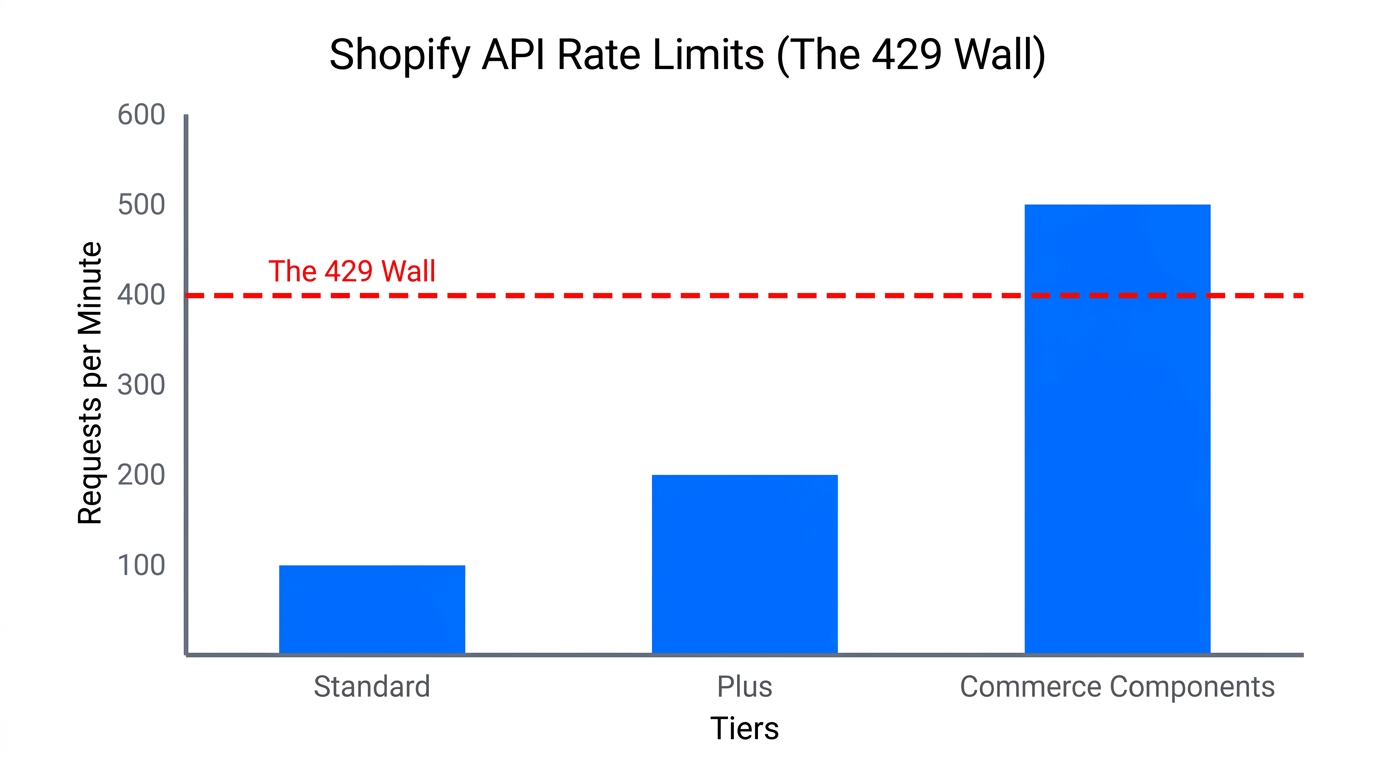
One of the biggest hurdles in automating Shopify support at scale is the API Rate Limit, often referred to by developers as the "429 Wall." If your AI agent tries to sync a massive 10,000-SKU catalog or process 500 refunds in a minute during BFCM, the API will throttle your connection.
| Technical Limit | Gorgias | Zendesk (Enterprise) | "Leaky Bucket" (80 req / 20 sec) | Tiered (Up to 2500 per min) | Bi-directional (Native) | App-based (View Only) | $0.90 - $1.00 | $1.50 - $2.00 | 1-3 Days | 6-8 Weeks |
|---|
To avoid hitting these limits, ensure your automation workflows use batching. Instead of real-time syncing for non-urgent data, have Stormy AI pull your daily performance reports or sync inventory levels in scheduled intervals. This keeps your API "bucket" empty for urgent customer-facing refund requests.
How Stormy AI Completes Your Support Stack
While Gorgias and Zendesk focus on talking to the customer, Stormy AI is the AI ecommerce employee that runs the store. Support automation fails if the rest of the business isn't in sync. Here is how Stormy AI handles the back-office side of your support playbook:
- Inventory Pulse: Stormy AI conducts daily inventory checks. If a product goes out of stock, it notifies your support AI to stop offering exchanges for that specific SKU.
- Supplier Follow-up: If a refund is triggered because of a defective product, Stormy AI can automatically draft an email to your supplier to claim a credit or report the batch issue.
- Performance Reporting: Every Monday, Stormy AI pulls your support metrics from Gorgias or Zendesk, combines them with your Meta Ads spend, and drops a complete P&L update into your shared workbook.
"The most successful brands in 2026 don't just use AI chatbots; they use AI employees to connect their front-office support to their back-office operations."
Conclusion: Your 2026 Automation Roadmap
Automating your Shopify support isn't a one-and-done task. It’s a process of constant refinement. To get started today, focus on these three pillars:
- Ground your AI: Ensure your return policies are clearly documented and indexed in your helpdesk.
- Empower Resolution: Move beyond deflection. Set up rules that allow your AI to actually edit orders and process refunds within defined parameters.
- Sync the Back-Office: Use an AI employee like Stormy AI to ensure your support decisions (like exchanges) are backed by real-time inventory and supplier data.
By following this playbook, you can achieve the industry benchmark of $0.90 per resolution (My AskAI), allowing your human team to focus on VIP customers and high-value growth initiatives.