In 2026, the success of your ecommerce brand on TikTok depends less on the creativity of your hooks and more on the quality of the data signals you feed the algorithm. With the death of third-party cookies long behind us, TikTok conversion tracking on Shopify has evolved into a sophisticated game of server-side data synchronization. If you are still relying on basic pixel tracking, you are essentially flying blind. To scale profitably today, you must master Maximum Data Sharing—the industry standard for feeding high-intent conversion signals to both the TikTok algorithm and your AI operations team.
The Evolution of Shopify Data Sharing in 2026
 6:06
6:06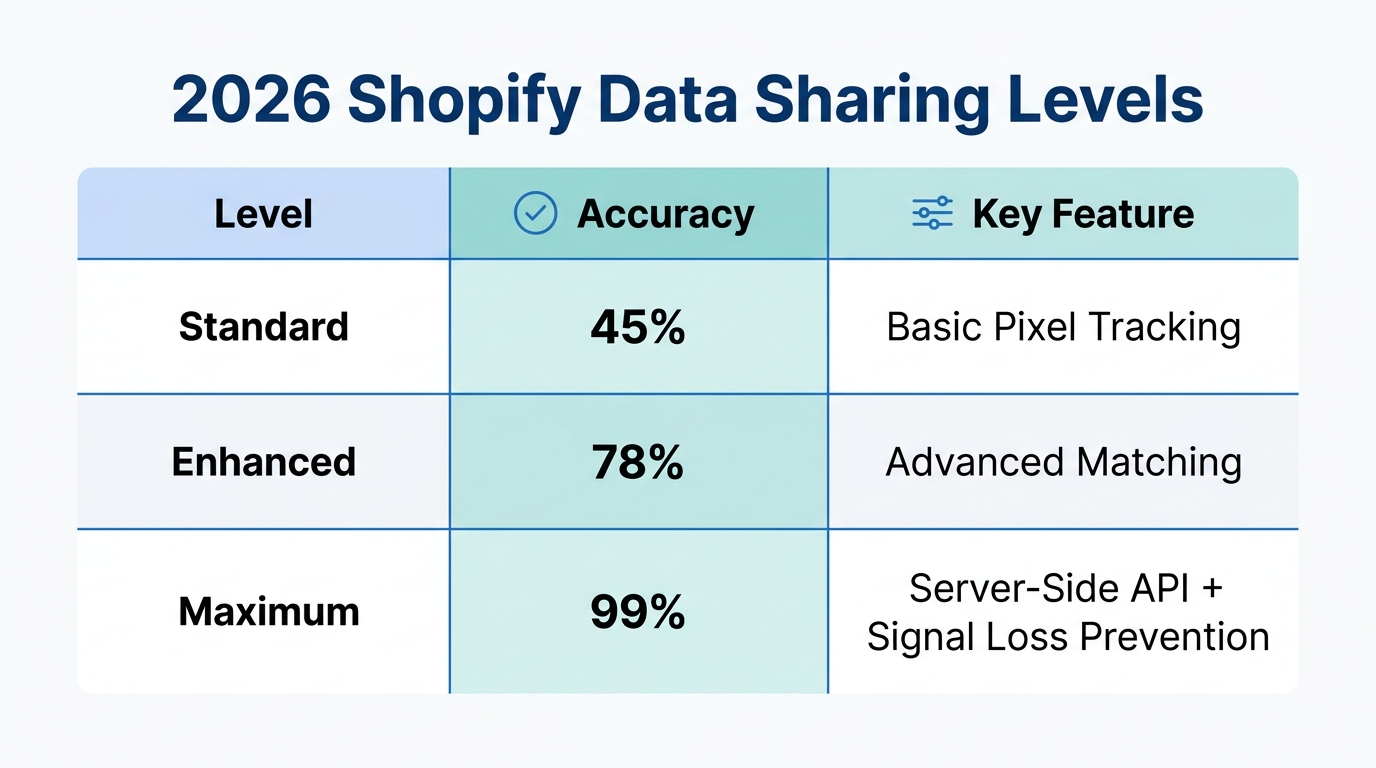
Gone are the days when a simple copy-paste pixel code was enough. Today, the connection between Shopify and the TikTok Ads Manager is a deep integration that shares customer behavior in real-time. By selecting the "Maximum" setting, you aren't just tracking page views; you are sharing hashed customer information, including email addresses and phone numbers, which allows TikTok to match store visitors to TikTok users with 90%+ accuracy.
This level of data granularity is what allows an AI ecommerce employee like Stormy AI to function effectively. Stormy monitors these conversion signals in the background, cross-referencing your TikTok spend with actual Shopify revenue to flag whenever a campaign's ROAS dips below your target threshold. Without Maximum data sharing, your AI teammate is working with incomplete information, leading to missed opportunities and wasted ad spend.
"In 2026, data isn't just an asset; it's the fuel for your AI automation. If your tracking is broken, your growth is capped."
Step 1: Setting Up Your TikTok Business Center
Before you can optimize your tracking, you need a centralized hub. The TikTok Business Center is where you manage your assets, including your ad accounts and pixels. To begin, head to the Business Center and click "Get Started." You can sign up using your brand's existing TikTok account or a professional email address.
During the setup, you will be prompted to enter your company information. It is crucial to use your official company website and industry category correctly. TikTok uses this metadata to categorize your brand's "vibe" before you even launch your first ad. Once your Business Center is live, you'll need to create or link a TikTok Ads Manager account. If you see a notification saying "Account contract pending," don't panic—TikTok usually approves these within 24 hours according to official support guidelines. To speed up the process, many top brands add a payment method immediately to signal to TikTok that they are a legitimate advertiser.
Step 2: Connecting the Shopify TikTok App
4:33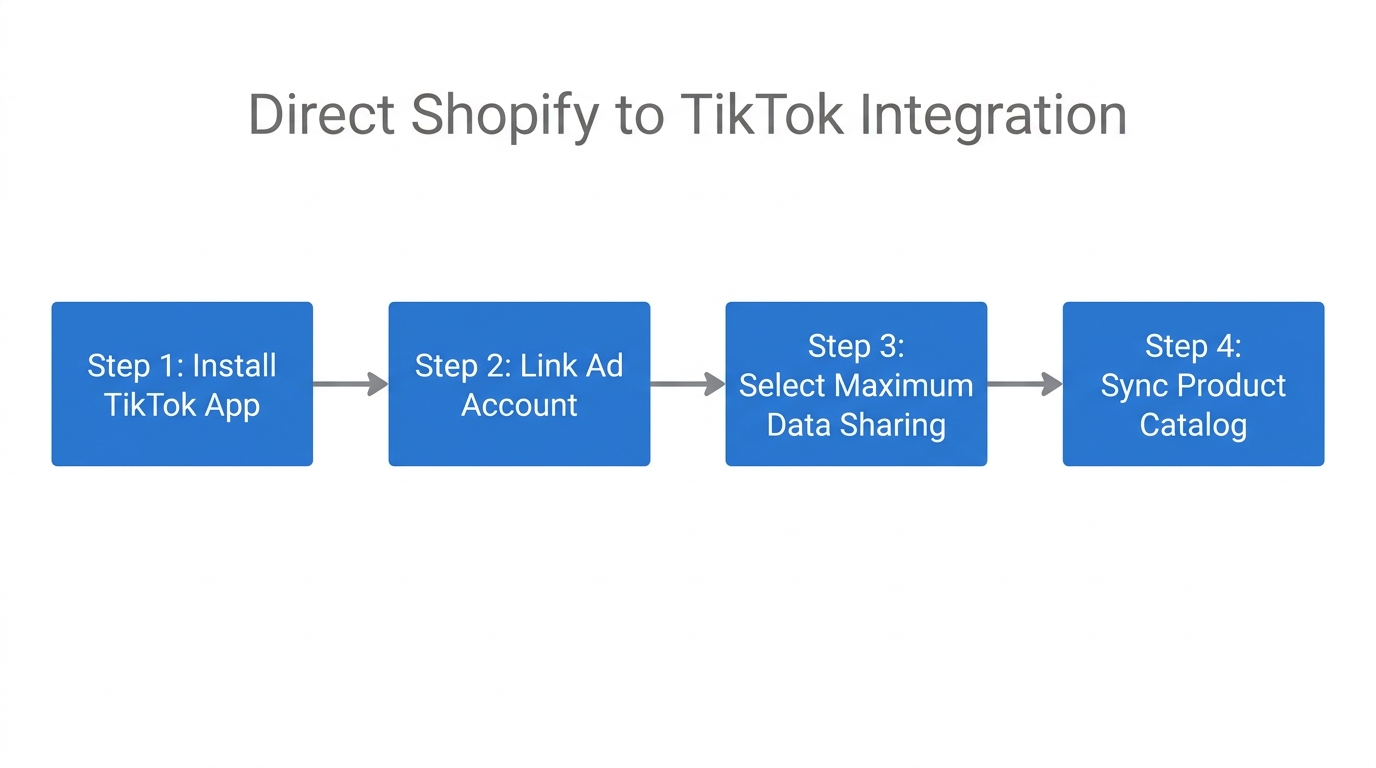
With your Business Center ready, the next step is the actual technical bridge. In your Shopify admin, navigate to the Apps section and search for the official TikTok App. This app is free and acts as the primary conduit for Shopify data sharing on TikTok.
- Install the App: Click install and grant the necessary permissions.
- Connect TikTok for Business: Link the Business Center account you just created.
- Connect Ads Manager: Select the approved Ads Manager account. If it still says "pending," wait a few hours and refresh.
Once connected, you will reach the most important screen in the setup: Data Sharing Levels. In 2026, there are three options: Basic, Enhanced, and Maximum. For any brand spending more than $50 a day, Maximum is the only viable choice. This level utilizes TikTok's Events API technology, which ensures that even if a user is on a private browser or using an ad-blocker, the server-side API can still attribute the sale to your TikTok campaign.
| Sharing Level | Tracking Method | Match Rate (Estimated) | Ideal For |
|---|---|---|---|
| Basic | Browser Pixel Only | 40-50% | Hobbyists |
| Enhanced | Pixel + Limited API | 65-75% | Small Stores |
| Maximum | Pixel + Full Events API | 90%+ | Scaling Brands |
Step 3: Validating Your Setup via TikTok Events Manager
6:38Never assume your tracking is working just because the toggle is on. You must verify that your TikTok conversion tracking on Shopify is actually firing. Navigate to the TikTok Events Manager and select "Data Sources." You should see a pixel titled "TikTok Pixel for Shopify."
To test the integration, use the "Test Events" tool. Enter your Shopify URL and click "Open Website." As you navigate your store—adding items to the cart and reaching the checkout—you should see real-time events appearing in the Events Manager. If you don't see activity, download the TikTok Pixel Helper Chrome extension. This tool will show you exactly which events (like PageView, AddToCart, and CompletePayment) are firing and if there are any errors in the data payload.
Once the events are verified, you can ask Stormy AI to start a daily inventory and ad pulse. Stormy will check your TikTok Shop and Shopify statuses, ensuring that your ads aren't running for products that have suddenly gone out of stock—a common mistake that wastes thousands in ad spend.
"Testing your events once isn't enough. Technical glitches happen. Automated monitoring is the only way to ensure 24/7 attribution accuracy."
Leveraging AI for Daily Ad Operations
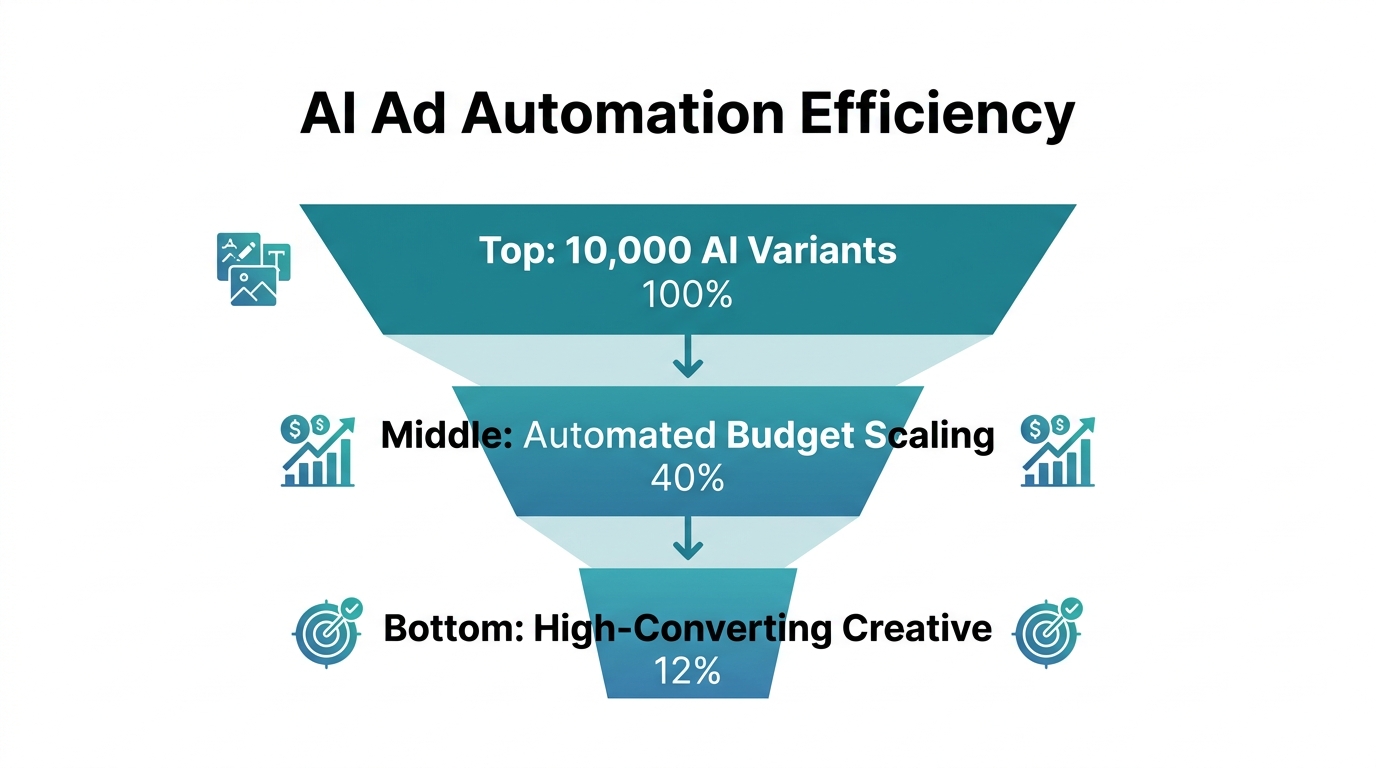
In 2026, the competitive advantage has shifted from "who can set up a pixel" to "who can act on the data fastest." This is where AI ecommerce ad automation changes the game. While a human media buyer might check the TikTok Ads Manager once or twice a day, an AI employee like Stormy AI is constantly monitoring the heartbeat of your store.
How Stormy AI Optimizes Your TikTok Strategy:
- Automated Performance Audits: Stormy pulls spend from TikTok and revenue from Shopify every morning, dropping a clean ROAS report into your shared workbook.
- Stockout Protection: If a SKU runs low in Shopify, Stormy can flag the corresponding TikTok campaign for you to pause, preventing "dead clicks."
- Supplier Follow-ups: If a winning ad causes a surge in orders, Stormy detects the inventory dip and automatically drafts a reorder email via Gmail or your preferred inbox to your supplier.
- Creator Tracking: For brands running TikTok Shop Affiliate campaigns, Stormy tracks which creators have posted and sends polite follow-ups to those who haven't yet fulfilled their sample agreement.
Scaling TikTok Ads Optimization in 2026
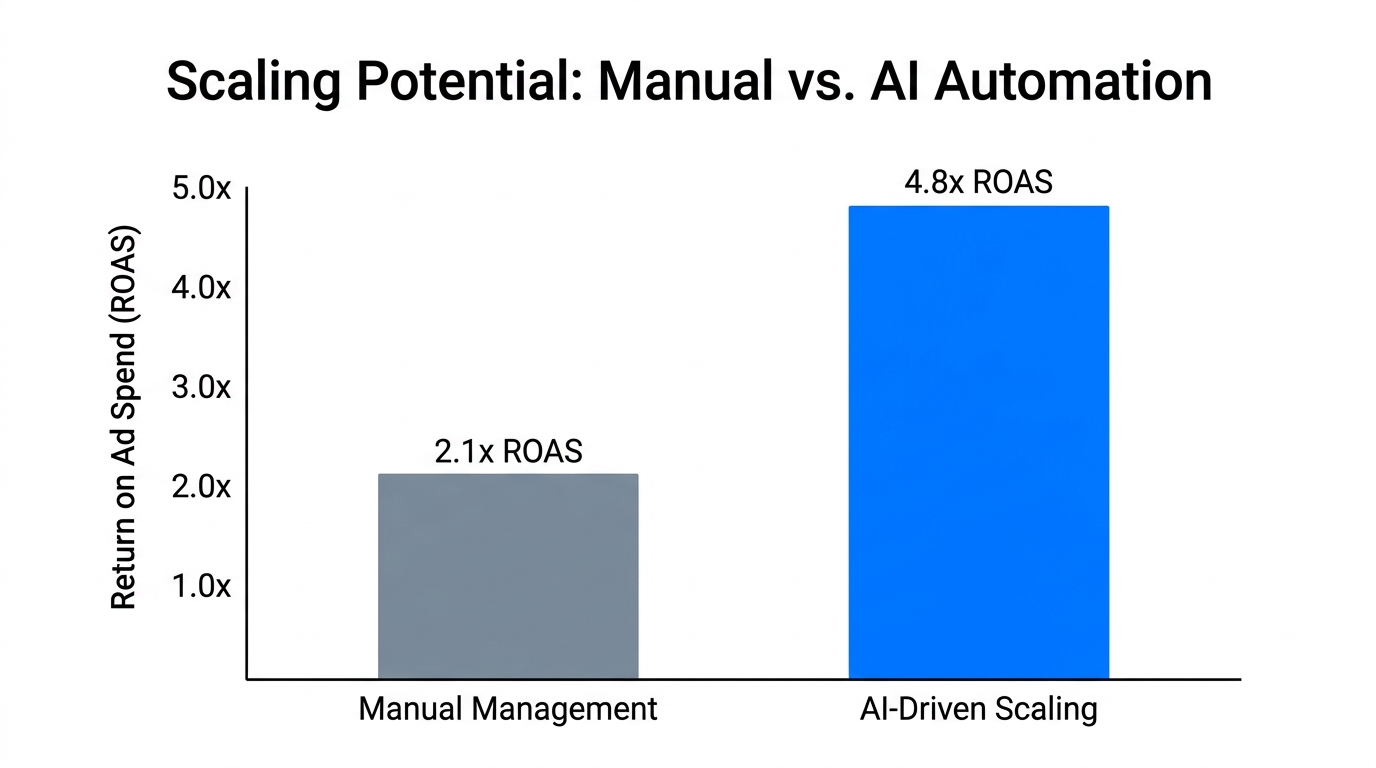
Once your tracking is bulletproof and your AI automation is live, you can focus on scaling. TikTok Ads optimization in 2026 is about finding the right balance between Broad targeting and Interest-based segments. Because your "Maximum" data sharing is feeding so much high-quality data back to TikTok, the algorithm's "Smart Targeting" will actually improve over time. The more conversions you feed it, the cheaper your customer acquisition cost (CAC) becomes.
Regularly review your data in the TikTok Events Manager to ensure your "Event Match Quality" (EMQ) score remains high. A high EMQ score tells TikTok that your server-side data is rich and reliable, which often leads to better ad placement and lower CPMs compared to competitors with poor tracking setups.
Conclusion: The Future of Automated Commerce
Setting up TikTok conversion tracking on Shopify with Maximum data sharing is no longer optional—it is the foundation of modern ecommerce. By ensuring every click, cart add, and purchase is tracked with surgical precision, you provide the necessary signals for both the TikTok algorithm and your AI teammates to succeed.
As you move forward in 2026, remember that the most successful brands are those that automate the "messy back office." By letting an AI ecommerce employee like Stormy AI handle the reporting, inventory monitoring, and supplier follow-ups, you free yourself to focus on what humans do best: building a brand that people love. Start by connecting your pixel correctly today, and let the data—and the AI—do the heavy lifting.