The Signal Audit: Fixing Google Ads Conversion Tracking to Fuel AI Bidding in 2026
Learn how to conduct a Google Ads conversion tracking audit in 2026. Fix tracking failures, implement enhanced conversions, and optimize AI bidding signals.
In 2026, the success of your digital marketing no longer hinges on your ability to manually tweak keyword bids or adjust device modifiers by 5%. We have officially entered the era of the "Black Box," where Google’s machine learning models—driven by Performance Max (PMax) and AI Max for Search—take the wheel. However, there is a silent killer lurking in most accounts: inaccurate data. Research shows that roughly 71% of Google Ads accounts suffer from inaccurate conversion tracking, causing AI algorithms to optimize for the wrong signals. If you are feeding the machine garbage, you will get expensive garbage in return.
The "Garbage In, Garbage Out" Crisis in AI Bidding
The primary reason AI bidding strategies fail this year isn't the algorithm itself; it's the quality of the signals provided to it. In 2026, search campaigns represent over 56% of total investment, but the way we audit them has fundamentally shifted from tactical to strategic. According to Metaflow AI, the average Google Ads account wastes approximately 76% of its budget on underperforming keywords and poor placements. Most of this waste stems from Smart Bidding chasing "hollow" conversions.
"Tactical audits matter less than you think. In an AI-first world, a technically perfect campaign can fail if it is strategically misaligned with business goals." — Sarah Stemen, Sarah Stemen, LLC
When your conversion tracking is broken, the AI cannot distinguish between a high-value purchaser and a bot filling out a contact form. This leads to a feedback loop where the system aggressively pursues low-quality traffic, assuming it's succeeding. Conversely, when signals are accurate, the results are transformative: campaigns using AI-driven Smart Bidding have seen an average 19% increase in overall conversions by identifying unique search query categories that manual bidding would have missed, according to data from ALM Corp.
Step 1: Auditing Primary vs. Secondary Conversion Goals
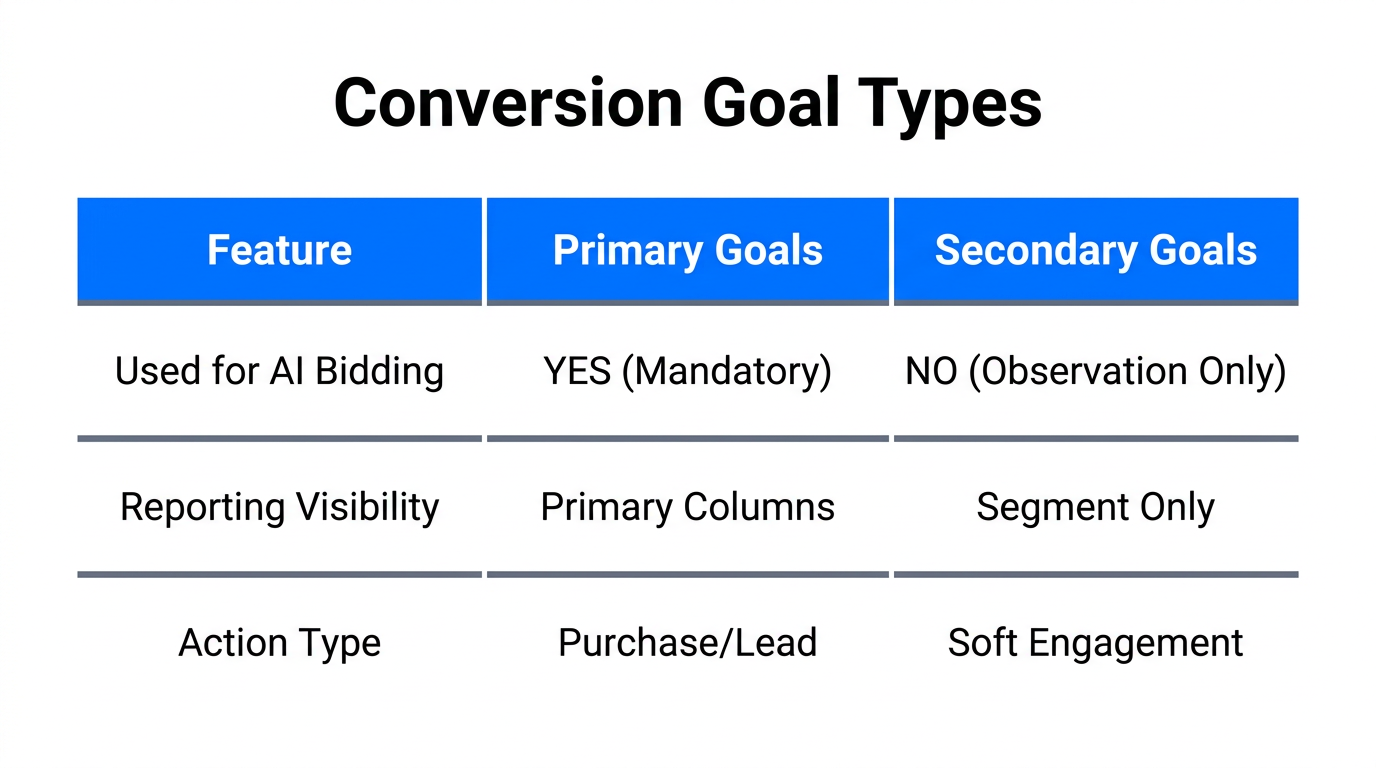
One of the most common mistakes in 2026 is treating every tracked action as a signal for bidding. To fix your Google Ads conversion tracking audit, you must strictly categorize your actions. Primary actions are used for optimization and reported in the "Conversions" column. Secondary actions are for your observation only and do not influence the AI's bidding decisions.
| Action Type | Setting | Purpose | Examples |
|---|---|---|---|
| Bottom-Funnel | Primary | Optimizes AI Bidding | Purchases, Qualified Leads, Booked Calls |
| Mid-Funnel | Secondary | Observation Only | Add to Cart, Newsletter Signups, 2+ Mins on Site |
| Micro-Signals | Secondary | Diagnostic | Button Clicks, Page Views, Video Plays |
If you set "Newsletter Signup" as a Primary goal alongside "Purchase," Google's AI may find it much easier (and cheaper) to get signups. It will then shift your budget away from sales to chase the easier micro-conversion. To maximize your ROI Potential, which can include a 30% reduction in CPA through proper Smart Bidding according to Marketing LTB, you must ensure only the most valuable business outcomes are set to Primary.
Step 2: Implementing Enhanced Conversions for First-Party Data
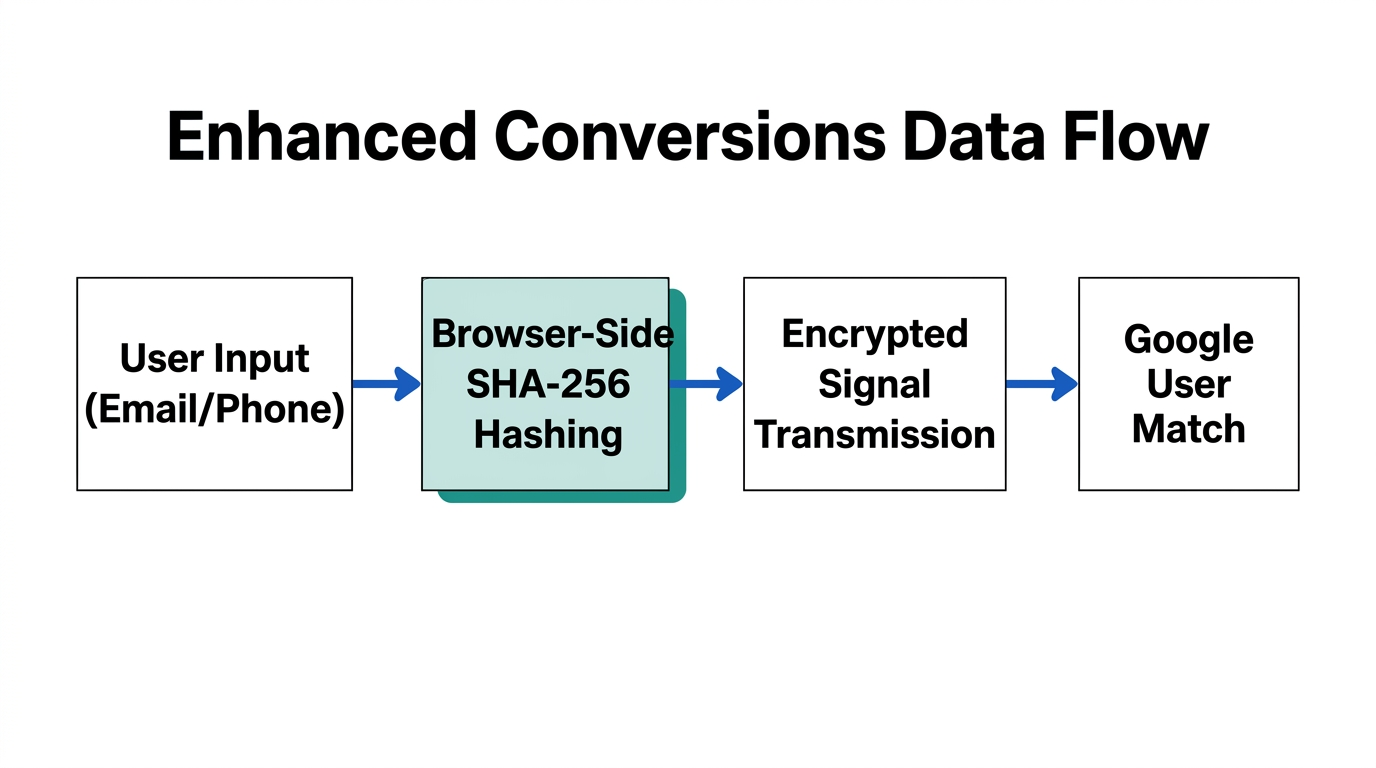
In a privacy-first world where third-party cookies have crumbled, Google Ads enhanced conversions are the bridge between your website and the ad platform. Enhanced conversions allow your site to send hashed, first-party data (like email addresses or phone numbers) back to Google in a secure way. This allows Google to "match" a conversion to an ad click even if the user has switched devices or cleared their cookies.
Without enhanced conversions, you are likely under-reporting your success by 10-15%. To audit this, navigate to your conversion settings and check the "Enhanced Conversions" status. You can implement this via Google Tag Manager or the global site tag (gtag.js). By providing this extra layer of data, you give the AI the "precision-targeted" feedback it needs to function in a conversational search environment where AI Overviews (AIO) may otherwise cloud attribution.
"The key insight for 2026: Survival depends on mastering automated targeting and optimizing your website so LLMs can understand your offer." — Jyll Saskin Gales, Google Ads Expert
Step 3: Auditing GA4 Linkage and "Enhanced Measurement"
Your GA4 Google Ads integration is the heartbeat of your signal strategy. Many advertisers link the accounts but fail to configure the GA4 property for maximum accuracy. First, verify that "Enhanced Measurement" is enabled in your GA4 data stream settings. This automatically tracks interactions like scrolls, outbound clicks, and file downloads without additional coding.
However, be cautious about which GA4 events you import into Google Ads. Importing every "recommended event" as a conversion can lead to the "Black Box" trap: trusting automated bidding without having at least 30 conversions in the last 30 days to provide a statistical baseline. Use tools like AskGAAI.com to query your data in natural language and identify if GA4 is reporting significantly different numbers than your backend CRM.
Step 4: Troubleshooting Redundant Actions and Double-Counting
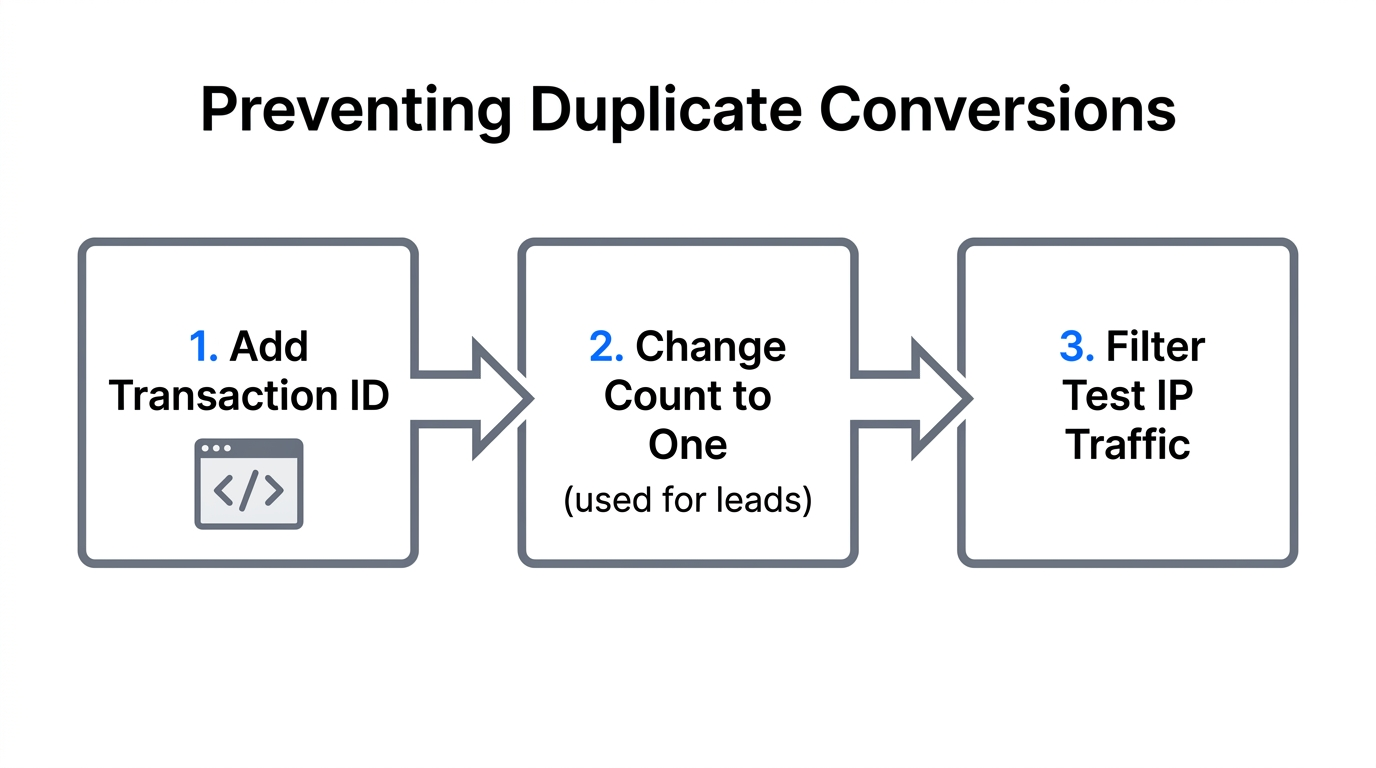
Double-counting occurs when the same user action is recorded multiple times. The most common scenario is having both a legacy GTAG purchase conversion and a new GA4 purchase event both set to "Primary." This tells the AI you made $200 when you only made $100. Over time, the AI will incorrectly value those users at double their actual worth.
To fix this during your conversion tracking troubleshooting, use the following checklist:
- Check the "Status" column in your Conversion actions. Look for tags firing on the same URL.
- Use Google Tag Assistant to walk through a test purchase and see which tags trigger.
- Ensure that for lead forms, the "Count" setting is set to "One" (to avoid counting multiple refreshes), whereas for purchases, it should be set to "Every."
- Audit your Performance Max Assets; if you are seeing high conversion rates but low sales, check if PMax is "counting" local store visits or automated directions as Primary conversions.
Step 5: Fueling the AI with Creative Signals
In 2026, "signals" aren't just technical data points; they are also the assets you provide. AI cannot optimize "thin" asset groups. For Performance Max, this means providing the full 15 images and 5 videos. Often, the best way to get these high-converting assets is through User-Generated Content (UGC). While you are fixing your tracking, platforms like Stormy AI streamline creator sourcing and outreach to ensure you have a constant stream of fresh, high-quality video assets to feed into your campaigns.
A real-world example of this synergy can be seen in the automotive sector. A group of 15 dealerships used AI-driven signals to inform Google's algorithm, resulting in a 40% increase in CTR and a 15% lift in conversion rates by ensuring the AI had both the data and the creative assets to match user intent (Strong Automotive).
The 2026 Signal Audit Tool Stack
To maintain a healthy account, you should supplement manual checks with AI-powered auditing tools. These platforms help identify "low-hanging fruit" and negative keyword opportunities that standard match types now frequently miss.
- groas.ai: Exceptional for real-time AI optimization and intent analysis.
- Optmyzr: The industry standard for automated audits and scripts to catch tracking breaks.
- PPCrush.ai: Specialized in identifying budget-bleeding queries that Broad Match + AI might still catch incorrectly.
- Opteo: Provides continuous monitoring and AI alerts for sudden drops in conversion volume.
"While AI Overviews may shrink organic CTR by 15–35%, they actually increase the value of precision-targeted PPC ads that are fed by accurate conversion data." — Andrew Percey, Prometheus PPC
Conclusion: The Signal is Your Strategy
The transition from manual to automated bidding is complete. In 2026, your role as a marketer has shifted from a "pilot" to an "engineer." Your primary job is to maintain the machinery. By performing a rigorous Google Ads conversion tracking audit, implementing enhanced conversions, and strictly managing Primary vs. Secondary goals, you provide the high-octane fuel your AI bidding needs to thrive.