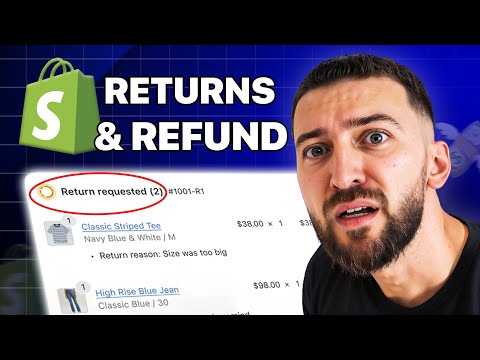
In 2026, the hallmark of a high-growth brand isn’t just a slick storefront or a viral TikTok campaign; it is a zero-touch back office. For years, the 'returns headache' was the leading cause of support lead burnout and operational bloat. Manually reviewing blurry photos of 'damaged' goods, cross-referencing order numbers, and drafting refund emails consumed 30-40% of a typical support team's week. However, the integration of specialized logistics tools and autonomous AI agents has changed the game. By combining the power of Parcel Panel Returns and Exchange with an AI ecommerce employee like Stormy AI, brands are now handling 90% of their return volume without a human ever clicking 'approve.'
Why Automated Returns Matter in 2026
 0:00
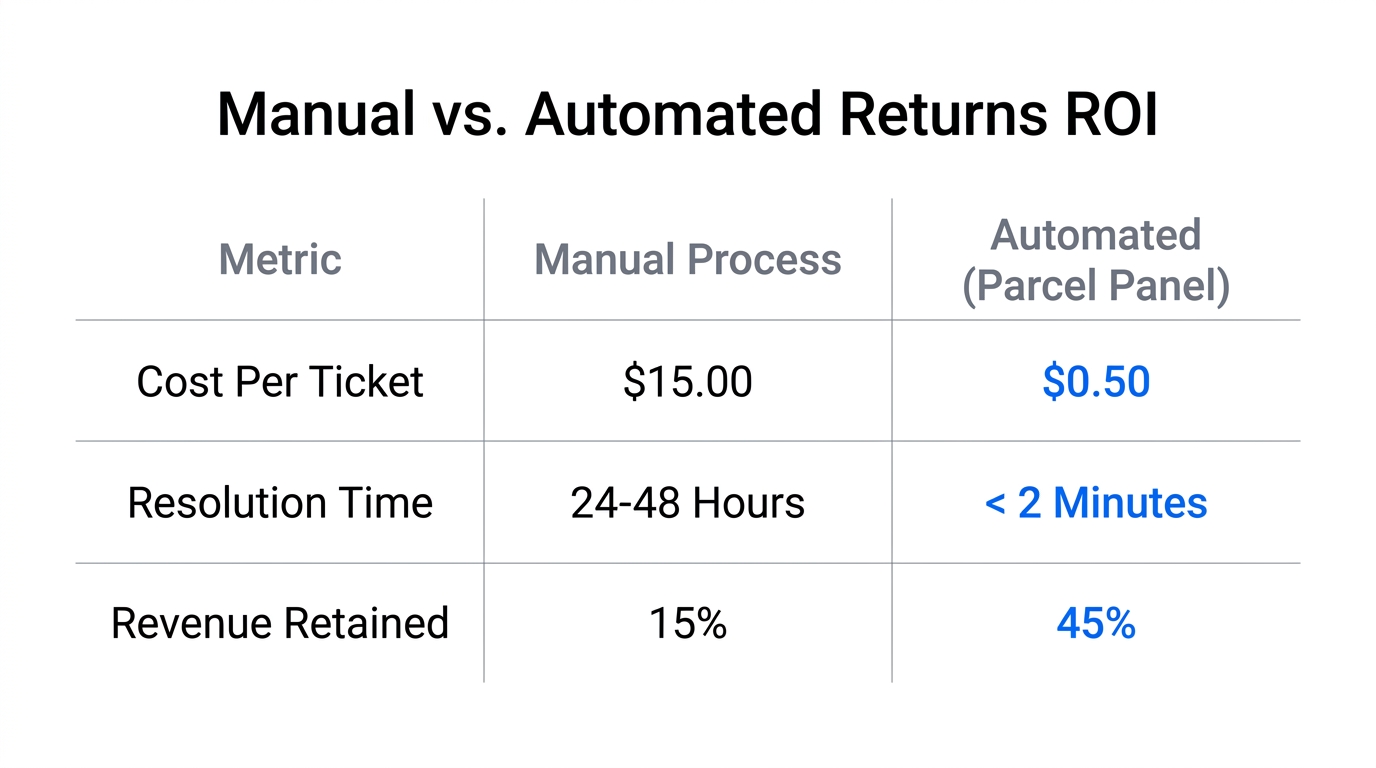
0:00Returns are no longer just a cost of doing business; they are a critical touchpoint for customer retention and revenue preservation. When a customer decides an item isn't right for them, the speed and ease of the return process determine whether they ever buy from you again. According to industry data from 2026, providing a self-service portal can drastically reduce costs while increasing the likelihood of an exchange over a refund.
By using a dedicated portal, your customers can enter their order number and email to start a return instantly. They can select specific items, provide reasons (like 'arrived too late' or 'poor quality'), and choose their solution—all within a branded interface. When you add an AI agent like Stormy AI into this flow, the AI can monitor these requests in the background, update your master spreadsheet, and even follow up with the customer if they forget to drop off their package at a courier like USPS or Evri.
"The goal is not just to process a return faster; it's to turn a negative product experience into a positive brand experience without increasing your head count."
Step 1: Setting up Your Branded Returns Portal
3:39To automate Shopify customer support, you first need a centralized hub for your customers. Parcel Panel allows you to build a portal that lives on your own domain (e.g., yourstore.com/apps/returns), ensuring a seamless brand experience.
Configuring Lookup and Solutions
- Install the App: Head to the Shopify App Store and install Parcel Panel Returns and Exchange.
- Define Lookup Methods: Choose how customers find their orders. Most brands in 2026 use a combination of Order Number + Email or Phone Number.
- Select Return Solutions: This is where revenue retention happens. You should prioritize Exchanges and Store Gift Cards. By dragging these to the top of the list in the Parcel Panel dashboard, you nudge customers toward keeping their money within your ecosystem.
| Return Solution | Revenue Impact | Customer Effort |
|---|---|---|
| Refund to Original Payment | Negative (Cash Out) | Low |
| Exchange for Same Item | Neutral (Stock Movement) | Medium |
| Store Credit / Gift Card | Positive (Future Sale) | Low |
| Refund for Discount Code | Positive (Incentivized) | Low |
Once your solutions are set, you can customize the styling. Upload your logo, choose your brand colors, and set a background image to make the portal feel like an integrated part of your Shopify store. In 2026, customer trust is built through consistency; a jarring jump to a third-party-looking page can increase drop-off rates.
Step 2: Using AI to Analyze Image Proofs for Damaged Items
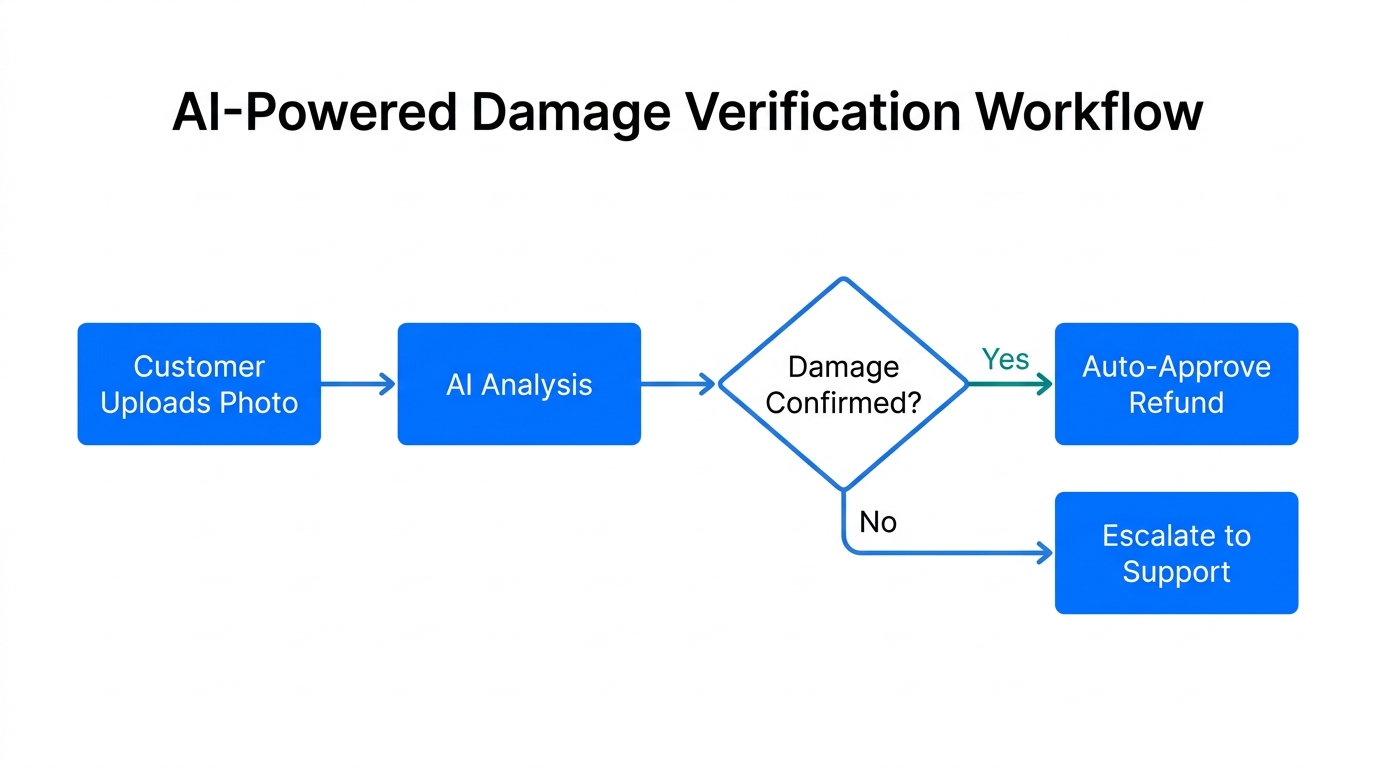
One of the biggest bottlenecks in AI for Shopify returns has historically been 'Damaged or Defective' claims. Usually, a human must look at the uploaded photo to verify the claim before approving a refund or replacement. In 2026, this is handled autonomously.
When a customer uploads a photo as part of their return request in Parcel Panel, Stormy AI can be triggered to scan the image. By using visual recognition technology, Stormy can detect if the item is truly broken, if it’s the correct product, and even if the damage matches the customer's description. If the damage is verified, Stormy can auto-approve the request and trigger a replacement order in Shopify immediately.
This drastically reduces Shopify support ticket reduction 2026 metrics. Instead of a customer waiting 24-48 hours for a support agent to wake up and look at an email, they get an approval notification in seconds. This level of responsiveness is what defines top-tier ecommerce operations today.
"If an AI can drive a car, it can certainly tell if a ceramic mug arrived in three pieces. Stop making humans do robot work."
Step 3: Setting Up Parcel Panel Automation Rules
11:18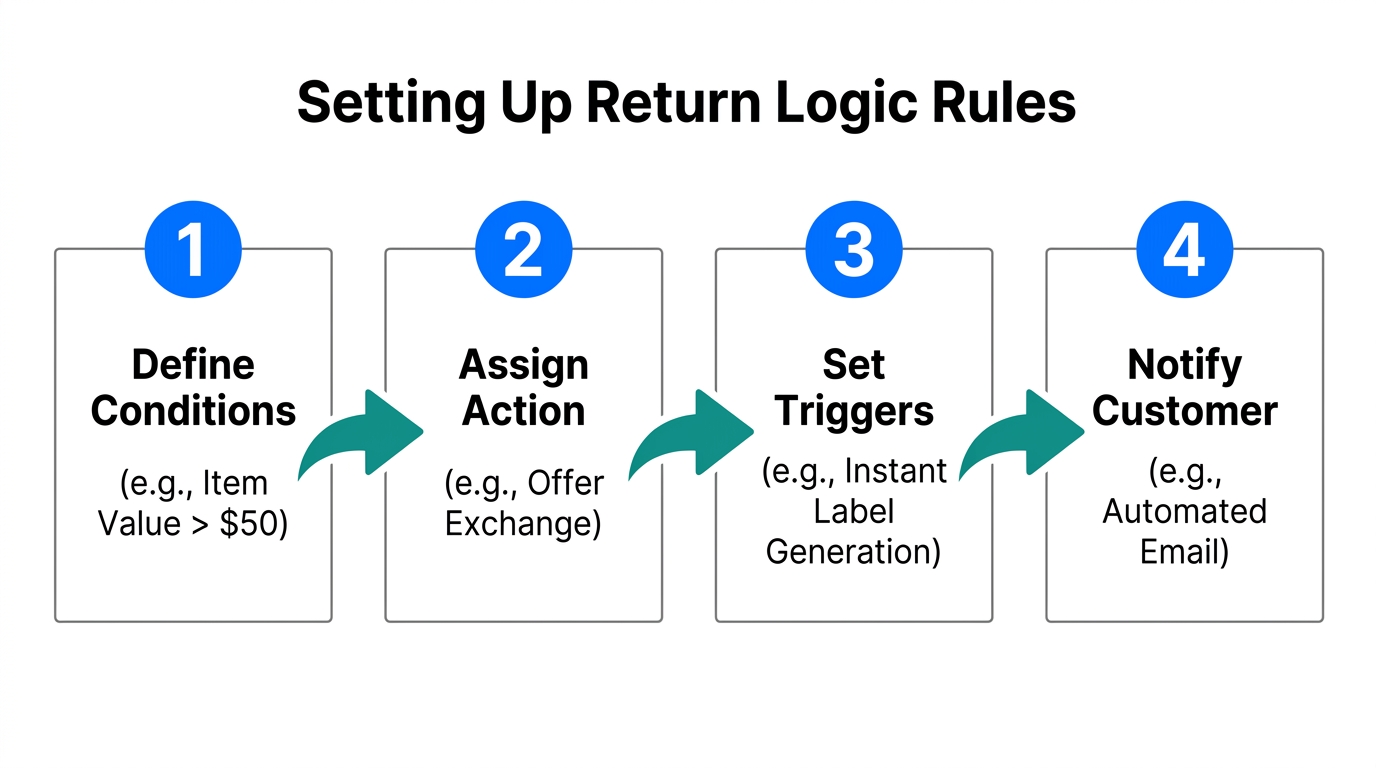
Automation isn't just about the AI; it's about the logic you build into your logistics platform. Within Parcel Panel, you can navigate to the Automation tab to browse templates for auto-approve return requests.
Criteria for Auto-Approval
- Return Window: Only auto-approve items within the standard 30-day fulfillment window.
- Product Category: Auto-approve apparel returns but flag 'Final Sale' or intimate items for review.
- Customer Tier: Use Stormy AI to cross-reference your Klaviyo or Shopify segments. If a VIP customer requests a return, auto-approve it regardless of the reason to maintain customer loyalty.
You can also automate the Logistics Integration. By connecting providers like ShipBob or ShipStation, Parcel Panel can automatically generate a prepaid return label (or a QR code for paperless returns) as soon as the request is approved. Stormy AI then monitors the tracking number provided by the courier. If the package hasn't been scanned within 7 days, Stormy can send a polite follow-up email through your Gmail or Gorgias account to remind the customer to send it back.
Step 4: Reducing Support Tickets with AI Triage
Even with a perfect portal, customers will still email you. "Where is my refund?" is the most common support query in ecommerce. An AI ecommerce employee handles this by acting as a first-responder in your inbox.
When an email arrives in Gorgias or Zendesk asking about a return, Stormy can:
- Identify the Order: Match the sender's email to a Shopify order.
- Check the Status: Look up the return status in Parcel Panel.
- Draft the Reply: "Hi Sarah, I see your return was delivered to our warehouse yesterday. Refunds typically take 3-5 business days to process. You should see the credit on your statement by Friday!"
By removing these repetitive tasks, your support lead can focus on complex issues like shipping disputes or supplier negotiations—tasks that actually require human empathy and decision-making.
"The most expensive way to answer a common question is to pay a human to type the same sentence for the 500th time this month."
Step 5: Using Return Data to Optimize Your Product Catalog
12:57Automation isn't just about saving time; it's about gathering data. Parcel Panel provides a comprehensive analytics dashboard that shows which items are being returned the most and why. This is gold for your product development team.
In 2026, smart founders use Stormy AI to pull these analytics weekly. Stormy can look at a spreadsheet of return reasons and flag, for example, that a specific SKU of leggings is being returned 40% of the time because it 'arrived too late.' This might indicate a supplier lead time issue rather than a product quality issue. Stormy can then draft an email to your supplier to address the delay before it impacts more customers.
| Metric | Manual Monitoring | Stormy AI Automation |
|---|---|---|
| Refund Speed | 24-72 Hours | < 5 Minutes |
| Return Reason Tagging | Often missed | 100% Accuracy |
| Supplier Follow-up | Reactive (after loss) | Proactive (weekly audit) |
| Customer Notification | Manual templates | Dynamic & Real-time |
Conclusion: Embracing the Zero-Touch Future
Managing returns doesn't have to be a 'headache.' By leveraging Parcel Panel for the customer-facing infrastructure and Stormy AI for the back-office execution, you can build a self-sustaining system that handles logistics, approvals, and communication autonomously.
This is the blueprint for automating Shopify customer support in 2026. You reduce the friction for the customer, preserve your revenue through exchanges, and free your team from the mundane. Start by setting up your portal, then layer in the AI to handle the triage. Your support lead—and your bottom line—will thank you.