Automating Amazon FBA Supplier and Inventory Ops with Open-claw MCP Integrations in 2026
Learn how to use Amazon FBA AI automation in 2026 with Open-claw and Model Context Protocol (MCP) to automate supplier follow-ups and inventory management.
In 2026, the landscape of Amazon FBA has shifted from manual oversight to autonomous management. The days of sitting in front of a computer, manually refreshing Amazon Seller Central to check inventory levels or drafting repetitive emails to suppliers, are officially over. Today, savvy operators are using AI agents—autonomous entities that don't just chat, but actually perform work across different platforms. By leveraging the Model Context Protocol (MCP) and tools like Open-claw, you can now run a multi-million dollar FBA business from your phone while at the gym or out for a walk.
This guide will walk you through the advanced setup of an AI-driven back office. We will explore how to use the latest Amazon FBA AI automation 2026 techniques to connect your mission-critical tools like Slack, Notion, and WhatsApp into a single, cohesive brain that manages your logistics while you sleep. If you have been looking for a way to scale without adding headcount, an AI ecommerce employee like Stormy AI or an agentic setup using Open-claw is your competitive advantage.
What is MCP (Model Context Protocol) and Why It’s a Game-Changer in 2026
Understand how connecting MCPs to Open-claw enables autonomous agentic workflows.
The Model Context Protocol (MCP) is the universal standard that allows Large Language Models (LLMs) to securely access local and remote data sources. Think of it as the "USB-C port for AI." In the past, connecting an AI to a tool like Trello or Notion required complex API integrations or brittle Zapier workflows. With Model Context Protocol for ecommerce, the AI can natively "understand" the structure of your database or task manager without middle-man software.
In 2026, FBA sellers use MCP to give their agents "eyes" into every part of the business. Instead of just generating text, the agent uses MCP servers to pull live data from your shipping manifest or your Shopify store and make decisions based on real-time reality rather than static training data. This is why AI inventory management for Amazon has become so much more reliable; the agent isn't guessing—it is looking at the actual numbers through a standardized protocol.
"The shift in 2026 isn't about AI that talks to you; it's about AI that talks to your tools so you don't have to."
The Open-claw MCP Setup Guide: Building Your AI Infrastructure
Learn how to set up your private Open-claw AI agent in seconds.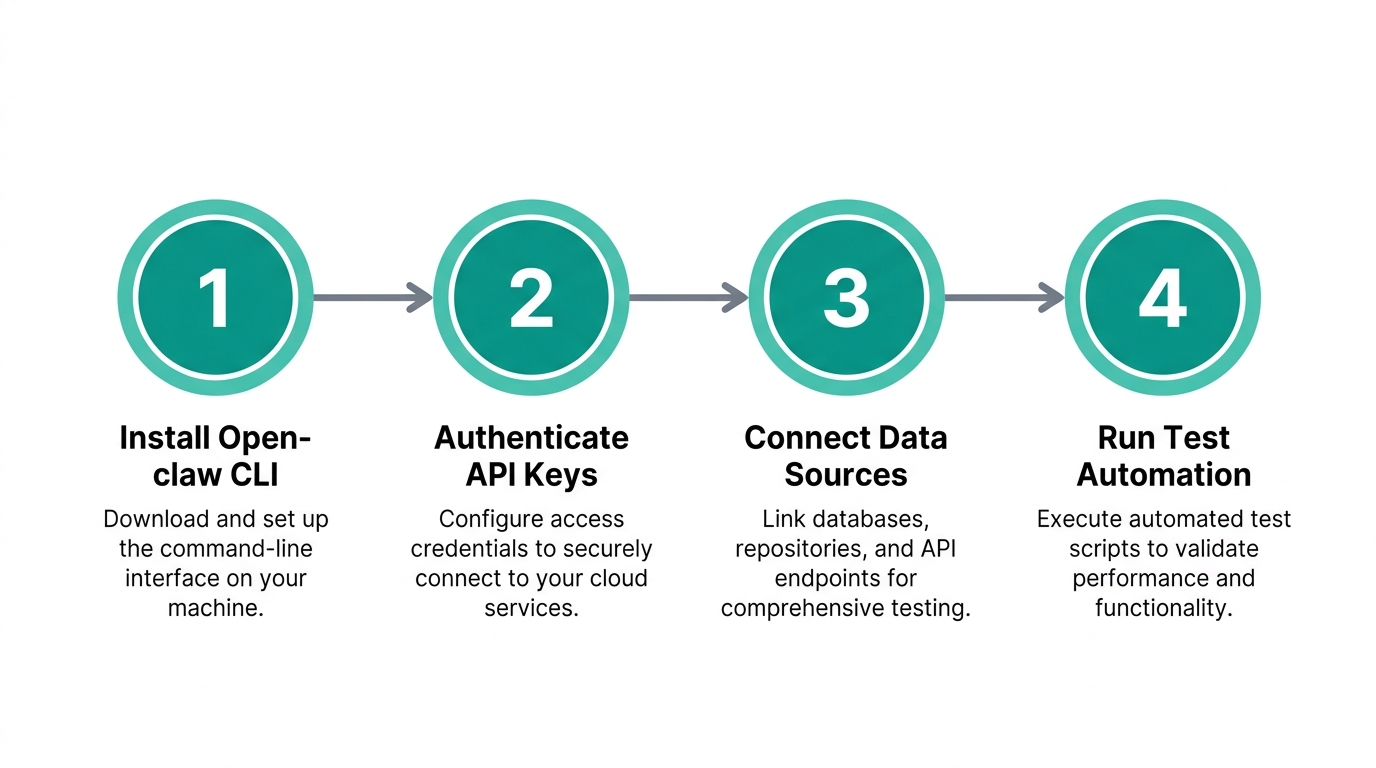
To run a truly autonomous operation, you cannot rely on your local laptop. If your computer goes to sleep, your business stops. That is why the first step in any Open-claw MCP setup guide is deploying your agent on a Virtual Private Server (VPS). This ensures your AI employee is "always on," 24/7, and handles sensitive data in a secure, isolated environment.
Step 1: Deploying the VPS
Head over to Hostinger and claim a Managed Open-claw plan. In 2026, this is the gold standard for beginner-friendly agent hosting. Choose the 12-month or 24-month period to lock in the best rate—usually around $5.49 per month. Ensure you enable the "Ready-to-use AI" and "Instant Web Search" options. These credits allow your agent to use models like Claude and GPT-4o without you needing to manage individual API keys from OpenAI or Anthropic.
Step 2: Activating the Gateway
Once your VPS is live, go to the Open-claw dashboard and click "Setup." You will be provided with an API key. Copy this and keep it safe. Then, choose your primary communication channel. Most sellers prefer Telegram for its robust bot API. Use BotFather on Telegram to create a new bot, name it (e.g., "FBA_Operations_Bot"), and paste the access token back into Open-claw. Your agent is now live and reachable from your phone.
| Operational Model | Manual FBA (Old Way) | AI-Agent FBA (2026 Way) |
|---|---|---|
| Inventory Tracking | Weekly manual spreadsheet audits | Daily autonomous pulses via MCP |
| Supplier Follow-up | Manual emails & WeChat pings | Automated WhatsApp gateway |
| Product Research | Hours of manual web scraping | 20-minute autonomous scrapes |
| Cost | High (Virtual Assistant salary) | Low ($5.49/mo VPS + AI credits) |
Connecting Your Stack: Slack, Notion, and Trello via MCP
Connect external tools like Slack and Notion using the built-in MCP interface.The true power of Amazon FBA AI automation 2026 lies in cross-platform task management. By adding MCP servers to your Open-claw agent, you enable it to move data between your "brain" (Notion) and your "communication hub" (Slack).
To add an MCP server, navigate to the Infrastructure > MCPs tab in your Open-claw dashboard. Click "Add Entry." For Slack, you will need to provide your workspace credentials. Once connected, you can give your agent complex instructions: "If a supplier emails a new invoice to my inbox, summarize the costs in my Notion 'Shipments' table and ping the #logistics channel in Slack."
While setting this up, ensure the red brain icon and tool icon are active in your chat interface. This tells the agent to use its long-term memory and its connected tools for every request. If you find the manual configuration of MCP servers too technical, an AI ecommerce employee like Stormy AI comes with these connectors pre-built, allowing you to link your Meta Ads Manager or Google Ads accounts in seconds.
"The competitive moat in ecommerce is no longer just the product; it's the speed at which your back office reacts to data. AI agents are the only way to react in real-time."
Automating Supplier Communication on WhatsApp
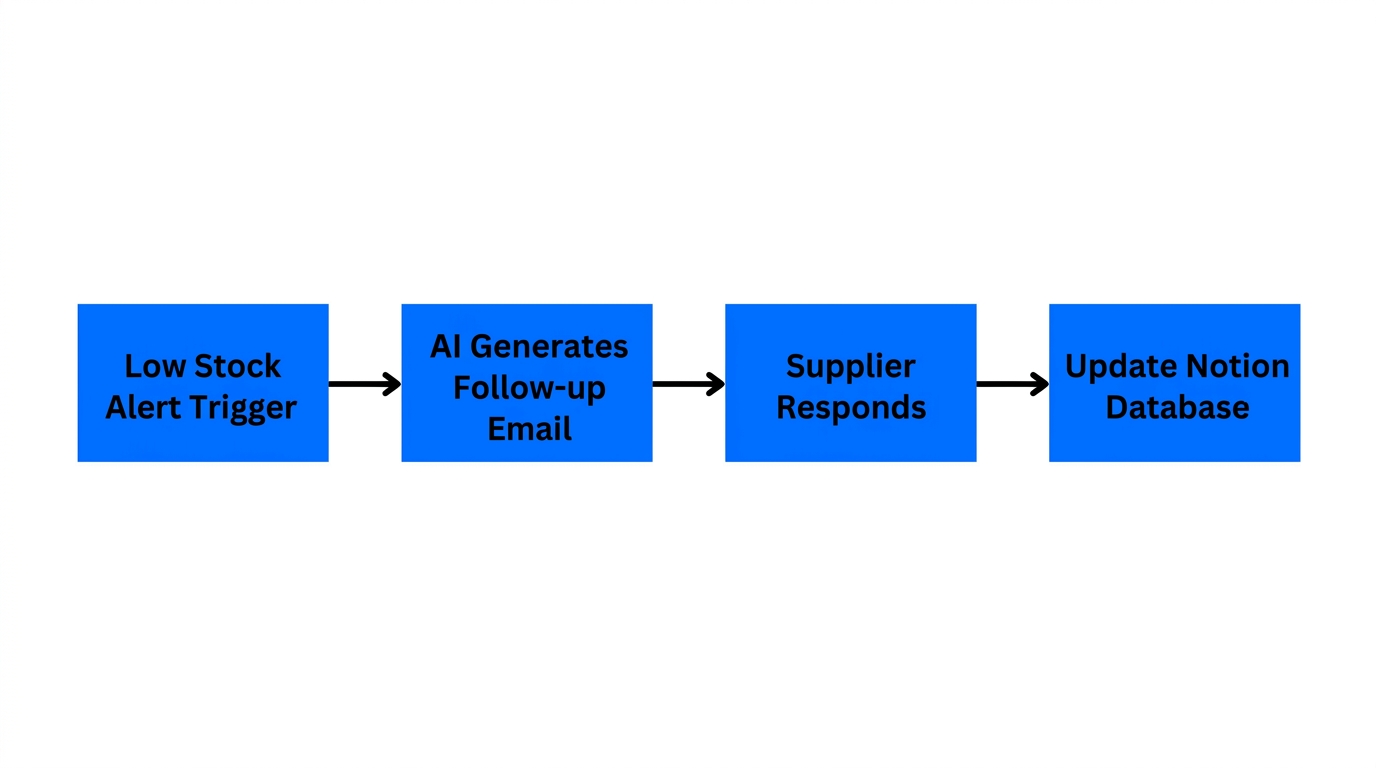
One of the most tedious parts of FBA is the constant automated supplier follow-up. In 2026, most manufacturers communicate via WhatsApp. Open-claw’s mobile gateway allows your agent to send and receive WhatsApp messages on your behalf.
To set this up, go to the Channels tab and enable WhatsApp. You will scan a QR code, similar to WhatsApp Web, linking your business number to the agent. You can then upload a markdown file (a "Knowledge Base") containing your supplier names, lead times, and typical shipping terms. Once trained, your agent can handle the following autonomously:
- Payment Reminders: Checking if a deposit has been sent and notifying the supplier.
- Production Updates: Asking "Is the 500-unit batch of SKU-402 still on track for Friday?" every Wednesday morning.
- Document Retrieval: Asking for the Bill of Lading (BOL) or commercial invoice as soon as a shipment is marked as "Departed" in your spreadsheet.
By delegating these low-leverage conversations to an AI agent, you free up 10-15 hours of your week. Your agent handles the "pestering," and you only jump in when a human decision—like approving a price increase—is required.
Setting Up Recurring Automations for Inventory and Restocks
Stockouts are the silent killer of Amazon rankings. AI inventory management for Amazon involves setting up recurring "Pulses" where the agent checks your stock levels against your current velocity. In the Open-claw Automation tab, you can create a daily task that triggers at 8:00 AM every morning.
The "Daily Pulse" Playbook:
- Data Pull: The agent uses the browser tool to scrape your Amazon Ads spend and sales data.
- Calculation: It calculates your 7-day and 30-day run rate.
- Threshold Check: If your "Days of Stock Remaining" falls below 21 days, it triggers a restock alert.
- Execution: The agent drafts a Purchase Order in Google Sheets and sends it to your supplier via the WhatsApp gateway for your final approval.
This is the exact workflow an AI employee like Stormy AI uses to keep your store running. By the time you wake up and check your phone, the heavy lifting of calculating reorder points is already done. You simply reply "Yes" to the agent's summary to move the shipment forward.
Monitoring ROI: Event Logs and Cost Control
Track your agent's operation logs and real-time usage costs easily.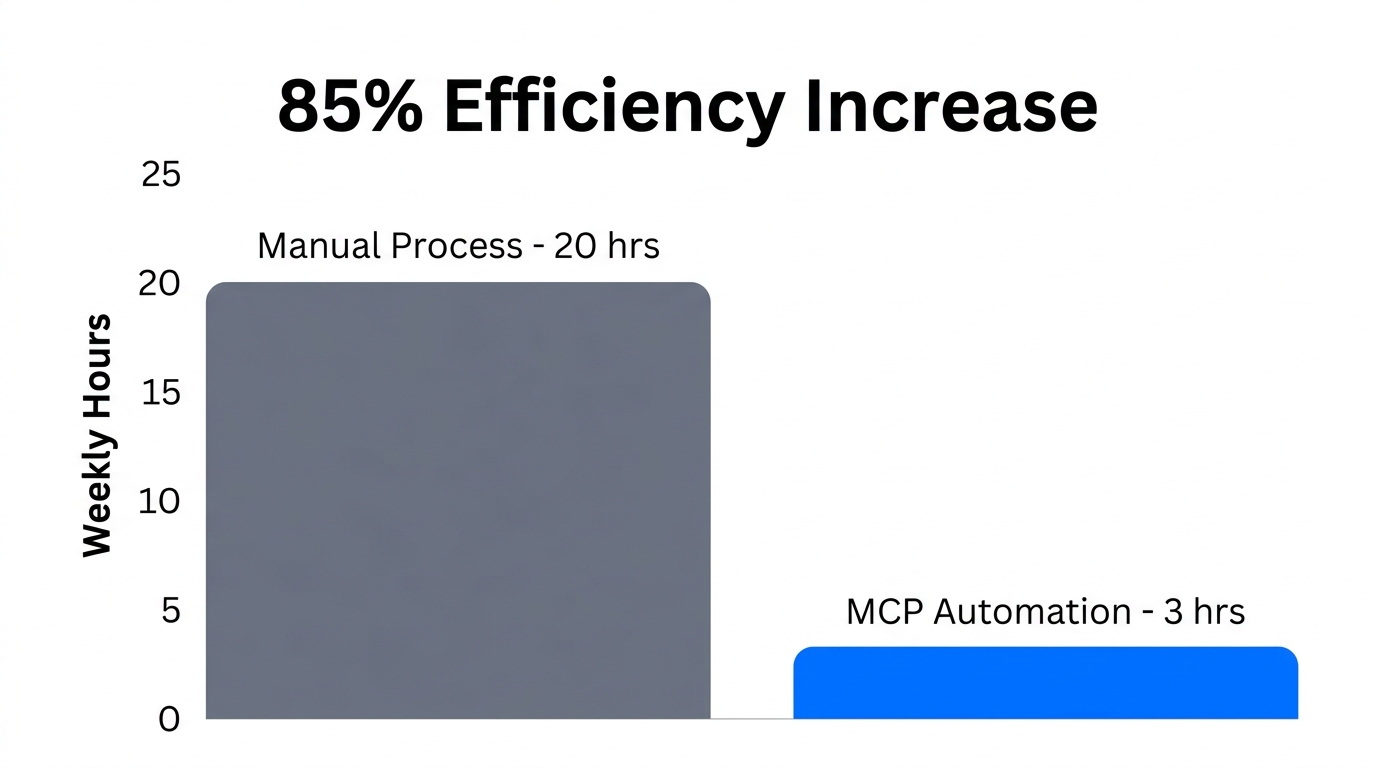
Running an Amazon FBA AI automation 2026 setup isn't free, though it is significantly cheaper than a human hire. To manage your bottom line, you must use the Event Logs and Cost Monitoring tabs in your agent dashboard. These tabs show you exactly how many credits were spent on web searches, image generation, or LLM reasoning.
If you notice a specific task—like product research—is consuming too many credits, you can adjust the agent's constraints. For example, instead of asking it to scrape the entirety of AliExpress, you can tell it to "focus only on beauty products with a $50+ price point." This narrows the search and saves on processing costs.
| Resource Type | Typical Monthly Cost (2026) | Usage Tip |
|---|---|---|
| VPS Hosting | $5.49 - $12.00 | Use Hostinger's managed Open-claw for security. |
| AI Reasoning Credits | $10.00 - $50.00 | Limit "Deep Thinking" modes to once-daily audits. |
| Web Search Credits | $5.00 - $20.00 | Enable "Instant Web Search" for live product trends. |
| Total Employee Cost | $20 - $82 / month | Replaces a $2,000/mo Virtual Assistant. |
"The goal is not to have the most 'intelligent' agent, but the most 'efficient' one. Manage your AI's cost-per-task like you manage your CPC on Amazon Ads."
The Future of FBA: Lean, Mean, and AI-Driven
In 2026, the barrier to entry for Amazon FBA has never been lower for those who embrace automation. By setting up an agent with Model Context Protocol for ecommerce, you are essentially building a digital back office that grows with you. Whether you are using Open-claw for its flexible MCP integrations or employing a dedicated agent like Stormy AI to handle your inventory and supplier follow-ups, the result is the same: more freedom and fewer errors.
Start small. Connect your Telegram bot today, set up a simple product research task, and watch as your autonomous teammate delivers insights while you're at the gym. Once you trust the agent's output, scale into MCP servers and full-scale automated supplier follow-up. The future of ecommerce isn't about working harder; it's about managing the agents that work for you.