The era of the manual media buyer—spending hours tweaking bids and manually uploading single image ads—is coming to a rapid close. As Meta shifts its entire infrastructure toward autonomous delivery, a new archetype is emerging: the Growth Engineer. This shift isn't just about using better tools; it’s about a fundamental change in philosophy where advertising is treated as software infrastructure. By leveraging the AI Meta Ads CLI and the Meta Marketing API, growth teams are now able to deploy, test, and scale campaigns with a level of precision and volume that was previously impossible. This guide provides a technical and strategic blueprint for implementing 'Advertising as Code' to dominate the modern social landscape.
The Rise of the Growth Engineer: Beyond the Ads Manager UI
For years, success on Facebook was determined by who had the best "hacks" for interest targeting. Today, Meta’s AI has largely commoditized that process. According to Meta Business, AI-powered Advantage+ campaigns can reduce cost-per-acquisition (CPA) by up to 17% and increase return on ad spend (ROAS) by 32%. The machine is now better at finding your audience than you are.
As the manual levers disappear, the role of the marketer is evolving into a software-led stack management role. This is the essence of growth engineering. Instead of navigating the sluggish Ads Manager UI, these professionals use the Meta Marketing API to programmatically control their spend. The goal is no longer to "find" the audience, but to feed Meta's machine learning engine the highest quality creative signals at scale.
"Performance marketers in 2026 won't be media buyers; they will be 'Growth Engineers' who manage ad-ops as a software stack."
By 2026, Meta aims to fully automate ad creation and targeting through its Andromeda engine, as reported by Reuters. To prepare, growth teams must move away from manual uploads and toward automated workflows. Using CLI and API automation for bulk operations can result in a 98% reduction in time spent on repetitive tasks, allowing teams to focus on strategy and creative direction rather than data entry.
Advertising as Code: Why Version Control Wins
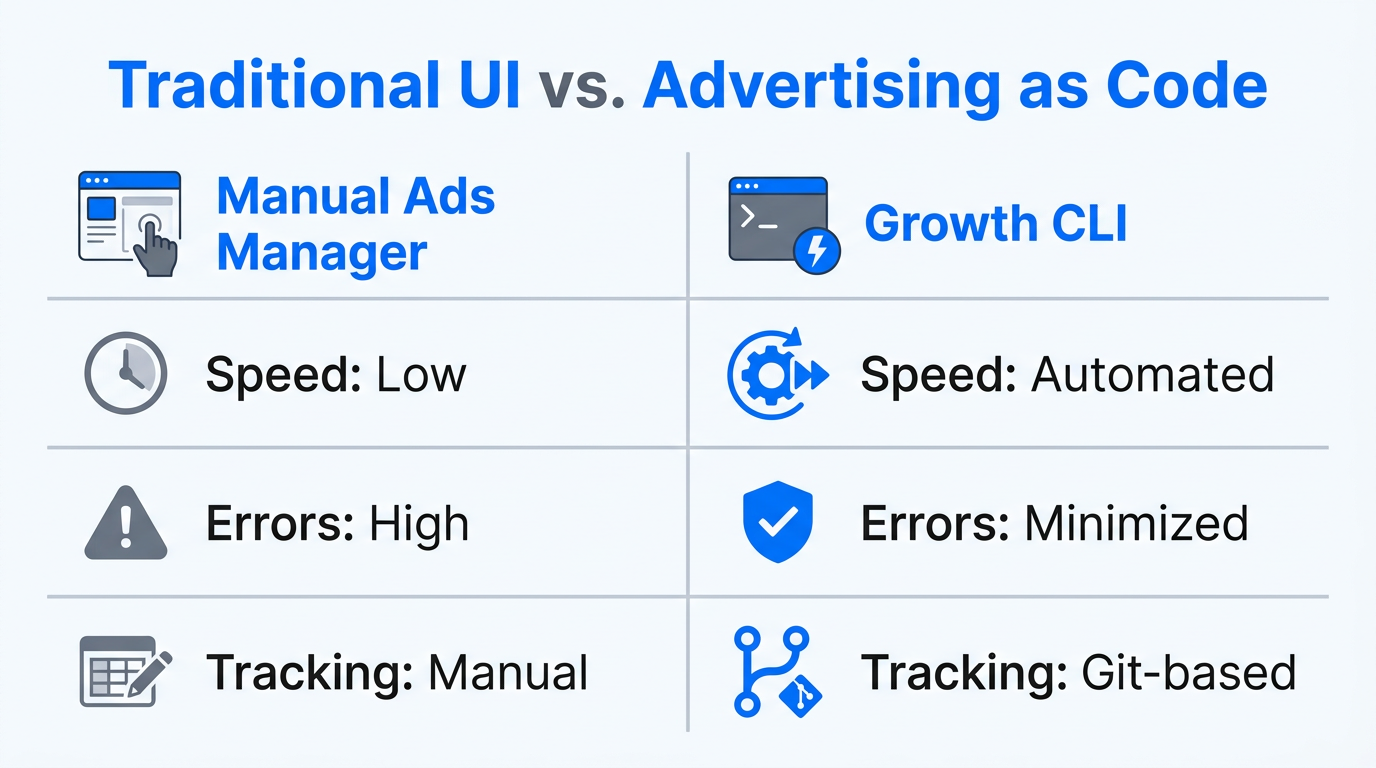
Treating your advertising infrastructure as code (AaC) means managing your campaigns using YAML-based configurations and Git version control. This approach offers several transformative benefits for high-growth startups and agencies:
- Instant Rollbacks: If a new campaign structure fails, you can revert to a previous configuration in seconds via the terminal.
- Peer Reviews: Changes to budgets or creative assets can be reviewed in a GitHub Pull Request before being deployed to the live ad account.
- Environment Consistency: Ensure that your testing, staging, and production ad accounts are perfectly synced.
| Feature | Manual Media Buying | Growth Engineering (CLI) |
|---|---|---|
| Deployment Speed | Hours (Manual Uploads) | Seconds (Scripted) |
| Scale | Limited by headcount | Unlimited (API-driven) |
| Error Margin | High (Human error) | Low (Validated Code) |
| Creative Testing | 5-10 variations | 50-100+ variations |
By using tools like the attainmentlabs/meta-ads-cli, teams can manage their entire ad account from their IDE. This allows developers to integrate ad deployment directly into their CI/CD pipelines, ensuring that every time a new product feature is launched, a corresponding ad campaign is triggered automatically.
The Playbook: Implementing the AI Meta Ads CLI
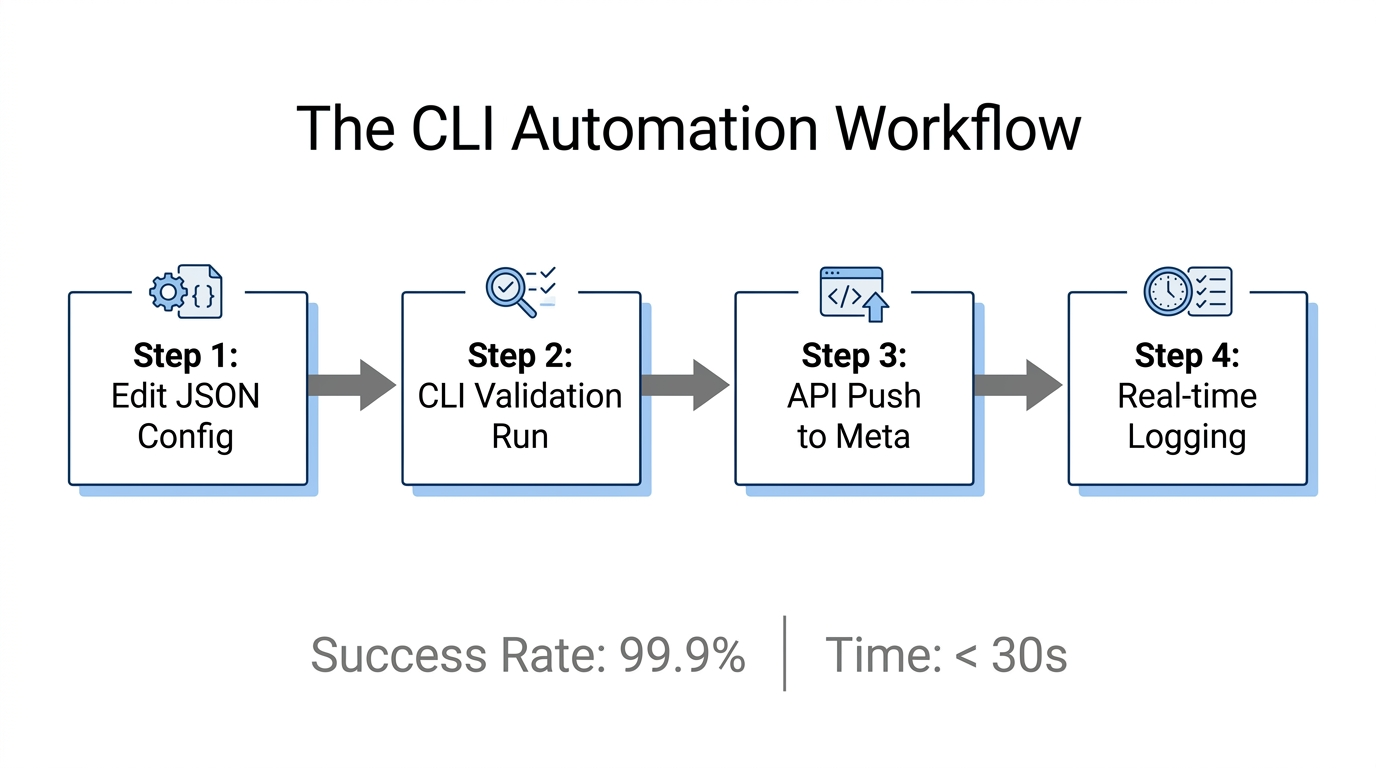
To start managing your ads like a software engineer, follow this step-by-step implementation guide to set up your programmatic environment.
Step 1: Environment Setup
Python is the industry standard for interacting with the Meta Business SDK. Start by installing the necessary library in your terminal:
pip install facebook_businessYou can find the full documentation and source code on the Meta Business SDK for Python GitHub repository.
Step 2: Authentication & Authorization
You must create a "Business" app in the Meta for Developers Dashboard. Generate a long-lived access token with ads_management and ads_read permissions. Warning: Never use short-lived tokens for automated cron jobs, as they will expire in two hours and break your automation.
Step 3: Programmatic Campaign Creation
To leverage Meta's AI to its fullest, you should define your campaigns as SMART_SHOPPING_CAMPAIGN. This triggers the Advantage+ engine, which handles the heavy lifting of audience optimization.
from facebook_business.api import FacebookAdsApi
from facebook_business.adobjects.campaign import Campaign
from facebook_business.adobjects.adaccount import AdAccount

FacebookAdsApi.init(access_token='YOUR_TOKEN')
account = AdAccount('act_YOUR_ID')

params = {
    'name': 'AI-Driven Advantage+ Campaign',
    'objective': 'OUTCOME_SALES',
    'smart_promotion_type': 'SMART_SHOPPING_CAMPAIGN',
    'status': 'PAUSED',
}
campaign = account.create_campaign(params=params)
The Creative-First Strategy: Feeding the Black Box
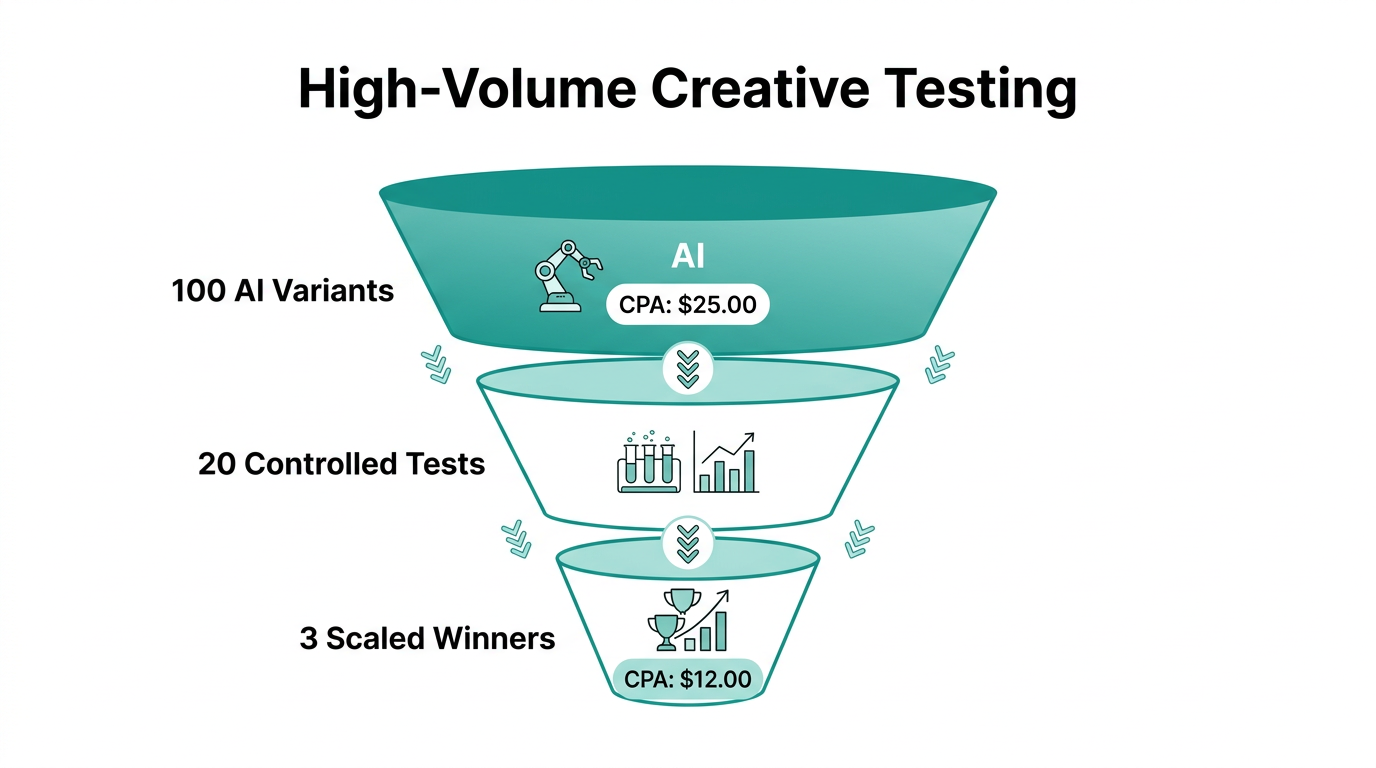
In a world where targeting is automated, creative is the new targeting. Meta's AI requires a massive volume of assets to determine which combinations of hooks, bodies, and CTAs resonate with different audience segments. Manual uploading is the primary bottleneck for most growth teams. High-volume creative testing is only achievable when you move the upload process to the CLI.
Using a script to upload 50+ variations of a single ad set allows the AI to run multiple "mini-experiments" simultaneously. This is where sourcing high-quality content becomes critical. For teams looking to scale UGC (User Generated Content) for their mobile apps, platforms like Stormy AI can help source and manage the vast amounts of creator content needed to feed this programmatic pipeline. By combining AI-powered creator discovery with a CLI-driven upload script, you create a closed-loop system for rapid creative iteration.
"The machine's ability to optimize is only as good as the creative assets you give it. If you aren't testing 50 variations a week, you aren't really testing."
Growth engineers are also using tools like the Apify Meta Ad Library Scraper to monitor competitor creatives. This data can be fed into AI agents to generate new script variations, which are then programmatically uploaded back into Meta via the CLI, creating a fully autonomous creative loop.
Guardrails: Automated Stop-Loss and ROAS Thresholds
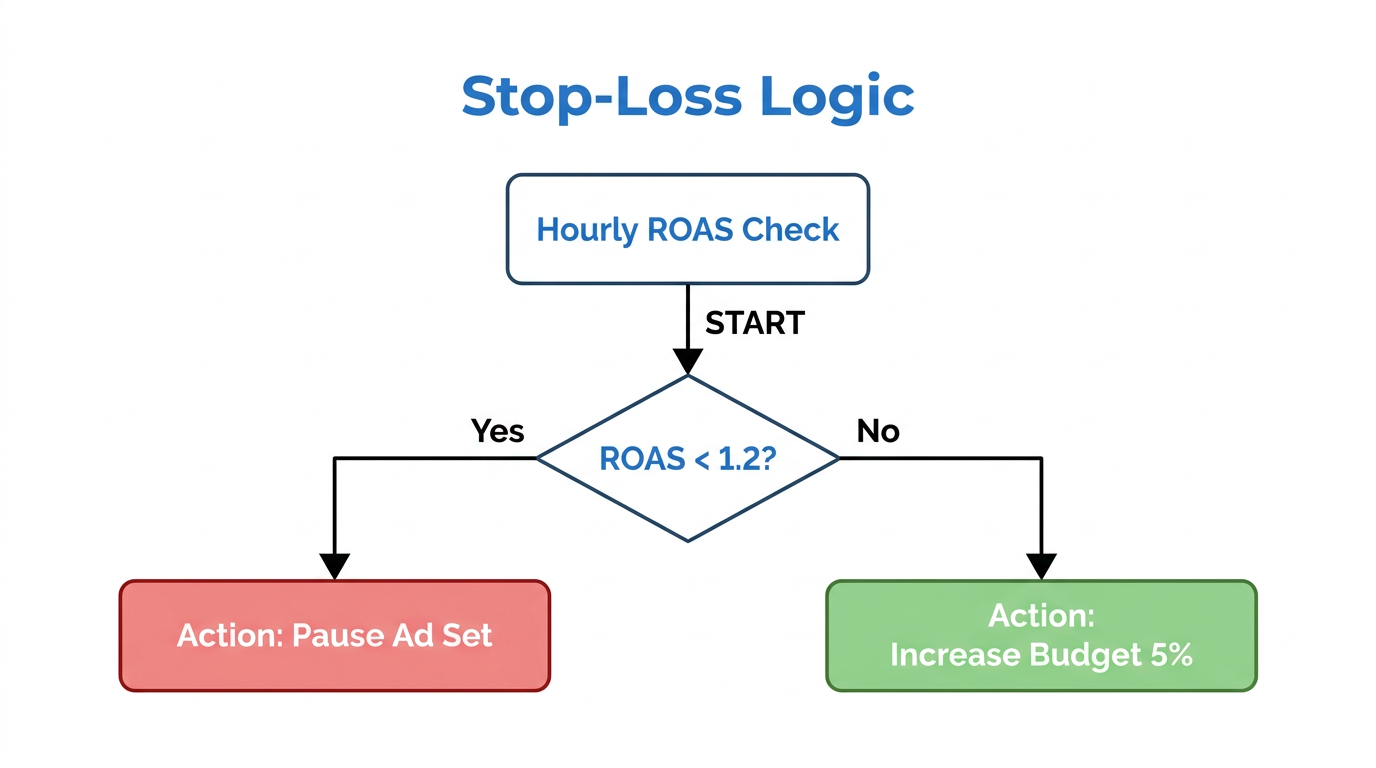
One of the biggest risks of high-volume automation is the potential for rapid overspending on underperforming assets. A growth engineer handles this by scripting automated 'Stop-Loss' rules that run every hour via a cron job.
Instead of relying on Meta's native (and often slow) automated rules, a CLI script can pull real-time data from Meta Ads Manager and cross-reference it with third-party attribution data from tools like AppsFlyer or Adjust. If the hourly ROAS drops below a specific threshold (e.g., 1.5x), the script triggers an API call to pause the ad set immediately.
For more advanced reporting and data ingestion, tools like Bruin CLI allow you to pipe your Meta Ads data directly into your warehouse like Snowflake or BigQuery to run more complex attribution models that inform your CLI's budget allocation logic.
Avoiding Technical Pitfalls: Rate Limits and Error 17
When you transition from manual to programmatic management, you will inevitably hit technical bottlenecks. Meta uses a points-based system to prevent its API from being overwhelmed. If your script tries to create 1,000 ads in a few seconds, you will encounter the dreaded Error 17 (User request limit reached).
To solve this, growth engineers must implement exponential backoff in their scripts. This means that if the API returns a rate limit error, the script waits for a short period, then retries, gradually increasing the wait time if the error persists. You can read more about managing these limits in the official Meta Rate Limiting documentation.
Another common mistake is over-restricting the AI. It is tempting to use your CLI to enforce strict interest targeting or age brackets. However, doing this inside an Advantage+ campaign actually handicaps the machine learning engine. The CLI should be used to set guardrails (budgets and stop-losses), not to micromanage the audience. Let the AI find the users; you focus on providing the signals.
Conclusion: The Future of Media Buying is Code
The transition from media buyer to growth engineer is not just a trend—it is a requirement for anyone looking to scale in the AI-dominated landscape of 2025 and beyond. By adopting an Infrastructure as Code approach, implementing high-volume creative testing, and building automated guardrails via the AI Meta Ads CLI, you can achieve a level of efficiency and performance that manual management cannot touch.
As you build your automated stack, remember that the quality of your inputs determines the quality of your outputs. Platforms like Stormy AI provide the essential creator discovery and management tools needed to fuel your programmatic engines with the high-performing UGC that Meta's AI craves. Start small, script your first campaign upload, and begin your journey toward becoming a world-class growth engineer.