Scaling Beyond the Theme: A Guide to the Shopify Storefront API for Custom Apps in 2026
Master the Shopify Storefront API in 2026. Learn to build custom mobile apps, headless commerce sites, and kiosks while automating the back office with AI.
In 2026, the traditional online storefront is no longer a single destination; it is a distributed network of touchpoints. Whether your customers are shopping via a high-speed custom mobile app, a self-checkout kiosk in a flagship coffee shop, or even a smart appliance, the underlying engine remains the same. To scale beyond the constraints of pre-built Liquid templates, high-growth brands are turning to the Shopify Storefront API. This powerful tool serves as the bridge between your custom code and Shopify's robust commerce logic, allowing for truly omnichannel ecommerce strategies that prioritize speed and flexibility.
Understanding the Storefront API: The Engine for 'Everywhere Commerce'
Jan introduces Shopify's diverse ecosystem of APIs for modern e-commerce development.
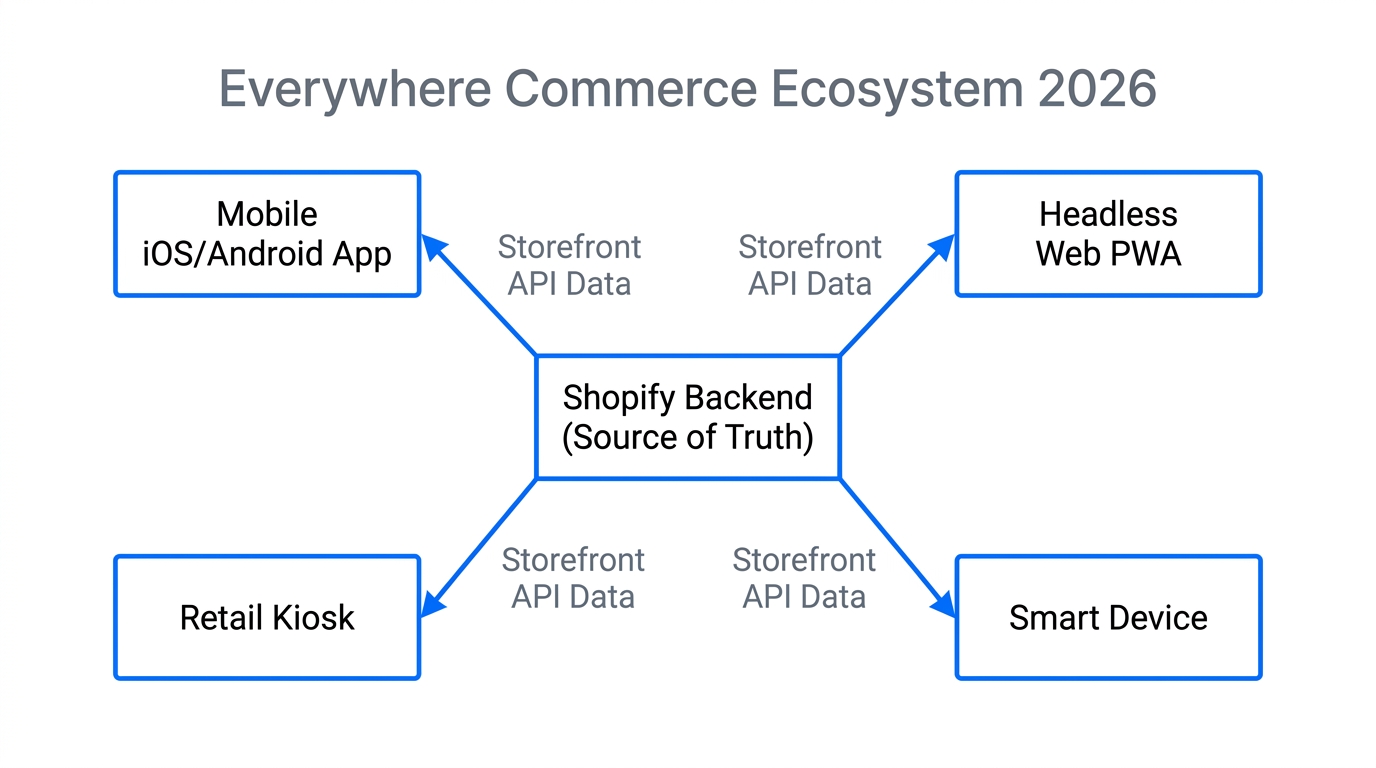
The Shopify Storefront API is distinct from the more commonly known Admin API. While the Admin API is designed for managing the "messy back office"—handling orders, inventory, and sensitive customer data—the Storefront API is built for the customer-facing experience. It is a GraphQL-based interface that provides unauthenticated access to your product catalog, collections, and checkout capabilities. As highlighted by Jan from codingwithjan.com, this API is what allows you to display products in environments where standard Shopify routes like /cart or /products simply don't exist.
By moving to a headless architecture, you decouple the front-end (what the user sees) from the back-end (the commerce engine). This is particularly useful for performance marketers who need sub-second load times to maximize conversion rates on paid traffic from Meta Ads Manager or TikTok Ads Manager. While your custom front-end handles the pixels, an AI ecommerce employee like Stormy AI can manage the backend operations, ensuring that your inventory levels across all these custom endpoints remain synced and accurate.
"The Storefront API is the bridge between your code and the Shopify store; it is how you read data and update the shopping experience across any device."
Why Bypassing Traditional Themes is the Move for 2026
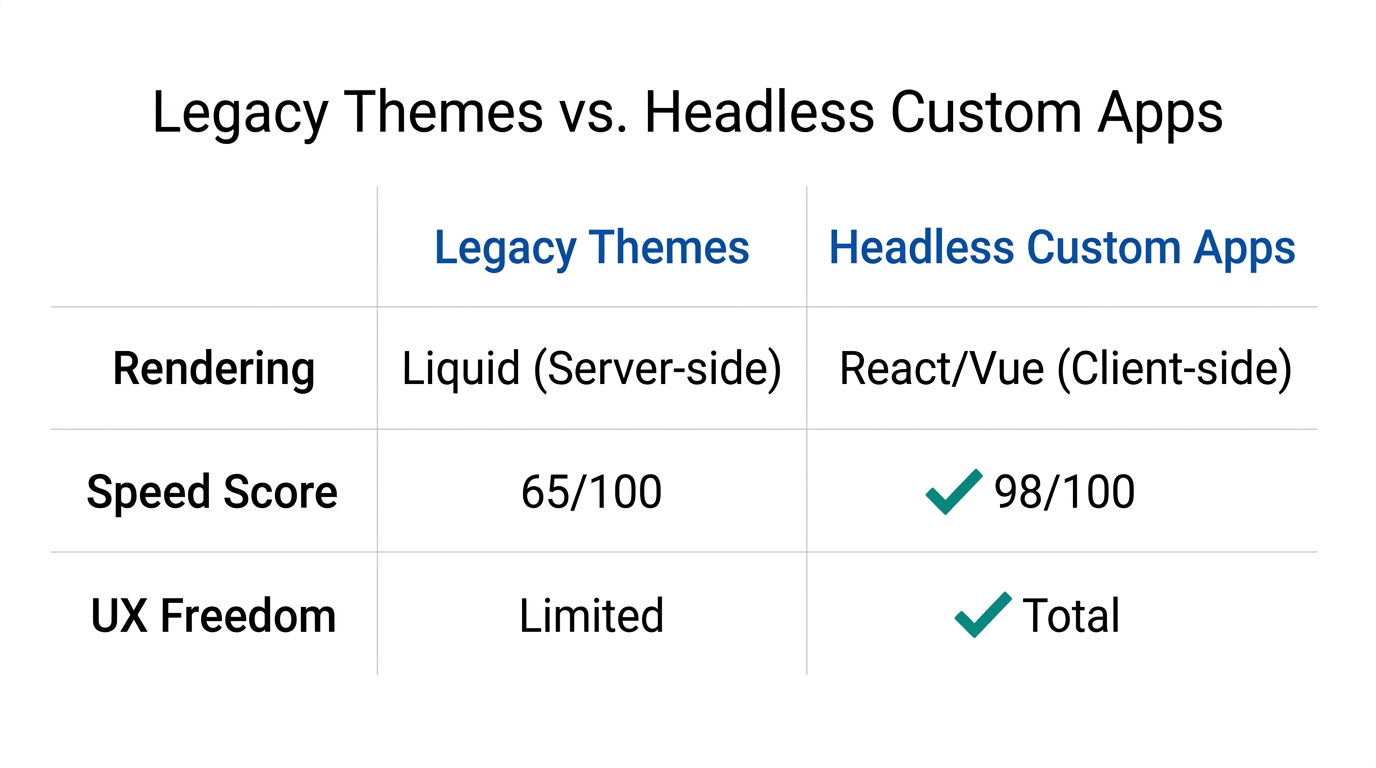
For years, Liquid themes were the gold standard. However, as mobile-first commerce evolved into app-first commerce, the limitations of browser-based themes became apparent. Custom mobile apps offer push notifications, biometric login, and offline capabilities that even the best responsive web design cannot match. By using the Storefront API, you can build a native iOS or Android app that feels instantaneous.
When you build a custom mobile app, you aren't just wrapping a website; you are fetching raw data. This means you don't over-fetch information. In a traditional REST API environment, requesting a product might return hundreds of lines of JSON. With the Storefront API’s GraphQL structure, you request only the specific fields you need—such as the featuredImage and price—dramatically reducing the payload size for users on 5G or slower connections.
The Structural Differences: Storefront vs. Admin API
Discover how the Storefront API powers unique shopping experiences outside of standard themes.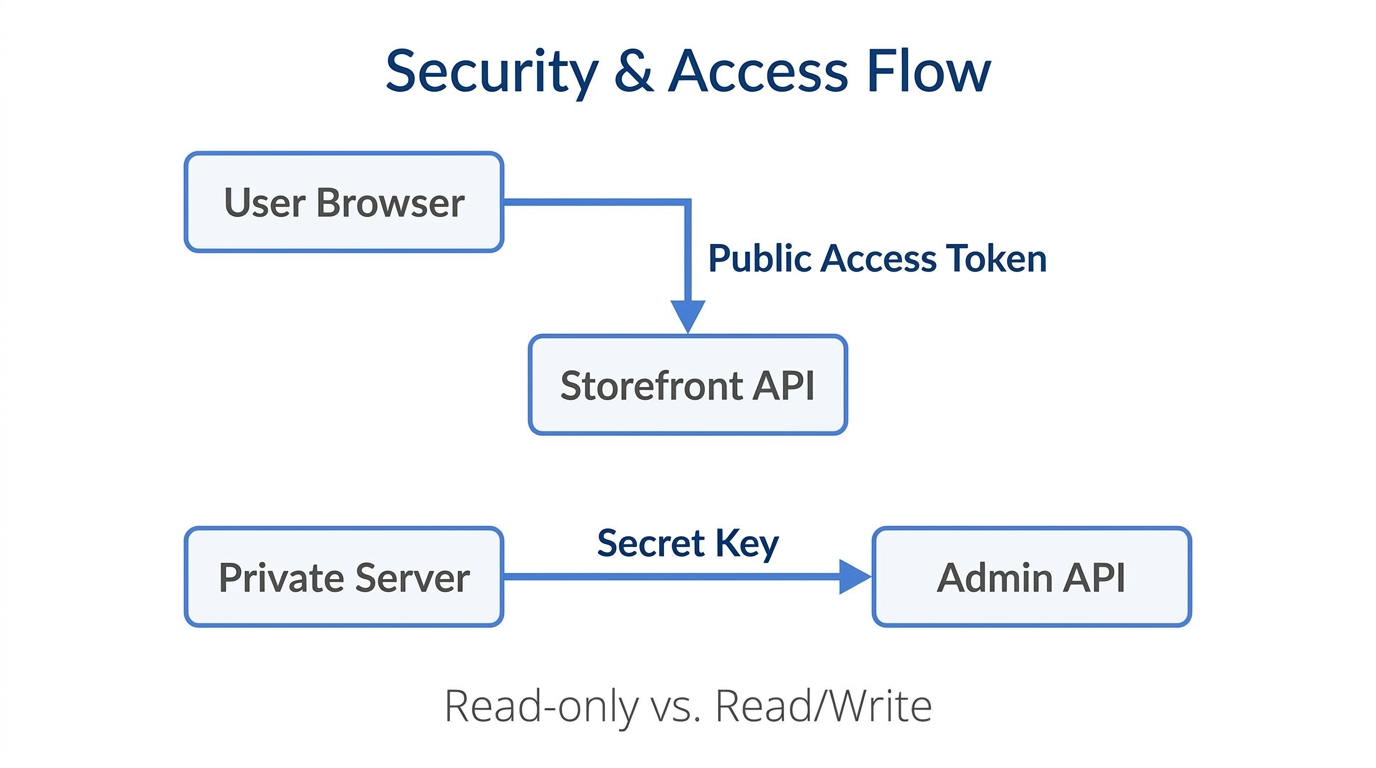
Understanding which tool to use is critical for store security and performance. Many developers mistakenly try to use the Admin API for front-end tasks, which is a major security risk. The Admin API contains private store data and should only be accessed from secure, server-side environments or apps. Conversely, the Storefront API is intended for public consumption.
| Feature | Storefront API | Admin API |
|---|---|---|
| Primary Use | Customer-facing storefronts | Back-office management |
| Architecture | GraphQL Only | GraphQL & REST |
| Rate Limits | None (Leaky Bucket doesn't apply) | Strict (Calculated by cost) |
| Security | Public Access Token | Private API Key / OAuth |
| Capabilities | Product info, Cart, Checkout | Inventory, Orders, Fulfilment |
A major advantage of the Storefront API is its lack of traditional rate limits. Because it is meant to handle flash sales and massive spikes in traffic, it is highly resilient. If your brand goes viral on TikTok Shop, the Storefront API can handle thousands of concurrent requests for product data without breaking a sweat, whereas the Admin API might throttle you.
Step-by-Step: Bridging Custom Environments with Shopify Checkout
Understand how Shopify Functions enable deep customization of the platform's backend logic.The goal of any custom commerce experience is to get the user to the payment screen as frictionlessly as possible. Here is the 2026 playbook for connecting your custom app to the secure Shopify checkout.
Step 1: Generate Storefront Access Tokens
Navigate to your Shopify Admin, create a Headless Channel, and generate a Storefront Access Token. This token is safe to include in your front-end code (JavaScript, Swift, or Kotlin) as it only grants permission to read public catalog data.
Step 2: Fetching the Catalog via GraphQL
Use a GraphQL query to pull your products. In 2026, many brands use Stormy AI to monitor which products are performing best across channels and then use those insights to dynamically update the "Featured" collection in their custom mobile app via the API.
Step 3: Managing the Cart Object
Instead of relying on browser cookies, you will use the Storefront API's cartCreate and cartLinesAdd mutations. This creates a server-side cart that can persist across different devices if linked to a customer ID. This is a core component of a modern omnichannel ecommerce strategy.
Step 4: The Handoff to Checkout
Once the user is ready to pay, you will request the checkoutUrl from the cart object. You then redirect the user to this secure Shopify Checkout page. This ensures you are PCI compliant without having to build your own payment processing vault.
"The ultimate headless experience feels like a native app but leverages the multi-billion dollar security infrastructure of the Shopify checkout."
Advanced Personalization: Metafields and the Secret API
In 2026, generic product pages don't convert. To win, you need hyper-personalization. This is where Metafields and Metaobjects come in. These allow you to store custom data—like technical specifications, care instructions, or even "Shopper Personas"—directly on the product resource.
While basic product data is public, some Metafields might be sensitive or require logic before being displayed. As Jan notes, the Storefront API has a "secret part" for Metaobjects. To access these, you often need to proxy your request through a middleware server. This is where an AI teammate like Stormy AI becomes invaluable. Stormy can watch your Shopify Metafields for updates from suppliers and automatically trigger a data refresh in your custom app, ensuring your customers always see the latest technical specs or pricing tiers.
How Stormy AI Automates the Headless Back-Office
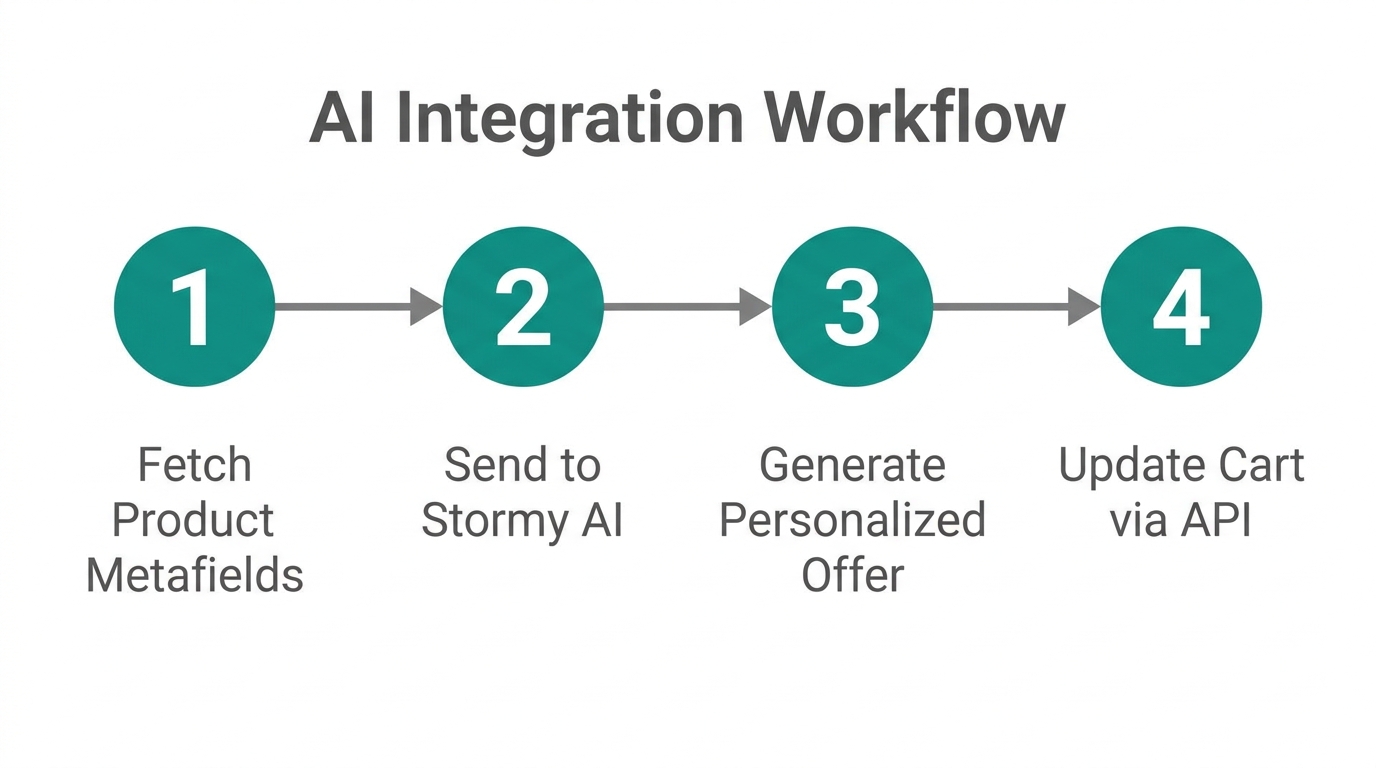
Building a custom storefront solves the customer experience problem, but it can create an operations nightmare. How do you track inventory across a website, a mobile app, and a kiosk? How do you ensure your creators on TikTok Shop are promoting products that are actually available in your custom headless environment?
This is where Stormy AI steps in as your AI ecommerce employee. Stormy doesn't just look at a dashboard; it interacts with your stack like a teammate. Here is how Stormy handles the headless workflow:
- Inventory Pulse: Stormy monitors inventory levels across all Shopify locations. If a specific SKU is running low due to high sales on your custom mobile app, Stormy automatically drafts a reorder email to your supplier.
- Ad Performance Reporting: Stormy pulls spend from Google Ads and revenue from your headless Shopify store, then generates a weekly ROAS report in a shared spreadsheet.
- Creator CRM: If you are using influencers to drive traffic to your custom app, Stormy can track which creators are driving the most conversions and send them personalized follow-ups or performance bonuses.
- Listing Health: Stormy constantly checks your Storefront API responses. If a product image goes missing or a variant becomes suppressed on Amazon or Shopify, Stormy flags it immediately before it impacts your bottom line.
The Bottom Line for 2026
Jan provides a comprehensive summary of all Shopify APIs and their core functions.Scaling a brand in 2026 requires moving past the "one-size-fits-all" mentality of basic themes. By mastering the Shopify Storefront API, you unlock the ability to meet your customers wherever they are—be it a mobile app, a physical kiosk, or a wearable device. While you focus on the creative and strategic aspects of your custom front-end, let an AI agent like Stormy AI handle the manual monitoring and back-office tasks that keep the engine running.