How to Avoid the 'PMax Trap' on Shopify: A 2026 Google Ads Playbook for 4x ROAS
Avoid the black box. Learn how to optimize your Shopify Performance Max strategy using brand exclusions, CPC caps, and Stormy AI for 4x ROAS in 2026.
It is 2026, and the "set it and forget it" era of Google Ads is officially dead. While Google Ads revenue has soared to a projected $321.6 billion this year according to Statista, many Shopify operators are finding themselves caught in what we call the "Performance Max Trap." This is a scenario where your ROAS looks phenomenal on paper, but your bank account tells a different story. In reality, Google’s AI is often just "cannibalizing" your organic brand search—claiming credit for customers who were already going to buy from your Shopify store.
With 5.6 million active stores competing in the Shopify ecosystem as of April 2026, you cannot afford to let an AI black box waste your margin. This playbook will show you how to take back control, force incrementality, and use automated budget management to ensure your ads are actually driving new growth, not just stealing it.
The 'Zombie Product' Audit: Killing Budget Bleed
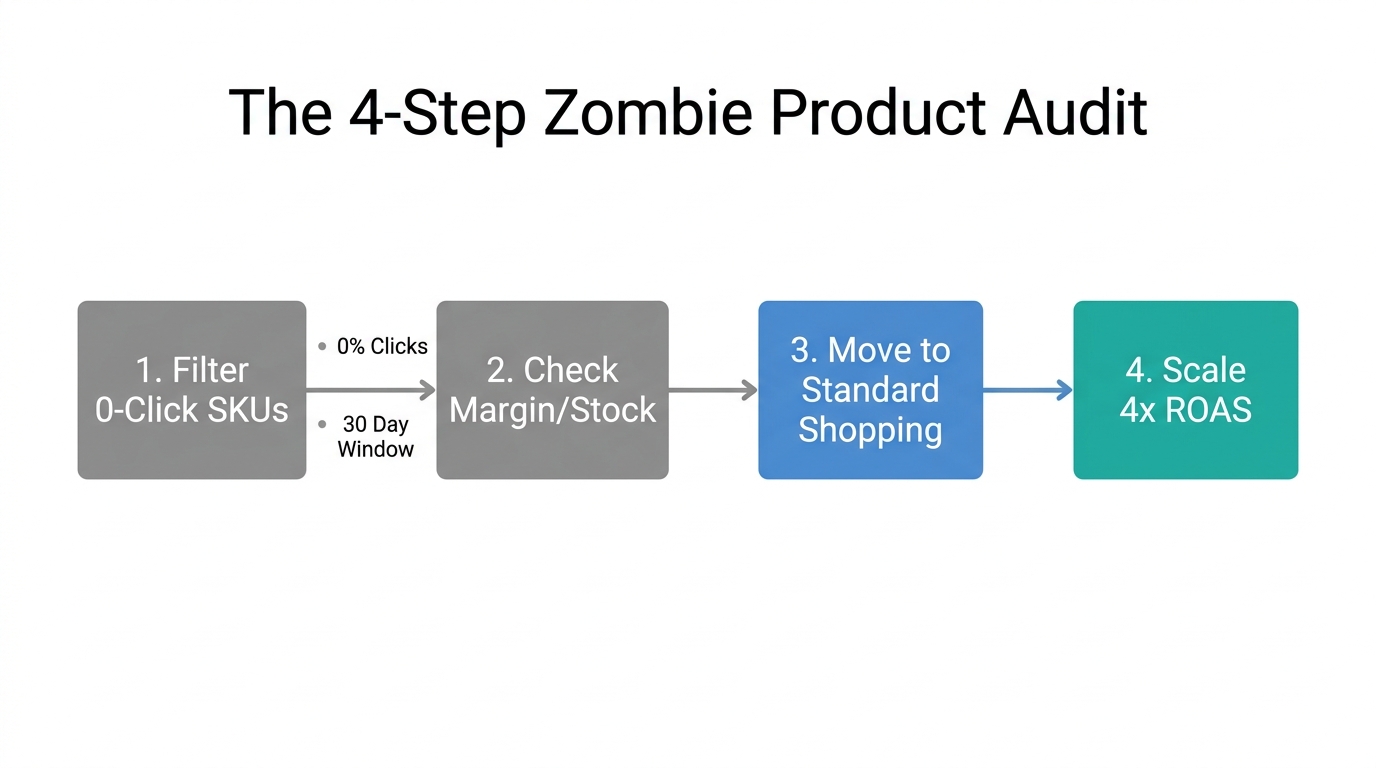
The first step in any high-performance Shopify Performance Max strategy is identifying the "Zombies." These are products in your feed that suck up significant portions of your daily budget, generate hundreds of clicks, but result in zero conversions. Data from Digital Applied suggests that Performance Max now accounts for 45% of all Google Ads conversions, but much of that spend is often hidden in low-quality Display or YouTube placements.
To run a Zombie Product Audit, you shouldn't just rely on the Google Ads dashboard. Instead, an AI ecommerce employee like Stormy AI handles the heavy lifting by pulling your product-level performance into a dynamic spreadsheet. Stormy AI can monitor your Shopify inventory and cross-reference it with Google Ads spend, automatically flagging SKUs that meet your "Zombie" criteria. Once flagged, you can have Stormy pause these products in your feed manager or move them to a "Low Priority" testing campaign.
"The most successful Shopify brands in 2026 don't just spend more; they audit more. If a product isn't converting after 100 clicks, it's not a traffic problem—it's a product-market fit problem."
Portfolio Target ROAS & Max CPC Caps
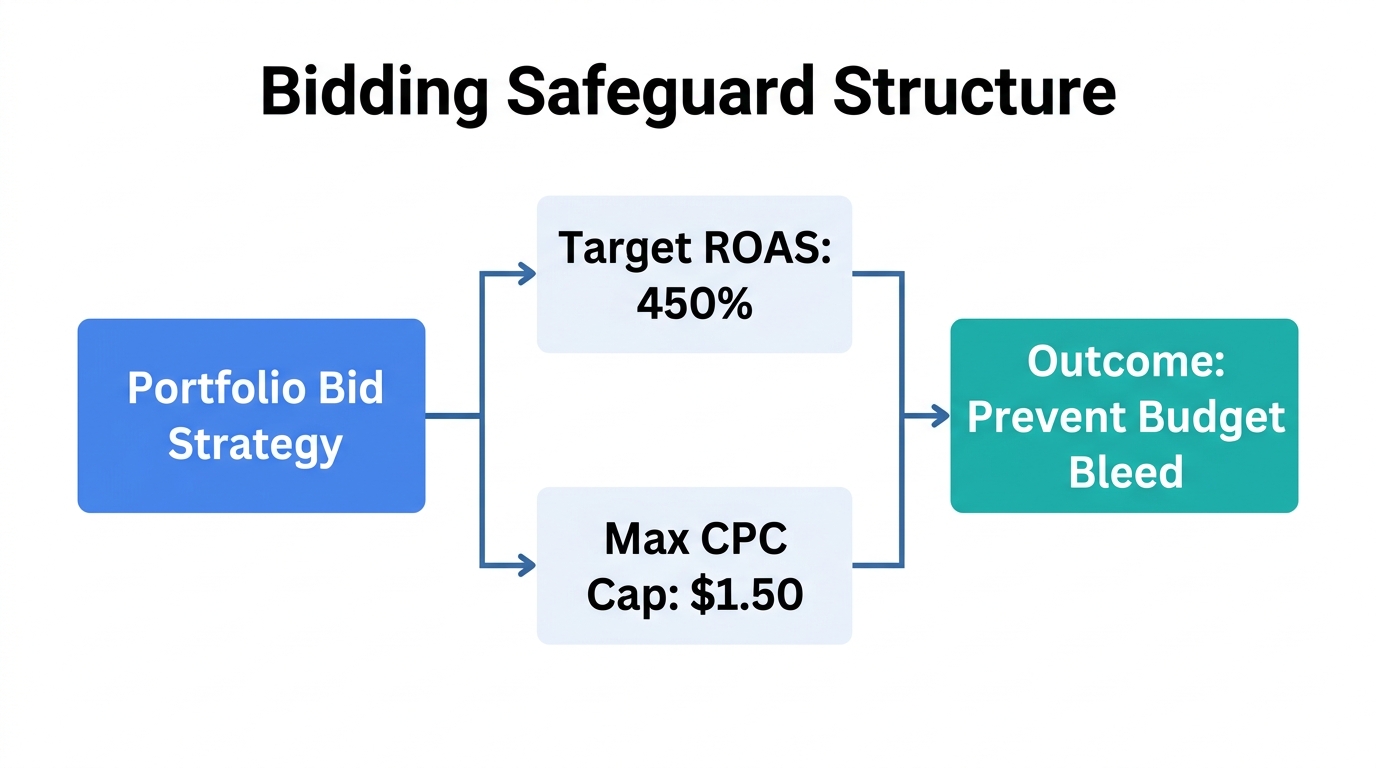
One of the biggest risks of PMax is that the AI will bid aggressively on high-intent terms regardless of the cost, often overpaying for clicks that would have cost half as much in a Standard Shopping campaign. In 2026, the average Search CPC has climbed to $2.96, a 12% increase year-over-year according to Store Growers. To fight this, you should implement Portfolio Bid Strategies with a hidden Max CPC Cap.
How to set up the Cap
- Navigate to Tools & Settings > Budgets and Bidding > Bid Strategies in your Google Ads account.
- Create a new "Target ROAS" Portfolio Strategy.
- Under "Advanced Options," set a Maximum CPC Limit. A good rule of thumb is to set this at 2x-3x your historical average CPC.
- Apply this strategy to your PMax campaigns.
This prevents the Google AI from entering bidding wars for "ego keywords" or placements that blow out your CPA. As documented by Excella PPC, using a Portfolio Target ROAS with a CPC cap helped one merchant scale from $20k to $800k per month by keeping the AI focused on efficiency rather than just volume.
Force New Customer Acquisition with Brand Exclusions
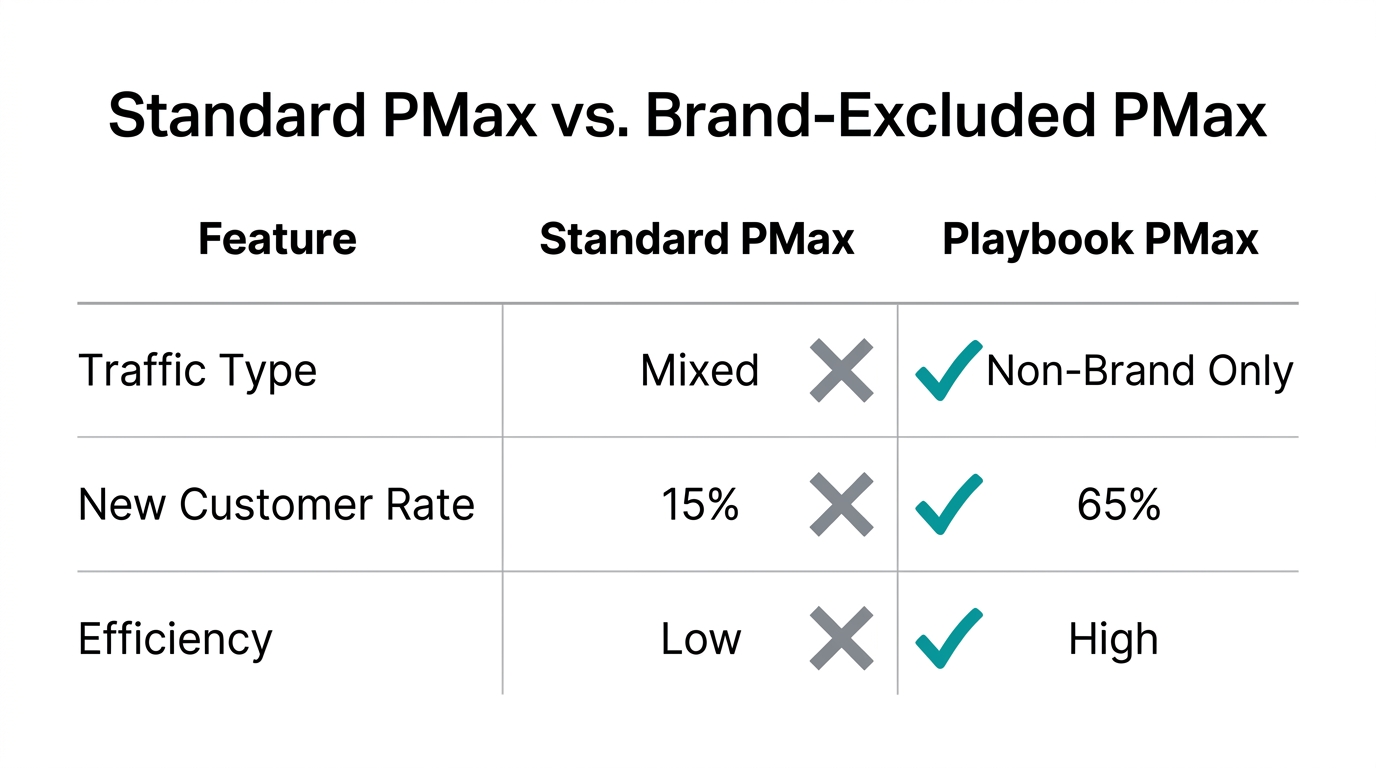
If you search for your brand name and your PMax ad is the first result, you are likely wasting money. In 2026, Google Ads brand exclusions are the only way to ensure your PMax vs Standard Shopping 2026 comparison remains honest. Without these, Google will naturally gravitate toward your brand terms because they have the highest conversion rates, making the campaign look better than it actually is.
To stop this, you must use Brand Exclusion Lists and Negative Keyword Themes. By excluding your own brand name from PMax, you force the algorithm to go out and find new customers who have never heard of your Shopify store. You should then capture that brand intent with a dedicated, low-budget Search campaign where you can control the messaging and keep the ROAS at 1000%+. This is part of a Google Ads budget automation strategy that prioritizes incrementality.
| Placement Type | Performance Max (Standard) | PMax with Exclusions | Standard Search (Branded) |
|---|---|---|---|
| Intent Type | Mixed (Brand + Cold) | Pure Prospecting | High Intent (Brand) |
| Est. CPC | $1.50 - $4.00 | $2.50 - $5.00 | $0.30 - $1.00 |
| True Growth | Low (Cannibalization) | Very High | Maintenance |
Segmenting by Profit Margin, Not Category
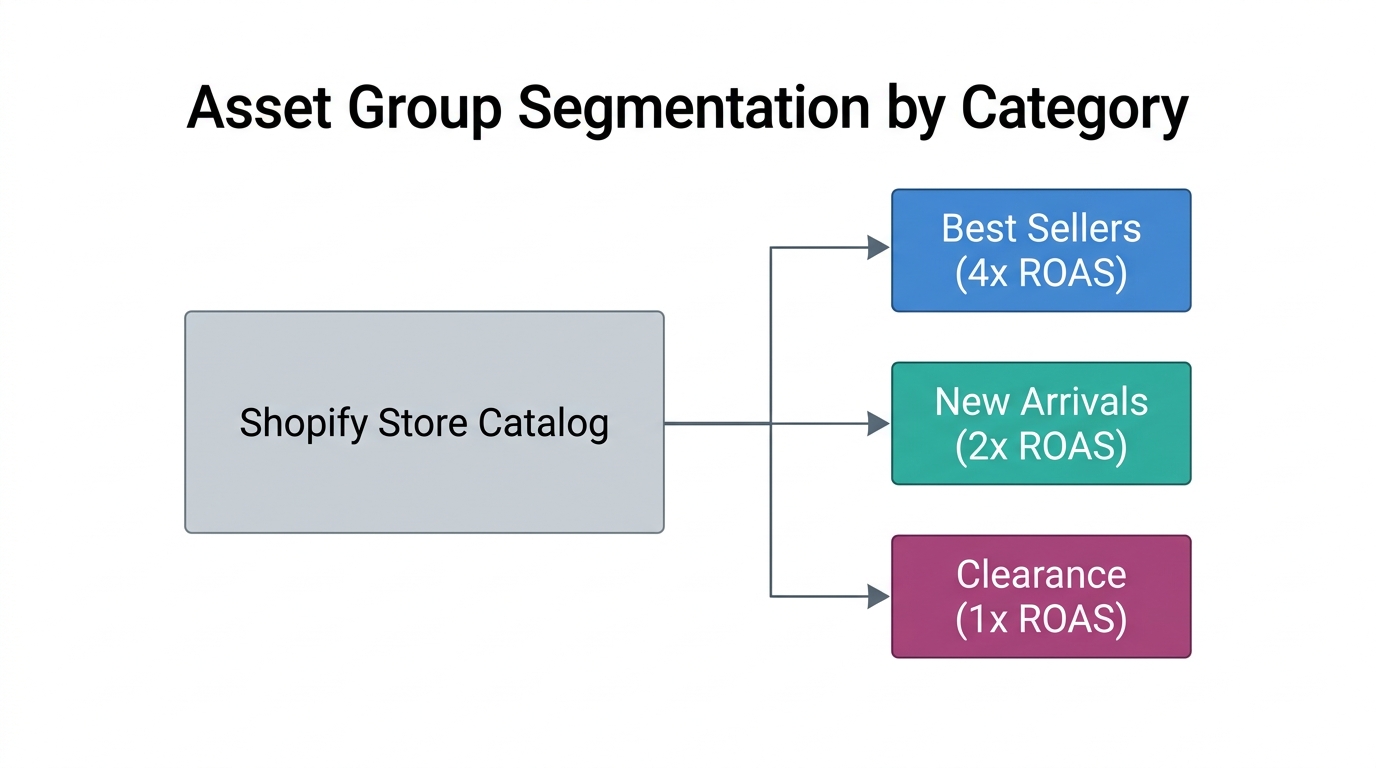
Most beginners organize their PMax Asset Groups by product category (e.g., "Shoes" vs "Hats"). In 2026, the pros organize by Profit Margin. Why? Because a 200% ROAS on a product with a 70% margin is a win, but that same 200% ROAS on a "Clearance" item with a 20% margin is a net loss.
You should create at least three distinct PMax campaigns based on your Shopify COGS data:
- High Margin PMax: Aggressive bidding, higher budget, focused on your most profitable hero products.
- Core Collection PMax: Balanced ROAS targets for your everyday sellers.
- Clearance/Liquidation PMax: Very high Target ROAS settings to ensure you aren't spending more to sell the item than the item is worth.
To keep these in sync, Stormy AI can monitor your Shopify back office, detect when a product’s margin changes due to a sale or supplier price hike, and automatically move the SKU between campaign asset groups. This level of Google Ads budget automation ensures you never spend your way into a deficit.
"In 2026, your product feed is your infrastructure. If your feed doesn't communicate your margins to your bidding strategy, you aren't running an ecommerce business—you're running a donation to Google's shareholders."
The 'Uplift' Test: Stormy AI vs. The Black Box
How do you know if Google Ads is actually responsible for your sales? In 2026, privacy updates and the shift to Consent Mode v3 (as noted by Consentmo) have made attribution harder than ever. Merchants often see a 30-40% loss in data due to ad blockers and browser restrictions.
This is where Uplift Experiments come in. You can ask Stormy AI to run a split-test experiment where PMax is pitted against a Standard Shopping hybrid model. Stormy AI handles the technical setup, monitors the results across a 14-day window to account for the "7-day re-indexing rule" mentioned by Dror Aharon, and generates a report on true incrementality.
The 2026 Shopify Google Ads Summary
Winning on Google Ads in 2026 requires more than just high-quality creative; it requires aggressive data management. By performing regular Zombie Product audits, enforcing Google Ads brand exclusions, and segmenting your campaigns by margin rather than category, you can achieve the elusive 4x ROAS while avoiding the PMax trap. Don't let the AI run your business into the ground. Instead, treat your ad account like the complex machinery it is, and use an AI ecommerce employee like Stormy AI to keep the gears turning in the background.
Ready to automate your back office? Let Stormy AI monitor your inventory, track your supplier follow-ups, and audit your ad spend while you focus on scaling your brand.