Shopify Functions Migration Guide 2026: Upgrading Your Inventory Logic from Scripts
Migrate from Shopify Scripts to Functions before the June 2026 deadline. This guide covers Sidekick scaffolding, the 2026-04 API, and inventory logic safety.
The clock is ticking for Shopify Plus merchants. As of April 15, 2026, Shopify Scripts can no longer be edited, and by June 30, 2026, the legacy Ruby-based scripting environment will be completely sunset. For brands running complex automated inventory logic or bespoke checkout rules, this isn't just a routine update—it is a critical migration that determines whether your store remains operational during the peak summer season. Moving to Shopify Functions offers unprecedented speed and reliability, but it requires a total rethink of how your back office handles custom logic. In this environment, an AI ecommerce employee like Stormy AI becomes essential for monitoring these new deployments, ensuring that as you migrate your scripts, your inventory levels and supplier follow-ups remain in perfect sync.
Understanding the June 2026 Deadline: The End of Scripts
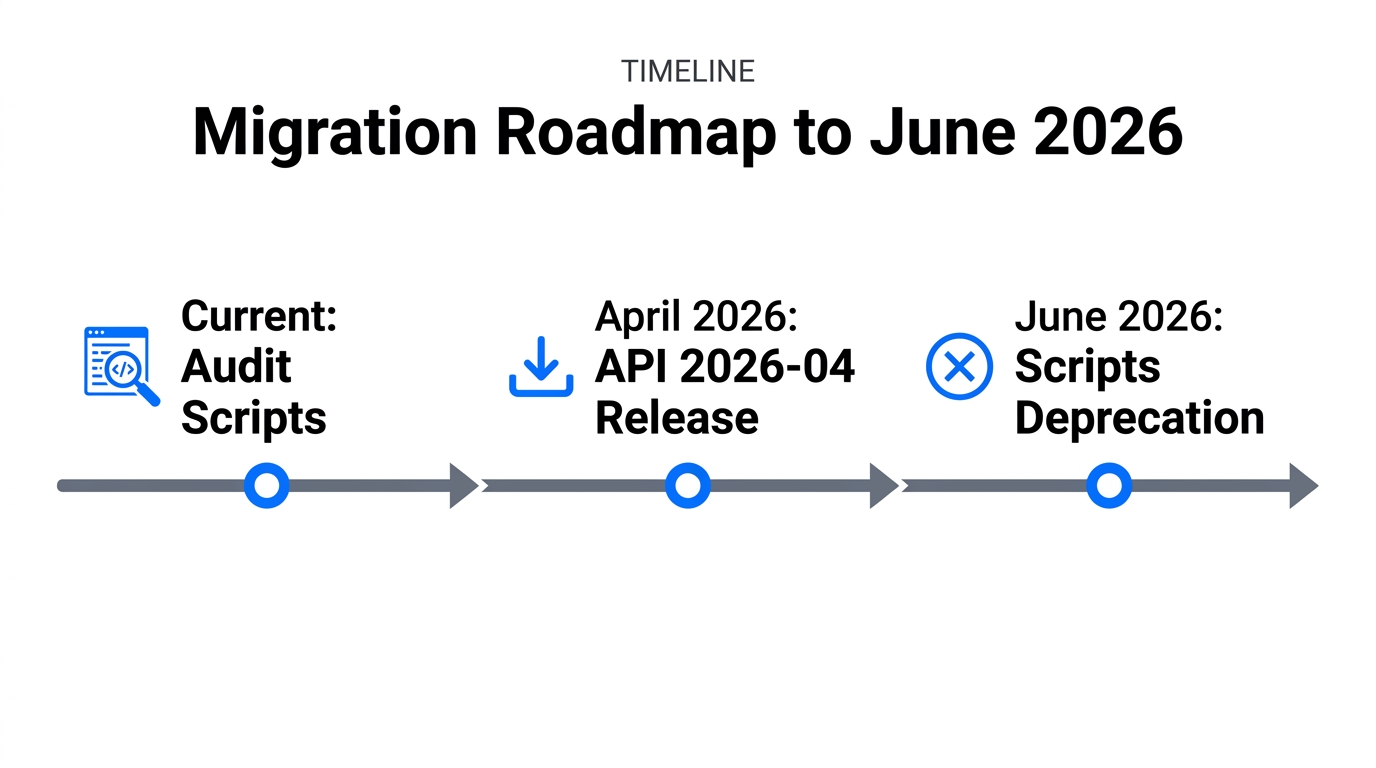
For years, Shopify Scripts allowed Plus merchants to inject custom Ruby code into the checkout process to handle everything from tiered pricing to complex shipping rules. However, according to latest industry reports on Shopify infrastructure migration, the legacy system is being replaced by Shopify Functions to solve long-standing performance bottlenecks and "technical debt" issues that plagued high-volume stores during flash sales. While Scripts ran on a single-threaded Ruby environment, Functions are built on WebAssembly (Wasm), allowing them to execute in under 5ms, even under extreme load.
This migration is mandatory because Shopify is moving toward a more modular architecture. By shifting to Functions, merchants gain access to more robust features like the 2,048 variant limit, which was officially introduced in the Shopify Editions updates. This change allows high-complexity brands in sectors like footwear and hardware to scale without the need for messy "ghost SKU" apps. However, managing 2,000+ variants across multiple locations requires the kind of autonomous oversight that Stormy AI provides—monitoring stockout risks and flagging listing errors before they hit your P&L.
Shopify Scripts vs Functions: The 2026 Comparison
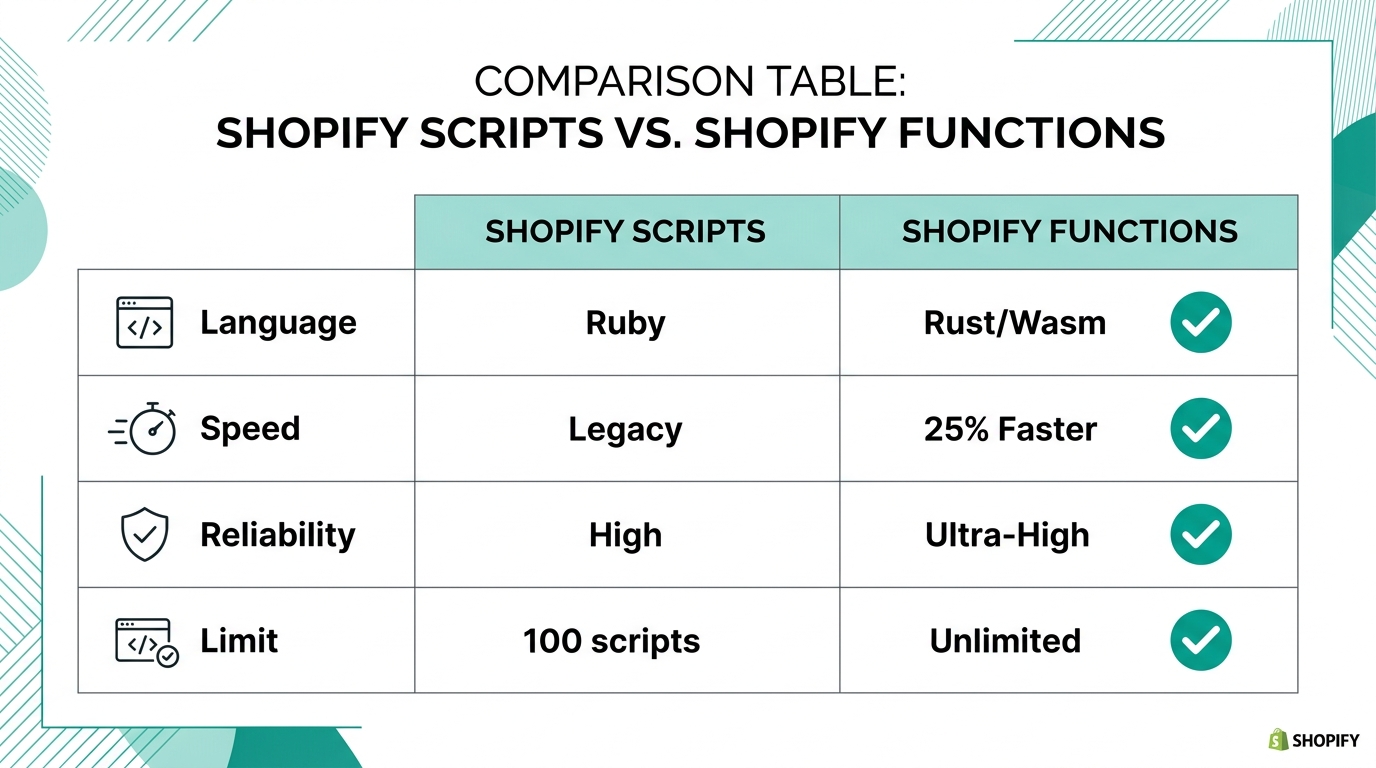
The shift from Scripts to Functions isn't just a language change from Ruby to Rust or JavaScript; it is a fundamental shift in how Shopify Plus technical debt is managed. Functions are pre-compiled and run on Shopify's global infrastructure, meaning they don't "break" during high-traffic events like traditional scripts often did.
| Feature | Shopify Scripts (Legacy) | Shopify Functions (2026) |
|---|---|---|
| Execution Time | Variable (can time out) | <5ms (consistent) |
| Scalability | Limited by Ruby VM | Global (WebAssembly) |
| Native UI | None (Code only) | App-based configuration |
| Inventory Logic | Post-checkout only | Integrated with Cart/Checkout |
| Maintenance | High technical debt | Part of the App ecosystem |
As noted by ecommerce productivity experts at eesel.ai, merchants are finding that Functions allow for much more sophisticated rules, such as location-based inventory routing and B2B-specific pricing logic. While Scripts were often a "black box" for the marketing team, Functions can be controlled via the Shopify Admin UI once an internal app is scaffolded.
"The difference between winners and losers in 2026 is 'pilot purgatory.' Only companies scaling AI to enterprise-wide operations are seeing the 20% cost reductions promised by the tech."
Scaffolding Internal Apps with Shopify Sidekick
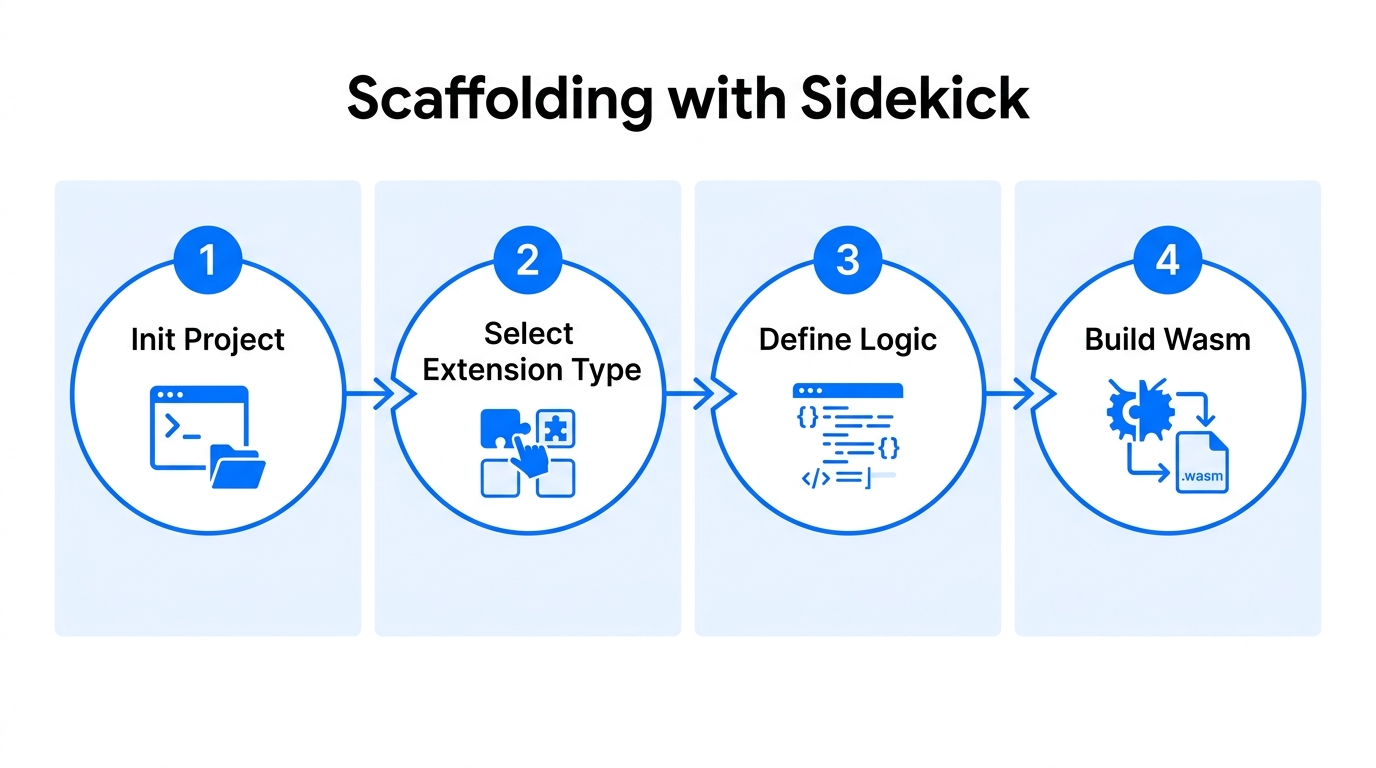
In 2026, you don't need a team of senior engineers to begin your Shopify Functions migration. Shopify Sidekick has evolved into a proactive development assistant. You can now "scaffold" internal apps by describing your logic in natural language. This is particularly useful for moving custom inventory logic that previously lived in a spreadsheet or a brittle Ruby script.
Step 1: Define Your Logic in Sidekick
Open your Shopify Admin and trigger Sidekick. Instead of asking for a report, give it a development prompt: "Scaffold a Shopify Function app that restricts 'Heavy' shipping profiles to customers in the Tri-State area and applies a 10% discount for B2B accounts with a 'Gold' tag."
Step 2: Generate the Wasm Schema
Sidekick will generate the necessary run.graphql and main.rs (or index.js) files. The ability to generate code/schemas via AI has reduced deployment times for internal apps from weeks to hours for teams using modern GraphQL schemas.
Step 3: Deploy via Shopify CLI
Once the scaffold is ready, you can deploy it as a custom app using the Shopify CLI. This ensures that your logic is version-controlled and doesn't conflict with other store settings. During this process, Stormy AI can be tasked to monitor the deployment status and alert you if the new Function triggers a spike in checkout errors or abandoned carts.
Implementing the 2026-04 GraphQL API: The Idempotent Directive
One of the most critical technical updates for 2026 is the Shopify 2026-04 API update. This update introduces the mandatory @idempotent directive for all inventory adjustments. Network lag during high-traffic flash sales has historically caused "double-adjustments"—where a single order deducts stock twice, leading to phantom stockouts.
The @idempotent directive ensures that if a GraphQL request is retried due to a timeout, Shopify only processes the inventory change once. This is a massive win for reliability, but it must be manually added to your migrated Functions. If you're using an AI agent like Stormy AI to handle your automated inventory logic, ensure it is configured to use this directive when updating rows in your operations spreadsheet.
Tutorial: Building Custom Regional Alerts with Sidekick
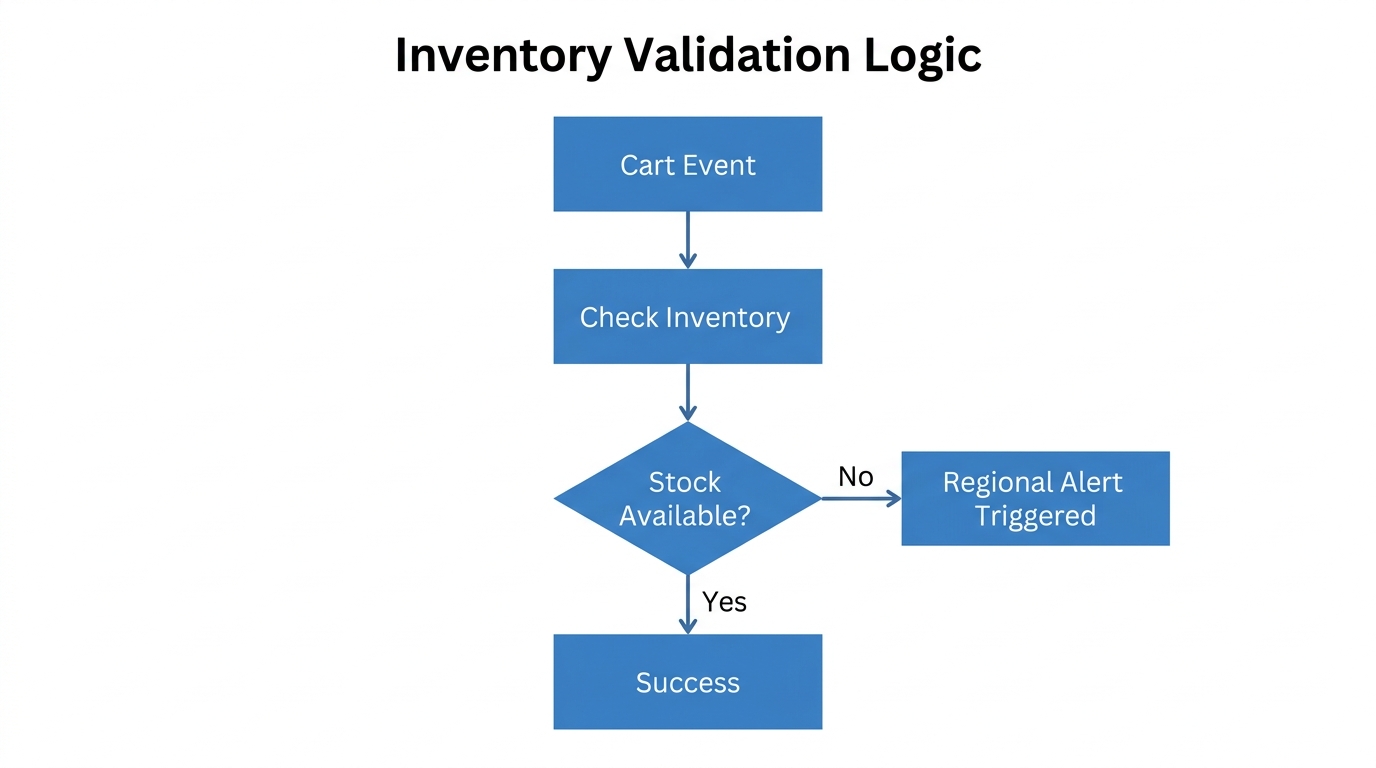
Inventory imbalances between regional warehouses are a silent killer of margins. Shipping a product from a West Coast warehouse to a New York customer can triple your fulfillment costs. In 2026, you can use Sidekick to build proactive alerts that monitor these imbalances.
Prompting Sidekick for Alerts
Rather than checking reports manually, you can use Sidekick to build a monitoring bridge. Use a prompt like: "Build an app to alert my Slack when regional warehouse A is 20% lower than regional warehouse B for SKUs with a velocity of >50 units/day."
Sidekick will generate the logic to query Netstock or Shopify native inventory data. Once live, Stormy AI can take the output of these alerts and automatically draft a stock transfer request or email your logistics provider via Slack to rebalance the inventory. This Sense-Plan-Execute workflow is the gold standard for lean ecommerce operations this year.
"Adding AI to a fragmented supply chain just automates confusion at a higher speed. The key is integrating AI agents into a clean, Function-based architecture."
Risk Mitigation: Avoiding 'The $40,000 Abandoned Cart Bug'
As you migrate your logic, be wary of the risks of fully automated code generation. Recent case studies show that brands failing to distinguish between Retail and B2B pricing can suffer massive losses when B2B customers receive retail-priced emails with heavy stackable discounts. Some brands have reported losing $40,000 in margin before a human noticed the discrepancy.
To avoid this, your Shopify Functions must be explicitly tested for customer segments. When scaffolding your migration, ensure you include "guardrail" logic that checks for the company_id attribute introduced in Shopify's B2B updates. Stormy AI can act as your safety net here by cross-referencing your Shopify orders against your Katana Cloud Inventory or ERP data to flag any orders where the final price falls below your established minimum margin.
Conclusion: Future-Proofing Your Operations
The transition from Shopify Scripts to Functions is more than a technical hurdle; it's an opportunity to rebuild your store's brain for the era of agentic commerce. By using Sidekick to scaffold your migration and the 2026-04 API to ensure inventory integrity, you're setting the stage for a truly autonomous back office. However, technology alone isn't enough—you need an employee that can watch the tools. While your new Functions handle the milliseconds at checkout, Stormy AI handles the hours of follow-ups, inventory checks, and supplier communications that keep the business alive. Don't wait until June 29 to start this migration. The era of the Ruby script is over; the era of the AI-driven back office is here.