In 2026, running an ecommerce brand on vanity metrics like ROAS (Return on Ad Spend) is a recipe for a quiet bankruptcy. Your Meta Ads Manager or Google Ads dashboard might show a healthy 4.0 ROAS, but if your product margins are thin and your shipping costs are spiking, that "winning" campaign could actually be burning cash every time a customer clicks 'buy'. To scale sustainably, you must bridge the data gap between your store's backend costs and your advertising platform. This is where tracking Shopify COGS Google Ads data becomes the most important technical setup in your marketing stack.
Most merchants are flying blind, unaware that a high-revenue product can still be unprofitable if the cost to produce and ship it is too high. This tutorial provides a definitive playbook for integrating your Cost of Goods Sold (COGS) directly into your reporting, turning Google Ads from a sales engine into a true profit-optimization machine. By the end of this guide, you will know how to move from reporting on gross revenue to reporting on net profit.
Defining COGS for 2026 Ecommerce: More Than Just Product Price
 0:37
0:37Before we dive into the technical implementation, we must define what actually constitutes your Cost of Goods Sold (COGS) in the current landscape. In 2026, the definition has evolved. It is no longer just the price you paid a supplier for a widget. To get an accurate ecommerce profit reporting 2026 view, your COGS must include every direct expense required to get that specific item ready for a customer.
- Raw Materials & Resale Items: The baseline cost of the product from your manufacturer.
- Packaging & Supplies: The boxes, tape, tissue paper, and inserts that go out with every order.
- Inbound Freight: The cost of shipping inventory from your supplier to your 3PL or warehouse.
- Production Labor: If you assemble or kit products in-house, the direct labor cost per unit.
Crucially, COGS does not include overhead like your Shopify subscription, customer support salaries via Gorgias, or your general marketing spend. It is the cost of the physical unit itself. Once you subtract COGS from your revenue, you arrive at your Gross Profit—the only number that truly matters when deciding which campaigns to scale.
"Scaling based on ROAS alone can drain your margins. Many merchants discover their best-selling products are actually their lowest-margin items once COGS is factored in."
The Technical Gap: Why Google Ads Doesn't Show Profit by Default
1:58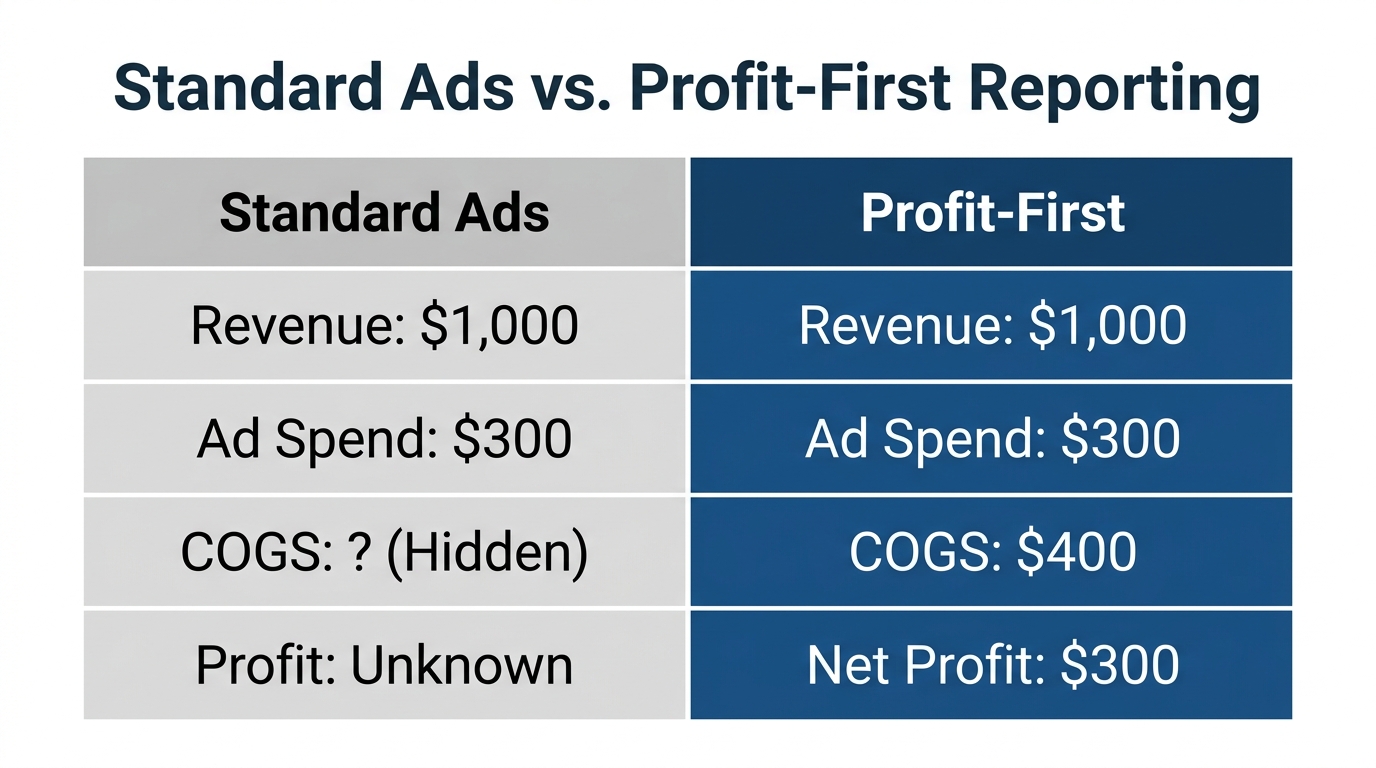
A common frustration for merchants is that even after they enter their product costs into Shopify, those numbers never seem to appear in their ad reports. There is a technical reason for this: Google Merchant Center (GMC) and Google Ads are two separate systems that speak different languages when it comes to financial data.
Merchant Center stores your product feed, including a field for cost_of_goods_sold. However, Google Ads does not automatically pull that value into your campaign reports. To track net profit Google Ads, the system requires a "handshake" at the moment of conversion. This requires conversions with cart data—a specific tracking configuration that sends item-level details (SKU, quantity, and price) back to Google during the checkout process.
| Feature | Standard Conversion Tracking | Conversions with Cart Data |
|---|---|---|
| Revenue Tracking | Yes | Yes |
| Product-Level ROAS | No | Yes |
| Gross Profit Reporting | No | Yes |
| Cost of Goods Sold (COGS) | No | Yes |
Without this item-level data, Google Ads sees a "$100 Sale" but doesn't know which products were in the cart. If it doesn't know the products, it can't look up their COGS in your Merchant Center feed, and the profit columns will remain empty.
Step-by-Step Guide: Syncing Shopify Product Costs to Google
3:19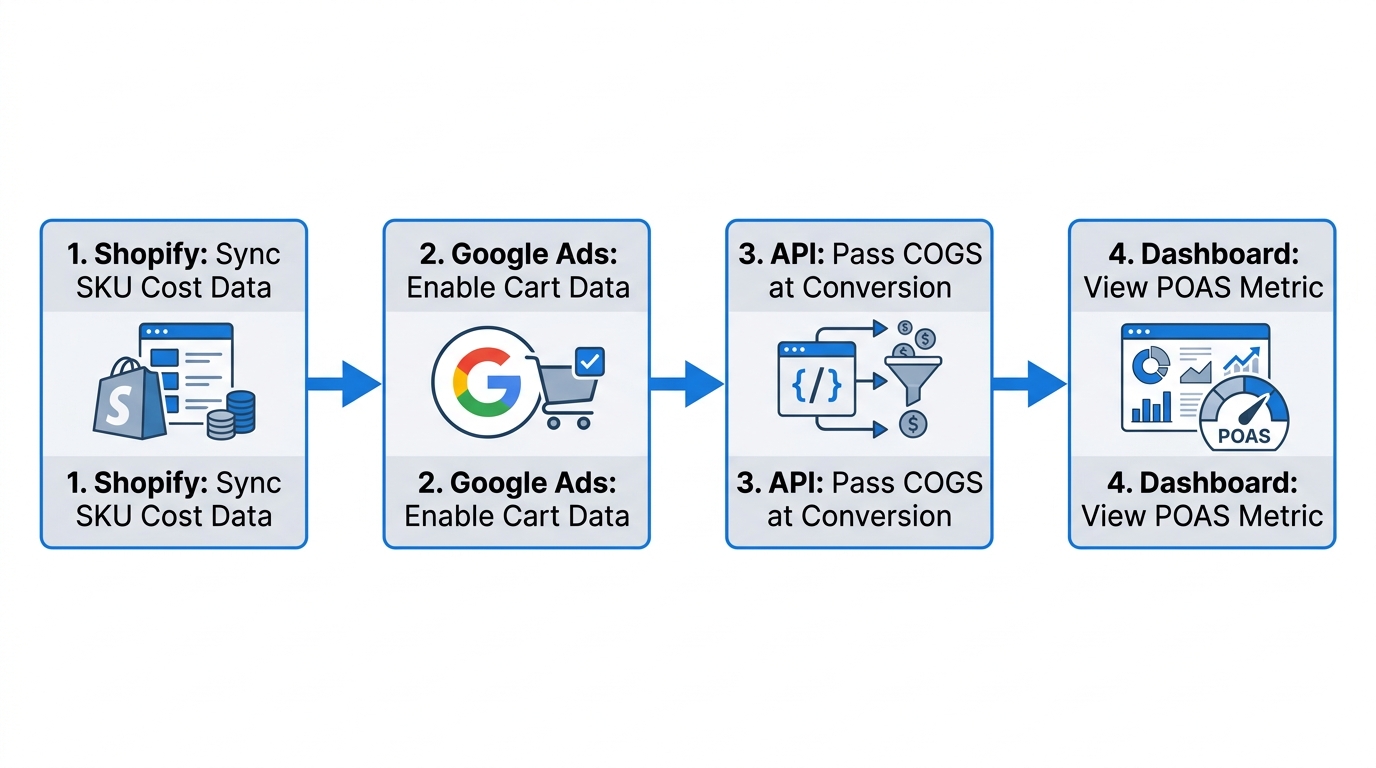
To fix this, you need a clean flow of data from your warehouse to your ad dashboard. Here is the playbook for Google Ads profit tracking.
Step 1: Audit Your Shopify Product Costs
First, ensure every SKU in your Shopify admin has an accurate value in the "Cost per item" field. If you have hundreds of SKUs, use a tool like Stormy AI to import a CSV of your latest supplier invoices and bulk-update these rows in a spreadsheet. Stormy AI can even set reminders to check for price increases from your suppliers every quarter so your COGS stays updated.
Step 2: Sync COGS to Google Merchant Center
Your product feed must include the [cost_of_goods_sold] attribute. Most feed apps like Simprosys or the official Google & YouTube channel for Shopify allow you to map the Shopify "Cost per item" field to this GMC attribute. Ensure your currency formatting follows the ISO 4217 standard (e.g., 15.00 USD). Mismatched currency codes are the #1 reason profit data fails to populate.
Step 3: Enable Conversions with Cart Data
This is the most technical part of the process. You must modify your Google Ads conversion tag to include the items array. This array must pass the id (which must match the Item ID in your GMC feed), price, and quantity. Many brands use a tracking app like Analyzify to handle this data flow without manual coding. Analyzify ensures the purchase event is structured exactly how Google Ads requires it to match conversions with your feed data.
"If anything is missing or mismatched in the chain—from the Item ID to the ISO currency code—your profit reporting will simply never show up."
Leveraging Stormy AI for Profit-Driven Ad Management
Once your tracking is live, you shouldn't just stare at the data; you should act on it. This is where an AI ecommerce employee like Stormy AI becomes invaluable. Instead of a human checking reports every morning, Stormy AI monitors your inventory and ad performance simultaneously.
For example, if a high-margin product is running low on stock, Stormy AI can flag the risk and suggest decreasing ad spend on that specific item to prevent a stockout. Conversely, if a campaign has a lower ROAS but a very high net profit because the COGS is minimal, Stormy can alert you to scale that campaign while your competitors—who only see the low ROAS—are busy turning theirs off.
By connecting Google Ads and Shopify to Stormy AI, you create a feedback loop where:
- Stormy watches the messy back office (inventory, COGS, supplier lead times).
- Stormy flags when a "winning" ad is actually losing money on a net basis.
- Stormy drafts updates to your ad budget for your approval.
Analyzing the Results: Moving to Marketing Efficiency Ratio (MER)
6:08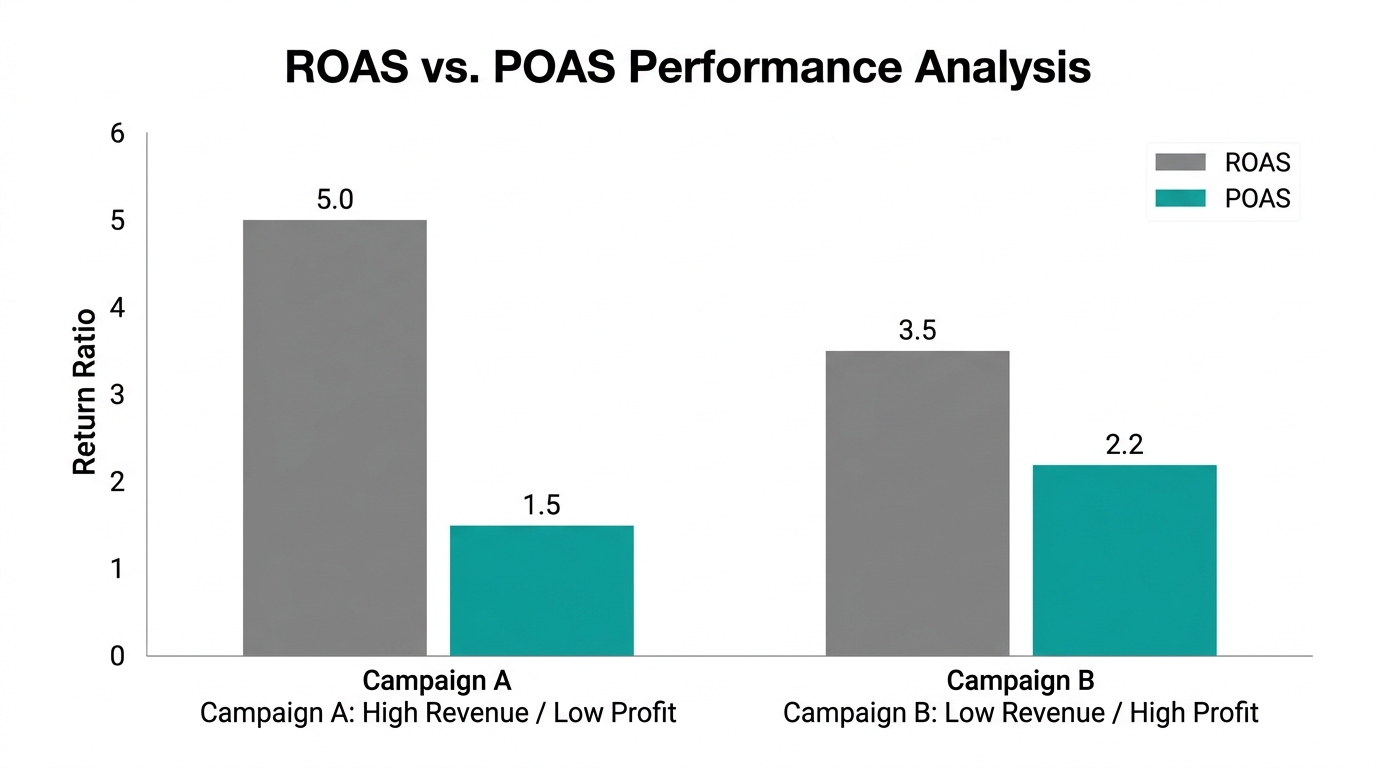
With COGS data flowing into Google Ads, you can finally calculate your Marketing Efficiency Ratio (MER) with context. MER is your total revenue divided by total ad spend. While MER is a great bird's-eye view, it becomes a superpower when you have product-level profit data.
You can now see which products have the best "Profit After Ad Spend." This allows you to stop optimizing for the "best-selling" products and start optimizing for the "most-profitable" ones. In the competitive landscape of 2026, the brand that knows exactly how much it can afford to pay for a customer—down to the penny of profit—is the brand that wins.
Conclusion: The Path to Profitable Scaling
Tracking Shopify COGS Google Ads data is no longer an optional "nice-to-have" for elite brands—it is a survival requirement. By implementing conversions with cart data and ensuring your Google Ads profit tracking is accurate, you move away from the dangerous world of vanity metrics and toward a business built on real, bankable profit.
If the technical setup of syncing feeds and managing item IDs feels overwhelming, remember that you don't have to do it alone. An AI ecommerce employee like Stormy AI can handle the heavy lifting of inventory monitoring, supplier follow-ups, and daily reporting in the background. Stop guessing if your ads are working and start knowing exactly how much profit you're making with every click. Connect your Google Ads to your Shopify COGS today, and let the data lead the way.