How to Automate Your Shopify Back Office Using Webhooks and Admin APIs in 2026
Learn how to master Shopify automation workflows using Webhooks and the Admin API in 2026. Move from manual polling to real-time, event-driven ecommerce operations.
In 2026, the era of the 'manual back office' is officially dead. If you are still logging into your dashboard to check for new orders, manually drafting invoices, or exporting CSVs to update your bookkeeping software, you aren't just wasting time—you are falling behind competitors who have transitioned to fully autonomous operations. Modern ecommerce is no longer about how many apps you can install; it is about how well those apps communicate. By mastering Shopify automation workflows using Webhooks and the Admin API, you can transform your store into a self-correcting, event-driven engine that runs while you sleep.
This playbook will guide you through the strategic shift from manual polling to real-time execution. We will explore the technical architecture required to secure your data, why GraphQL has become the non-negotiable standard for efficiency, and how an AI ecommerce employee like Stormy AI can act as the 'brain' that processes these technical triggers into business outcomes.
The Core Engine: Defining the Shopify Admin API in 2026
Learn why the Admin API is the most crucial tool for Shopify developers.
The Shopify Admin API is the bridge between your custom code and your store's private data. It is the most powerful tool in a seller's arsenal, allowing for programmatic read and write access to products, customers, collections, and orders. Unlike the public-facing Ajax API—which handles storefront interactions like adding items to a cart without a page refresh—the Admin API manages the sensitive data that keeps your business alive.
By 2026, the Admin API has evolved to be almost exclusively GraphQL-based. This shift is critical for performance. In older REST-based systems, requesting a single product title often forced the server to send the entire product object, including descriptions, images, and variant data you didn't need. This "overfetching" slowed down integrations and hit rate limits faster. Today, we use Shopify Admin API for sellers to pinpoint exactly what we need, reducing server load and ensuring that automation flows remain snappy even during high-traffic events like Black Friday.
"The API is the bridge between your code and the Shopify store—it's how you read data, update data, or get notified when something changes in real-time."
From Polling to Pushing: The Power of Shopify Webhooks
Discover how webhooks notify your application about real-time events happening in Shopify.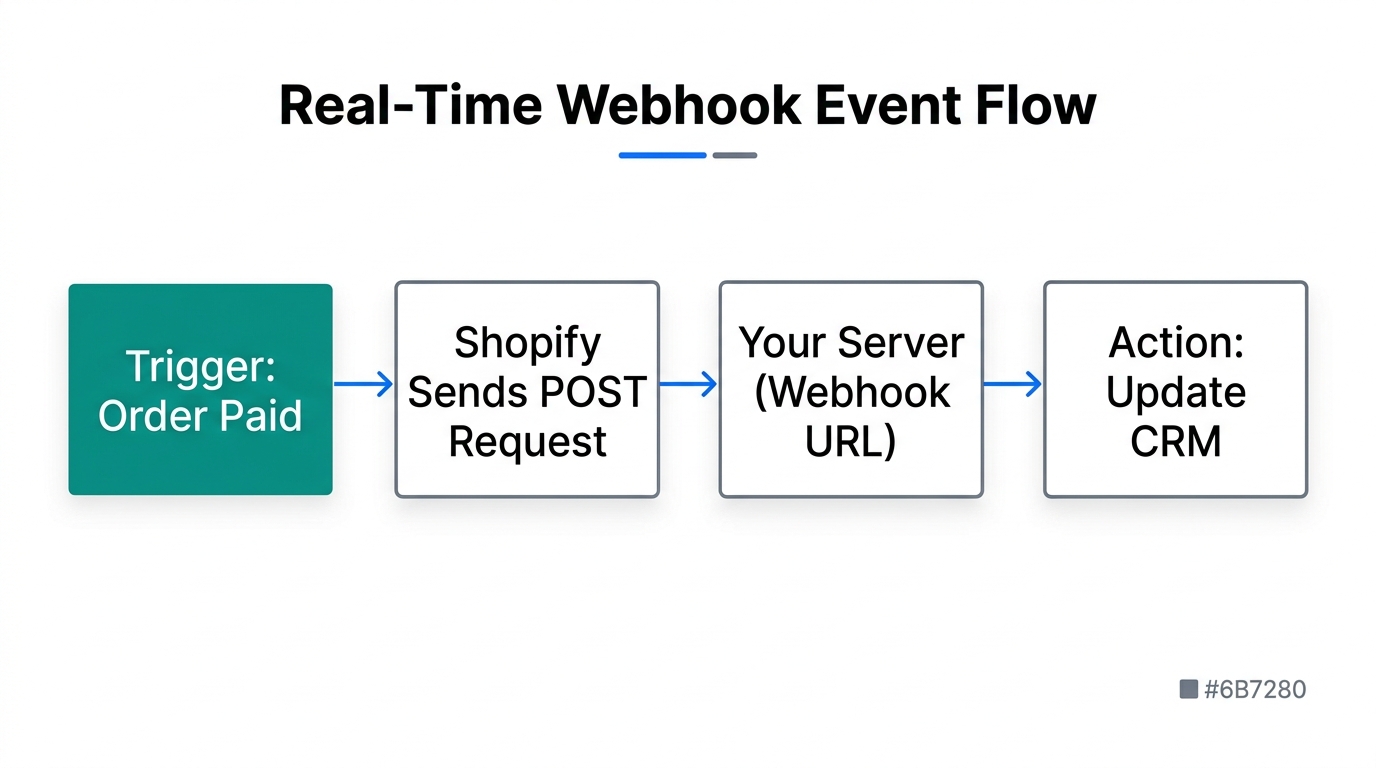
One of the biggest mistakes ecommerce operators make is "polling." This is the process of having a script check the Shopify API every five minutes to see if any new orders have arrived. It is inefficient, expensive, and results in a lag between an event and an action. Shopify Webhooks solve this by acting as an event-driven notification system.
Instead of you asking Shopify "Is there anything new?", Shopify tells your server "Hey, an order was just created, here is the data." This allows for instantaneous automation. For example, the moment a customer completes a purchase, a webhook can trigger your bookkeeping software to generate an invoice, notify your warehouse, and update your CRM. This is the foundation of a modern Shopify Webhooks tutorial 2026 workflow.
Common Webhook Events for Back-Office Automation
- orders/create: Trigger instant invoicing or internal Slack notifications.
- products/update: Sync inventory levels with your Amazon Seller Central or TikTok Shop listings.
- collections/update: Trigger a site-wide cache clear or update your Meta Ads Manager product feed.
- refunds/create: Automatically notify Stormy AI to draft a customer apology email and track the return shipment.
The Security Layer: Why Your App Server Must Handle the Keys
A common pitfall for beginners is attempting to call the Admin API directly from the browser (the frontend). This is a massive security risk. Any code running on a website can be inspected and manipulated by a user. If you put your secret API key in your frontend JavaScript, a malicious actor could steal it and gain full read and write access to your entire store. They could delete your products, steal customer data, or wipe your inventory.
The correct architectural flow for ecommerce back office automation looks like this:
- The user performs an action (or a Webhook triggers).
- A request is sent to your private app server (or an AI agent like Stormy).
- Your server, which safely stores your secret API keys, makes the request to Shopify.
- Shopify returns the data to your server.
- Your server processes that data and performs the final action (e.g., updating a spreadsheet or sending an email).
| Feature | Ajax API (Frontend) | Admin API (Backend) |
|---|---|---|
| Access | Public (no key needed) | Private (secret key required) |
| Data Type | Non-sensitive (Product titles, prices) | Sensitive (Orders, Customers, Inventory) |
| Standard | REST-style | GraphQL |
| Security Risk | Low | Extremely High (if exposed) |
The Shift to GraphQL in 2026: Precision and Performance
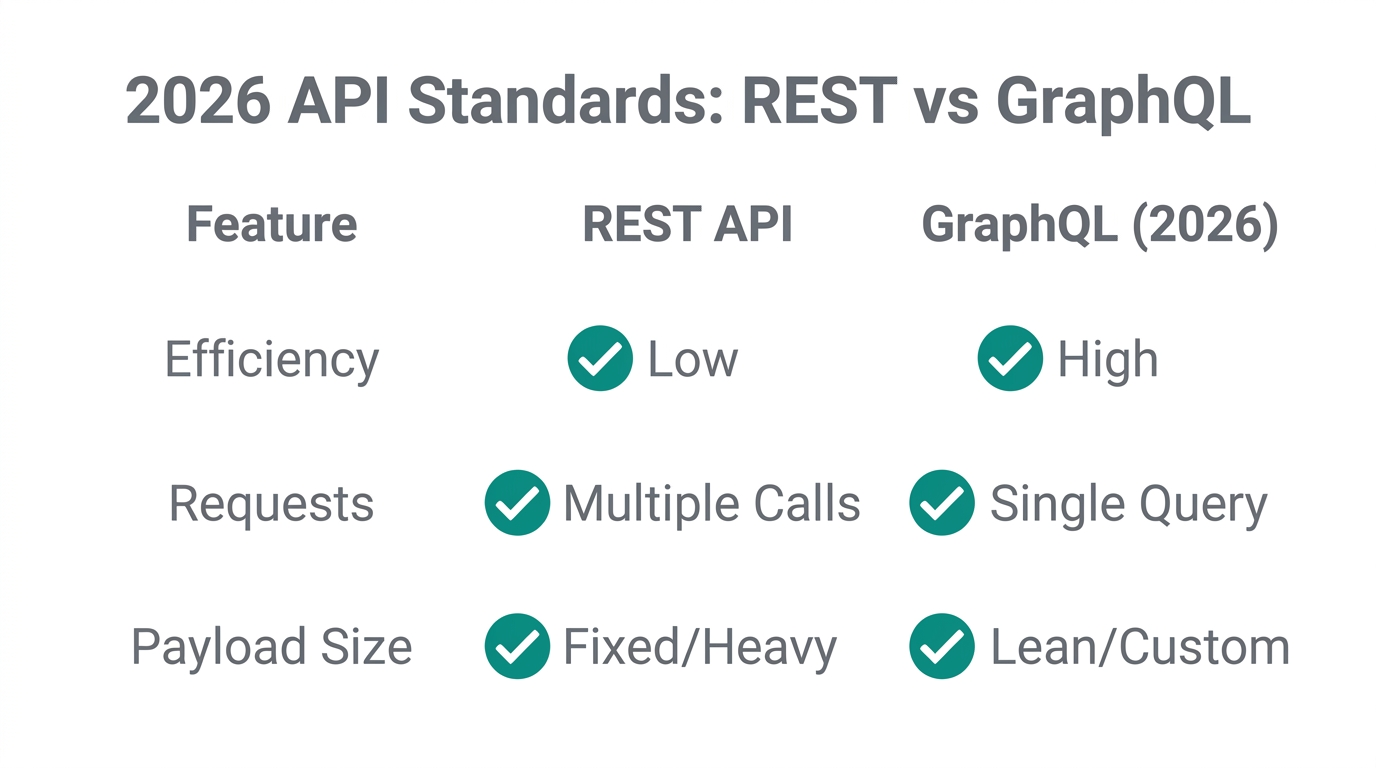
By 2026, GraphQL is no longer just an alternative to REST; it is the industry standard for high-performance ecommerce. The primary advantage is precision. In a complex store with thousands of variants, a REST API call for "all products" might return megabytes of data. With GraphQL, you write a query that asks specifically for the first three products, but only their ID and title.
This efficiency is vital for managing rate limits. Shopify restricts how many requests you can make in a given timeframe to prevent server abuse. Because GraphQL queries are more compact, you can often accomplish more within a single "request bucket" than you could with multiple REST calls. This is particularly important for Shopify automation workflows that involve bulk updates, such as seasonal price changes or inventory syncing with TikTok Shop.
"In 2026, GraphQL is the difference between an automation that scales and one that breaks the moment your store hits 1,000 orders a day."
Integrating Stormy AI: The Brain in Your Back Office
Technical triggers like webhooks are useless if you don't have a system to act on the data. While tools like Zapier or Make can handle simple "if this, then that" logic, they often fall short when human-like judgment is required. This is where Stormy AI enters the chat.
Stormy AI is an AI ecommerce employee that can subscribe to your Shopify webhooks and act as a virtual operations manager. Instead of just moving data from Point A to Point B, Stormy understands the context of the data. For example:
- Inventory Pulse: When a product stock level drops (via a webhook), Stormy doesn't just send an alert. It checks your supplier lead times in a spreadsheet, looks at past sales velocity, and drafts a reorder email to your vendor for you to approve.
- Order Exception Handling: If a webhook flags a high-risk fraudulent order, Stormy can automatically put the order on hold, cross-reference the customer's history in Gorgias, and draft a polite verification email.
- Ad Performance Audits: Stormy can pull revenue data from Shopify and spend data from Meta Ads Manager or Google Ads to build a daily ROAS report in a shared workbook.
The 2026 Automation Playbook: Step-by-Step
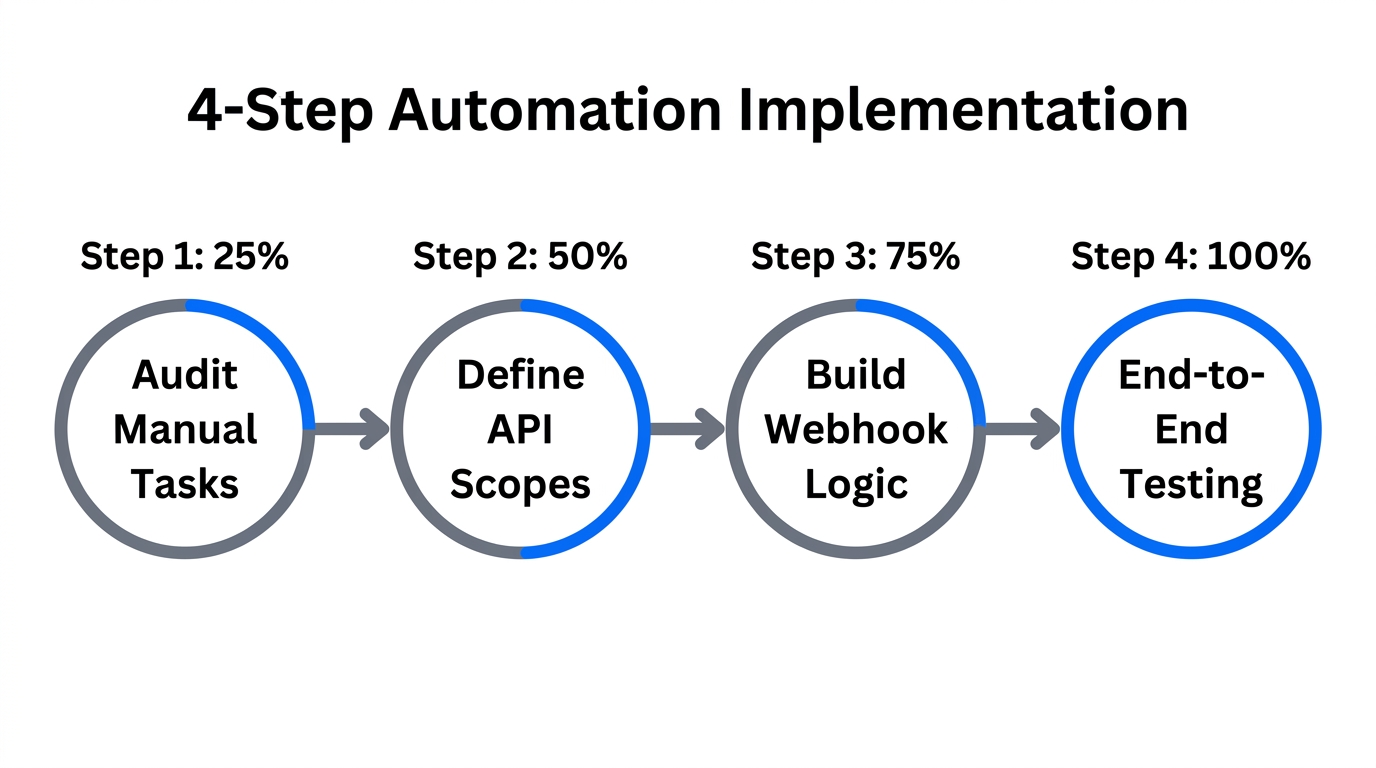
Ready to move away from manual work? Follow this sequence to set up your first event-driven automation flow.
Step 1: Identify Your High-Volume Manual Tasks
Audit your week. What tasks are you doing repeatedly? Usually, these involve Klaviyo segment updates, supplier follow-ups, or revenue reporting. Choose one task to automate first—ideally something that triggers on an order_created or inventory_level_updated event.
Step 2: Configure Your App Server or Agent
You need a destination for Shopify's webhooks. You can set up a custom Node.js or Python server, or more simply, connect your store to an autonomous agent like Stormy AI. In your Shopify Admin, go to Settings > Notifications > Webhooks to create a test webhook and ensure your endpoint is receiving data.
Step 3: Build Your GraphQL Queries
Use the Shopify GraphiQL App to test your queries. Ensure you are only requesting the specific fields you need for your automation. For instance, if you are automating invoicing, you only need the customer's name, email, and the line items—don't waste resources fetching the full shipping logs.
Step 4: Implement Event Validation
Always verify the HMAC header of incoming webhooks to ensure they actually came from Shopify and not a malicious third party. If you are using Stormy AI, this security layer is handled automatically as part of the connector setup.
"The goal is a 'zero-touch' back office where human intervention is reserved for strategy and creativity, not data entry."
Conclusion: Building a Resilient Ecommerce Engine
A final summary of Shopify's API landscape and how to choose the right one.Mastering Shopify automation workflows is no longer a luxury for enterprise brands; it is a survival requirement for lean teams. By leveraging the power of Webhooks and the precision of the GraphQL Admin API, you can reclaim dozens of hours every week. Whether you are syncing data with Stripe for payments or using Stormy AI to handle your supplier follow-ups, the objective is the same: building a business that operates with the speed and accuracy of code.
As you move into the latter half of 2026, focus on reducing the number of manual checkpoints in your business. The more you can move toward an event-driven model, the more scalable your operation becomes. Start small, automate one critical webhook today, and watch as your ecommerce back office automation transforms your daily workflow.