In 2026, shipping is no longer just a back-office utility; it is the front line of customer experience. As global e-commerce sales are projected to reach a staggering $6.88 trillion this year, the ability to fulfill orders with surgical precision is what separates high-growth brands from the rest. For Shopify merchants, the ShipStation Shopify tutorial 2026 has changed. We are moving away from manual weight-checking and toward autonomous orchestration. While an AI ecommerce employee like Stormy AI handles your messy back-office tasks like inventory monitoring and supplier follow-ups, ShipStation has evolved into an 'Intelligence Layer' that manages the physical movement of your goods.
This guide provides a comprehensive, step-by-step playbook for implementing the latest 2026 features, including natural language automation and AI-driven rate decisioning. Whether you are shipping 50 orders a month or 50,000, these workflows are designed to save you hours of manual labor and thousands of dollars in carrier surcharges.
The State of Shipping Automation in 2026
The logistics automation market is on track to hit $67.14 billion by the end of 2026, according to data from Coherent Market Insights. For the average merchant, this means that "good enough" shipping is no longer an option. Today, 84% of e-commerce businesses rank AI-driven automation as their top technology priority, as noted in recent Shopify/EMARKETER reports. Small and Medium Enterprises (SMEs) currently hold 65.4% of the market share in logistics automation because tools like ShipStation have democratized access to enterprise-grade technology.
Step 1: The 2026 Shopify to ShipStation Integration
Integrating your Shopify store with ShipStation is the first move in building an automated fulfillment engine. The process has been streamlined for 2026 to include deeper data syncing for multi-channel inventory management.
- Create Your Account: Navigate to ShipStation and click "Start Shipping Now." You can take advantage of a 30-day free trial without needing a credit card upfront.
- Connect Sales Channels: Under Account Settings > Sales Channels, select "Add New." Search for Shopify.
- Install the App: You will be redirected to the Shopify App Store. Click "Add App" and authorize the connection. This allows ShipStation to pull order totals, recipient data, and SKU weights directly from your store.
- Configure Ship-From Locations: Navigate to Shipping > Ship From Locations. It is vital to enter your warehouse or home address accurately, as this data is used by AI to calculate real-time transit times and carrier zones.
Once connected, your unfulfilled orders will begin populating in the "Awaiting Shipment" tab. However, the real power lies in what happens next: Automation.
"2026 is the year of AI enablement. We are moving from manual dashboards to autonomous orchestration where the software is the decision-maker, not just the printer." — Tiago Paiva, Logistics Analyst
Step 2: Using 'Ask ShipStation' Natural Language Prompts
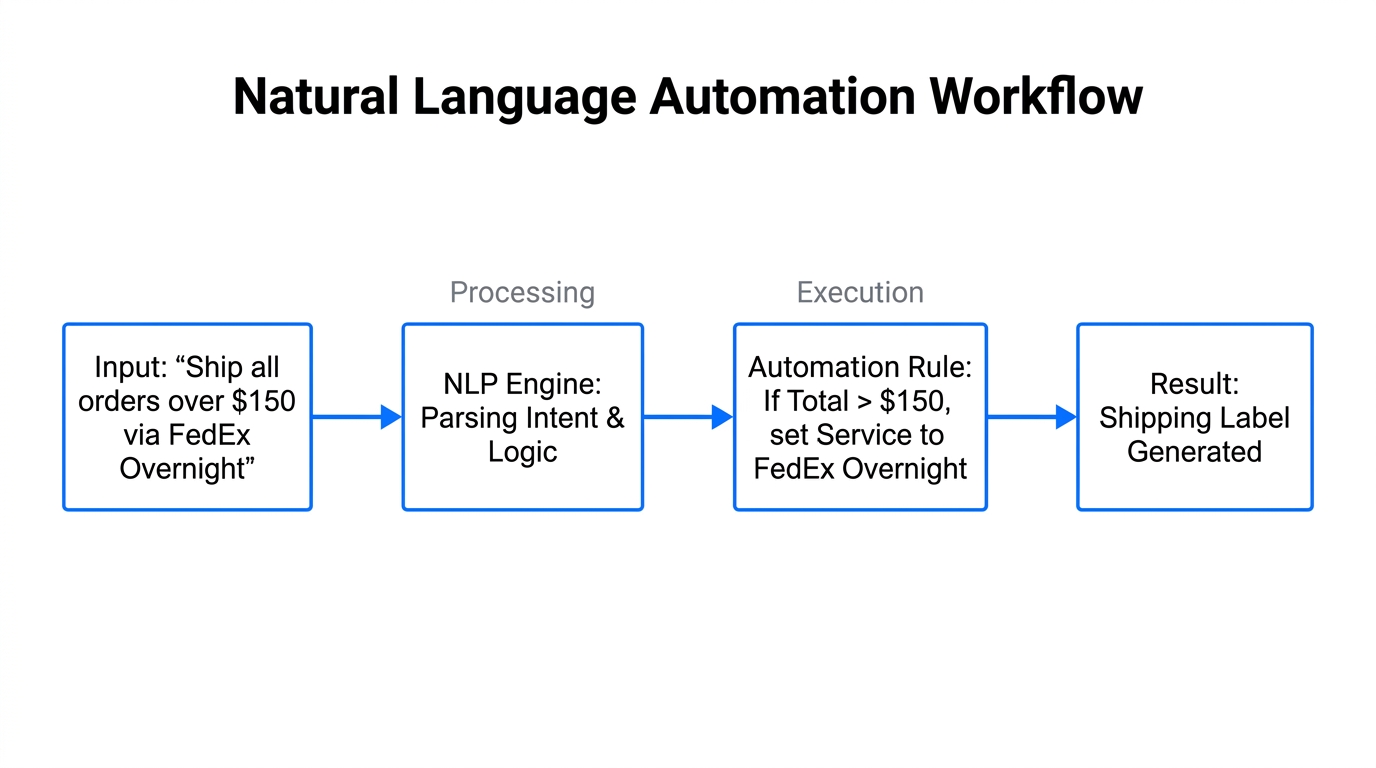
The biggest update in 2026 is the "Ask ShipStation" feature. Gone are the days of building complex "If-Then" logic chains using tedious dropdown menus. You can now build AI shipping rules using plain English.
How to Build Rules with NLP:
Navigate to the Automation tab and locate the AI prompt box. Instead of manual configuration, try typing these prompts:
- "Flag all TikTok Shop orders over $100 for signature confirmation and assign them to the 'High Value' folder."
- "If an order contains a 'Pre-Order' tag in Shopify, hold the shipment until next Friday."
- "Apply USPS Ground Advantage to any domestic order weighing less than 1lb that is going to Zone 1 or 2."
By using these prompts, you reduce the risk of human error and ensure that every order is handled according to your specific business logic. While ShipStation executes the physical label logic, you can ask Stormy AI to monitor these shipments and flag any that haven't been picked up by the carrier within 24 hours, keeping your fulfillment pipeline clean.
Step 3: Implementing AI 'Rate Decisioning'
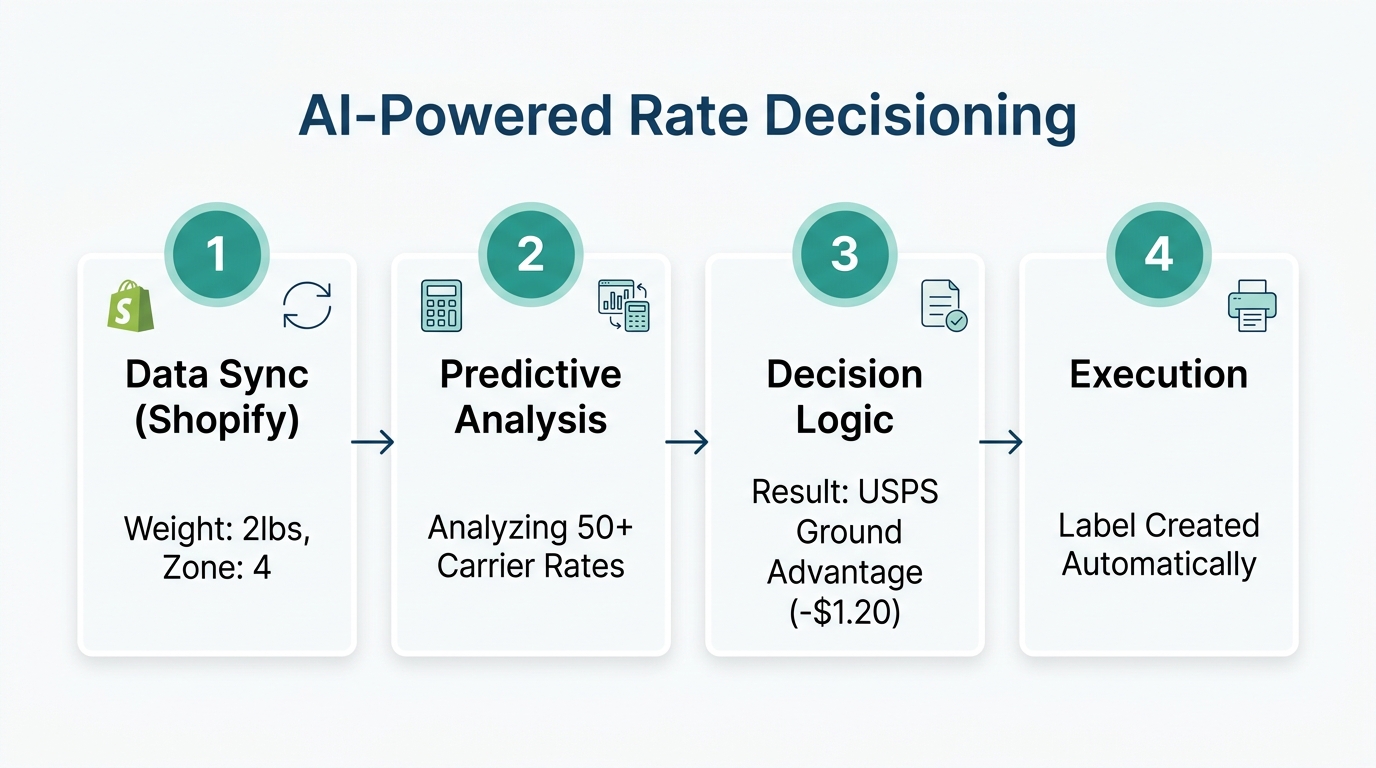
In the past, "Rate Shopping" simply meant looking for the cheapest price. In 2026, we use AI Rate Decisioning. This system evaluates carrier performance in real-time. If a specific hub—for instance, a FedEx hub in Memphis—is experiencing weather delays or peak-season congestion, the system will automatically pivot your shipment to a regional carrier like Sendle or Lasership without you lifting a finger.
| Feature | Traditional Rate Shopping | 2026 AI Rate Decisioning |
|---|---|---|
| Selection Logic | Cheapest price only | Price + Hub Latency + Weather |
| Carrier Mix | Major carriers only (UPS/USPS) | Dynamic inclusion of Regional Carriers |
| Peak Surcharges | Manually avoided | Automatically bypassed via route logic |
| Latency | High (Manual check) | Zero (Autonomous execution) |
As noted by Maersk, "Agentic AI" in logistics now allows systems to switch carriers based on hub performance. High-volume shippers like Spiceology have saved thousands of dollars during holiday seasons by using this automated rate shopping to navigate peak-season surcharges in real-time, according to a ShipStation Case Study.
"Intelligence is the new decision layer. It’s no longer about who has the cheapest label, but who has the most resilient data-driven workflow." — Todd Greenbaum, CEO of ShipStation
Step 4: Navigating 2026 Pricing and the Scale Tier API
ShipStation's pricing has evolved to reflect its new AI capabilities. A critical change for 2026 is the "API Paywall." Access to the ShipStation API (necessary for custom integrations or tools like Zapier) is now restricted to the Scale (Gold) Tier and above.
2026 Pricing Breakdown:
- Starter ($25/mo): Up to 500 shipments, 3 users. Good for small shops but lacks API access.
- Accelerate ($65/mo): Up to 3,000 shipments, 5 users. Includes basic automation.
- Scale ($155/mo): Up to 7,500 shipments, 10 users. Unlocks API access and advanced reporting.
- Enterprise (Custom): Unlimited shipments and dedicated account management.
If you are a mid-market merchant shipping over 5,000 orders per month, the Scale Tier is essential. It allows you to consolidate your tech stack. According to the ShipStation Newsroom, mid-market accounts have eliminated an average of five separate logistics tools by using the integrated features of the higher tiers, saving roughly $2,700 per month in SaaS subscriptions.
Step 5: Reducing WISMO Tickets with Branded SMS
One of the most effective Shopify shipping automation tactics in 2026 is moving your tracking notifications from email to SMS. While email open rates linger around 20%, SMS open rates are a staggering 98%.
By enabling Branded SMS Tracking Notifications in ShipStation, you provide customers with hyper-accurate, real-time updates. This single move has been shown to reduce "Where Is My Order" (WISMO) support tickets by 30%. This frees up your support team—or your AI support agent—to handle more complex inquiries. If you use Stormy AI, it can automatically triage any incoming shipping disputes, drafting on-brand replies based on the real-time tracking data pulled from your ShipStation dashboard.
The 2026 Competitive Landscape
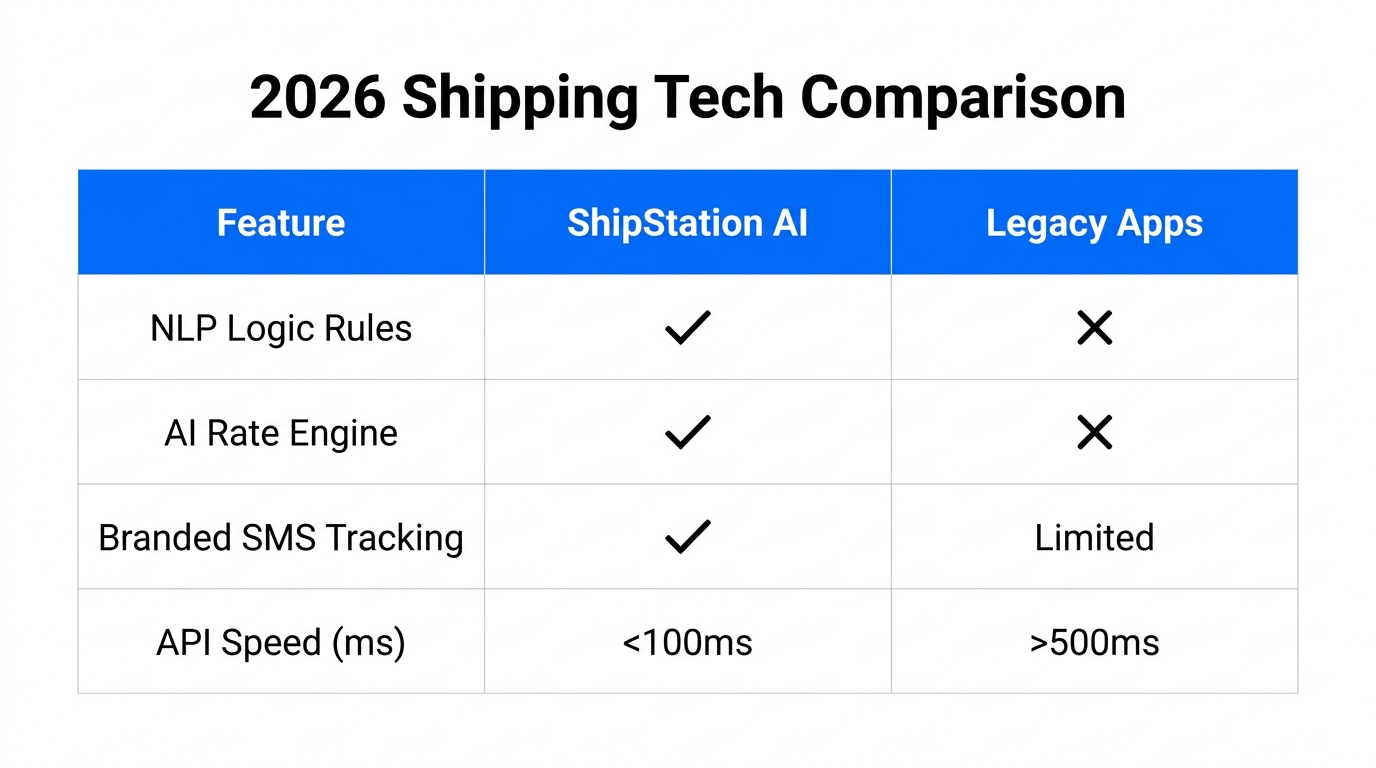
While ShipStation is the powerhouse for multi-channel merchants, it isn't the only option. Depending on your volume, other tools might fit your specific needs better.
| Platform | Best For | The "Catch" in 2026 |
|---|---|---|
| ShipStation | Multi-channel (Shopify + Etsy + TikTok) | Most expensive; API paywall |
| Shippo | Developers and API-first setups | Per-label fees can add up fast |
| Veeqo | Amazon-first sellers | Requires 50% label volume via Amazon |
| Pirate Ship | Solo-entrepreneurs (Simple USPS/UPS) | No automation rules or inventory sync |
If you are scaling a serious brand, the AI-powered features of ShipStation generally outweigh the cost. As noted in a Business Wire report, the transition to "Intelligent Returns" (offering store credit + bonus) has increased upsells by 112% for merchants using these advanced post-purchase loops.
"The 'Delivery Expectations Gap' is real—60% of consumers want free 2-day shipping, but only 35% of retailers can do it without losing money. Automation is the only way to close that gap." — Michael Haswell, Ecommerce Specialist
The AI Ecommerce Playbook: Running a Lean Operation
In 2026, the goal is to run a high-revenue business with a lean team. By combining Shopify shipping automation with an autonomous teammate, you achieve true operational freedom. Here is how the workflow looks in a modern 2026 stack:
- Discovery: You use Stormy AI to discover and reach out to creators on TikTok Shop.
- Sales: Those creators drive traffic to your Shopify store.
- Fulfillment: ShipStation pulls those orders and uses AI Rate Decisioning to print the most cost-effective, fastest label.
- Monitoring: Stormy AI watches the shipment status. If a carrier hub gets stuck, Stormy flags it and alerts your supplier to adjust future lead times.
- Reporting: Every Friday, Stormy pulls your shipping spend from ShipStation and ad spend from Meta Ads to build a comprehensive P&L in a shared workbook.
Conclusion: Shipping as a Growth Engine
The ShipStation Shopify tutorial 2026 is no longer just about printing labels—it’s about data-driven resilience. By implementing AI shipping rules, leveraging NLP prompts, and utilizing the Scale Tier API, you transform fulfillment from a cost center into a growth engine. As e-commerce continues to evolve, the brands that win will be those that automate the boring back-office tasks, allowing their human founders to focus on brand, product, and strategy.
Ready to automate the rest of your store? Let an AI ecommerce employee like Stormy AI handle your inventory, suppliers, and ad reporting while you focus on scaling to the next level.