In 2026, the dream of the "all-in-one" logistics provider has largely faded for high-growth brands. As the global e-commerce fulfillment market surges toward $154.31 billion this year, according to Mordor Intelligence, merchants are realizing that specialization wins over centralization. You might have a core catalog of high-volume SKUs perfect for a 3PL, but you also have custom, made-to-order, or fragile items that require the white-glove touch of your own in-house team. This is where a hybrid fulfillment strategy becomes your secret weapon.
Managing two separate fulfillment nodes—your own warehouse via ShipStation and a global 3PL network like ShipBob—can be an operational nightmare if not architected correctly. Without a clear playbook, you face duplicate label billing, inventory discrepancies, and frustrated customers receiving three different boxes for one order. Fortunately, with the right API configurations and an AI teammate like Stormy AI monitoring the back office, you can run a multi-node operation that scales without the headcount.
"2026 is the year of AI enablement, not transformation. The industry is rebuilding the foundation of clean data before AI can autonomously orchestrate delivery networks."
The Logic of Hybrid Fulfillment: Why Two is Better Than One
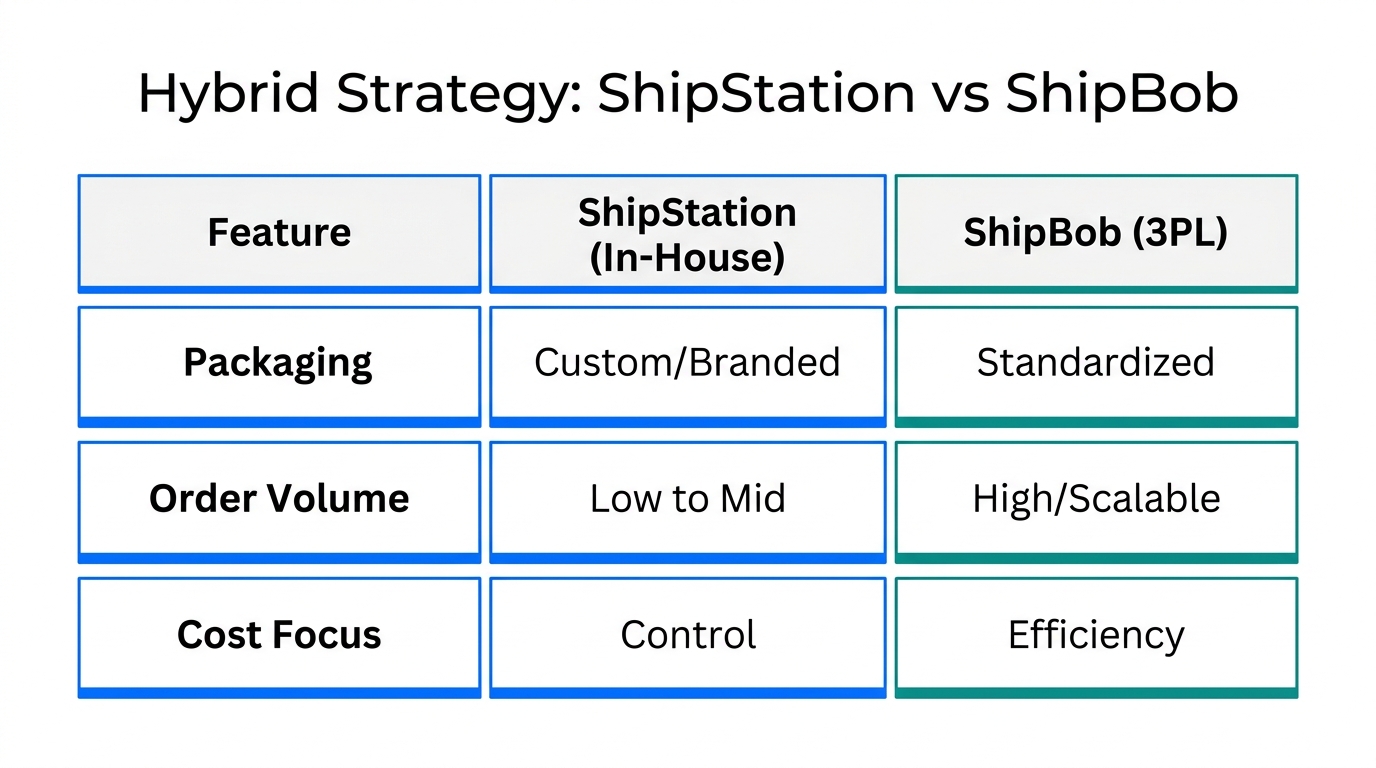
Why bother with both? For most brands, ShipBob is the gold standard for scaling. Their case studies show brands like Our Place cutting delivery times to 2.5 days by leveraging a distributed warehouse network. However, ShipStation (part of the $1 billion+ Auctane group, per Auctane) offers unparalleled control for in-house packing. A hybrid model allows you to:
- Protect Margins on Custom Goods: Ship made-to-order items in-house to avoid the high storage fees for slow-moving or bulky items often found at 3PLs.
- Leverage 2-Day Shipping: Use ShipBob's nodes to place high-velocity SKUs closer to customers, increasing cart conversion by an average of 18.4%.
- Mitigate Risk: If one node faces a bottleneck or "receiving lag," you can instantly reroute orders to the other to maintain SLA compliance.
Step-by-Step: The ShipStation-ShipBob Integration Tutorial
To make this work, you must connect the two platforms via the ShipStation API V2. This ensures that even if an order is fulfilled by ShipBob, it still lives inside your ShipStation records for unified reporting. An AI employee like Stormy AI can even monitor this connection to flag 429 rate-limit errors or sync failures before they impact your shipping queue.
Step 1: Generate API Keys
- Log into your ShipStation account and navigate to Settings > Account > API Settings.
- Click Generate New API Keys. Copy both the API Key and API Secret immediately.
- Log into your ShipBob dashboard and navigate to Integrations > App Store.
- Search for "ShipStation" and click Connect. Enter the keys you just generated.
Step 2: Map Your Inventory
Within the ShipBob integration settings, you must choose which SKUs ShipBob is allowed to "see." Do not sync your entire catalog if half of it is custom-made in-house. Only sync the SKUs that are physically stocked in ShipBob's warehouses to prevent "ghost" inventory from showing up on your Shopify or TikTok Shop storefronts.
| Feature | ShipStation | ShipBob |
|---|---|---|
| Core Model | SaaS (You pack it) | 3PL (They pack it) |
| 2026 Pricing | Starts at $14.99/mo | $275/mo minimum |
| Inventory Control | High (Manual overrides) | Automated (Distributed) |
| Best For | Custom/MTO Items | Best-sellers/Catalog |
Configuring Routing Rules to Prevent Duplicate Billing
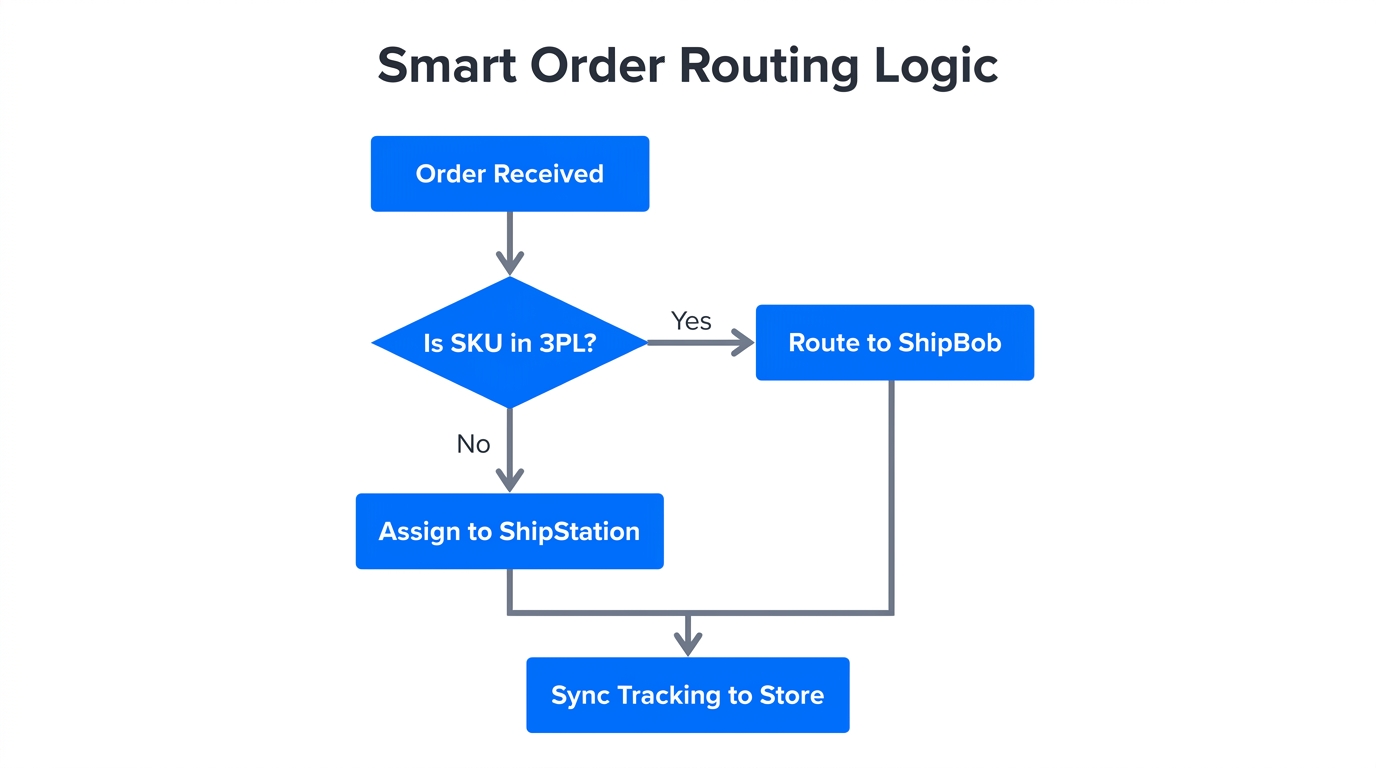
The biggest risk of a hybrid setup is the duplicate label trap. If a Shopify order contains one ShipBob SKU and one in-house SKU, both systems might try to fulfill the entire order. You must use ShipStation's automation engine to prevent this.
The "Exclude" Rule
In ShipStation, navigate to Settings > Automation > Automation Rules. Create a new rule called "Exclude ShipBob SKUs." Set the criteria to "SKU matches [List of ShipBob SKUs]" and the action to "Move to On Hold" or "Tag with 'Fulfillment: ShipBob'." This prevents your in-house team from accidentally printing a label for an item ShipBob is already handling.
The 'ShipBob-B2B' Tag Strategy
For wholesale orders coming from TikTok Shop or Shopify, you need a distinct workflow. ShipBob requires specific documentation for B2B/Wholesale shipments. Use the "ShipBob-B2B" tag in ShipStation. When Stormy AI detects this tag on a high-value order, it can automatically attach the required commercial invoices or BOLs (Bill of Lading) to the ShipBob task, ensuring your wholesale customers aren't delayed by paperwork bottlenecks.
"Logistics has been stitched together across too many vendors. In 2026, we are giving merchants enterprise-grade reporting to identify delivery risks before they leave the warehouse." — Kelly Vincent, CPO at ShipStation
TikTok Shop Logistics Automation in 2026
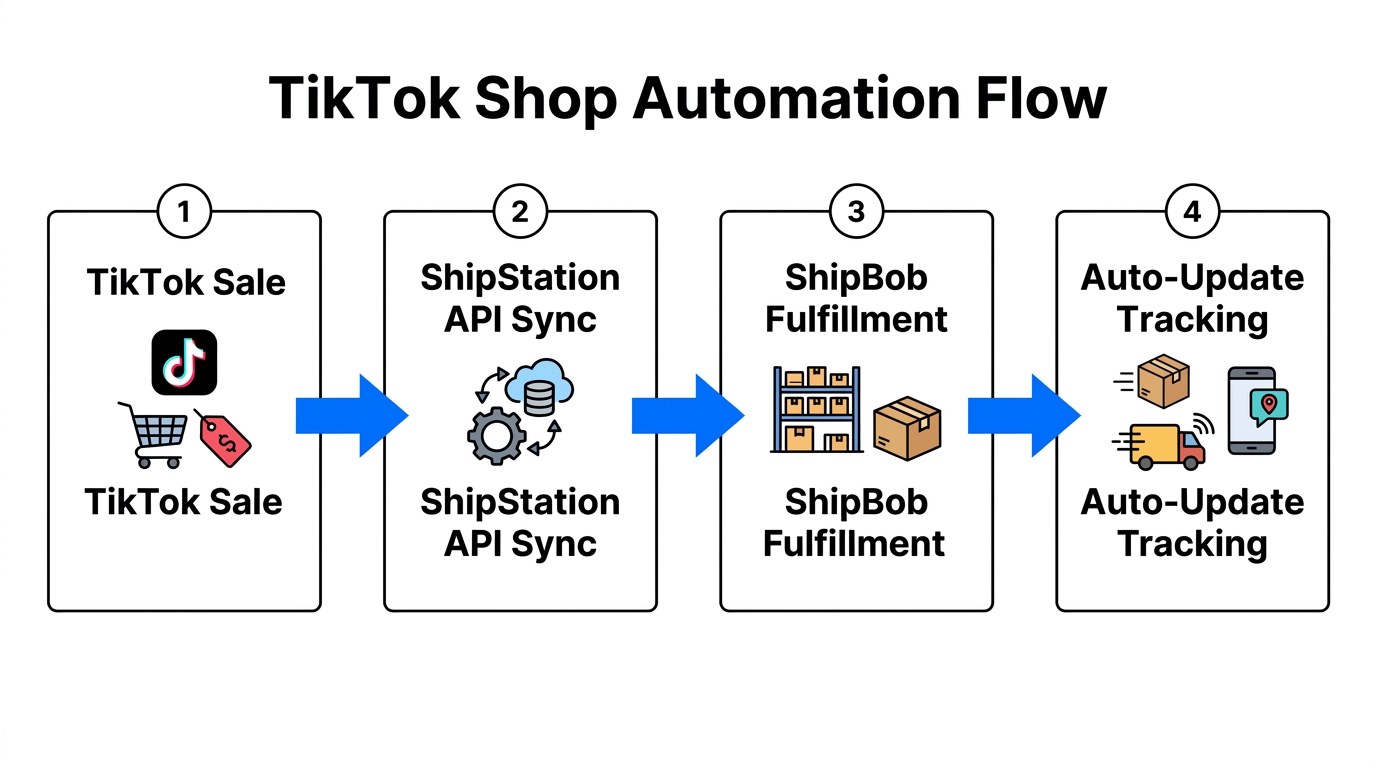
TikTok Shop has become a major logistics driver this year. Because TikTok requires strict Ship-by Dates, any delay in a hybrid model can lead to account suppression. According to Productiv, 57% of companies now outsource to 3PLs to meet these aggressive marketplaces SLAs.
To automate this, set up a multi-channel inventory sync. When a creator's post goes viral on TikTok, Stormy AI monitors the spike in orders. If ShipBob's stock for that SKU hits a predefined "safety threshold," Stormy can automatically update your TikTok Shop listing to pull from your in-house ShipStation inventory instead, preventing a stockout during your peak viral moment. This level of cross-platform orchestration is exactly why brands are moving away from manual spreadsheets and toward AI ecommerce employees.
Using Stormy AI to Manage Split-Shipment Confusion
Hybrid fulfillment naturally leads to split shipments—one order arriving in two boxes from two different locations. This is the #1 cause of "Where is my order?" (WISMO) tickets in Gorgias or Zendesk.
This is where Stormy AI earns its keep. Instead of a human agent manually checking two different tracking numbers, Stormy handles the support loop in the background:
- Proactive Triage: Stormy detects an order with split tracking numbers and drafts an email to the customer: "Hey, your order is so special it's coming from two of our hubs! Box 1 (Catalog) is arriving Tuesday via ShipBob, and Box 2 (Custom) is being hand-packed today via ShipStation."
- Status Monitoring: If ShipBob reports an "inventory discrepancy" (a known issue where receiving can lag, per ShipBob Support), Stormy flags the delay to the founder and drafts a polite follow-up to the 3PL account manager.
- Unified Reporting: Stormy pulls data from ShipStation and ShipBob into a single 2026 P&L spreadsheet, calculating your true shipping cost per order across both nodes.
Maintaining a Unified Tracking Experience
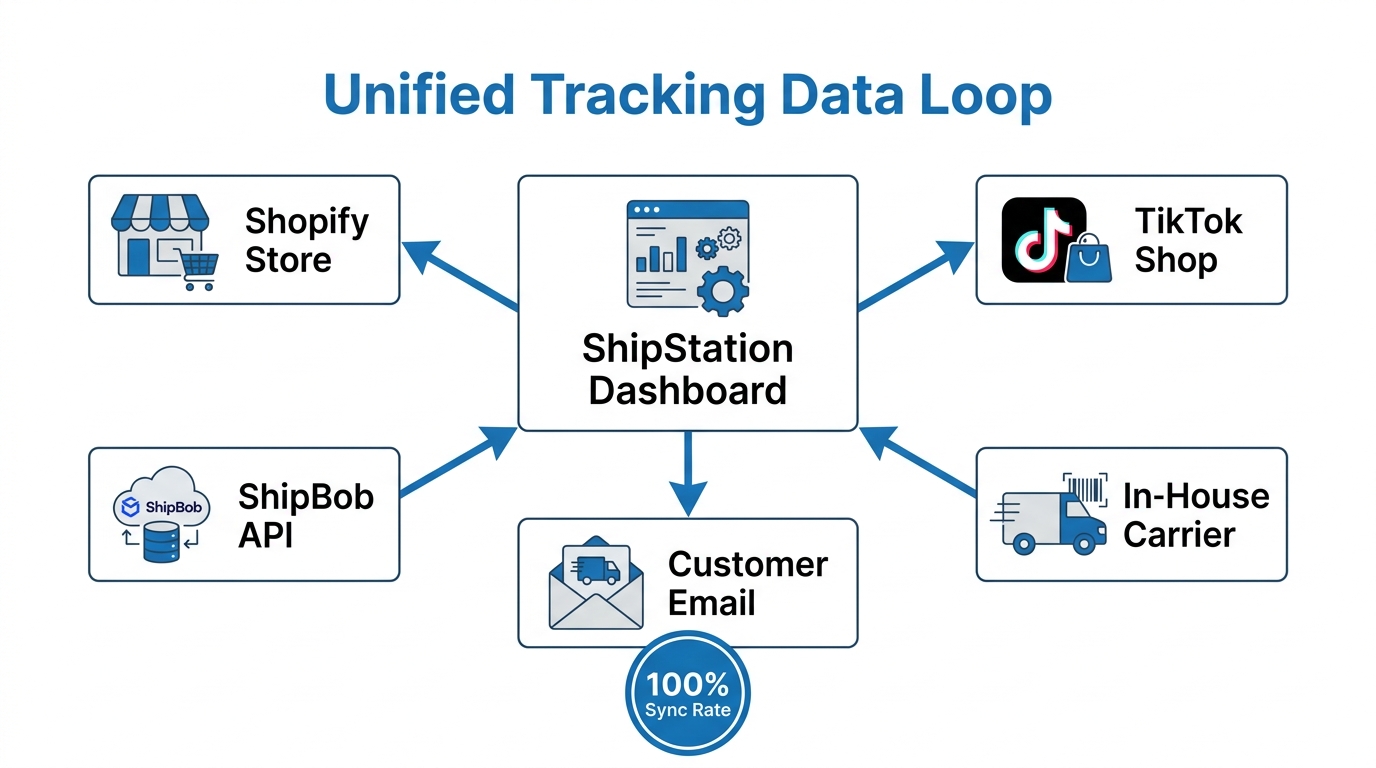
To keep the customer experience seamless, avoid sending two separate native shipping emails. Instead, use a post-purchase platform like Wonderment or Malomo. These tools can aggregate multiple tracking numbers into a single branded portal.
In 2026, Estimated Delivery Dates (EDD) are a critical conversion metric. As noted by ShipStation's recent benchmarks, 25%+ of consumers now use AI chat agents to find products based on how fast they can arrive. By using ShipBob for your coastal hubs and ShipStation for your central hub, you can provide an "order by 2pm for 2-day delivery" promise across 90% of the US.
The Bottom Line: Scalable Chaos
The hybrid logistics model is the only way to maintain high-touch brand quality while achieving global shipping speeds. By connecting ShipStation for control and ShipBob for scale—and letting Stormy AI handle the messy data sync and support tickets in between—you build a business that is truly defensible. As you scale into 2027 and beyond, remember that your logistics stack is only as strong as the automation rules that govern it. Stop packing boxes manually and start orchestrating a network.