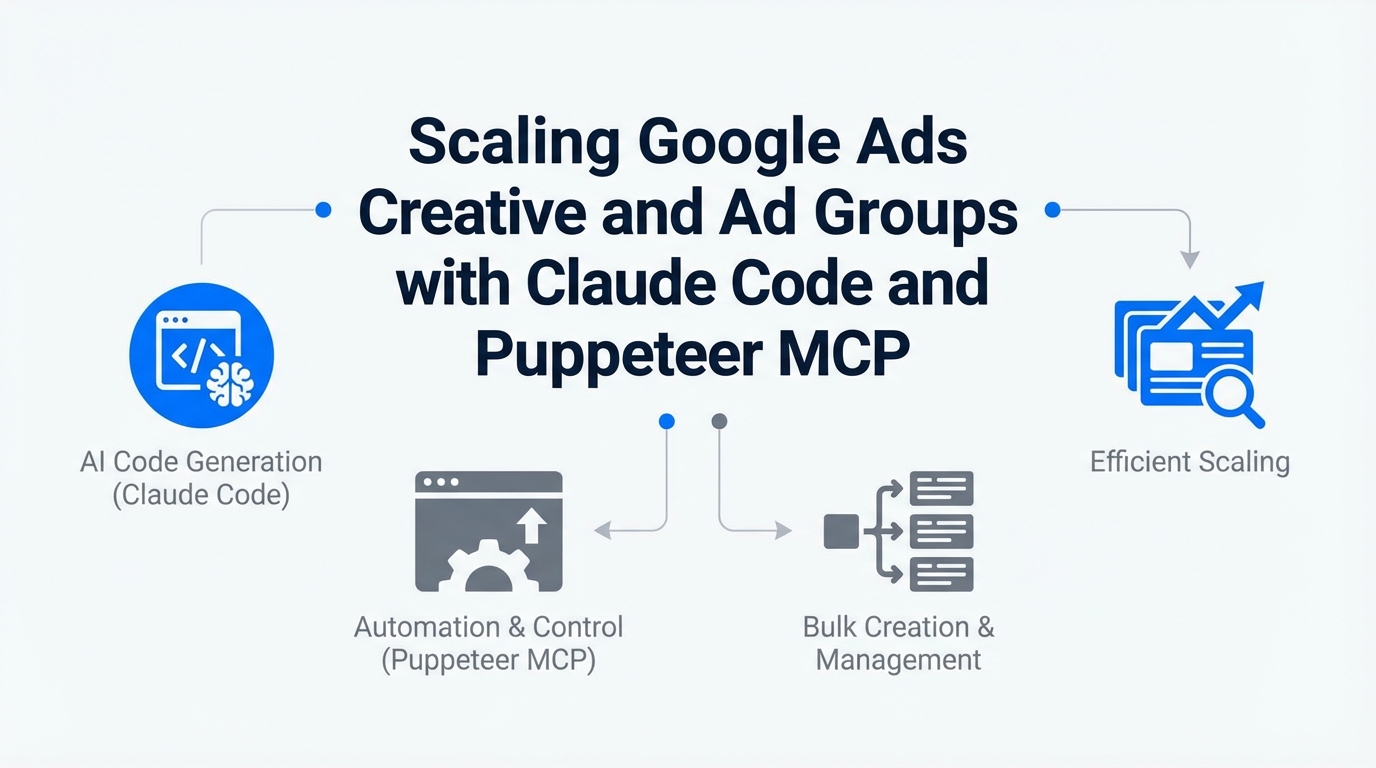
The landscape of digital advertising is undergoing a seismic shift, moving away from manual spreadsheet management toward autonomous agent orchestration. As we move through 2025, the standard practice of "chatting" with an AI is being replaced by agentic workflows that can execute terminal commands, browse live websites, and interface directly with APIs. For performance marketers, this means the ability to achieve unprecedented scale in Google Ads creative automation and programmatic ad group generation.
By early 2025, over 80% of Google Ads advertisers have already adopted automated bidding. However, the true bottleneck remains the bridge between the landing page content and the ad group structure. Using tools like Claude Code and the Puppeteer Model Context Protocol (MCP) server, marketers can now build a closed-loop system that scrapes live URLs and generates hyper-relevant ads in real-time.
The Agentic Shift: From Chatbots to Delegators
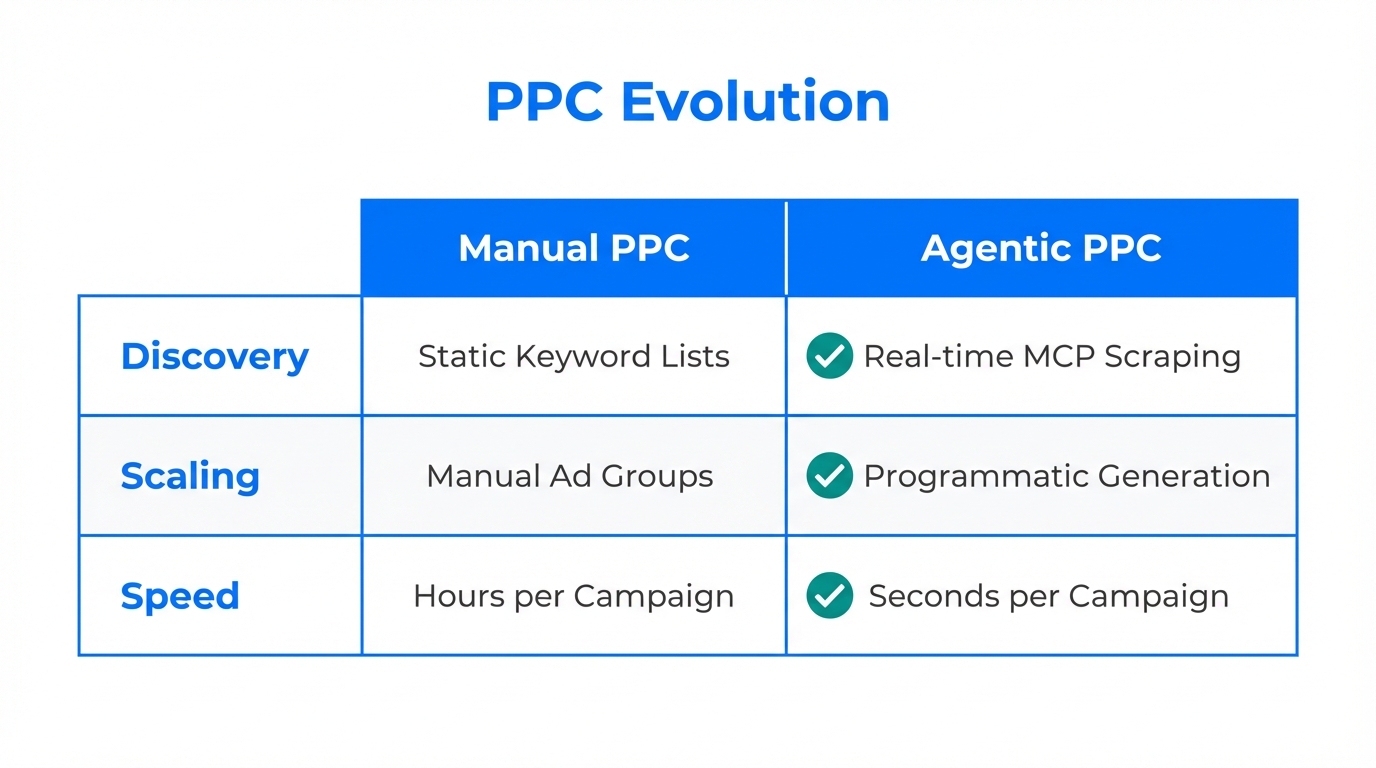
The core difference between traditional AI tools and Claude Code is the shift from an "accelerator" to a "delegator." While a tool like ChatGPT might help you write a better headline, an agentic CLI tool like Claude Code can actually build the ad group for you. This is increasingly critical as Google deprecates legacy bidding strategies like Enhanced CPC (ECPC) in favor of full Smart Bidding.
With Gartner predicting that by 2026, 40% of enterprise applications will embed autonomous AI agents, the competitive advantage lies in how quickly you can integrate these agents into your marketing stack. The goal is no longer just high-volume creative; it is contextual precision that matches the user's conversational intent on the search engine results page (SERP).
"The future of Google Ads isn't about bidding—it's about the data context you feed the bidding algorithm. Claude Code acts as the bridge between your website's reality and Google's auction."
| Feature | Traditional PPC Workflow | Agentic Workflow (Claude Code) |
|---|---|---|
| Keyword Extraction | Manual Keyword Planner research | Automated scraping via Puppeteer MCP |
| Ad Group Creation | Bulk uploads via Editor (Slow) | Programmatic generation via API |
| Creative Refresh | Every 30-90 days manually | Weekly iterative 'Vibe' updates |
| Performance Audit | Weekly CSV exports and pivots | Real-time terminal-based querying |
Technical Setup: Deploying Claude Code and MCP Servers
To begin your journey into Google Ads creative automation, you must move beyond the browser and into the terminal. Claude Code is a command-line interface (CLI) that requires Node.js (v18+) for installation. Once installed, it doesn't just talk to you; it reads your local files and interacts with the Model Context Protocol (MCP).
Step 1: Installing the CLI
Open your terminal and run the following command to install the CLI tool. This allows you to run Claude as a persistent agent within your marketing directories.
npm install -g @anthropic-ai/claude-code
claude auth login
Step 2: Configuring the Puppeteer MCP
The Puppeteer MCP server is the "eyes" of your agent. It allows Claude to "view" your landing pages, extract text, and analyze visual hierarchies. You will need to edit your mcp.json file (usually located in your home directory under .config/claude/) to include the Puppeteer server configuration.
Step 3: Connecting to the Google Ads API
To execute programmatic ad group generation, you need to connect Claude to your Google Cloud Project. You will require your Google Ads Developer Token, Client ID, and Client Secret from the Google Cloud Console. This setup enables Claude to push data directly to your account without needing a manual CSV import.
Bridging the Gap: Landing Page Keyword Extraction
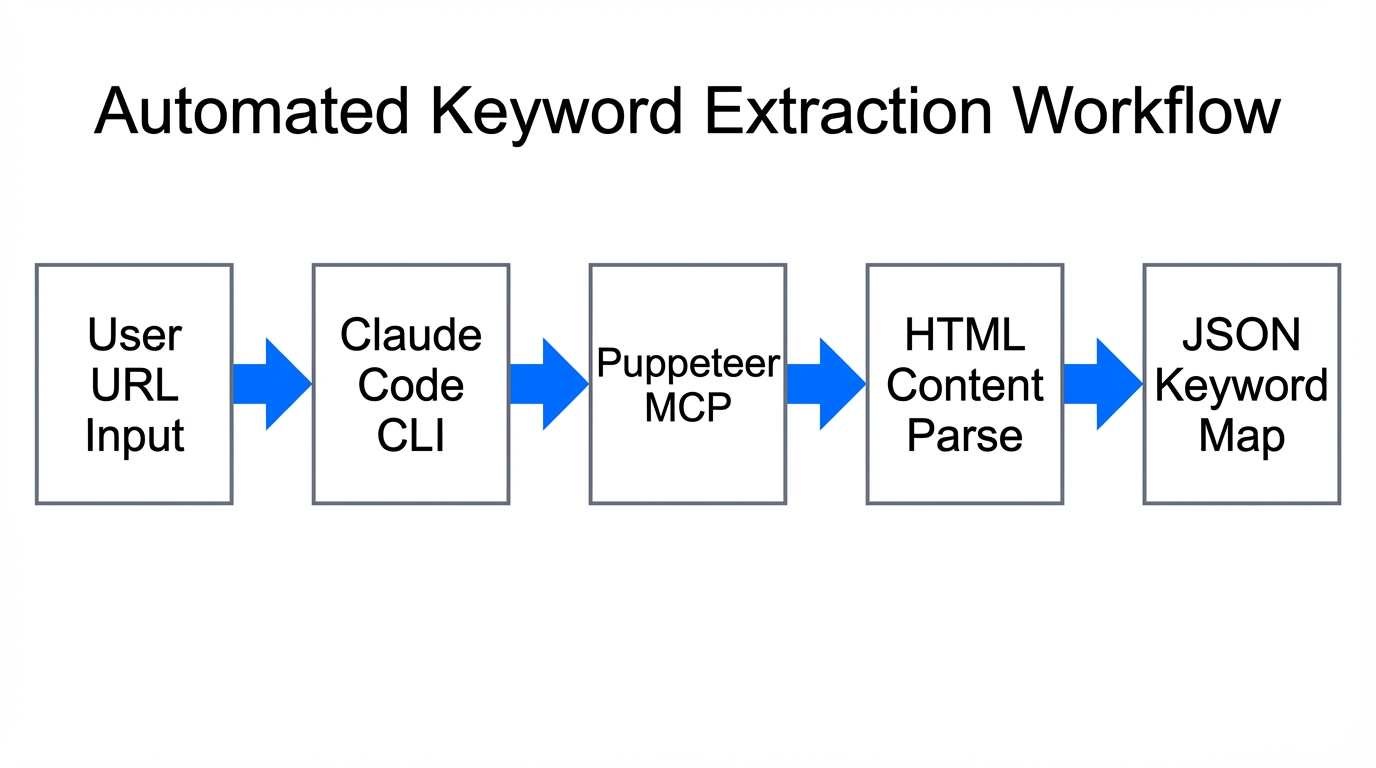
One of the most powerful applications of the Puppeteer MCP is landing page keyword extraction. Traditionally, marketers would manually read a page to find the core value propositions and then guess which keywords might work. With an agentic workflow, you can point Claude at a URL and ask it to identify the "semantic core" of the page.
By using the command claude "Use Puppeteer to scrape our new SaaS pricing page and suggest 15 Exact Match keywords that aren't already in our 'Competitor' campaign," you are performing a task in seconds that used to take hours. This prevents the "Context Death Spiral" where your ads become disconnected from the actual product updates on your site.
The Playbook for Programmatic Ad Group Generation
Once Claude has extracted the relevant keywords and landing page data, the next step is building the ad groups. This is where AI copywriting for Google Ads shines. Instead of generic headlines, you can instruct the agent to generate copy that iterates on "Vibe Marketing"—the concept of focusing on emotional resonance rather than just features.
- Contextual Seeding: Create a Notion or local
CLAUDE.mdfile in your project root. Include your brand voice, negative keyword lists, and CPA targets. This acts as the agent's long-term memory. - Creative Iteration: Use Claude to generate headlines based on specific psychological triggers. For example:
claude "Generate 10 new headlines for our mobile app install campaign based on the 'Immediate Gratification' angle." - API Push: Once the copy is approved, Claude uses the Google Ads API to create new Exact Match ad groups that map directly to the scraped landing page sections.
When you are sourcing visual assets or video content for these automated ad groups, platforms like Stormy AI streamline creator sourcing and outreach to help you quickly discover and manage UGC creators who can produce the high-performing video creative needed for Performance Max or YouTube campaigns.
"Programmatic ad creation is the death of the 'one-size-fits-all' ad group. We are moving toward a 1:1 ratio between specific landing page sub-sections and ad group targeting."
Automating Competitor Gap Analysis
Why stop at your own site? The Claude Code MCP servers allow you to perform automated search for keyword opportunities on rival sites. By pointing the Puppeteer agent at a competitor’s landing page, you can identify the specific hooks and keywords they are prioritizing.
You can use a prompt like: claude "Compare our 'Features' page with [Competitor URL]. Identify 3 keyword gaps where they are ranking but we are not bidding in Google Ads." This type of competitor gap analysis ensures your programmatic ad group generation isn't happening in a vacuum. It allows you to bid aggressively on the terms your competitors are successfully using to acquire customers.
For more advanced users, you can even sync this data with automation platforms like n8n to build visual workflows that trigger Claude Code audits whenever a competitor updates their homepage. This keeps your Google Ads creative automation at the bleeding edge of market shifts.
Optimizing for High-LTV: Syncing GA4 and Google Ads
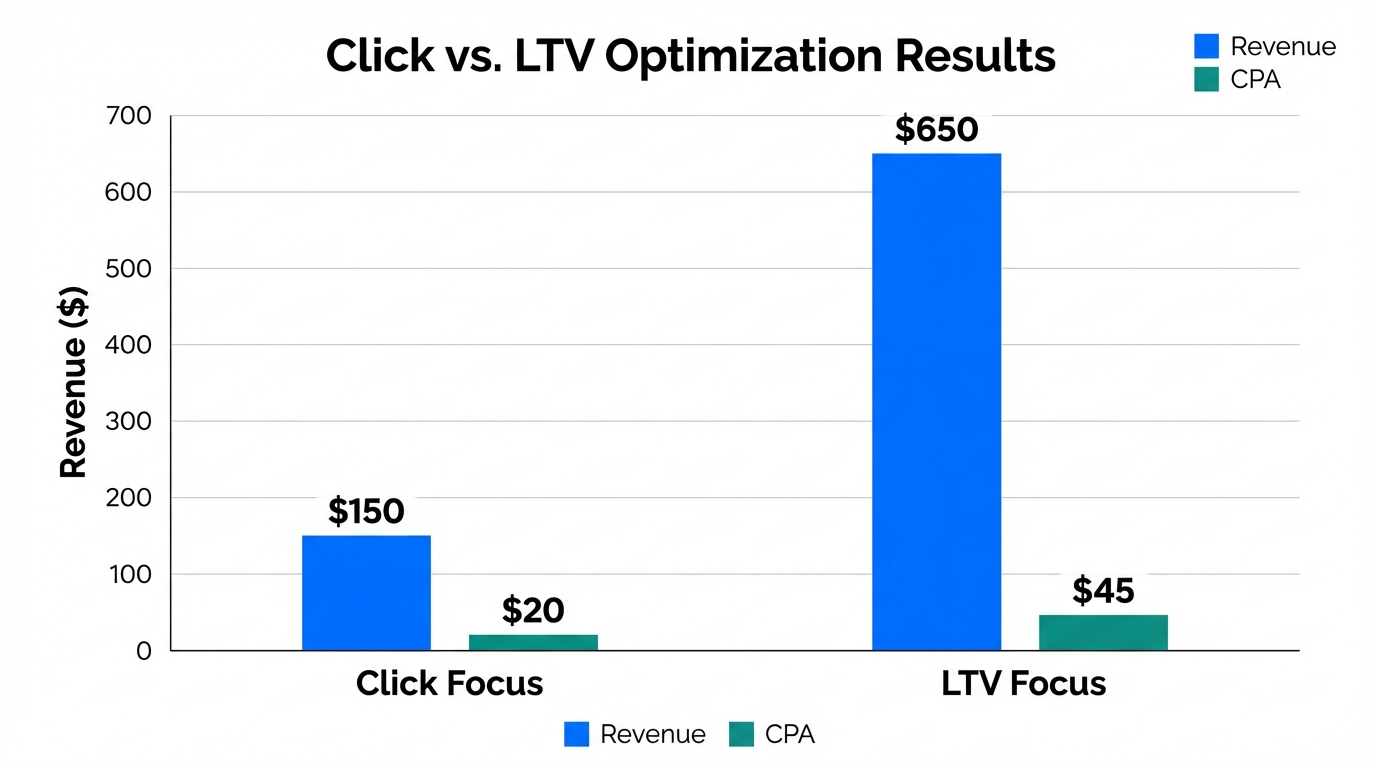
A common mistake in automated workflows is optimizing for the wrong metric. AI is naturally optimized for reach and volume; without strict guidance, it will bid on high-volume but low-intent terms. To solve this, you must sync your Google Analytics 4 (GA4) data into the automation flow.
Using Claude Code, you can query your GA4 data to find which ad groups are driving high Lifetime Value (LTV) rather than just cheap clicks. This allows the agent to prune underperforming ad groups and reallocate budget to the "winners." You can use tools like the GAQL Token Generator to simplify the process of getting query tokens for the Google Ads Query Language, making it easier for Claude to interface with your data.
Platforms like Stormy AI provide the necessary creator management and performance tracking to ensure that the creative assets being used in these automated campaigns are actually driving the needle on your bottom-line metrics.
Common Mistakes to Avoid in AI Ad Automation
While the potential for programmatic ad group generation is massive, there are several pitfalls that can drain your budget if not handled correctly. Performance marketers should approach agentic AI with a "trust but verify" mindset.
- The "Magic Prompt" Fallacy: Expecting one prompt to manage a million-dollar account. Automation requires a modular, step-by-step system defined in your
CLAUDE.mdfile. - Neglecting Negative Keywords: Because AI seeks broad relevance, it may bid on irrelevant terms. Maintain a strict, regularly updated negative keyword list that the agent must cross-reference.
- Data Silos: Failing to connect GA4 leads to an agent that is "flying blind," optimizing for CTR while your conversion rate plummets.
- Over-Automation: Letting the agent push bids live without human approval. Use the terminal's
Shift+Tabreview functions to double-check the agent's logic.
Conclusion: The Future of Programmatic Search
Scaling Google Ads in 2025 requires a shift from manual execution to agentic orchestration. By leveraging Claude Code and Puppeteer MCP, you can bridge the gap between your website's content and your ad account structure, creating a system that learns and iterates at the speed of the market.
Whether you are performing landing page keyword extraction, conducting competitor gap analysis, or refreshing headlines for better "emotional resonance," the goal is to use AI to handle the tedious manual labor so you can focus on the overarching strategy. Start small by automating your performance audits, then gradually move toward full programmatic ad group generation. The marketers who master these autonomous workflows today will be the ones who dominate the SERPs tomorrow.