The landscape of App Store Optimization (ASO) has undergone a fundamental shift. We have moved past the era of simple keyword matching and entered the age of Intent-Based Semantic Optimization. With Apple’s recent algorithm updates and the introduction of Generative AI search features like "Ask Play," visibility is no longer just about who has the highest volume keywords—it is a battle of context, relevance, and user experience signals. In this high-stakes environment, search remains the primary driver of growth, accounting for 70% of all App Store discovery and roughly 65% of all installs occurring directly after a search query.
The CPP-Keyword Mapping Framework: Aligning 70 Pages with Intent
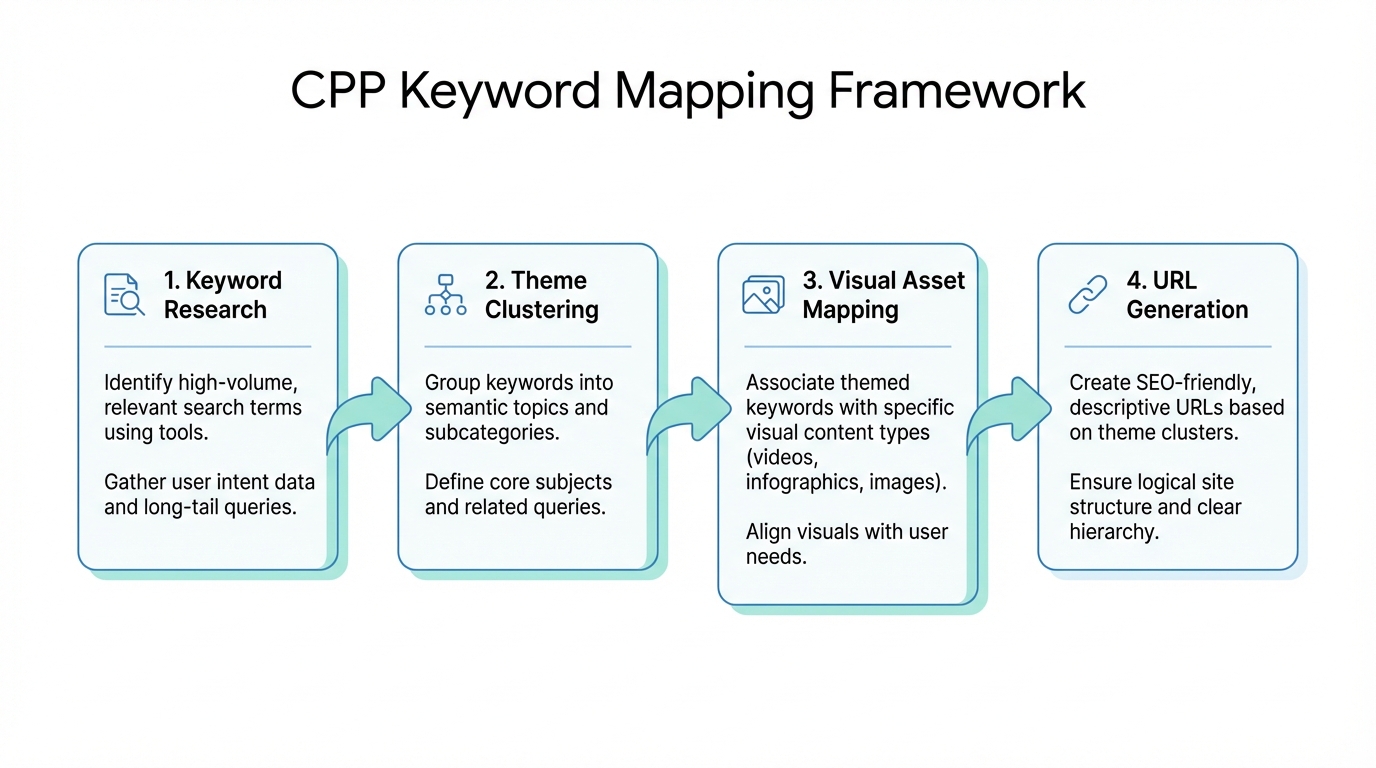
One of the most powerful tools currently available to developers is the expansion of Apple Custom Product Pages (CPPs). With the limit now increased to 70 custom pages, the strategy has shifted from general branding to granular "Intent Cluster" mapping. Instead of showing the same generic screenshots to every user, you can now tailor the visual experience to the specific term a user searched for through Apple Search Ads campaigns.
The CPP-Keyword Mapping framework involves identifying high-intent clusters and assigning a unique CPP to each. For instance, a fitness app might target clusters like "postpartum yoga," "HIIT for beginners," and "marathon training plans." By matching the visual creative to the searcher's specific goal, apps are seeing an average 8.6% lift in conversion. This synergy between paid and organic efforts is mandatory in an "ad-heavy" search environment where organic results often appear further down the page.
"The 2026 algorithm shift means targeting a cluster like 'AI-powered grocery list for families' is now infinitely more effective than fighting for the high-competition head term 'Grocery'."
Optimizing for Screenshot Indexing: Designing for the Algorithm
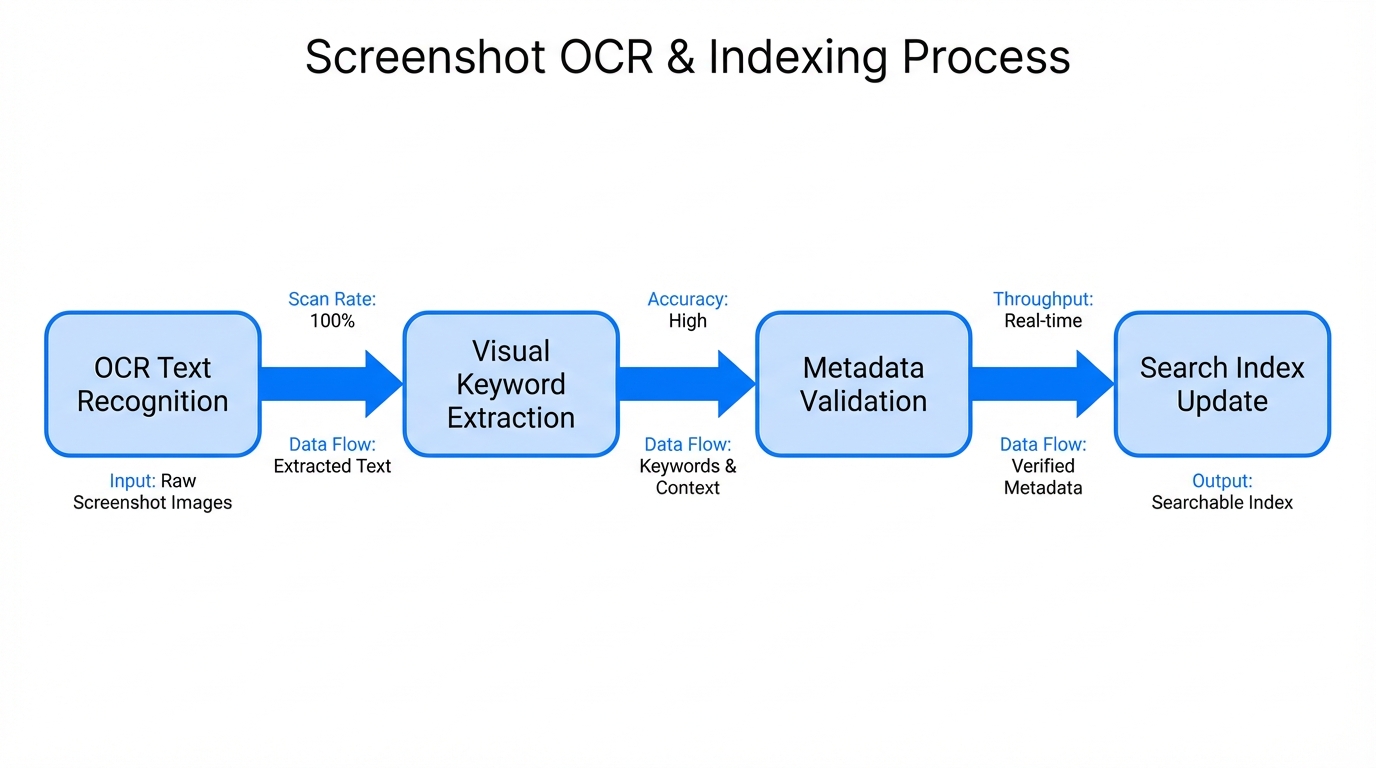
A major breakthrough in app store screenshot indexing occurred when Apple’s algorithm began extracting and indexing text directly from screenshot captions. Visual assets are no longer just for conversion rate optimization for apps; they are a dual-threat that influences discoverability. Captions must now be designed with OCR (Optical Character Recognition) in mind.
To maximize this, use high-contrast text and avoid overly stylized fonts that might confuse the algorithm's text extraction. Incorporate your primary keywords into the first three screenshots, as these are the most heavily weighted. Research suggests that indexing these captions allows apps to rank for niche terms that aren't even present in the metadata fields, effectively expanding your keyword footprint without hitting character limits.
Measuring the Lift: 2026 Conversion Benchmarks
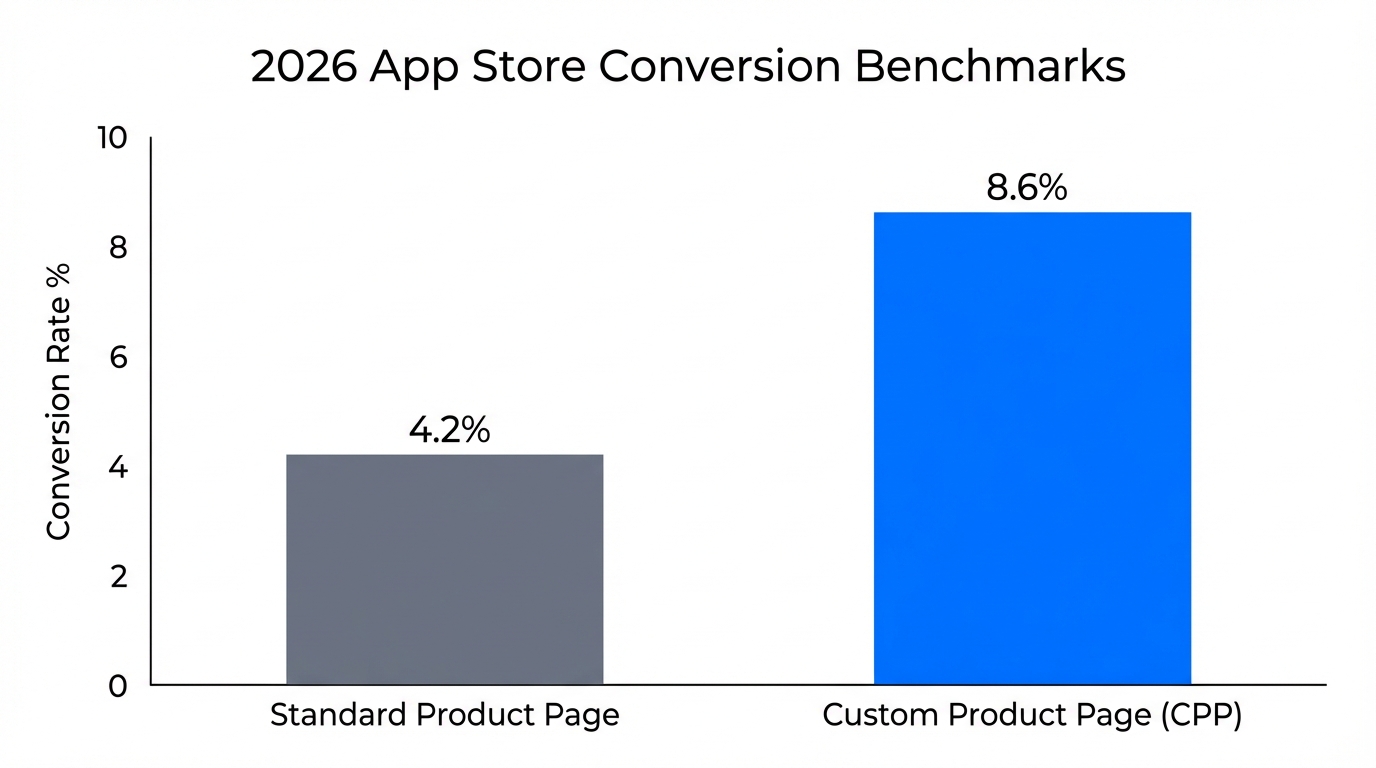
Understanding where your app stands relative to the market is critical for prioritizing your ASO visual strategy. Conversion rates vary wildly by category, with utility and business apps generally seeing much higher intent-to-install ratios than hyper-competitive gaming niches.
| App Category | Average CVR (iOS) | Top Performers |
|---|---|---|
| Business | ~25.0% | 66.7% |
| Utilities | ~40.6% | 55.2% |
| Board Games | ~1.2% | 5.4% |
| Racing Games | ~20.6% | 31.2% |
To reach these top-tier performance levels, teams must engage in continuous A/B testing of visuals. When testing CPPs, focus on the "Hero" (first) screenshot. Tools like MobileAction provide keyword matrices that help you identify which visual elements resonate most with specific user demographics.
Experience Optimization (AXO) and Organic Ranking
In 2026, the algorithm has evolved to prioritize post-install behavior through Experience Optimization (AXO). Apple now monitors engagement signals—such as retention rates and in-app event participation—as direct ranking factors. If a user downloads your app via a CPP but uninstalls it within minutes because the value proposition didn't match the visuals, your organic ranking will suffer.
To improve AXO, you should source authentic content that reflects the true user experience. For many growth teams, using platforms like Stormy AI to discover creators who can produce high-quality UGC (User-Generated Content) for these custom pages is a game-changer. Authentic visuals lead to better-informed users, which in turn leads to higher retention and improved AXO signals. Additionally, leveraging the "Review Loophole"—using NLP tools to analyze what users love and incorporating those phrases into your CPPs—can create a self-reinforcing loop of relevance and ranking.
"App stores now prioritize post-install behavior; retention rates and stability are no longer just product metrics—they are direct ranking signals in the 2026 algorithm."
Avoiding Metadata Cannibalization and Maximizing Space
A common mistake in Apple App Store algorithm updates is metadata cannibalization. This occurs when a developer duplicates keywords across the Title, Subtitle, and Keyword fields. Apple indexes each field only once; repeating keywords is a waste of precious character space that could be used for broader semantic reach.
Instead, follow this technical metadata playbook:
- Title: Reserve for your highest-volume head term and brand name.
- Subtitle: Use for 2-3 supporting keywords that define the core utility.
- Keyword Field: Fill with unique, high-intent long-tail terms—never repeat words used in the Title or Subtitle.
- Screenshot Captions: Use this space to repeat keywords you want to emphasize for the indexing algorithm, as this field operates on a different logic than the metadata fields.
Successful apps like Spotify have mastered this by adapting their strategies globally. They don't just translate; they use "Super Geo-Localization" to target regional slang and cultural search patterns, effectively doubling their indexed capacity. Tools like AppTweak can help you identify these semantic gaps and ensure you are not wasting space on terms that have a difficulty score above your app's current authority level.
The "Victory Moment" and Future-Proofing
Finally, to sustain your ranking, you must encourage keyword-rich reviews. Trigger a review prompt immediately after a "Victory Moment" (e.g., finishing a workout or completing a level). Ask specific questions like "What is your favorite feature?" to guide users toward mentioning keywords you want to rank for. The algorithm increasingly weighs reviews as a source of semantic truth.
By leveraging the full potential of 70 Custom Product Pages, optimizing for screenshot indexing, and maintaining a strict AXO-focused strategy, developers can navigate the complexities of the 2026 App Store. For those looking to scale their creative sourcing for these 70 pages, platforms like Stormy AI streamline creator sourcing and outreach to ensure every CPP conversion is maximized.