In 2026, the Amazon marketplace is no longer just a battle of logistics and bid prices; it is a battle of brand resonance and operational speed. For Amazon Seller Central power users, the generic, robotic product descriptions of the past are a liability. To stand out, you need a distinct brand voice that persists across every SKU, every customer reply, and every marketing asset. This is where Google AI Studio has become the secret weapon for lean teams. By combining the power of the Gemini models with custom tool-building capabilities, you can move from manual listing management to a fully automated, AI-driven operation.
While an AI ecommerce employee like Stormy AI handles the messy back-office tasks—like monitoring inventory levels on Amazon Seller Central, following up with suppliers, and flagging suppressed listings—Google AI Studio provides the creative engine to power your content and brand identity. In this guide, we will walk through the exact steps to build your own custom tools and automate your Amazon FBA AI listing optimization workflow without writing a single line of code.
Setting Up Your Command Center in Google AI Studio
 0:30
0:30Before you can automate your brand voice, you need to understand the environment. Google AI Studio is a professional-grade playground that allows you to interface directly with Google's most advanced models, including the latest iterations of Gemini. To get started, head to the platform and sign in with your Google account.
The layout is divided into four main sections that you will use to run your brand:
- Playground: Where you test prompts for images, video, and text using technologies like Imagen 3.
- Build: The "no-code" zone where you describe a tool and the AI creates the software for you.
- Dashboard: Where you monitor your usage and active projects via the Google Cloud Console.
- Documentation: For technical deep-dives if you decide to integrate these tools into a larger stack using the Gemini API documentation.
"Google AI Studio lets you build apps, games, or even websites in your browser without a single line of code, turning every FBA seller into a software architect." [Source: Google Keynote]
Automating Brand Voice with Permanent System Instructions
4:15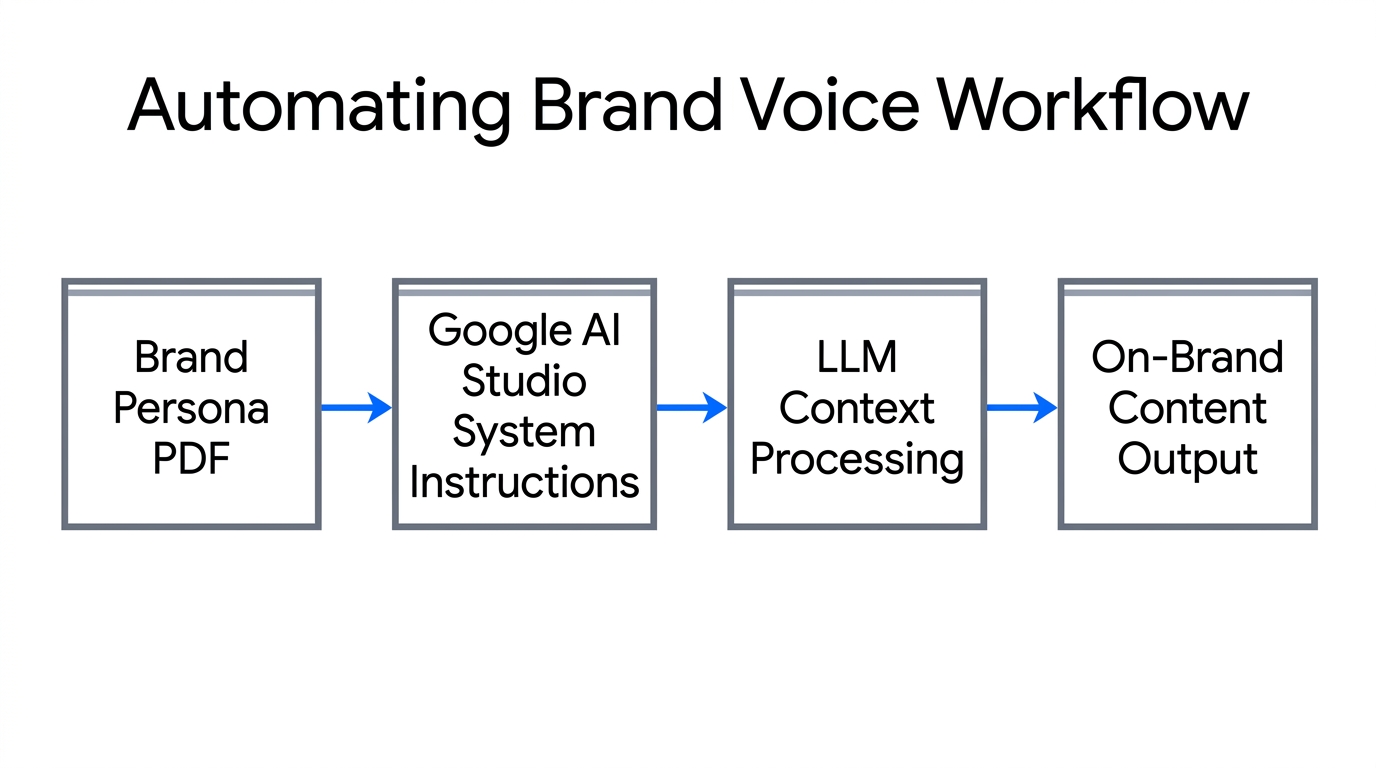
The biggest challenge with ai brand voice automation is consistency. If you use a fresh chat every time you need a description for a new SKU, the AI starts from zero, often defaulting to a generic, overly enthusiastic "AI tone." To fix this, you must use System Instructions.
System Instructions act as a permanent briefing that runs before every prompt. This is where you "lock in" your brand's persona. For example, if you sell premium leather goods on Amazon, your instructions should specify that your tone is "rugged, heritage-focused, and minimalist," explicitly forbidding words like "transformative" or "revolutionary."
How to Set Up Your Brand Persona:
- Navigate to Playground > Code, Reasoning, and Chat.
- On the right sidebar, open Run Settings.
- Click System Instructions and paste your brand voice rules.
- Save and title the configuration (e.g., "FBA Brand - Heritage Leather Tone").
Once this is active, you can ask Google AI Studio to "Write an Amazon product bullet points for a new bifold wallet," and it will automatically apply your rugged, heritage tone without being reminded. This ensures your brand sounds like the same human wrote every listing. While the AI generates this content, Stormy AI can be tasked to take these outputs and update your product rows in a master tracking spreadsheet, ensuring your back office stays organized as you scale.
'Vibe Coding': Build Ecommerce Tools Without Code
6:15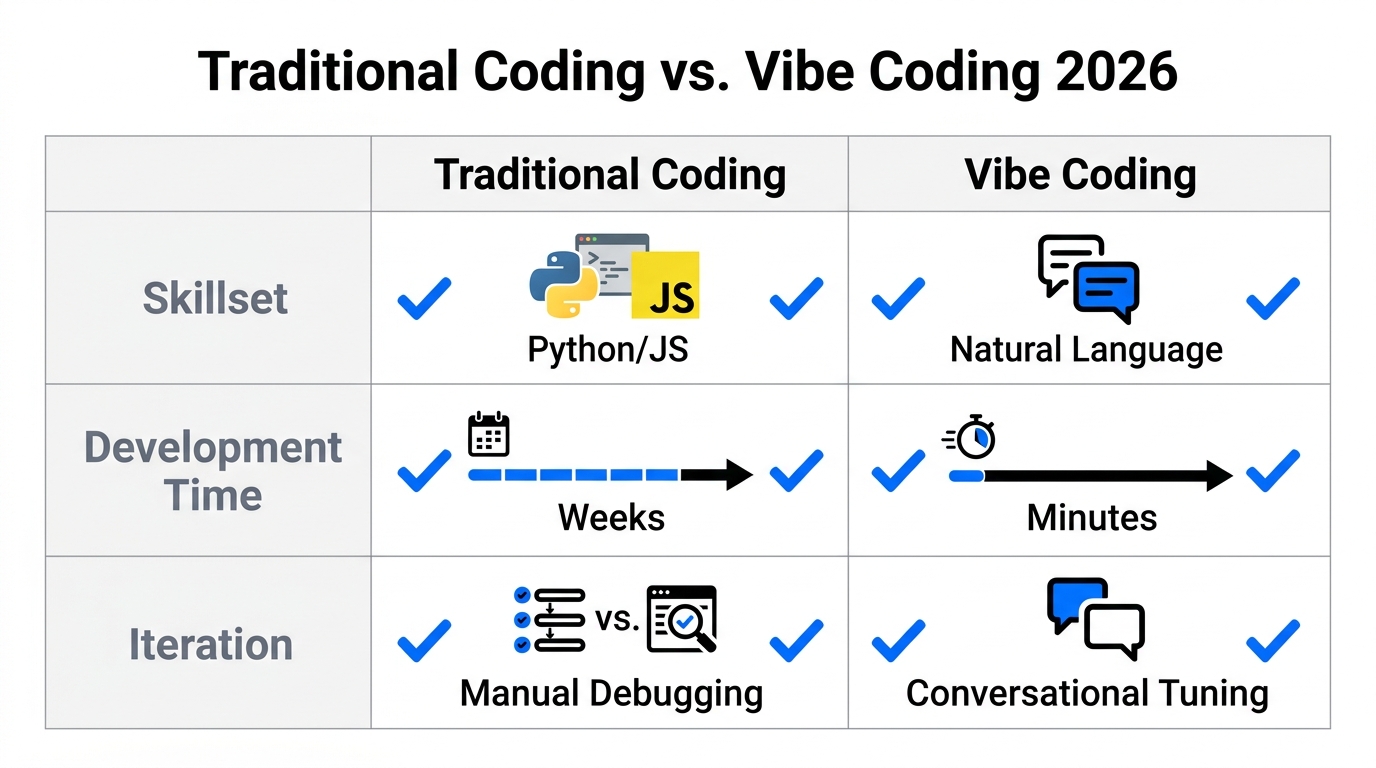
One of the most revolutionary features of 2026 is "Vibe Coding." This refers to the ability to build functional internal applications simply by describing them in plain language. For Amazon FBA sellers, this means you can build custom tools for internal curation or customer experience that previously would have cost thousands in developer fees.
Imagine a tool called Vibe Space—an internal app that curate products based on a specific "mood" or aesthetic. In Google AI Studio, you can head to the Build tab and type: "Create an ecommerce feed app that changes product curation and UI color schemes based on a detected mood via voice or facial biometrics."
The AI will generate a working V1 of this tool. You can iterate by saying, "Add a button that exports the curated list to a CSV compatible with Shopify," and the tool will update accordingly. This is how you build ecommerce tools without code that solve your specific niche problems.
| Feature | Traditional Development | Vibe Coding (AI Studio) |
|---|---|---|
| Cost | $5,000 - $50,000+ | Included in Platform |
| Time to Launch | Weeks to Months | Minutes to Hours |
| Skill Requirement | Full-stack Developer | Plain English Description |
| Maintenance | Manual updates/patches | Prompt-based iteration |
Amazon FBA AI Listing Optimization with Google Search Grounding
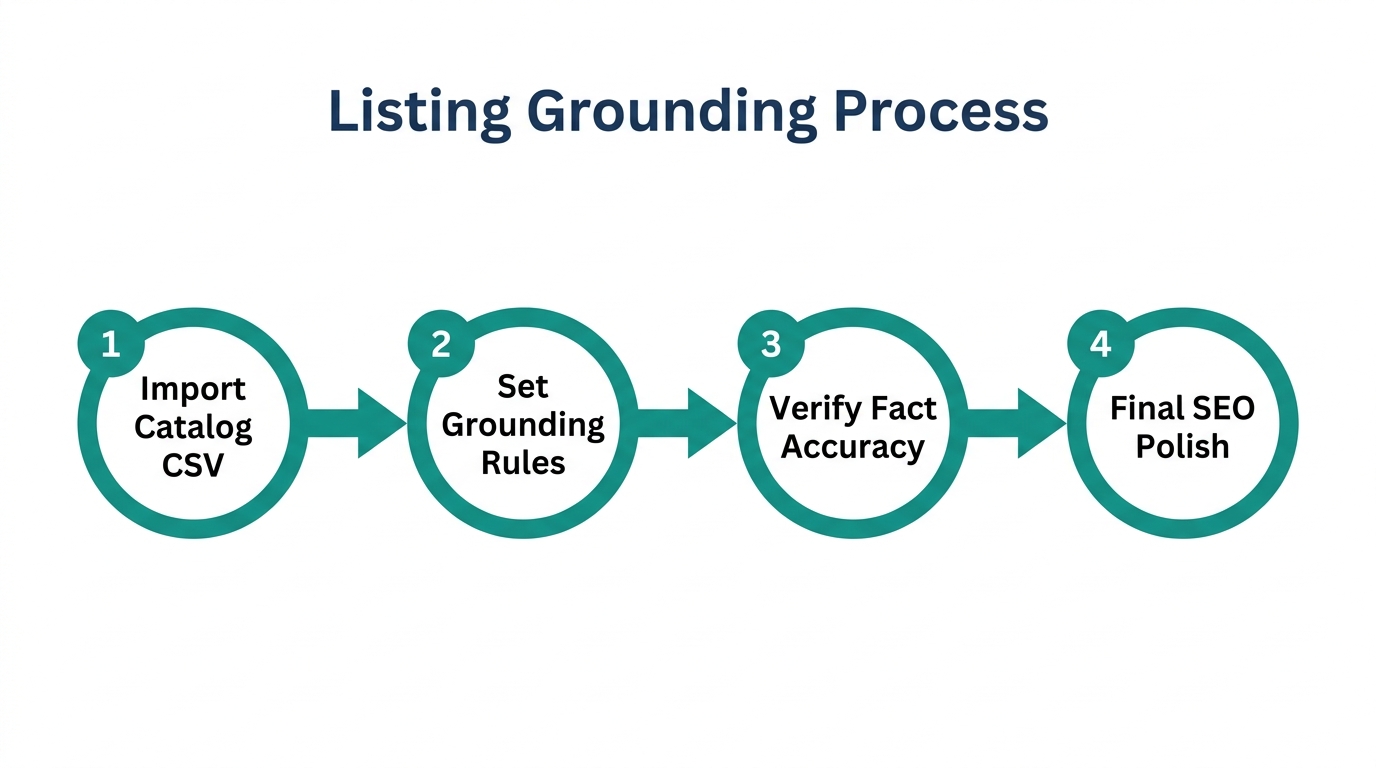
To win on Amazon, you need more than just good copy; you need competitive intelligence. Google AI Studio includes a Grounding with Google Search tool that allows the AI to pull real-time data from the live web. This is a game-changer for amazon fba ai listing optimization.
By turning on the Grounding chip in the bottom right of the chat window, you can paste a competitor's Amazon URL and ask: "Analyze this product page. Tell me what it's doing well for conversion and where it's weak. Give me 3 changes I can make to my listing to beat them."
"Grounding isn't guessing. It's pulling real-time data from live product pages to turn competitive gaps into a prioritized action list for your brand." [Learn more about AI-powered search grounding]
After you get these insights, you can have Stormy AI wake up every Monday morning to re-run this analysis, ensuring you never fall behind a competitor's price drop or listing update. While you focus on the high-level strategy, your AI employee handles the recurring audit tasks.
Generating Visual and Video Assets at Scale
2:00Conversion on Amazon is driven by visuals. In 2026, you shouldn't be waiting weeks for a lifestyle shoot. Google AI Studio’s Image Generation and Video Generation modes allow you to create high-end assets in seconds using models like Veo for video and Imagen 3 for stills.
The Visual Workflow for FBA:
- Product Background Replacement: Upload a raw product photo and prompt: "Replace the background with a clean, warm-toned linen surface. Keep the shadows natural. Make it look like a high-end lifestyle shoot."
- Homepage Headers: Generate 16:9 minimalist flat-lay images using the editorial beauty campaign aesthetic for your Shopify store or Amazon Brand Story.
- Product Videos: Use VO 3.1 Fast (the 2026 successor to Google Veo) for quick social media assets and VO 3.1 (4K resolution) for your main Amazon product video. You can describe a "futuristic Pilates kit for women" and get a rendered video without a production crew.
Integrating AI Studio with Your Back-Office Workflow
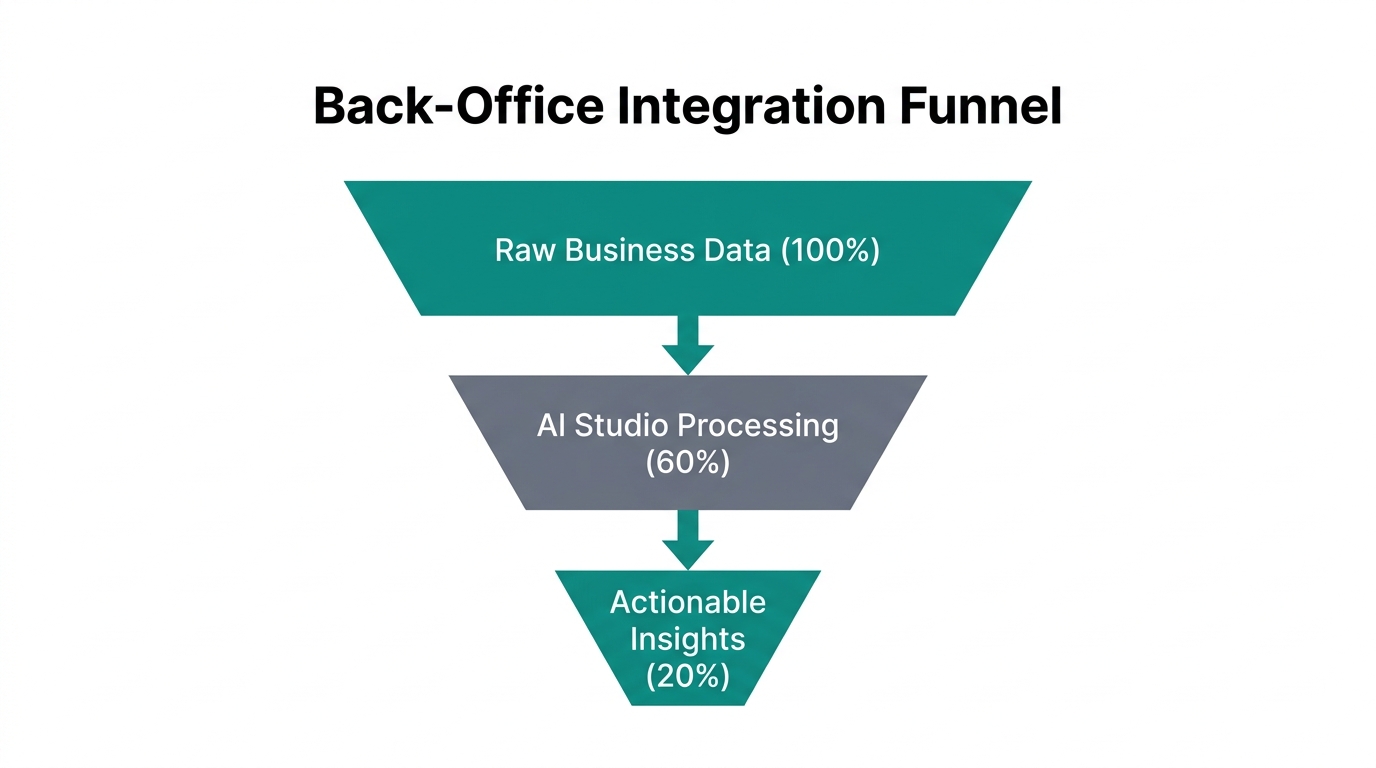
The true power of these tools is realized when they are integrated into your daily operations. Google AI Studio creates the "brain" (the voice, the strategy, the creative), but an autonomous agent like Stormy AI provides the "hands."
For example, you can take the optimized product copy generated in AI Studio and have Stormy AI monitor your Amazon Seller Central account for any listing suppressions or broken variants. If a listing goes down, Stormy can automatically draft a polite but firm email via Gmail to your supplier or Amazon support, linking the conversation directly back to your SKU management spreadsheet.
This creates a closed-loop system: AI Studio optimizes the brand, and Stormy AI protects the operations. This synergy is how one-person FBA brands are managing 50+ SKUs with the efficiency of a 10-person agency in 2026. You might even integrate status updates via Slack to keep your human team in the loop.
Conclusion: The Future of Autonomous FBA Branding
Scaling an Amazon FBA brand in 2026 requires moving beyond manual labor. By leveraging Google AI Studio to automate your brand voice and build custom internal tools, you remove the creative bottleneck that slows down most sellers. From ai brand voice automation through system instructions to building ecommerce tools without code using Vibe Coding, the barrier between an idea and a live product listing has never been thinner.
Start by setting up your API key, locking in your system instructions, and testing a few lifestyle image edits. As you build your creative engine, remember to offload the repetitive execution to an AI teammate like Stormy AI. The brands that win this year will be those that use AI to think and AI to act.