In early 2026, the global supply of Apple’s Mac Mini units vanished almost overnight. It wasn’t a supply chain hiccup or a new hobbyist craze; it was the result of a massive shift in digital marketing. Marketers had discovered that the most efficient way to run a $100,000/month ad budget wasn’t through a massive agency team, but through a self-hosted, autonomous agent. At the heart of this movement is OpenClaw, an open-source framework that has evolved from a simple GitHub project into a powerhouse with over 247,000 stars.
We are no longer in the era of "AI assistants" that merely suggest copy. We have entered the era of agentic AI—tools that don't just talk, but execute. For growth marketers and founders, this means transitioning from manual bidding and data exports to a world where your ad ops run 24/7 on autopilot. This playbook will walk you through the technical-lite steps to deploy OpenClaw and install the necessary "skills" to automate your performance marketing stack.
The OpenClaw Philosophy: Why Local-First Matters
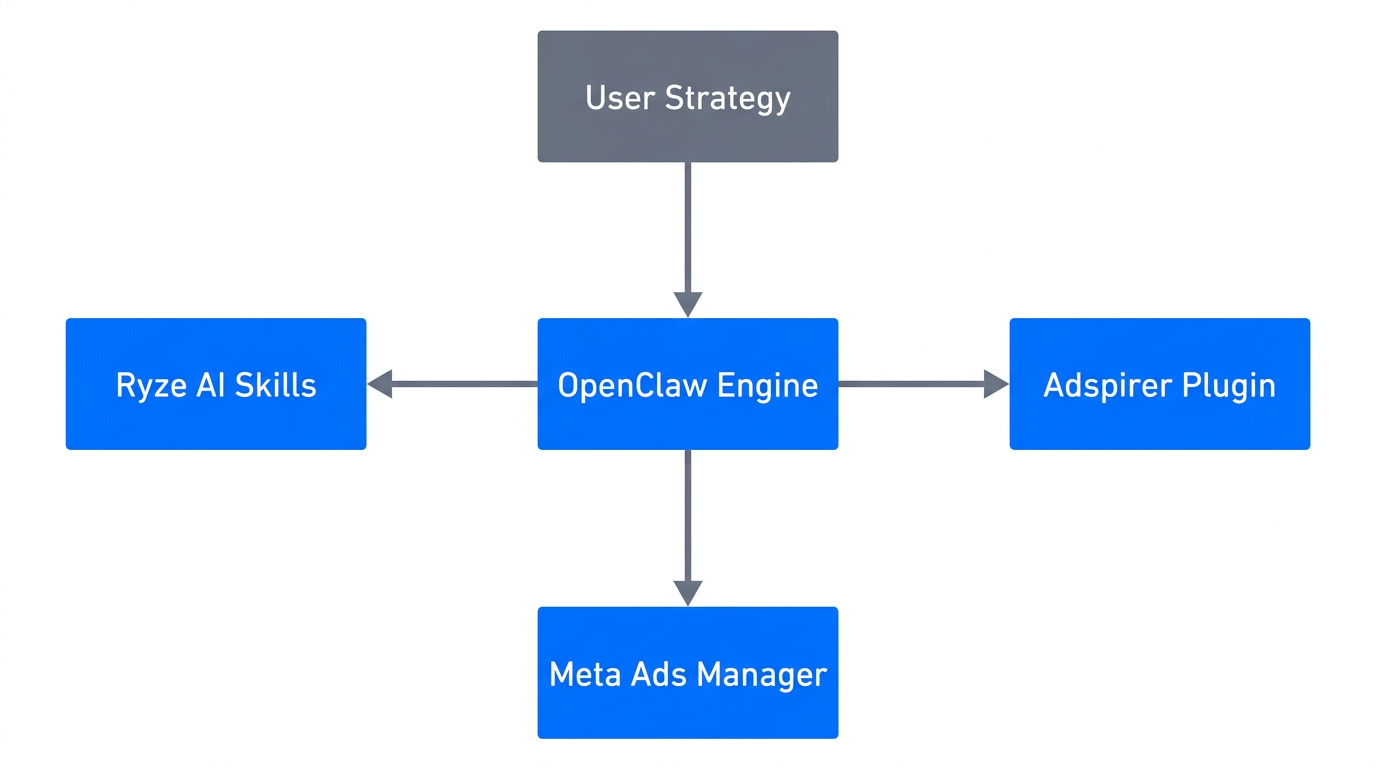
Before diving into the setup, it’s vital to understand why OpenClaw has disrupted the industry. Unlike cloud-based platforms that require you to upload your sensitive first-party data to their servers, OpenClaw runs locally on your hardware or a private VPS. With the death of third-party cookies and rising privacy concerns, marketers are increasingly protective of their data. By using a local agent, you maintain full data sovereignty while leveraging powerful LLMs like Anthropic’s Claude 3.7 or OpenAI’s o3.
OpenClaw utilizes the Ad Context Protocol (AdCP), a standardized way for AI agents to "read" complex ad account structures across Meta, Google, and TikTok without needing custom API scripts for every individual task. This means you can "hire" a digital employee that monitors your ROAS 24/7, detects creative fatigue, and manages bids without ever needing a coffee break.
"The primary trend of 2025 is the move from generative AI (writing ads) to agentic AI (running ads) — agencies are no longer buying software; they are hiring digital employees."Step 1: Deployment Options for 24/7 Availability
To automate Meta ads with AI effectively, your agent needs to be online 24/7. While running OpenClaw on a local Mac Mini is popular for high-privacy tasks, growth marketers typically prefer a Virtual Private Server (VPS) for consistent connectivity. This ensures the agent can react to a sudden dip in performance at 3:00 AM without relying on your home internet connection.
For a robust OpenClaw tutorial for marketers, we recommend two primary hosting options: DigitalOcean or AWS Lightsail. Both offer affordable, scalable environments that can run Docker containers—the preferred method for deploying OpenClaw.
| Provider | Recommended Plan | Why It Works |
|---|---|---|
| DigitalOcean | Basic Droplet (4GB RAM) | Fastest setup; excellent Docker support. |
| AWS Lightsail | 4GB Instance | Integrates with existing AWS stacks; high reliability. |
| Local Mac Mini | M2 or M4 Chip | Highest privacy; no monthly cloud costs. |
Detailed technical instructions for Docker deployment can be found in Simon Willison’s OpenClaw guide. Once your instance is live, you can communicate with your agent via Telegram or Slack, making it feel like a teammate rather than a software tool.
Step 2: Installing the Ryze AI Skill Registry
An agent is only as good as its training. In the OpenClaw ecosystem, "Skills" are markdown files that teach the agent specific ad workflows. Instead of writing code, you provide the agent with a Skill Registry that defines its responsibilities, constraints, and objectives.
The ClawHub is the official repository for these skills, but for paid media, the gold standard is the Ryze AI Skill Registry. These are specialized skills designed for high-performance ad operations. You simply drop these files into your ~/.openclaw/workspace/skills/ folder.
Key Skills for Your Ad Ops Playbook:
- The Auditor: Scans your account every 2 hours to ensure ROAS hasn't dropped below your target. If it has, the agent alerts you immediately via message.
- The Bid Manager: Implements an automated bidding strategy based on real-time performance data, scaling winners and cutting losers.
- The Creative Analyst: Monitors Click-Through Rate (CTR) trends over 7, 14, and 30-day windows to detect creative fatigue before it kills your margins.
By using Ryze AI skills, you are essentially installing a professional media buyer's brain into your OpenClaw instance. This allows companies like Procter & Gamble to see conversion lifts of up to 30% by reacting to data faster than any human team could.
"The Auditor skill doesn't just watch data; it understands the intent of the campaign. If ROAS dips below 2.0, the agent doesn't just pause ads — it diagnoses why and suggests the fix."Step 3: Configuring the Adspirer Plugin
While skills define the logic, plugins provide the connectivity. To truly automate your ad operations, OpenClaw needs to talk to the platforms where your ads live. The Adspirer plugin is a "zero-config" integration that bridges OpenClaw with over 100+ social and search platforms.
Whether you are running ads on TikTok, LinkedIn, Meta, or Google, Adspirer allows the agent to pull live metrics and push changes (like budget adjustments or ad set pauses) directly. This eliminates the need for manual data exports to spreadsheets—a process that 85% of marketing companies are now looking to move away from in favor of agentic models.
When configuring Adspirer, ensure you use a dedicated "Standard" or "Read-Only" account for the agent rather than your primary Admin login. This is a critical security step to prevent "Data-Set Creep," where an agent might accidentally access sensitive internal information not intended for the ad platform.
Step 4: Setting Up the Human-in-the-Loop (HITL) Gate
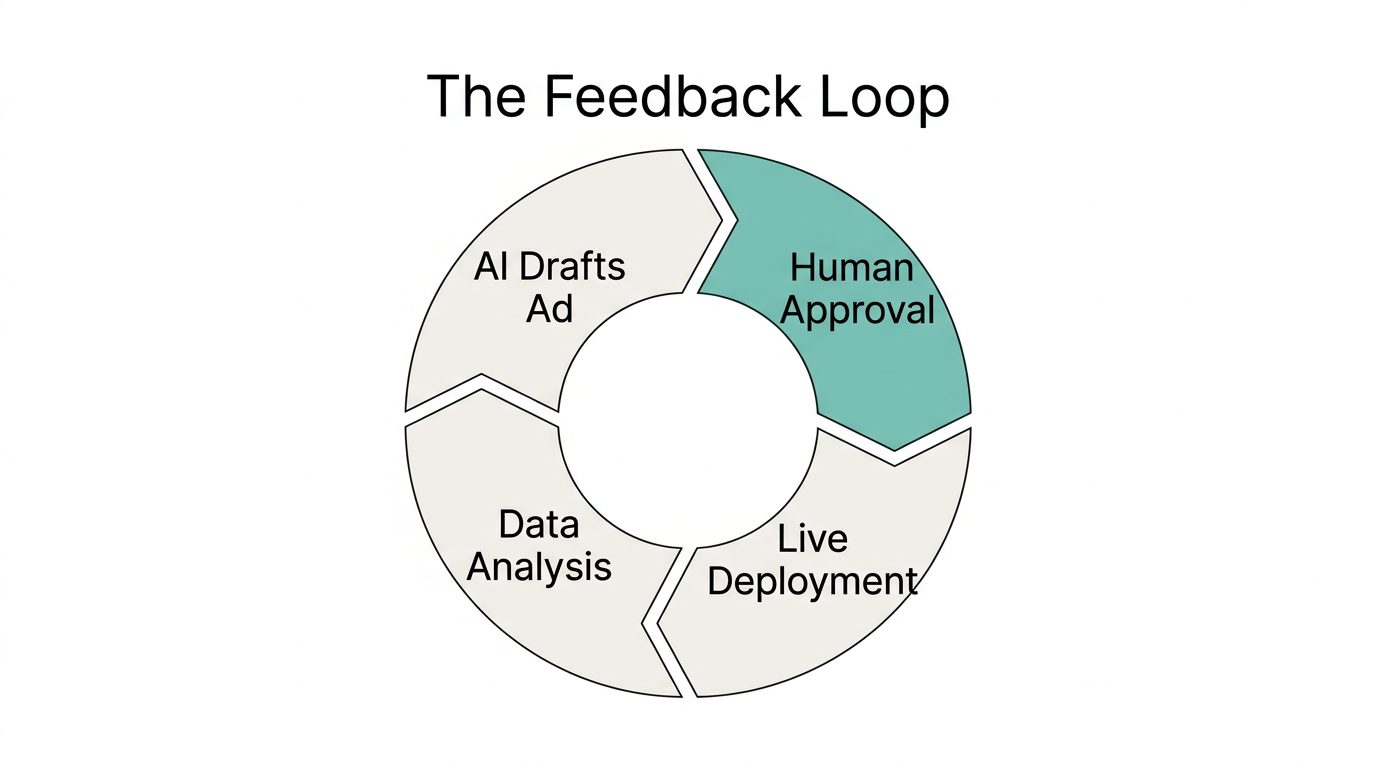
One of the biggest mistakes in an AI ad ops playbook is the "set and forget" mentality. Even the most advanced LLMs can occasionally "hallucinate" or misinterpret a sudden market shift, such as a holiday weekend or a viral news event. To scale safely, you must implement a Human-in-the-Loop (HITL) gate.
OpenClaw allows you to configure the /think level for specific tasks. For high-stakes decisions—like increasing a daily budget by $5,000—you should set the thinking level to "High" and require a final confirmation. The agent will present its reasoning (e.g., "CTR is 25% above average and CVR is stable"), and you simply reply with a "Yes" or "Approved" via Telegram to execute the change.
SOUL.md or AGENTS.md file in your workspace to define your brand's voice and constraints. This prevents the agent from producing generic ads that don't resonate with your specific audience.While OpenClaw manages the technical execution and bidding, the raw creative remains the most important variable. To feed the agent high-quality assets, many brands use Stormy AI to discover and vet UGC creators who can produce the authentic content that modern algorithms crave. Once you have the content, your OpenClaw agent can handle the heavy lifting of testing and optimization.
"Scaling budgets without a confirmation gate is like driving a Ferrari blindfolded. The HITL gate is your safety belt for automated scaling."Common Mistakes to Avoid in AI Ad Ops
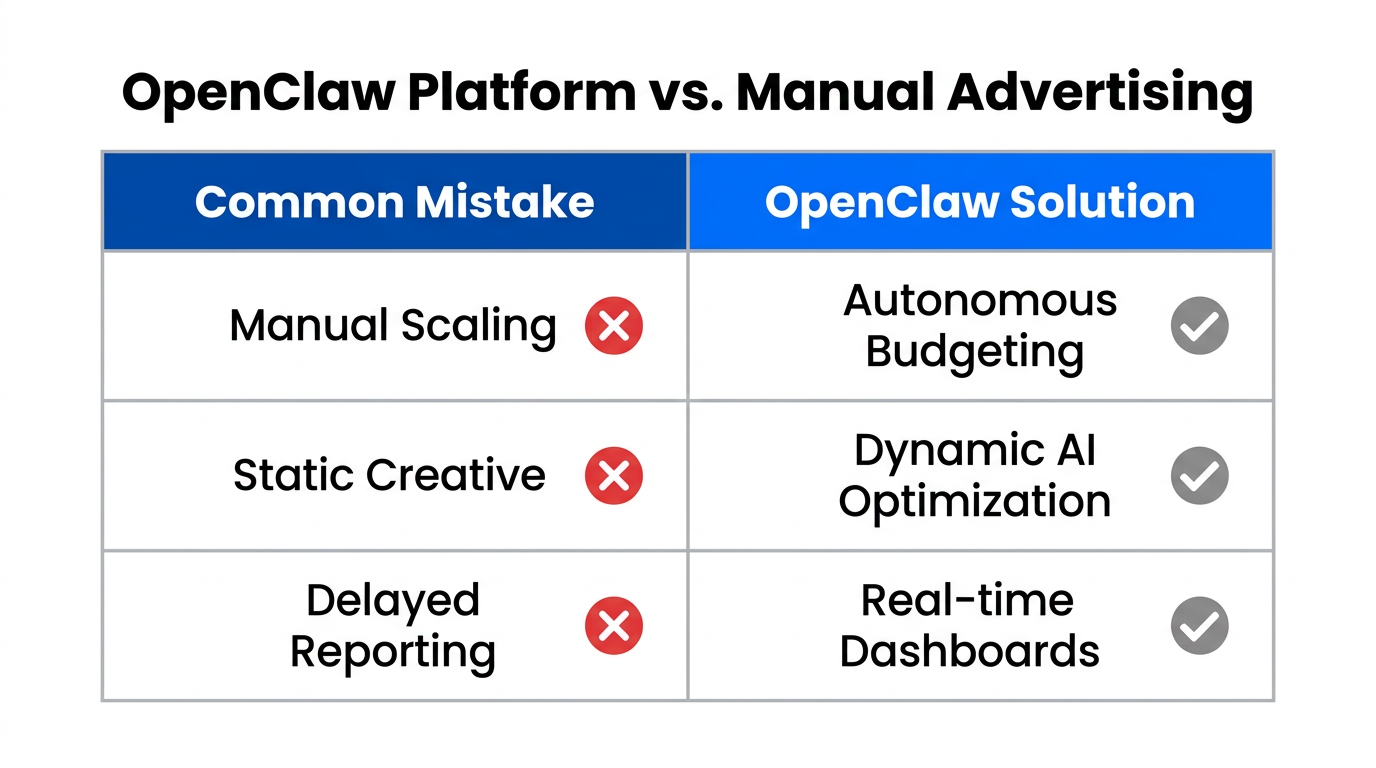
As you build your autonomous ad machine, avoid these common pitfalls that can derail your automated bidding strategy:
- Excessive Permissions: Never give an agent full Admin access. Limit it to the specific ad accounts it needs to manage.
- Ignoring Creative Fatigue: An agent can optimize bids perfectly, but if the creative is dead, the campaign will fail. Ensure your Creative Analyst skill is active.
- Set and Forget: Always monitor the agent’s
/usage tokensfooter to manage LLM costs and ensure it hasn't entered a loop. - Generic Brand Voice: Without a proper brand guidelines file, the AI will default to the most generic "marketing speak" possible.
| Mistake | Risk | Solution |
|---|---|---|
| Admin Access | Security Breach | Use Standard/Read-Only permissions. |
| No HITL Gate | Budget Burn | Set /think level to High for budget changes. |
| No Brand File | Generic Creative | Create a SOUL.md file for brand tone. |
Conclusion: The Future of Autonomous Growth
Deploying OpenClaw to run your paid ads isn't just about saving time; it's about operating at a level of precision that humans simply cannot match. By following this AI ad ops playbook—hosting on a VPS, installing Ryze AI skills, integrating Adspirer, and maintaining human oversight—you can scale your performance marketing with a lean, efficient team.
The era of manually refreshing ad managers every hour is over. Whether you are a startup founder or a growth lead at a major enterprise, the tools to build your own "digital employee" are now available and open-source. Start by setting up your first Droplet on DigitalOcean, and join the ranks of marketers moving toward a truly autonomous future.
For those looking to streamline the creator side of the equation alongside their ad ops, Stormy AI offers the perfect complement for finding the influencers who will provide the fuel for your OpenClaw engine.