In 2026, the traditional Sales Development Representative (SDR) model is undergoing a radical transformation. As Jensen Huang recently noted, we are entering the era of the "agentic system"—where every company needs a strategy for autonomous digital employees. This isn't just about chatbots; it's about autonomous AI SDR workflows that can manage a CRM, browse the web, and execute hyper-personalized outreach while you sleep. Leading this charge is OpenClaw, an open-source personal agent that many are calling the "new computer."
For startup founders and sales leaders, the goal this year is simple: maximize lead conversion without exploding headcount. Research from the Harvard Business Review has long shown that response time is the critical factor in closing deals. By deploying OpenClaw as a digital employee, you can bridge the gap between lead discovery and a closed deal. While platforms like Stormy AI are essential for the initial discovery of high-quality creators and B2B prospects, OpenClaw serves as the execution engine that manages those relationships through to the finish line.
Step 1: Wiring OpenClaw to Your Lead Pipeline
 48:47
48:47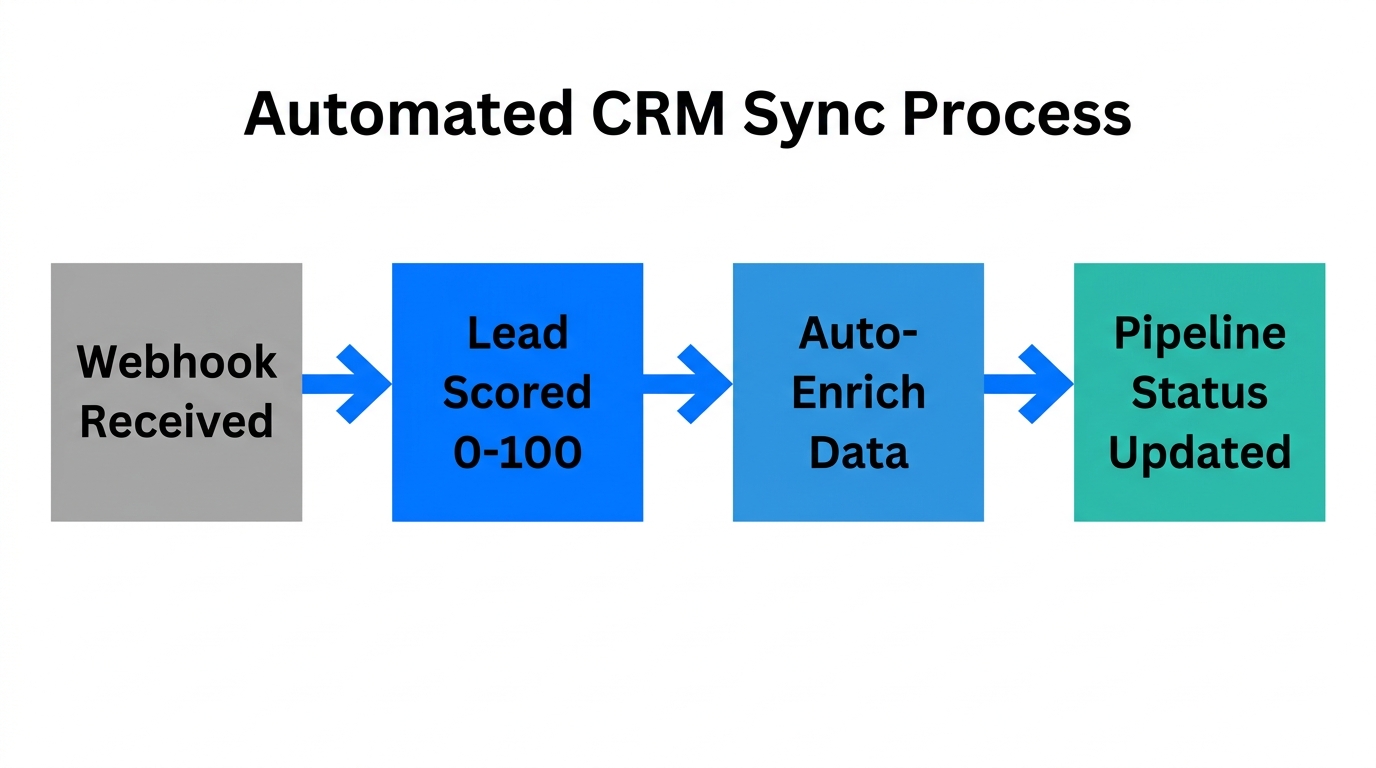
The first step in building your 2026 sales machine is connecting OpenClaw to your data sources. Unlike legacy automation tools, OpenClaw operates locally on your machine or a secure server, giving it direct access to your files and tools. To create a self-managing CRM, you must wire the agent to Google Sheets and Gmail.
Inside your OpenClaw workspace folder, the agents.md file acts as the primary instruction set. You can configure a "CRM Agent" that is specifically tasked with monitoring a Google Sheet. Whenever a new lead is added—perhaps sourced from a niche search on Stormy AI—OpenClaw detects the entry and initiates a background research sequence. It doesn't just copy-paste; it uses its built-in browser tool to visit the prospect’s website, LinkedIn, or latest YouTube video to gather context.
"OpenClaw isn't just a chatbot; it's a living system that wakes up every 30 minutes to check if your business needs help closing a deal."
The 'Human-in-the-Loop' Workflow: Personalization Without the Slop
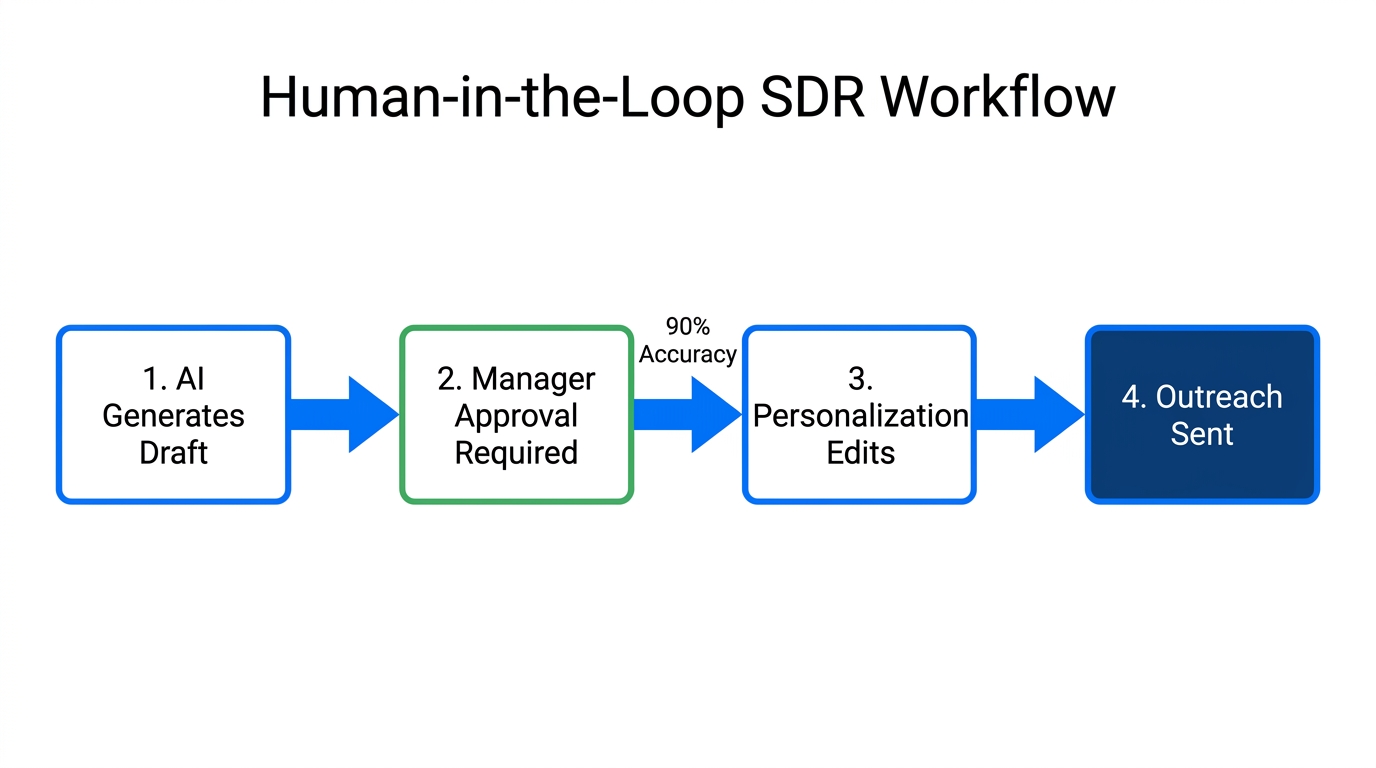
One of the biggest mistakes in AI lead generation 2026 is full automation without oversight, leading to "AI slop" that prospects ignore. To avoid this, successful sales teams use a "Human-in-the-Loop" (HITL) system. OpenClaw is configured to draft hyper-personalized messages in Gmail and save them as drafts rather than sending them immediately.
This is managed through the soul.md and identity.md files. By feeding OpenClaw your previous successful emails and specific tone guidelines, it learns to write like you. You can spend 10 minutes every morning reviewing the "Drafts" folder, making quick tweaks, and hitting send. This allows one founder to manage the outreach volume of five full-time SDRs while maintaining a high-trust, authentic connection with every lead.
| Feature | Traditional SDR | OpenClaw AI SDR (2026) |
|---|---|---|
| Lead Research | Manual (15-30 mins per lead) | Autonomous Browser Search (Seconds) |
| Follow-Up Speed | Variable (often 2-3 days) | Immediate (Triggered by Heartbeat) |
| Multi-Channel | Email Only | Email, WhatsApp, Telegram, Slack |
| Personalization | Generic Templates | Context-Aware Hyper-Personalization |
Automating Multi-Channel Outreach with Browser Relays
5:17In 2026, business doesn't just happen in the inbox. It happens on WhatsApp and Telegram. OpenClaw provides a unique advantage here through its Chrome Relay and Managed Browser capabilities. Unlike old-school API bots that often get banned, OpenClaw can act as a "browser agent" that logs into your web-based messaging apps just like a human would.
By using the browser.fetch and browser.click skills, OpenClaw can open WhatsApp Web, find a contact from your Google Sheets CRM, and send a follow-up message if they haven't replied to your email. This multi-channel approach significantly boosts response rates because it meets the prospect where they are most active. You can even set up a specific Telegram Group for your bot, where you can message it commands like "Hey, follow up with all leads who were interested in the demo," and it will execute the task across all channels.
Configuring 'Heartbeat' Triggers for 24-Hour Persistence
5:47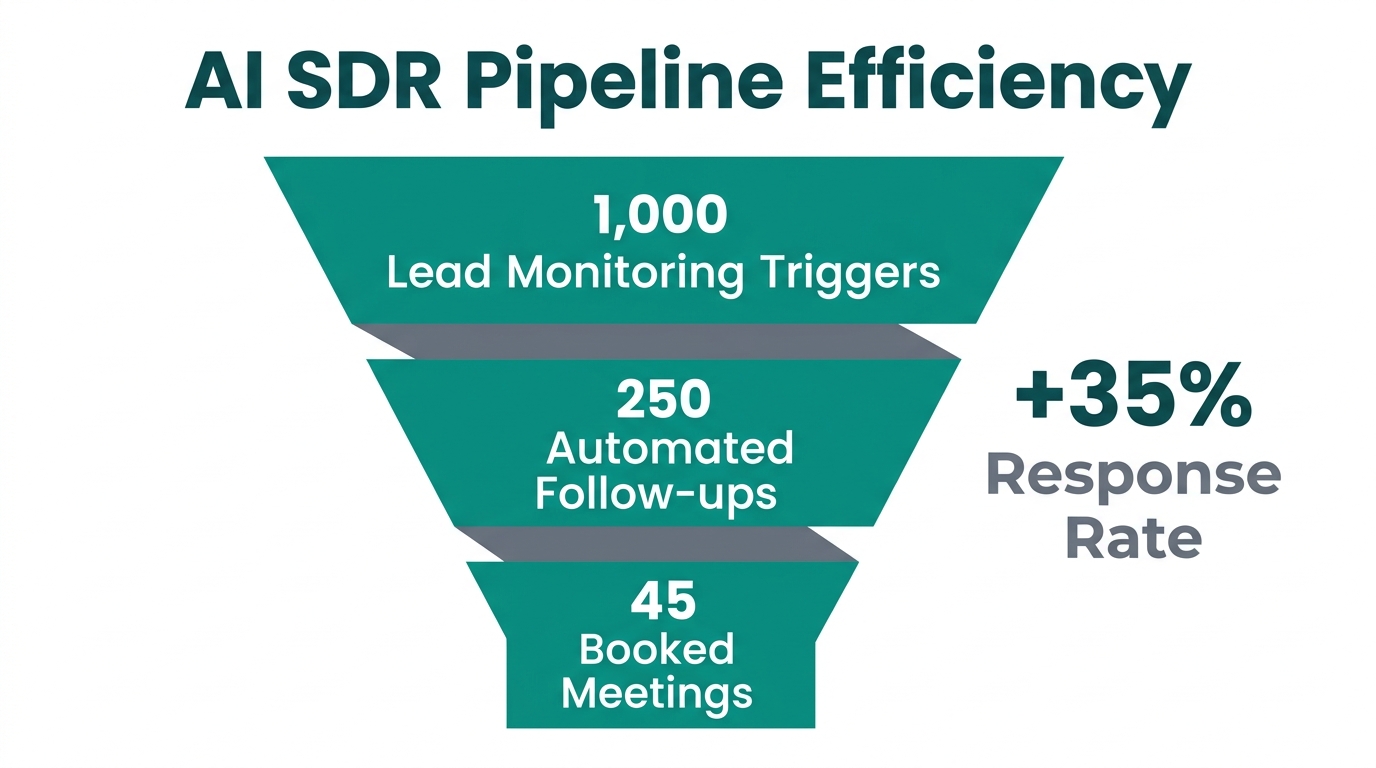
The secret weapon of OpenClaw is the heartbeat.md file. This is a script that runs every 30 minutes, ensuring the agent is "proactive" rather than just "reactive." In a customer acquisition strategy, speed is everything. A lead that goes cold for more than 24 hours is often lost to a competitor.
You can program your Heartbeat to perform a Lead Health Check. The logic works like this:
- Check the CRM for leads in the "Interested" stage.
- Check Gmail and WhatsApp for the last interaction date.
- If no response has been received in 24 hours, generate a follow-up draft based on the specific context of the last conversation.
- Ping the human manager on Slack or Telegram to approve the follow-up.
"Persistence is the difference between a 2% and a 20% conversion rate. The Heartbeat ensures your sales engine never takes a day off."
Using Memory Features for Deep Prospect Context
15:17The biggest complaint about AI in sales has always been its lack of "memory." OpenClaw solves this with its dual-layered memory system. The memory.md file acts as long-term storage for high-level insights, while daily logs in the memory/ folder capture granular details of every conversation.
When OpenClaw prepares to outreach to a prospect, it doesn't just look at the current prompt. It performs a vector search across its memory to see if you've interacted with this person before, what their objections were, and what their personal interests are (e.g., "Mentioned they are a big fan of the Lakers in our March meeting"). This level of detail makes the AI indistinguishable from a high-tier human SDR. To ensure this memory persists, you should enable the sessionmemory experimental feature, which flushes conversation data into the permanent log before the context window resets.
Security and the 'Principle of Least Access'
Deploying an AI SDR workflow requires giving an agent access to sensitive accounts. To mitigate risk, we recommend the Principle of Least Access. Instead of giving OpenClaw access to your personal Gmail, create an agent-owned account (e.g., sdr@yourstartup.com).
Additionally, always store your OpenAI or Anthropic API keys in a .env file outside of the OpenClaw workspace. This prevents the agent from accidentally reading or sharing its own credentials. For maximum security, run your OpenClaw setup on a local machine rather than a public VPS, as this places the agent behind your local network's firewalls and Apple's hardware security layers.
The Future of Customer Acquisition
By the end of 2026, the companies that thrive will be those that have successfully integrated digital employees into their core operations. Combining the discovery power of Stormy AI with the execution capabilities of OpenClaw creates a formidable sales engine that scales infinitely.
Start by automating a single workflow—perhaps just the follow-up emails for your Calendly bookings. As you gain trust in the system's memory and tone, expand into multi-channel outreach and full CRM management. The "magical moments" of sales automation are no longer a dream; with OpenClaw, they are a few configuration files away.