In 2026, the ecommerce landscape has entered what industry experts call "The Great Orchestration." It is no longer enough to simply run ads on a single platform; winning brands are now strategically converging Google’s search dominance with Amazon’s transactional gravity. While Amazon Ads revenue is projected to hit a staggering $70.8 billion by the end of this year, savvy Shopify operators are realizing that direct-to-Amazon ads often come with a hidden cost: the loss of customer ownership. This guide breaks down the ultimate hybrid playbook for 2026, showing you how to drive high-intent traffic to your DTC site while using Amazon’s logistics to close the deal.
The Customer Ownership Gap: Why Shopify Beats Direct-to-Amazon Ads
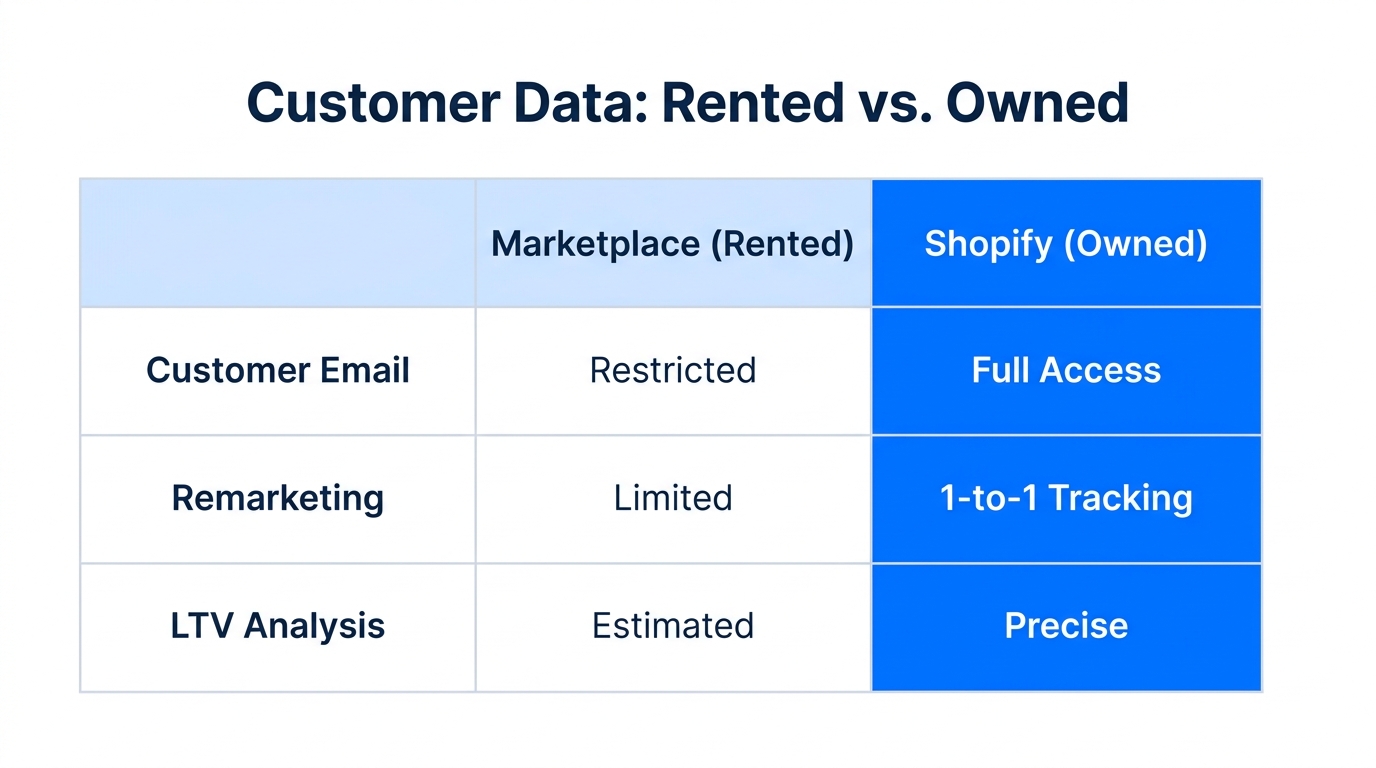
One of the biggest pitfalls for modern ecommerce brands is falling into the "Amazon-only" trap. While Amazon offers conversion rates that can soar to 20% or higher for Prime members, it keeps the most valuable asset behind its walled garden: the customer’s email address. When you drive traffic from Google Ads directly to an Amazon listing, you are essentially paying to build Amazon's kingdom, not your own.
By driving traffic to a Shopify storefront first, you capture first-party data. This allows you to build long-term LTV through email flows in tools like Klaviyo and SMS remarketing. In 2026, the cost of acquisition is too high to treat every sale as a one-off transaction. You need to own the lead.
"The key to 2026 isn't choosing between Google and Amazon—it's orchestrating them. Use Google to build the audience and Shopify to own the relationship."
| Feature | Amazon Ads | Shopify + Google Ads |
|---|---|---|
| User Intent | High (Ready to buy) | Mixed (Research & Discovery) |
| Data Ownership | Low (Amazon keeps the email) | High (You own the CRM) |
| Conversion Rate | 10–15% (Prime: 20%+) | 2–5% (Average) |
| Best For | Transactional volume | Brand building & LTV |
How to Configure Google PMax 'Search Themes' for 2026
Google's Performance Max (PMax) has evolved significantly this year. Now rebranded by many as "AI Max," the platform uses multimodal models to place your products across Search, YouTube, and the Gemini-powered AI Overviews. However, practitioners often complain about the "black box" nature of these campaigns. To regain control, you must leverage Search Themes.
As of late 2025, Google increased the search theme limit to 50 per asset group. This allows you to "steer" the AI toward high-margin categories that traditional automated bidding might overlook. For example, if you sell high-end electrolytes, you don't just want to target "salt powder." You want to target specific 2026 trends like "bioavailable mineral hydration for athletes." While the keyword difficulty for broad terms is nearly impossible (ranking 88/100 according to Ahrefs), niche search themes let you bypass the competition.
Tutorial: Implementing 'Buy with Prime' on Shopify
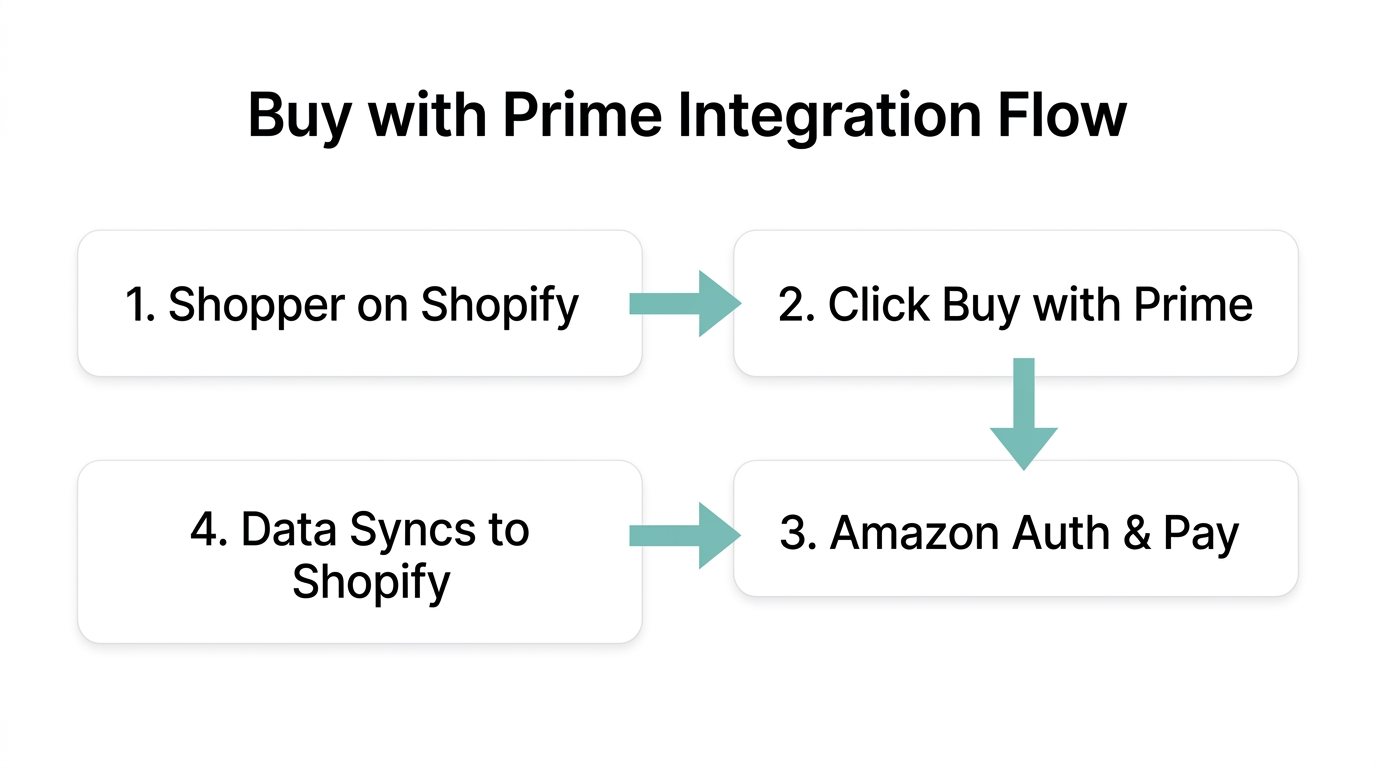
The bridge between DTC data ownership and Amazon's conversion power is Buy with Prime. This feature allows shoppers to use their Prime benefits (free, fast shipping and saved checkout info) directly on your Shopify site. It’s the ultimate conversion rate optimization (CRO) hack for 2026.
Step 1: Verify Eligibility and Inventory
Ensure your products are enrolled in FBA (Fulfillment by Amazon). You can use inventory monitoring tools to check your current levels across Amazon Seller Central and flag any SKUs that are at risk of a stockout before you turn on the ads.
Step 2: Install the Buy with Prime App
Navigate to the Shopify App Store and search for the official "Buy with Prime" app. Once installed, you will need to link your Amazon Pay and Amazon Seller Central accounts. This integration is crucial because it allows you to capture the customer's email on Shopify *before* they click the Prime checkout button.
Step 3: Configure the Widget Placement
Place the Buy with Prime button directly below your "Add to Cart" button on product pages. According to Amazon's latest merchant data, adding this button can increase conversion rates by up to 25% for participating merchants.
"Buy with Prime is the secret weapon for DTC. It provides the Amazon trust factor without sacrificing your Shopify customer data."
Scaling Creative Workflows with Multimodal AI
In 2026, "the ad is the targeting." Success on Google and Meta depends entirely on your ability to test dozens of creative variations. Using ChatGPT 4o and advanced image models, brands are now generating 100+ ad variations in minutes.
The workflow involves providing an inspiration image (e.g., a high-performing Amazon Ads creative) and your product photography. AI can then swap backgrounds, adjust lighting, and generate copy tailored to different personas—from Gen Z athletes to busy parents. This level of experimentation is what separates the $10k/month stores from the $1M/month powerhouses.
Advanced Ops: Using AMC for Cross-Platform Attribution
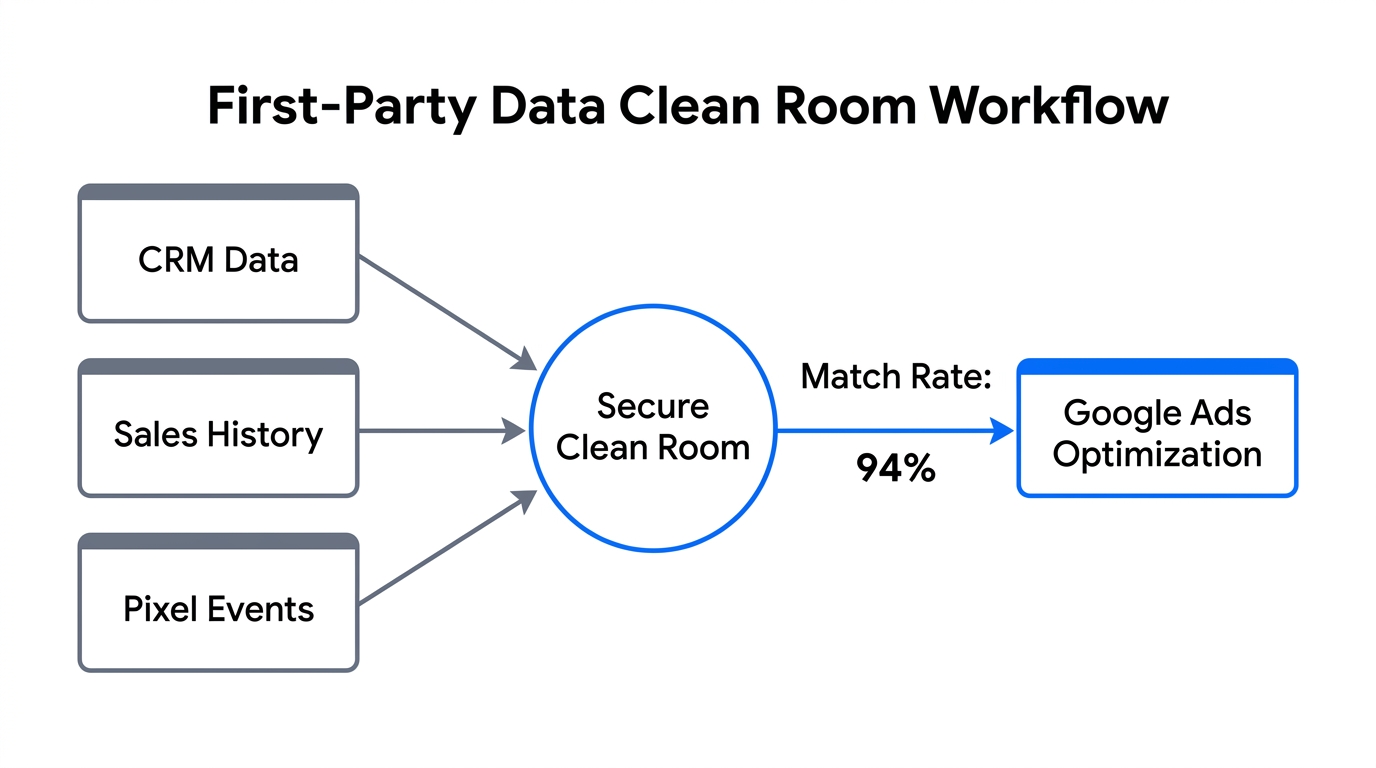
How do you know if a user who clicked your Google Search Ad eventually bought on Amazon via your Buy with Prime button? The answer lies in Amazon Marketing Cloud (AMC). AMC is a clean room where you can link Shopify site behavior with Amazon ad exposure without compromising privacy.
By using autonomous systems to import arbitrary CSVs from Google Ads and Amazon Attribution into a dynamic spreadsheet, you can generate charts and pivots to show you the true incrementality of your off-platform spend. This prevents the "Black Box" problem where PMax takes credit for organic sales.
Conclusion: The AI-Driven Future of Shopify Ops
Mastering a Shopify Google Ads strategy in 2026 requires more than just high bids; it requires a sophisticated hybrid approach. By driving traffic to your own site, capturing first-party data, and leveraging Buy with Prime for conversion, you get the best of both worlds.
The back-office work required to manage this—monitoring inventory on Amazon, tracking ad performance on Google, and following up with suppliers—can be overwhelming. This is where an AI ecommerce employee like Stormy AI becomes essential. While you focus on brand strategy and high-level growth, Stormy keeps the spreadsheets updated, monitors for stockout risks, and ensures your operation runs autonomously in the background.