JCB 930, 940, and 950 Critical Stop or Fault Code: Build the Service Packet First
When a JCB 930, 940, or 950 rough-terrain forklift shows an illuminated critical stop warning or active fault code display, safe intake begins by recording the exact cluster indications and consulting the full Operator's Manual rather than attempting unguided repairs.
STORMY Editorial · · 8 min read
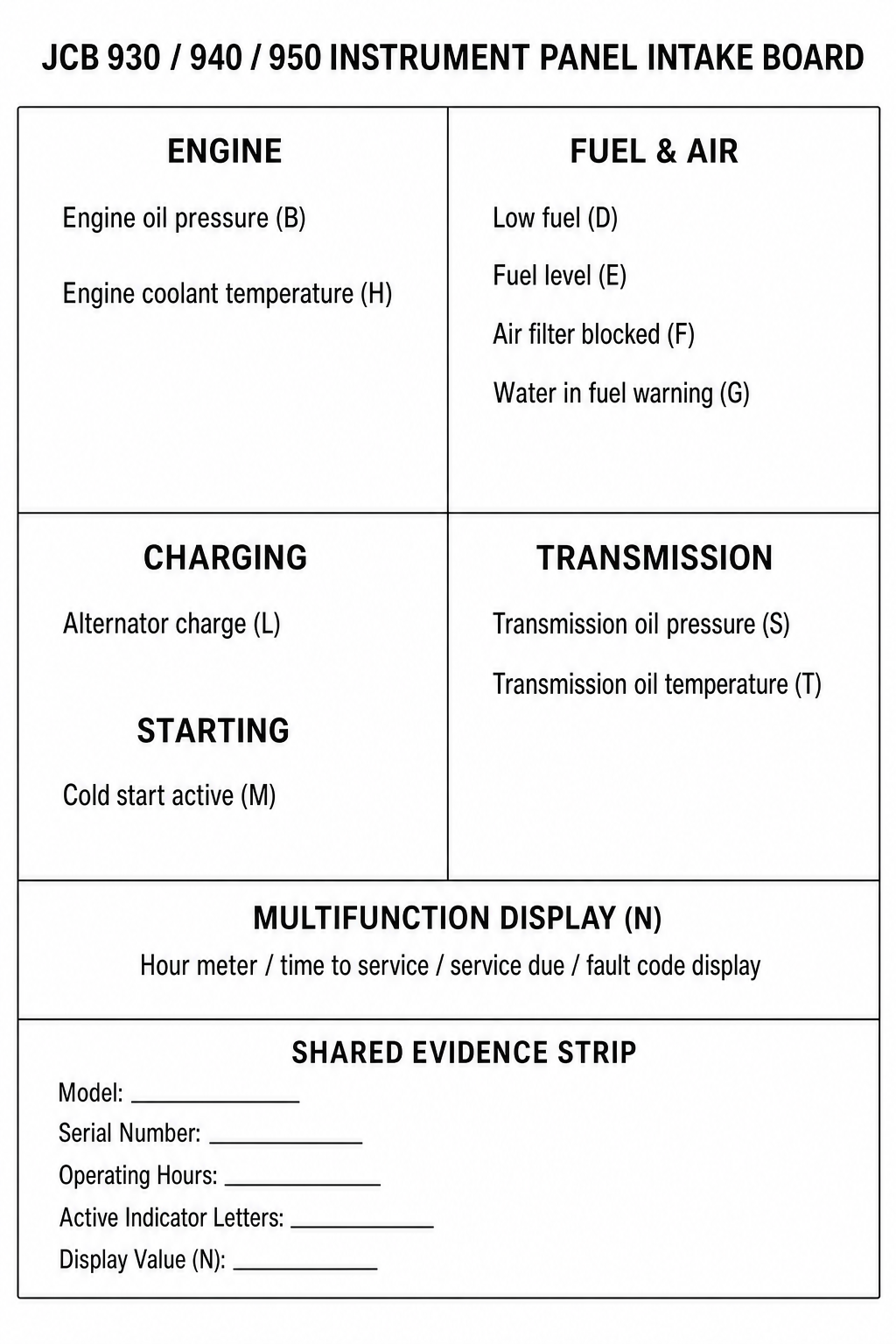
Editorial text-first instrument panel intake chart identifying component indicator positions and blank intake lines for service recording.
JCB QRG Revision 1.0, PDF page 1, Instrument Panel
Manual ID
Revision 1.0 (Publication 46906-7750149665)
The JCB 930, 940, and 950 rough-terrain forklift Quick Reference Guide identifies the instrument panel layout, including the Critical stop indicator (Position Q), the Amber warning lamp (Position A), and the multifunction display (Position N) that shows the hour meter, time to service, service due, and active fault codes. The Quick Reference Guide explicitly states that it does not replace the Operator's Manual and does not provide fault code definitions or repair procedures. When a warning lamp or fault code appears, operators and site personnel must record the exact panel indications and consult the official Operator's Manual or an authorized JCB dealer.
1
1. Identify the Active Indicator Position
Observe the instrument panel to determine which specific indicator position is illuminated, such as Critical stop (Position Q), Amber warning (Position A), Engine oil pressure (Position B), Water in fuel warning (Position G), or Engine coolant temperature (Position H).
2
2. Record the Exact Characters from Display N
Inspect Position N (designated for hour meter, time to service, service due, and fault code display) and transcribe the exact displayed characters or numbers onto the intake record without interpreting their meaning.
3
3. Record Machine Model and Serial Number
Document the exact machine model (JCB 930, 940, or 950), product serial number, total operating hours from display N, and physical site location.
4
4. Consult the Official Operator's Manual or Contact a JCB Dealer
Because the Quick Reference Guide does not contain fault code definitions or repair procedures, refer to the complete JCB Operator's Manual, access www.servicepro.jcb.com, or provide the recorded intake details to an authorized JCB dealer.
Information Provided in Quick Reference Guide vs. Not Provided in Quick Reference Guide
Category
Provided in Quick Reference Guide (Revision 1.0)
Not Provided in Quick Reference Guide
Instrument Panel Indicators
Callout locations and names (A through T), including Critical stop (Q), Amber warning (A), and Multifunction display (N).
Fault code definitions, diagnostic meanings, or root-cause explanations.
Operating and Safety Rules
Basic transport best practices and notice that the guide does not replace the Operator's Manual.
Complete safety disclaimers, operational procedures, and maintenance schedules.
Service and Repair
URL reference to www.servicepro.jcb.com for additional information.
Diagnostic procedures, disassembly instructions, component testing, or repair steps.
Operator Qualifications
Requirement to read Operator's Manual before initial operation.
Training curricula or qualified technician certification criteria.
Instrument Panel Callout Map and Indicator Locations
The JCB 930, 940, and 950 Quick Reference Guide details twenty designated callout positions across the operator instrument panel. Position Q identifies the Critical stop warning lamp, and Position A designates the Amber warning lamp.
Position N is designated as the multifunction display for hour meter, time to service, service due, and fault code display. The instrument panel also identifies dedicated positions for Engine oil pressure (B), Low fuel (D), Fuel level (E), Air filter blocked (F), Water in fuel warning (G), Engine coolant temperature (H), Indicators (J), Park Brake (K), Alternator charge (L), Cold start active (M), Seat belt (P), Main beam (R), Transmission oil pressure (S), and Transmission oil temperature (T).
Position Q: Critical stop
Position N: Hour meter / time to service / service due / fault code display
Position A: Amber warning
Positions B, F, G, H, S, T: Engine oil pressure, air filter blocked, water in fuel warning, engine coolant temperature, transmission oil pressure, and transmission oil temperature
Official Document Boundaries and Disclaimers
The Quick Reference Guide explicitly states on page 1 that it does not replace the Operator's Manual and that operators must read all disclaimers, safety instructions, and other instructions in the Operator's Manual before initially operating the product.
The document provides no fault code lookup tables, troubleshooting trees, or repair procedures. JCB's official knowledge repository states that quick start guides provide basic machine and controls orientation, do not include health and safety aspects, and direct users to contact a JCB dealer for additional information.
Recording Evidence on the Blank Service Intake Card
To capture complete information from the machine without making unverified assumptions, site personnel can transcribe the visible facts directly into a blank service intake record.
The intake record captures the machine model (JCB 930, 940, or 950), serial number, total operating hours, active indicator callout letters from the instrument panel, and the exact alphanumeric characters shown on Display N. For additional documentation, JCB refers users to www.servicepro.jcb.com or authorized JCB dealers.
JCB Machine Quick Start Guides Knowledge HubOfficial JCB knowledge repository confirming quick reference guide scope, operator qualification prerequisites, and disclaimer that reference guides do not replace operator manuals.
This guide applies to JCB 930, 940, and 950 rough-terrain forklifts referencing the instrument panel layout in Quick Reference Guide Revision 1.0. It covers indicator location identification and intake data recording. It does not provide fault code decoding, diagnostic testing, or repair instructions, which require the official Operator's Manual or authorized dealer service.