In the hyper-competitive landscape of 2025, where the Apple App Store hosts over 1.92 million apps, the battle for visibility has become a ruthless zero-sum game. With approximately 70% of all app installs originating from a direct search, your iOS keyword optimization is no longer just a technical checkbox—it is the primary engine of your growth. As Apple’s search algorithm evolves toward semantic intelligence, developers who cling to old-school keyword stuffing are finding their rankings plummeted in favor of those who master the subtle science of metadata intent.
Zero-Waste Character Allocation: The Technical Rules
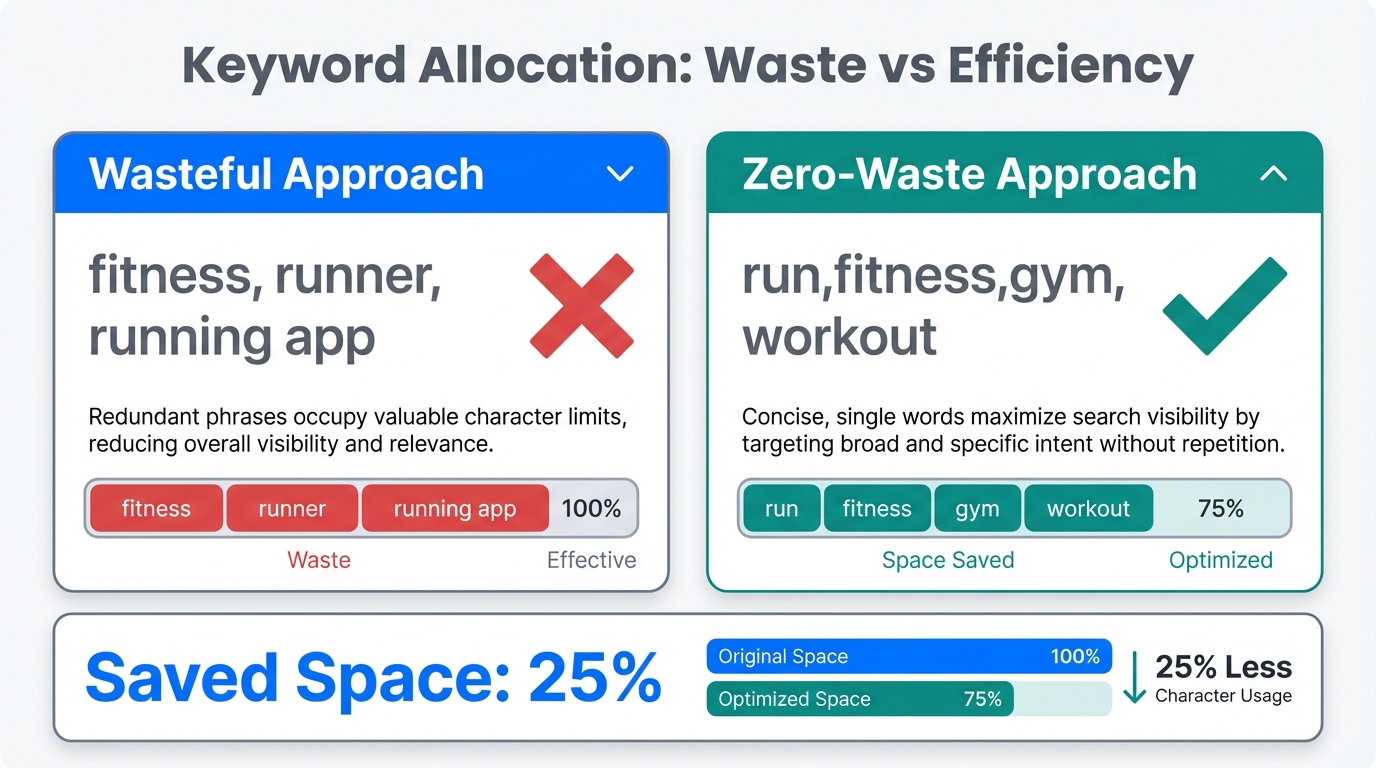
The app store keyword field is a hidden 100-character power-up that many developers squander on filler words and redundant phrases. Unlike the Title and Subtitle, which are visible to the user and serve a dual purpose of conversion and indexing, the keyword field is purely for the algorithm. To maximize your ASO metadata strategy, you must adhere to the strict technical constraints that define elite performance.
First, abandon the use of spaces. Apple’s indexing treats commas as the only necessary separators. Instead of writing "fitness, workout, health," you should write "fitness,workout,health." This simple shift can save you 10-15 characters—space that could be used for an additional high-intent long-tail keyword. Furthermore, never repeat keywords that already appear in your Title or Subtitle. The algorithm automatically combines these fields; repeating "Fitness" in all three places doesn't increase your weight; it simply robs you of space for synonyms or related terms.
| Metadata Element | Character Limit | Priority Level | Best Practice |
|---|---|---|---|
| App Title | 30 | Highest | Brand Name + Core Keyword | Subtitle | 30 | High | Value Proposition / Action | Keyword Field | 100 | Medium | No spaces, no repetitions |
Apple Search Ads (ASA) as a Research Engine
One of the most profound shifts in modern ASO is the marriage of paid and organic data. Industry veteran Thomas Petit argues that Apple Search Ads should be viewed primarily as a research tool rather than just a conversion channel. While many focus on the immediate CPA of an ad, the real treasure is the Search Term Report.
By running discovery campaigns, you can identify which keywords actually drive "Tap-Through Rate" and, more importantly, post-install retention. If a specific keyword has a high volume but zero conversion for your app, including it in your organic 100-character field is a waste of resources. Use ASA data to validate keywords before committing them to your organic metadata, ensuring that every character you use is backed by proven user intent.
"The insights from Apple Search Ads data—knowing which keywords actually convert—are more valuable than the immediate downloads they bring."
The 4-Week Optimization Cycle: Killing Static Metadata
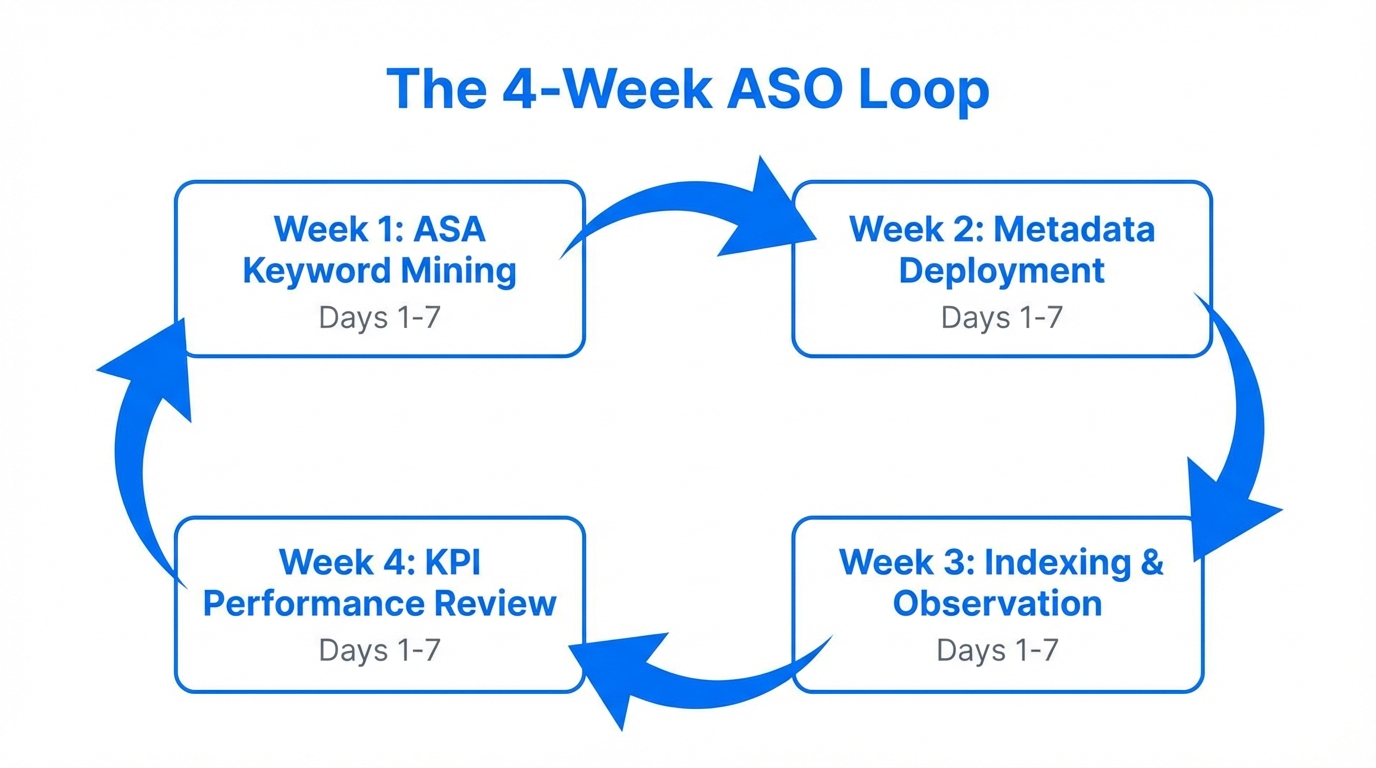
Static metadata is a growth killer. User search behavior is seasonal, fluctuating with cultural trends, holidays, and even platform updates. According to research by Appfigures, top-performing apps update their metadata every 4 weeks to stay relevant.
A fitness app, for example, might prioritize "New Year resolution" and "home workout" in January, but pivot toward "summer body" and "outdoor running" by May. Failing to rotate your keywords means you are missing out on shifting demand. Use App Store Connect analytics to monitor your ranking trends and be prepared to swap out underperforming terms during your monthly ASO sprint.
Beyond Translation: The Localization Playbook
A common mistake in global growth is literal translation. Effective localization requires adapting your keywords to regional pain points. For instance, a fintech app in the US might see high volume for "Investing" and "Stock Market." However, in Germany, users are statistically more risk-averse; focusing on "Security," "Savings," and "Versicherung" often yields better results. Platforms like AppTweak suggest that 2026 is the year of "Intent-Matching over Keyword-Stuffing."
Localization is not just about language; it is about cultural context. In some markets, users search for the "problem" (e.g., "how to stop snoring"), while in others, they search for the "category" (e.g., "sleep tracker"). Successful ASO requires a database of solutions, not just a list of translated words. This is where tools like Stormy AI can assist, helping brands source local UGC creators who can provide the authentic vernacular and search terms used by real people in those specific regions.
| Market | US Focus Phrase | Regional Focus Phrase | Psychological Driver |
|---|---|---|---|
| Germany | Investing | Sicherheit/Sparen | Security & Trust |
| Japan | Dating | Enmusubi (Matchmaking) | Tradition & Marriage |
| Brazil | Fitness | Academia/Treino | Social/Community |
Advanced Filler Word Efficiency
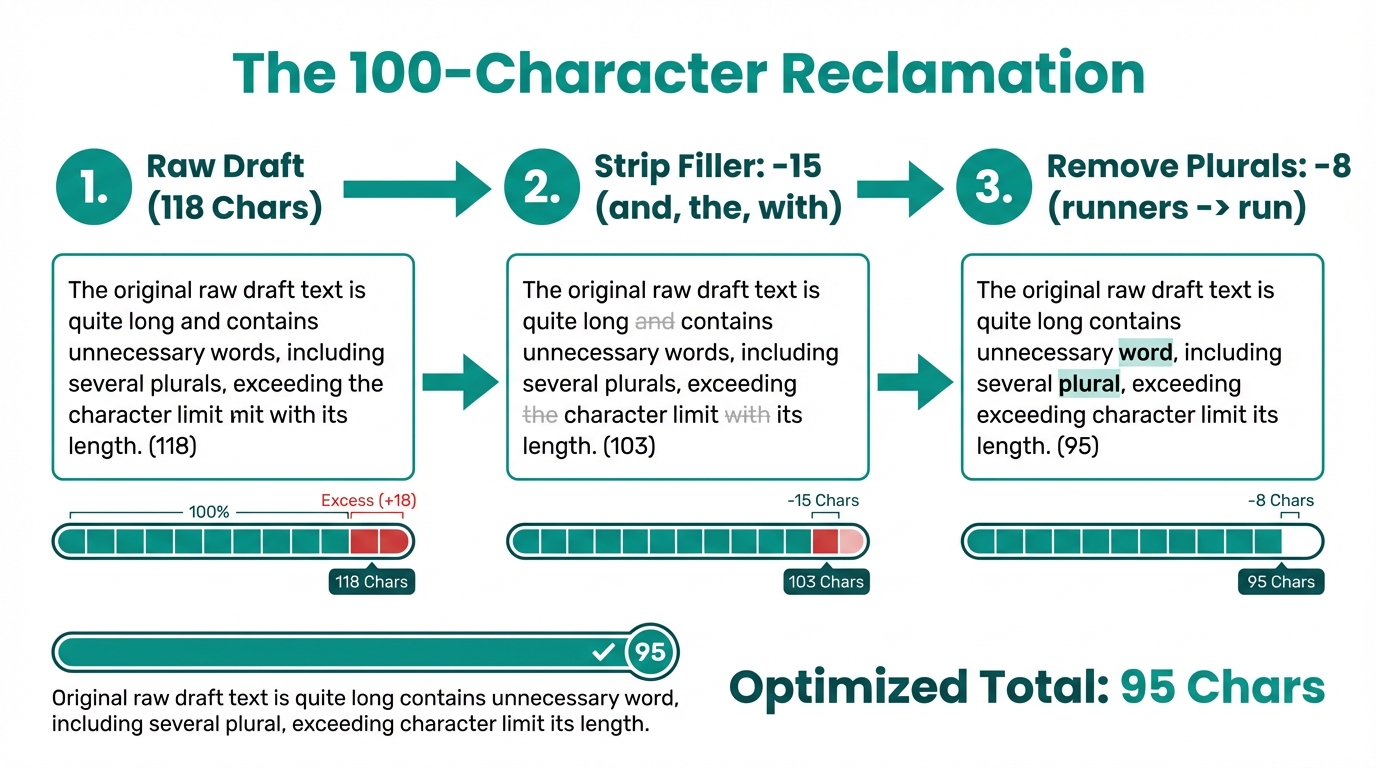
Since the rollout of iOS 18.1, Apple’s algorithm has become significantly more sophisticated at filtering noise. Data indicates that stop words such as "the," "and," and "with" appear in less than 3.2% of top-ranked app titles. The algorithm is smart enough to ignore these, and having them in your 100-character app store keyword field is essentially throwing away ranking potential.
By removing these fillers, you increase your keyword density. If your metadata is "The best app for meditation and sleep," the algorithm really only cares about "meditation" and "sleep." By stripping the rest, you make room for more valuable terms like "anxiety," "mindfulness," or "relax." This efficiency is what separates the top 1% of apps from the millions of others struggling for a single impression.
"2026 is the year of Intent-Matching over Keyword-Stuffing. Practitioners must shift from a 'database of words' to a 'database of solutions'."
The Era of Semantic Indexing and Apple Intelligence
With the integration of Apple Intelligence, the App Store search bar is no longer just looking for a direct match. It is looking for context. Users are now moving toward Natural Language Search (NLS), typing phrases like "apps to help me sleep better without meds" rather than just "sleep app." This means your metadata strategy must include broader, descriptive terms that signal your app's utility.
Furthermore, Apple now indexes the text within your screenshots. This is a game-changer for discovery. Visuals are no longer just for converting the user once they land on your page; they are a primary discovery lever. Ensure your captions contain high-intent keywords that complement your hidden 100-character field. This multi-layered approach to iOS keyword optimization ensures you are captured by both the traditional lexical search and the new semantic AI search engines.
Monitoring Success with App Store Analytics
To truly master your metadata, you need a robust feedback loop. App store analytics should be your North Star. Monitor your ranking changes daily after every metadata update. If you see a dip in rankings for a core term, revert or pivot immediately. Tools like Phiture and their ASO Stack provide frameworks for understanding how these changes impact the bottom line.
As you scale, managing the relationship between organic search and creator-led growth becomes vital. Modern platforms like Stormy AI allow you to track how influencer mentions and UGC videos correlate with spikes in specific search queries. By aligning your keyword strategy with your external marketing efforts, you create a "flywheel effect" where social buzz drives search volume, and your optimized metadata captures that intent perfectly.
The Final Metadata Checklist
Mastering the 100-character hack requires a blend of technical discipline and creative marketing. By treating your metadata as a living, breathing asset rather than a set-it-and-forget-it task, you position your app to win in the zero-sum game of the App Store.
- Maximize the 100 characters: Use commas, no spaces, and zero filler words.
- Research with ASA: Only use keywords that have proven conversion data.
- Pivot every 4 weeks: Stay ahead of seasonal trends and algorithmic shifts.
- Localize with intent: Adapt your keywords to the psychological drivers of each specific market.
- Optimize visually: Remember that screenshot text is now indexed for search.
Successful app store analytics and ASO are about consistency. Start your next optimization cycle today by auditing your current keyword field—you likely have 15-20 characters of wasted space just waiting to be turned into new installs.