In 2026, the digital storefront is no longer just a collection of pages; it is a fluid, high-performance application. Modern consumers, accustomed to the instantaneous responsiveness of native mobile apps and social platforms, have zero patience for the traditional page reload. Every white screen that appears while a customer adds an item to their cart or searches for a product represents a moment of friction—a moment where a potential sale can evaporate. To stay competitive, DTC operators must leverage the Shopify Ajax API 2026 to create a truly seamless shopping experience. This guide will walk you through how to transform your Shopify theme into a conversion machine by eliminating reloads and shortening the path to purchase.
The Death of the Page Reload in 2026
 0:00
0:00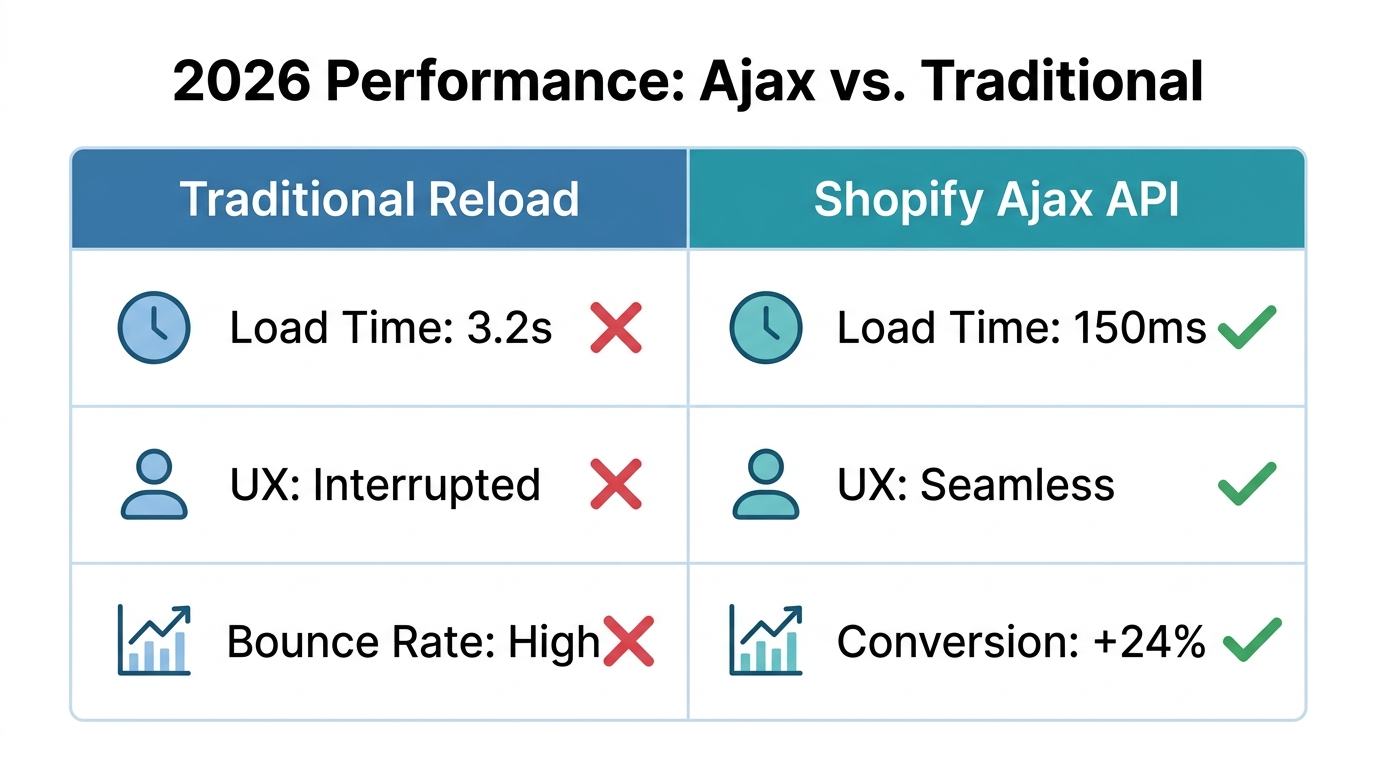
Why are page reloads such a significant problem for Shopify conversion rate optimization? In a landscape where attention is the most valuable currency, a three-second reload feels like an eternity. Research into ecommerce performance consistently shows that interactive elements that respond in under 100 milliseconds significantly improve user retention. When a customer clicks "Add to Cart," they shouldn't be sent to a new page; they should see a side-cart slide out or a notification bubble pop up instantly. According to Shopify theme performance benchmarks, minimizing server round-trips is critical for maintaining high Core Web Vitals.
"In 2026, every millisecond of a page reload is a 1% drop in potential revenue. If your store feels like a website and not an app, you are leaving money on the table."
By using the Shopify Ajax API, you are essentially building a bridge between your theme's code and the Shopify backend. This allows you to update data—like cart contents or product details—without forcing the browser to fetch a whole new HTML document. This isn't just about speed; it's about maintaining the user's flow. Once these high-conversion optimizations start driving more traffic and sales, an AI ecommerce employee like Stormy AI can handle the resulting back-office surge by monitoring inventory and following up with suppliers in the background.
What Exactly is the Shopify Ajax API?
0:54As highlighted by experts at codingwithjan.com, the Shopify Ajax API is the easiest way to talk to Shopify programmatically within your theme. Unlike the Admin API, which is built for private data and server-side apps, the Ajax API is completely public. This means it exposes data that is already meant to be seen by the customer—such as product descriptions, prices, and titles—and allows for actions the customer is authorized to take, like adding an item to their cart.
Because it is a REST-style API, you communicate with it using standard HTTP requests (GET and POST). While this means you might occasionally "over-fetch" data—receiving a full product JSON when you only needed the price—it is incredibly simple to implement. For brands aiming for maximum Shopify theme performance, this simplicity is a feature, not a bug.
| Feature | Shopify Ajax API | Shopify Admin API | Shopify Storefront API |
|---|---|---|---|
| Access | Public / Theme-side | Private / App-side | Public & Private / Headless |
| Primary Use | Theme Interactivity | Store Management | Custom Front-ends |
| Data Format | REST | GraphQL | GraphQL |
| Page Reloads | Eliminates them | N/A | Eliminates them |
While you focus on optimizing the frontend with these APIs, Stormy AI handles the messy middle. While you use Ajax to update the cart, Stormy can watch those same Shopify orders to flag fulfillment issues or calculate real-time profitability in your spreadsheets.
Predictive Search: Shortening the Path to Purchase
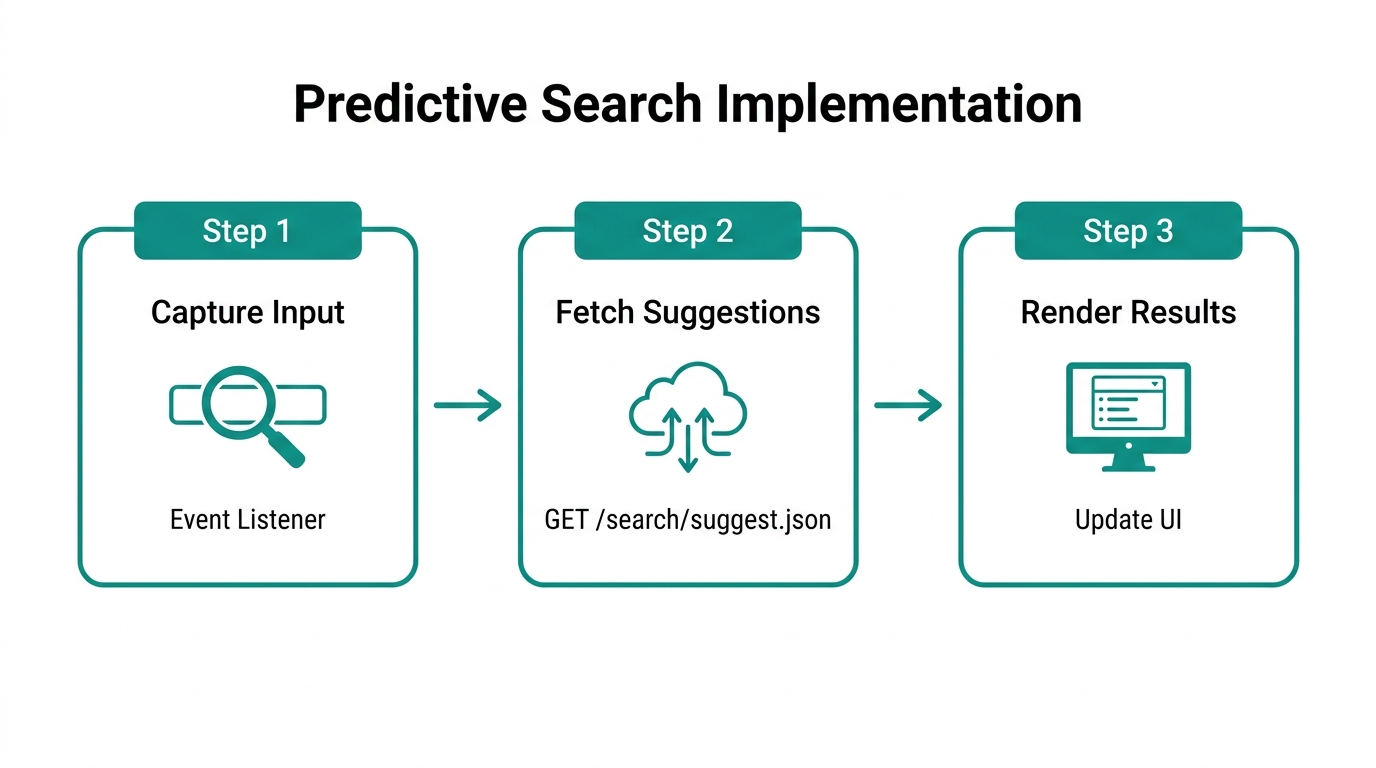
One of the most powerful applications of this technology is the Shopify predictive search tutorial workflow. In 2026, a static search bar is a relic. Customers expect to see product suggestions, collections, and even blog posts appearing as they type. This feature, known as type-ahead search, drastically reduces the steps required for a customer to find and buy a product.
How to Implement Predictive Search
- Query the Endpoint: Use a GET request to
/search/suggest.json. You can pass parameters likeqfor the search term andresources[type]to specify if you want products, pages, or collections. - Handle the JSON: The API will return a JSON object containing matches. You can then use JavaScript to parse this data and inject it into a dropdown menu beneath your search bar.
- Optimize for Intent: Ensure your results include a thumbnail image, the price, and a direct link to the product page.
By implementing a robust predictive search, you are using the Shopify Ajax API 2026 to guide users directly to the checkout. Shortening the discovery phase is the fastest way to increase your conversion rate. If you notice certain search terms are trending but inventory is low, you can ask Stormy AI to check with your supplier on lead times so you don't run out of stock during a surge.
"Predictive search isn't just a UI feature; it's a sales assistant that anticipates what your customer wants before they finish their thought."
Building a Seamless 'Add to Cart' Experience
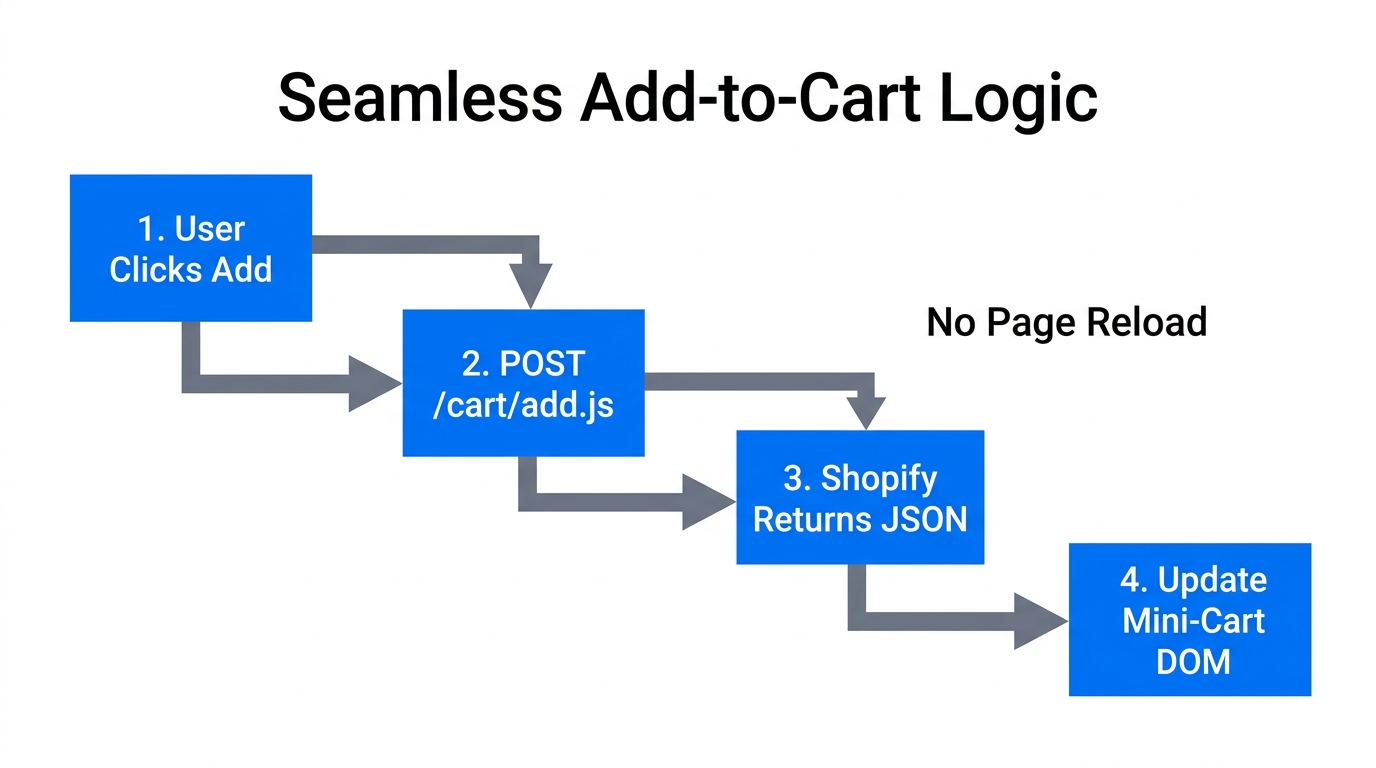
The standard Shopify "Add to Cart" behavior often redirects the user to the /cart page. In a high-conversion environment, this is counterproductive. You want the user to stay on the product page and keep shopping. This is where the /cart/add.js endpoint becomes essential.
By intercepting the form submission with JavaScript, you can send the product data to the Ajax API in the background. Once the request is successful, you can trigger a "Mini-Cart" or "Slide-Out Cart" to show the customer their updated total. This keeps the momentum going and encourages higher Average Order Value (AOV). Many developers use Liquid objects in conjunction with JavaScript to ensure the cart UI reflects the latest discounts and line-item properties.
While you are building these complex frontend interactions, remember that the backend needs to keep up. Stormy AI can be set to wake up every time a specific SKU is added to a cart frequently but not purchased, flagging potential listing errors or pricing issues in your dashboard.
Dynamic Updates with the Section Rendering API
Perhaps the most advanced feature of the Shopify Ajax suite is the Section Rendering API. Sometimes, you need to update a large portion of the page—like a related products section or a filtered product grid—without a refresh. Instead of building complex JSON-to-HTML logic in JavaScript, you can ask Shopify to render a specific section of your theme and return the HTML directly.
By appending ?sections=header,sidebar to your Ajax request, Shopify will return an object containing the updated HTML for those specific sections. This allows you to maintain the look and feel of your Liquid theme files while gaining the performance benefits of a single-page application.
Why This Matters for Conversion
- Filter without Friction: Let users filter products by size or color and watch the grid update instantly.
- Live Cart Updates: Update the shipping bar (e.g., "Spend $10 more for free shipping") the moment an item is added.
- Dynamic Cross-sells: Show real-time recommendations based on what is currently in the cart.
Using the Section Rendering API ensures that your store remains consistent with your brand's design while achieving industry-leading Shopify theme performance. You can see detailed breakdowns of these technical implementations on codingwithjan.com.
Security, Simplicity, and Safety
A common concern for DTC founders is security. Since the Ajax API is public, is it safe? The answer is yes. As Jan from codingwithjan.com points out, the Ajax API only exposes data that is already public. It cannot be used to access customer order history, personal details, or private inventory counts. For those tasks, you would need the Shopify Admin API, which requires secure, server-side authentication.
When implementing these features, follow these best practices:
- Graceful Degradation: Ensure your store still works for the small percentage of users who might have JavaScript disabled.
- Error Handling: Always provide feedback if an "Add to Cart" action fails (e.g., if an item just went out of stock).
- Loading States: Use subtle skeletons or progress bars so the user knows their action is being processed.
While you manage the user experience, Stormy AI manages the operational safety. While you use the Ajax API to show public data, Stormy can use your Shopify connectors to monitor for suppressed listings or missing images, ensuring that your high-speed frontend is always showing accurate information.
"The best UX is invisible. It’s the absence of waiting, the absence of friction, and the presence of a flow that leads straight to the buy button."
Beyond the Frontend: Running the Store with AI
7:03Optimizing your UX with the Shopify Ajax API 2026 is the first step toward scaling. But as your conversion rate climbs, so does the volume of manual work. This is where the concept of the AI ecommerce employee comes in. While you and your developers focus on the frontend, Stormy AI acts as your teammate in the back office.
Stormy doesn't just provide a dashboard; it uses tools. It can:
- Monitor Ads: Pull data from Meta Ads Manager and Google Ads to see which high-conversion landing pages are actually profitable.
- Follow Up: Send polite emails to suppliers when lead times for top-selling Ajax-optimized products start to slip.
- Manage Support: Detect refund requests in Gorgias and draft replies so you can focus on growth.
By combining a high-performance frontend powered by the Shopify Ajax API with an autonomous back-office powered by Stormy AI, you are building a resilient, lean ecommerce brand for 2026 and beyond. Stop making your customers wait for page reloads, and stop making yourself wait for manual data entry. Transform your store into a seamless, automated machine today.