In 2026, the gap between a boutique Shopify brand and a global retail giant has virtually disappeared, thanks to the democratization of high-end creative tools. You no longer need a $50,000 monthly retainer with a creative agency to produce 4K video ads or editorial-grade photography. Instead, elite founders are turning to Google AI Studio—an underrated powerhouse that handles everything from image generation to real-time store audits. While an AI ecommerce employee like Stormy AI runs your messy back-office operations, inventory checks, and supplier follow-ups, you can use Google's latest models to build a visual brand that stops the scroll.
Setting Up Your Google AI Studio Workspace for Ecommerce
 1:30
1:30Before you can generate a single asset, you need to configure your workspace for professional use. Unlike standard chat interfaces, Google AI Studio is designed for builders. When you first sign in with your Google account, you will notice a sidebar with four primary sections: Playground, Build, Dashboard, and Documentation. For ecommerce asset management, your home will primarily be the Playground.
To get started, navigate to the bottom left of the sidebar and click "Get API key." If you do not see any existing keys, click "Import projects," select a project from the dropdown, and then create your key. Treat this key as a password—it controls your billing and usage limits. Once your workspace is live, you can ask Stormy AI to link your Google AI Studio outputs directly into your product management spreadsheets for seamless publishing to Shopify.
"The move from manual content creation to AI-driven generation isn't just about speed; it's about the ability to test 100x more creative variations than your competitors."
Generating Editorial Shopify Headers with Nano Banana 2
2:30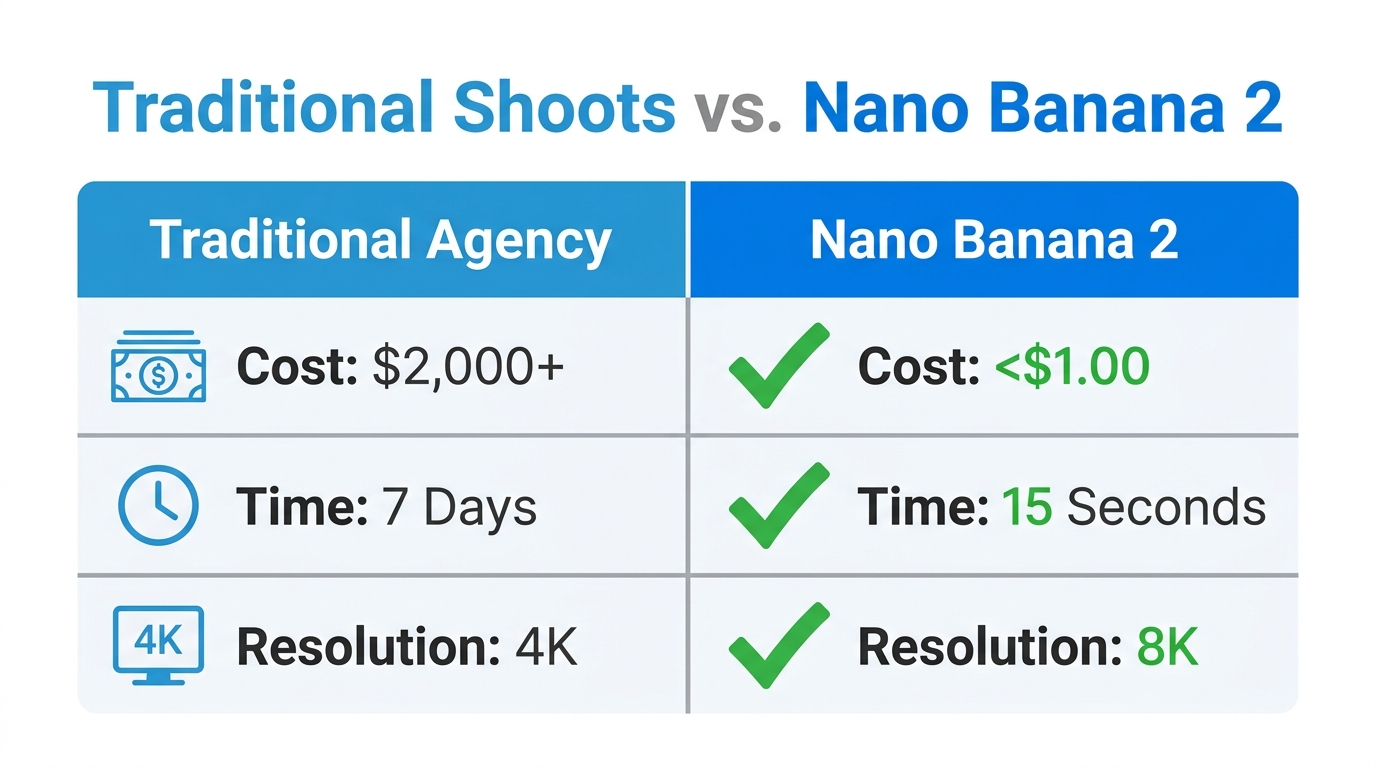
One of the most powerful features in Google AI Studio is the model selector. In 2026, the gold standard for ecommerce imagery is the Nano Banana 2 model (the latest iteration of Google's Imagen technology). While the base Nano Banana model is excellent for experimentation, Nano Banana 2 offers the high-resolution texture and lighting accuracy required for professional Shopify homepage headers.
For a high-stakes asset like a hero banner, use the following prompt structure to ensure an editorial aesthetic: "Generate a photo-realistic 16:9 website header image for a premium skincare brand. Minimalist flat lay, three amber glass serum bottles arranged on white marble. Single fresh botanicals beside each bottle. Soft natural side lighting. Editorial beauty campaign aesthetic." Within seconds, the model produces imagery that would traditionally require a full-day studio shoot and a professional lighting technician. For even higher resolution, you can select "Redo with Pro" to invoke the Nano Banana Pro model, which is optimized for large-format displays.
Fixing Low-Quality Product Shots with AI Editing
Every Shopify store owner has them: product photos that are technically okay but lack the "vibe" needed to convert. Maybe the background is cluttered, or the lighting feels flat. Google AI Studio allows you to upload existing photos and perform complex edits using natural language. This is a game-changer for maintaining visual consistency across your entire catalog without re-shooting every SKU.
Upload your photo to the Image Generation card in the Playground and try this prompt: "Replace the background with a clean, warm-toned linen surface. Keep the product lighting and shadows exactly as they are. Make it look like a high-end lifestyle shoot." The AI maintains the integrity of your physical product while placing it in an aspirational environment. This allows you to scale your Amazon and Shopify listings with luxury-grade visuals for the cost of a few API tokens.
Step-by-Step: 4K Product Videos with VO 3.1
7:15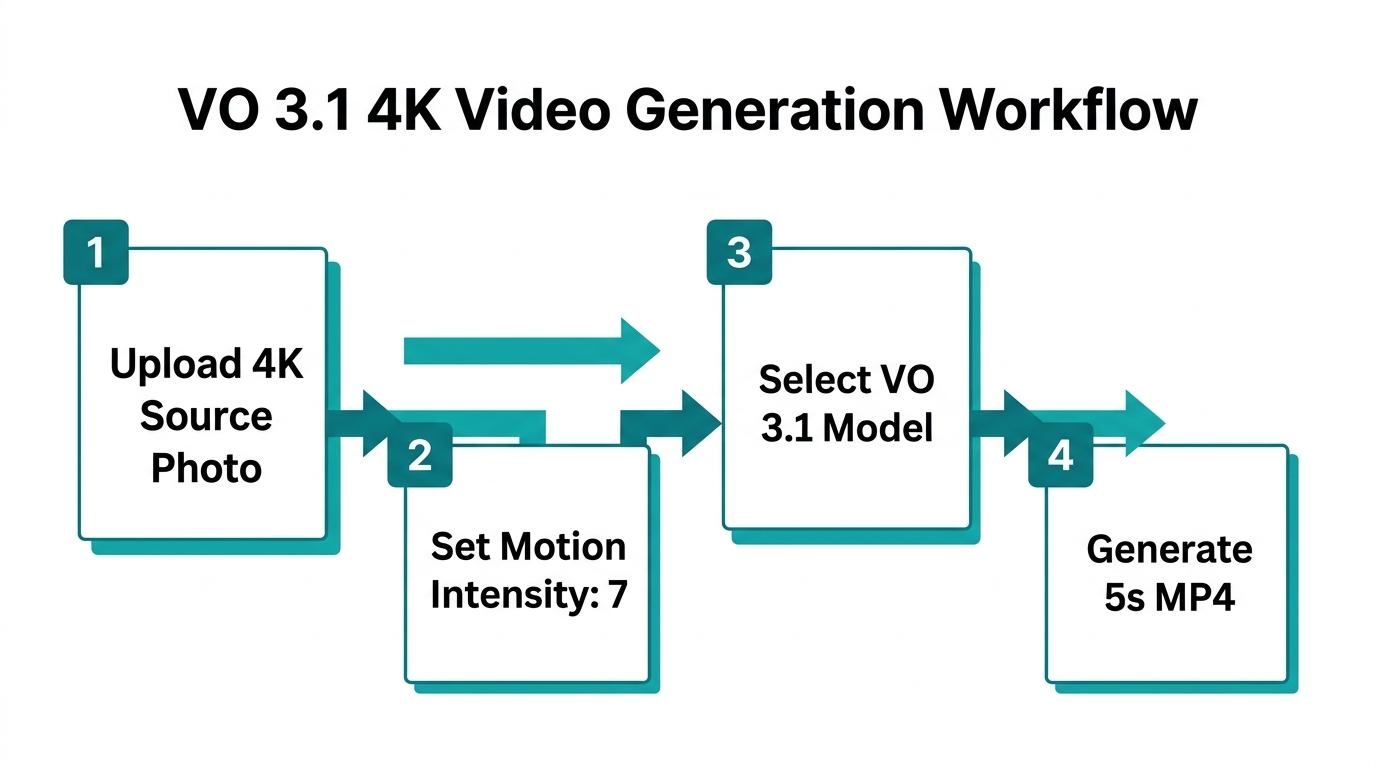
Video is the undisputed king of conversion on TikTok Ads and Meta Ads. The VO 3.1 model (built on the Google Veo architecture) in Google AI Studio allows you to generate high-fidelity video content with sound from a simple text prompt. While Stormy AI monitors your ad performance and flags underperforming creatives, you can use VO 3.1 to rapidly iterate on new video concepts.
Step 1: Select Your Model
Navigate to the Video Generation card. You will see three options: VO 3.1, VO 3.1 Fast, and VO 2. For professional ads, always choose VO 3.1. Use the "Fast" version only for rapid storyboarding or internal concepting.
Step 2: Engineer the Video Prompt
The more specific you are about movement and lighting, the better the result. For example: "Cinematic 4K close-up of a futuristic Pilates kit for women. The camera pans slowly across the matte texture of the equipment. Soft studio lighting with a slight pink hue. Ambient, upbeat lo-fi background music included."
Step 3: Adjust Resolution and Sound
On the right-hand settings panel, toggle the resolution to 4K. Be aware that 4K generation takes longer and costs more than 720p. You can also toggle "Text-to-speech" to add a professional voiceover directly into the video file, removing the need for external editing software like CapCut or Adobe Premiere Pro.
"The difference between a 720p concept and a 4K final output is the difference between a 'maybe' and a 'buy now' from a customer."
| Feature | 720p Concepting | 4K Final Output |
|---|---|---|
| Use Case | A/B testing hooks and scripts | Final Meta/TikTok ad creative |
| Generation Speed | Fast (under 60 seconds) | Slow (3-5 minutes) |
| Relative Cost | Low (1x credits) | High (4x-6x credits) |
| Visual Quality | Good for mobile previews | Crisp on all screen sizes |
Locking in Brand Consistency with System Instructions
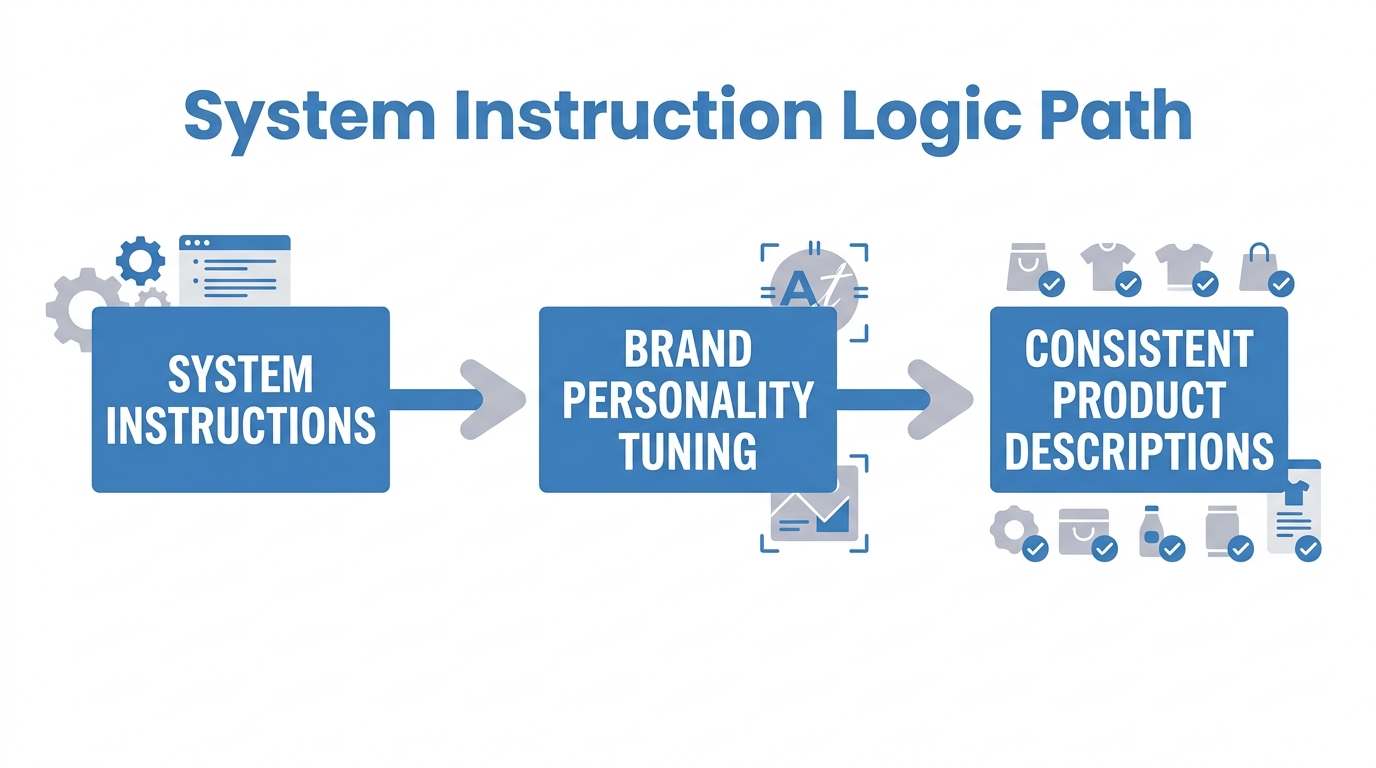
One of the biggest risks of using AI for ecommerce is "hallucinated" brand voices. If your brand is premium and understated, you don't want the AI generating hype-filled, emoji-laden copy. Google AI Studio solves this through System Instructions.
By clicking "Run Settings" and then "System Instructions," you can paste a permanent briefing that the AI follows for every prompt. For a premium leather goods store, your instructions might include: "Always use a confident, minimalist tone. Never use more than two adjectives per sentence. Focus on craftsmanship and heritage. Avoid exclamation points." This ensures that whether you are generating product descriptions or chat replies, the output always sounds like you. Just as Stormy AI uses your specific brand rules to draft customer support replies on Gorgias, these instructions keep your creative assets aligned.
Real-Time Conversion Audits with Share Screen
5:00Perhaps the most futuristic feature of Google AI Studio is the Real-time mode. By selecting "Share Screen," you can allow the AI to look at your live Shopify store and provide feedback. This is essentially a live CRO audit from a machine trained on billions of high-converting web pages.
Try this: Share your product page tab and say, "You are a conversion rate expert who is brutally honest. Tell me the three biggest reasons a first-time visitor would hesitate to buy. Then tell me which one to fix first and exactly what to change." The AI will analyze your hierarchy, CTA placement, and image quality in real time. You can even use the "Grounding with Google Search" tool to have the AI compare your pricing and social proof against live competitor URLs, giving you a prioritized list of updates to make.
The 2026 Ecommerce Playbook
To win in 2026, you must stop being the person who does the work and start being the person who directs the agents. By mastering Google AI Studio for your creative assets and employing an AI ecommerce employee like Stormy AI for your operations, you can run a multi-million dollar brand with the overhead of a side hustle. You have the tools to generate 4K video, editorial imagery, and real-time audits—now it is time to build. For more tactical deep dives, be sure to check out the latest tutorials from Learn with Shopify and start automating the boring parts of your business today.