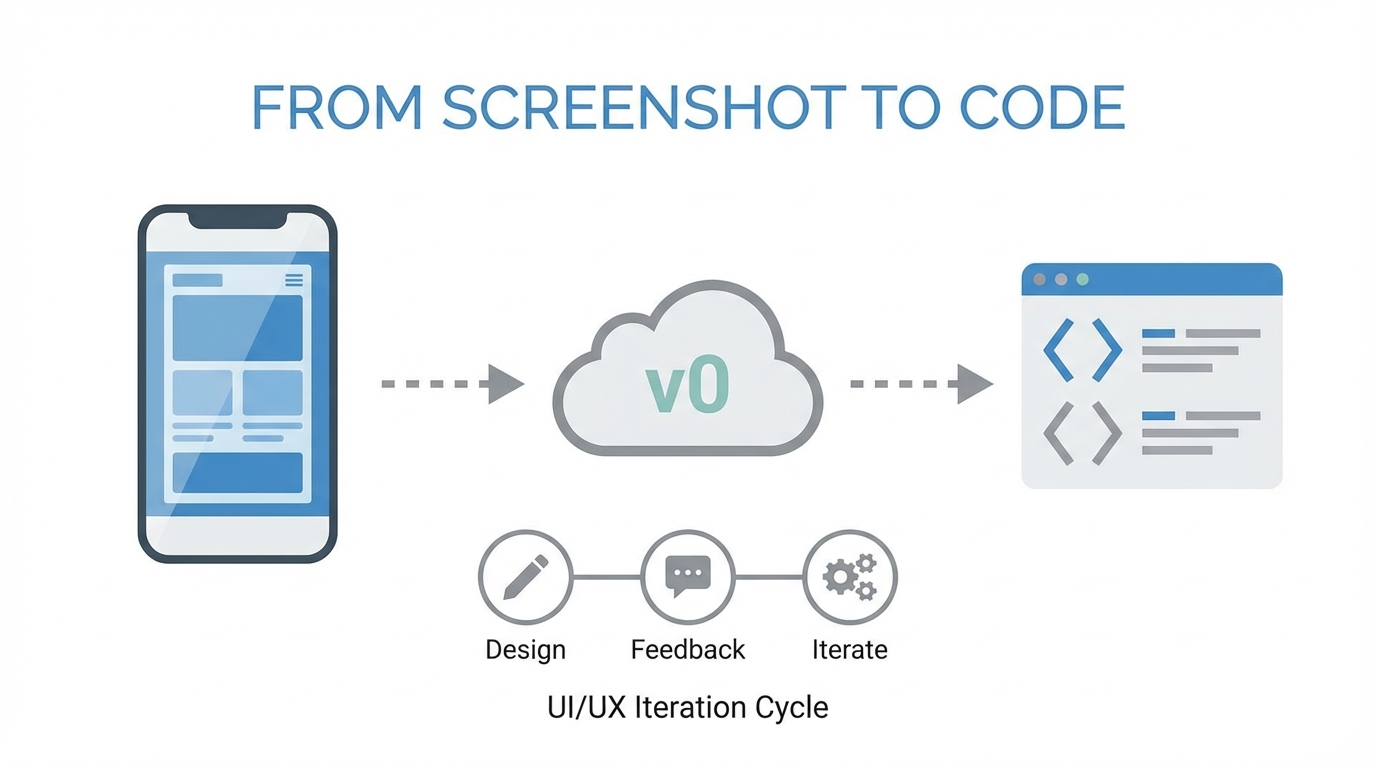
The era of manual Figma-to-code handoffs is rapidly evolving. For years, the gap between a high-fidelity design and a functional frontend was filled with hours of tedious CSS adjustments and component restructuring. Today, tools like v0.dev are bridging that gap by allowing builders to move from a screenshot to code ai in a matter of seconds. Whether you are a solo founder with a vision or a senior engineer looking to accelerate your workflow, mastering the art of iterative prompting in an ai ui design generator is the new essential skill. This isn't just about generating code; it's about developing a design taste that steers the AI toward professional, high-end results.
The New Paradigm of Automated Frontend Development
As Lee Robinson, VP of Product at Vercel, explains, v0 is more than just a chat interface; it is an AI assistant specifically tuned for automated frontend development. It understands the nuances of modern web frameworks, particularly the interplay between React, Next.js, and Tailwind CSS. The core philosophy here is that the AI handles the repetitive 'ones and zeros' while you focus on the vision and the 'taste' of the product.
When you start a project in v0, you are not just asking for a layout; you are initiating a multi-round iteration process. Successful builders often start with a high-level prompt or, better yet, a screenshot of a UI they admire. By providing a visual anchor, you give the ai ui design generator a structural foundation to build upon. However, the first result is rarely the final one. The magic happens in the follow-up prompts where you refine the spacing, the color palette, and the data density.
Developing 'Design Taste' with Godly and Shadcn UI
One of the most common hurdles for non-designers is the inability to articulate why a design feels off. To get the most out of shadcn ui v0, you need to feed it inspiration. Lee Robinson suggests using sites like Godly.website to find top-tier startup designs. By observing how high-growth companies handle their landing pages, you can begin to identify patterns in three-column grids, scrollable areas, and hero section layouts.
Another critical foundation is Shadcn UI. Because v0 is built on top of this system, it understands the 'language' of these components. If you tell v0 to 'use a Shadcn-style date picker' or 'customize the card components to match my brand,' it knows exactly which Tailwind classes to modify. This connection ensures that the code generated is not 'throwaway' code, but production-ready React components that fit into a scalable design system.
The Power of Typography and Imagery
It is easy to underestimate how much of professional web design comes down to just two factors: typography and imagery. A layout can be structurally perfect, but if the fonts are generic and the images are low-resolution, the site will feel like a prototype. When using v0 tailwind css, you should be specific about your font choices. For instance, prompting for a 'clean Sans Serif font' versus an 'elegant Serif font' can completely change the vibe of a SaaS landing page.
If you are building in a Next.js environment, you can even tell v0 to import specific Google Fonts using the Next font package. This level of granularity prevents the AI from defaulting to standard system fonts that might lack personality. Similarly, the quality of imagery is a 'make or break' element. High-quality photography, like that seen on Apple's website, is what separates a world-class landing page from a generic template. You can upload placeholder images to v0 and ask it to integrate them into your design to see the immediate impact on the aesthetic.
The Playbook for Mobile-First Iteration
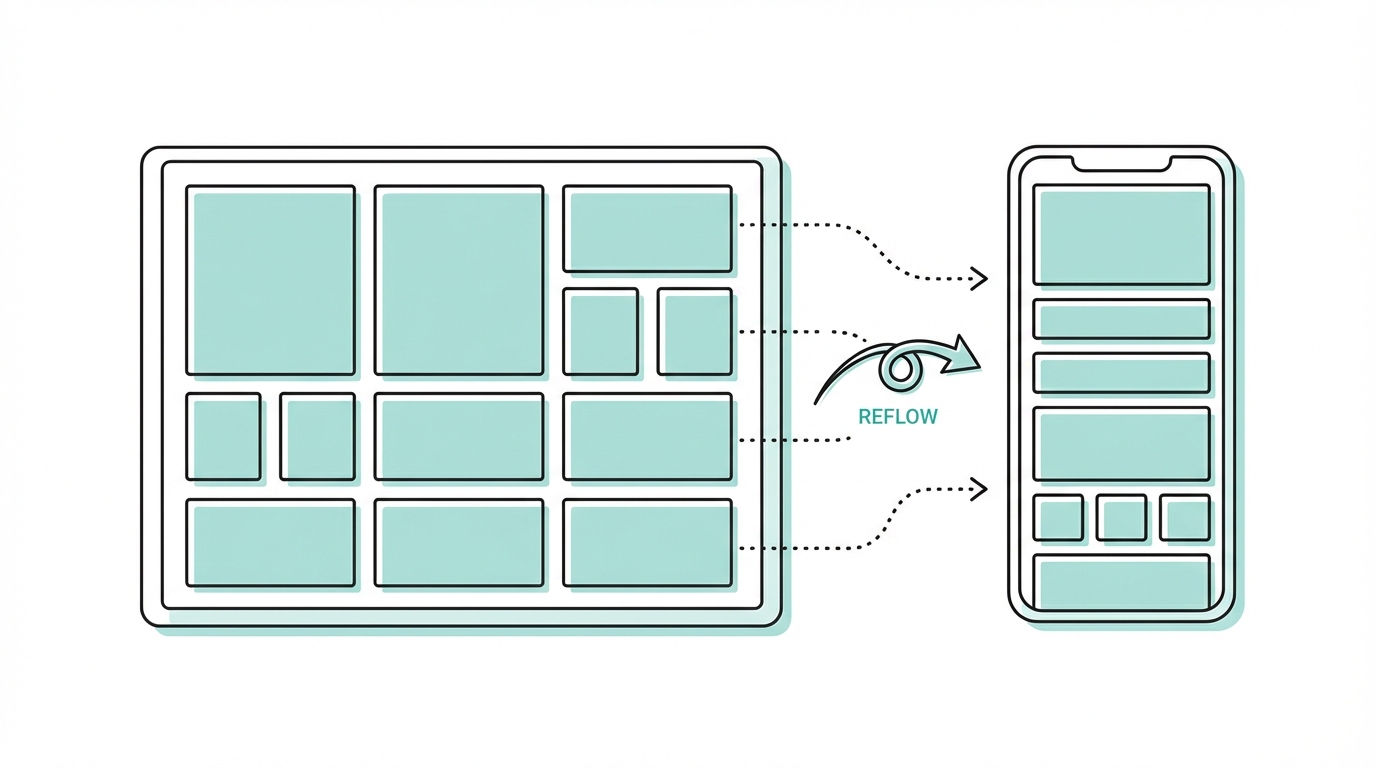
Creating a fluid, responsive layout is one of the most powerful features of automated frontend development, but it often requires explicit guidance. If a table looks great on desktop but breaks on mobile, you can't just hope the AI fixes it. You need a systematic approach.
Step 1: Identify the Breakpoint Issues
Use the built-in preview in v0 to toggle between desktop and mobile views. Note specifically where elements overlap or where text becomes unreadable. If an image is taking up too much vertical space, that is your first target.
Step 2: Use Specific Tailwind Classes
Because v0 'thinks' in Tailwind, you can use direct instructions like 'on mobile, hide the third column of the table' or 'reduce the vertical padding of the hero section for smaller screens.' Being specific about the desired behavior—rather than just saying 'fix mobile'—yields much better results.
Step 3: Iterate on Information Density
For data-heavy apps, like an email client or a music player, mobile responsiveness often means tightening information density. You might prompt: 'On screens smaller than 768px, switch to a single-column list view and use smaller album art placeholders.'
Beyond Static Layouts: Advanced Easing and Animations
A truly high-end UI feels alive. Traditionally, writing complex cubic-bezier transitions or Tailwind animations required significant CSS expertise. With v0, you can ask for these features in plain English. If a sheet or a modal feels 'clunky' when it opens, you can prompt the AI to 'make the easing smoother and the duration faster.'
You can even request specific animation sequences. For example, if you are building a developer tool landing page, you might ask for an 'animated terminal component that types out a sequence of shell commands.' The AI will generate the necessary logic and Tailwind classes to create a sophisticated, performant animation that would have taken an hour to write manually. This allows builders to focus on the user experience rather than the syntax of animation libraries.
Connecting the Frontend to the Backend

Once you have perfected the look and feel using the screenshot to code ai, the next step is making it functional. v0 doesn't stop at styling; it can help you bridge the gap to your data layer. You can provide your database schema and ask the AI to 'generate the ORM code to fetch these activity logs.' Whether you are using Drizzle ORM or Prisma, the AI can help you write the logic that connects your beautiful UI to a Postgres database.
This is where the concept of automated frontend development reaches its full potential. You can design the UI, refine the accessibility, and then immediately generate the backend hooks needed to make the app 'real.' This speed of execution is revolutionary for startups trying to find product-market fit.
Scaling Your App with UGC and Influencers

Building a beautiful app is only half the battle; the other half is getting it in front of users. In the modern landscape, User-Generated Content (UGC) is the most effective way to drive app installs and brand awareness. Once your landing page is live, you need a strategy to find creators who can showcase your product in action.
For founders managing this transition, tools like Stormy AI can help source and manage UGC creators at scale. Just as v0 automates the UI discovery process, Stormy AI uses natural language search to find influencers on TikTok, Instagram, and YouTube who fit your niche. Managing these relationships within a dedicated creator CRM ensures that your marketing efforts are as organized and efficient as your development process.
The v0 Iteration Checklist: How to Prompt Like a Pro
To consistently get high-quality output from v0, follow this iterative playbook:
- Start with a Screenshot: Don't start from a blank page. Use a screenshot of a site you love to set the structure.
- Refine Typography: Ask for specific font families and weights (e.g., 'Medium weight Sans Serif for headers').
- Control the Grays: Don't settle for default black and white. Ask for 'neutral grays' or 'warm, slate-colored backgrounds' to add depth.
- Tighten Density: If a UI feels too 'airy,' tell the AI to 'reduce the padding between rows and make the information density tighter.'
- Specify Tailwind Values: If you know CSS, use it. Prompting for 'h-4 w-4' on an icon is more effective than saying 'make it small.'
- Animate the Interaction: Ask for 'hover states' and 'smooth transitions' to make the UI feel responsive to user input.
Conclusion: Building in the Age of AI
The transition from screenshot to code ai is more than a technical shortcut; it is a fundamental shift in how we build for the web. By leveraging v0 tailwind css and shadcn ui v0, builders can produce interfaces that were previously only possible for large design teams. The key takeaway from experts like Lee Robinson is to 'suspend disbelief' and embrace these tools as partners in the creative process.
As you move from prototype to production, remember that the most successful products combine high-end design with a robust distribution strategy. Whether you are refining your CSS easing or sourcing creators on Stormy AI, the goal is the same: to build something that resonates with users and stands out in a crowded digital landscape. Start your next project with a single prompt and see how far the iteration can take you.