Crown WAV 60-118 Won't Move: Separate a Service Alert From Travel-Position and Gate Signals
Distinguish yellow Service Alerts, yellow Operator Action beeps, and red safety-gate lights on the Crown WAV 60-118 to record an accurate intake packet for the supervisor.
STORMY Editorial · · 8 min read
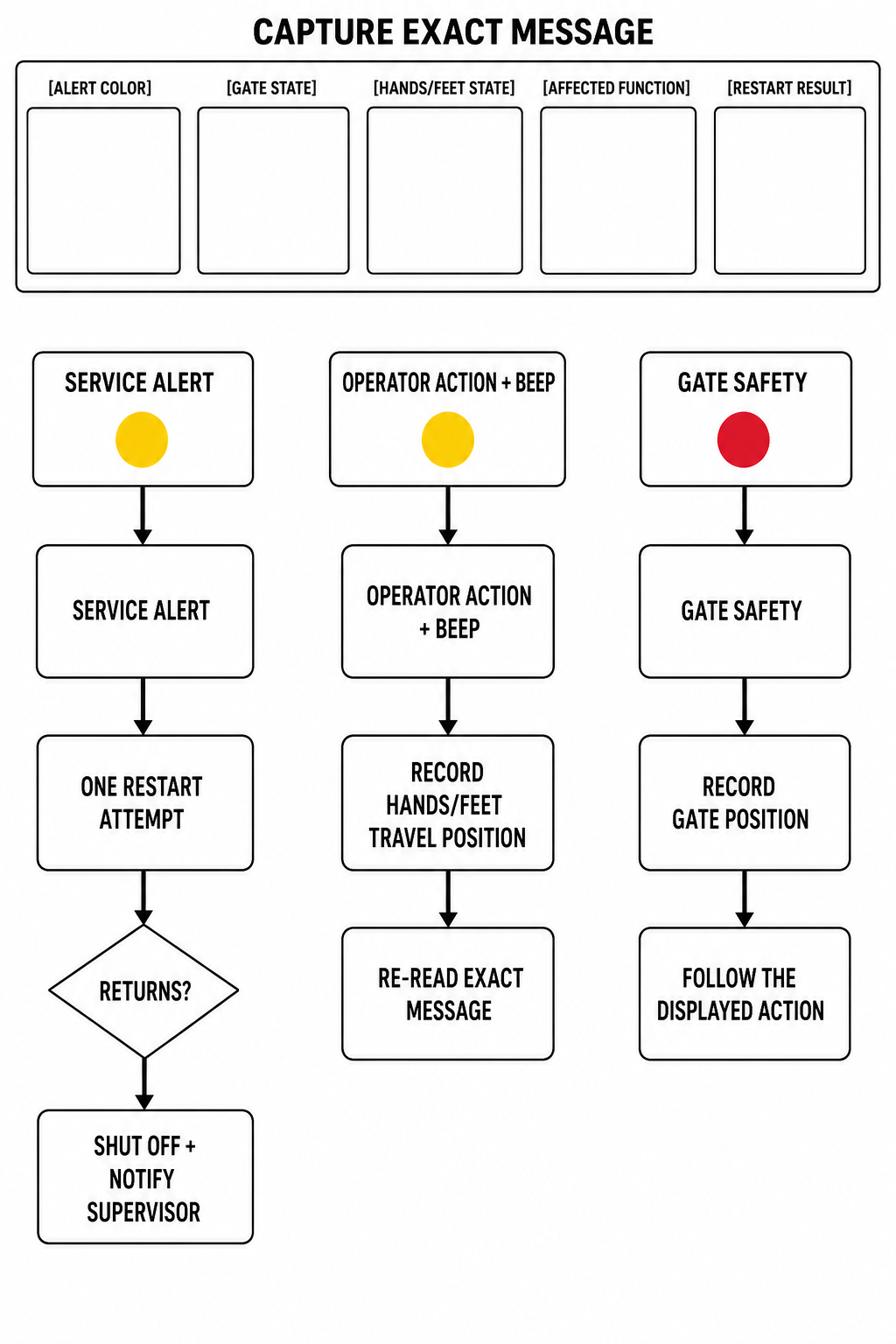
Figure 1: Original editorial intake diagram distinguishing Crown WAV 60-118 Service Alerts, Operator Action travel-position signals, and gate safety indicators. The linked Crown source is controlling.
When a Crown WAV 60-118 Work Assist Vehicle stops, console lights and display messages indicate specific operating states that must not be collapsed into one diagnosis. The Crown WAV 60 Operator Manual establishes distinct boundaries between a yellow Service Alert where the manual says to try restarting the vehicle once; if the light comes on again, shut the vehicle off and notify the supervisor, a yellow Operator Action indicator with an audible beep signaling hands or feet out of travel position, and a red safety light requiring closed gates. Recording the exact indicator color, gate position, body travel position, display message, affected function, and one-restart outcome provides an accurate service intake record without unauthorized disassembly or component speculation.
1
Record Active Console Indicators and Audible Beeps
When the vehicle stops or will not drive, observe the console display. Note whether the yellow Service Alert light is illuminated, the yellow Operator Action indicator is active with an audible beep, or the red safety light is lit, recording each active indicator state separately. Document any displayed text or message verbatim.
2
Document Hands, Feet, and Gate Position
Record whether hands and feet are in travel position when the Operator Action light and beep occur. Record whether the vehicle gates are open or closed if the red safety light illuminates or if an onscreen notification prompts for gate closure.
3
Try Restarting the Vehicle Once for Service Alerts
If the yellow Service Alert indicator illuminates and the vehicle stops due to a sensed fault, try restarting the vehicle once. Do not attempt repeated restarts if the alert persists.
4
Shut Off or Do Not Use and Notify Supervisor
If the Service Alert light comes on again after trying a restart, shut the vehicle off and notify the supervisor. If a trouble screen indicates a machine problem, or if anything does not look, work, feel, or sound right, do not use the vehicle and notify the supervisor.
Crown WAV 60-118 Display Indicators, Display Screens, and Manual Instructions
Display Indicator / Screen
Condition Defined by Manual
Manual Operator & Intake Instruction
Yellow Service Alert Light
Fault is sensed and vehicle stops.
Try restarting the vehicle. If light comes on again, shut vehicle off and notify supervisor.
Yellow Operator Action Light + Beep
Hands and/or feet are not in the travel position.
Record hands and feet position; check display for error messages if vehicle will not drive when moving twist grip.
Red Safety Light
Vehicle gates require closure for continued operation.
Close the vehicle gates to continue operating.
Notification Screen
Screen requires an operator response (e.g., enter code, charge battery, close gates, check covers/doors, switch operation, placement of feet and hands).
Respond to onscreen prompt (e.g., enter code, charge battery, close gates, check covers or doors, place feet and hands); record message for intake.
Trouble Screen
Screen indicates a problem with the truck (e.g., overheating of components, sensor issues).
Record complete screen message, do not use vehicle if anything does not look, work, feel, or sound right, and notify supervisor.
Display Architecture: Separating Service Alerts, Prompts, and Trouble Screens
The Crown WAV 60-118 console display presents distinct indicators and alphanumeric screens to convey vehicle status, operator requirements, and sensed conditions. The operator manual clearly separates routine status screens, action-requiring notification screens, and machine trouble screens from dedicated indicator lights.
If the vehicle will not drive when moving the twist grip, check the display for error messages, as distinct indicator lights convey separate states. Recording each indicator state, screen message, and prompt separately ensures accurate intake details for the supervisor.
Status/Information Screens: Present operational metrics including battery charge remaining, maintenance due, and performance level.
Notification Screens: Require operator responses, such as entering a code, charging the battery, closing gates, checking covers or doors, switch operation, or placement of feet and hands.
Trouble Screens: Indicate problems with the truck, such as overheating of components or sensor issues.
Travel-Position and Gate Indicators
The Operator Action indicator illuminates yellow accompanied by an audible beep whenever an operator's hands and/or feet are not in the travel position. If the vehicle will not drive when the operator moves the twist grip, the operator manual directs checking the display for error messages.
A dedicated red safety light indicates that the vehicle gates must be closed to continue operating. When the vehicle stops or will not drive, recording whether the red safety light, yellow Operator Action light, or a specific notification screen is active captures the operating context.
Service Alert Response and Supervisor Notification Boundary
When a fault is sensed, the yellow Service Alert light illuminates and the vehicle stops. Under the OEM operator manual instructions, the manual says to try restarting the vehicle once; if the light comes on again, shut the vehicle off and notify the supervisor.
Personnel must never attempt repeated restarts or interlock and gate bypasses. If anything does not look, work, feel, or sound right, the operator must not use the vehicle and must notify the supervisor with the alert color, gate state, hands and feet state, affected function, and restart result.
Sources and limits
Crown WAV 60 Series Operator Manual (600238-200A)Primary operating instructions covering display indicators, Service Alert restart instructions, travel position beeps, gate safety lights, and notification/trouble screens (printed pages 13-14 / PDF pages 26-29).
This guide applies specifically to the Crown WAV 60-118 Work Assist Vehicle based on Crown Operator Manual 600238-200A and specification sheet WAV60 SPEC GB 08/21, 10. It addresses visible display triage and safe operator intake boundaries. It does not provide service manual diagnostic procedures, electrical repairs, or mechanical adjustments, and does not apply to other Crown equipment models.