Crown SC 5700 Over-Temperature Light: The Exact Manual Page and Safe Response
A close reading of the SC 5700 operator manual: what the yellow thermometer light proves, what the operator should do, and what the page does not diagnose.
STORMY Editorial · · 7 min read
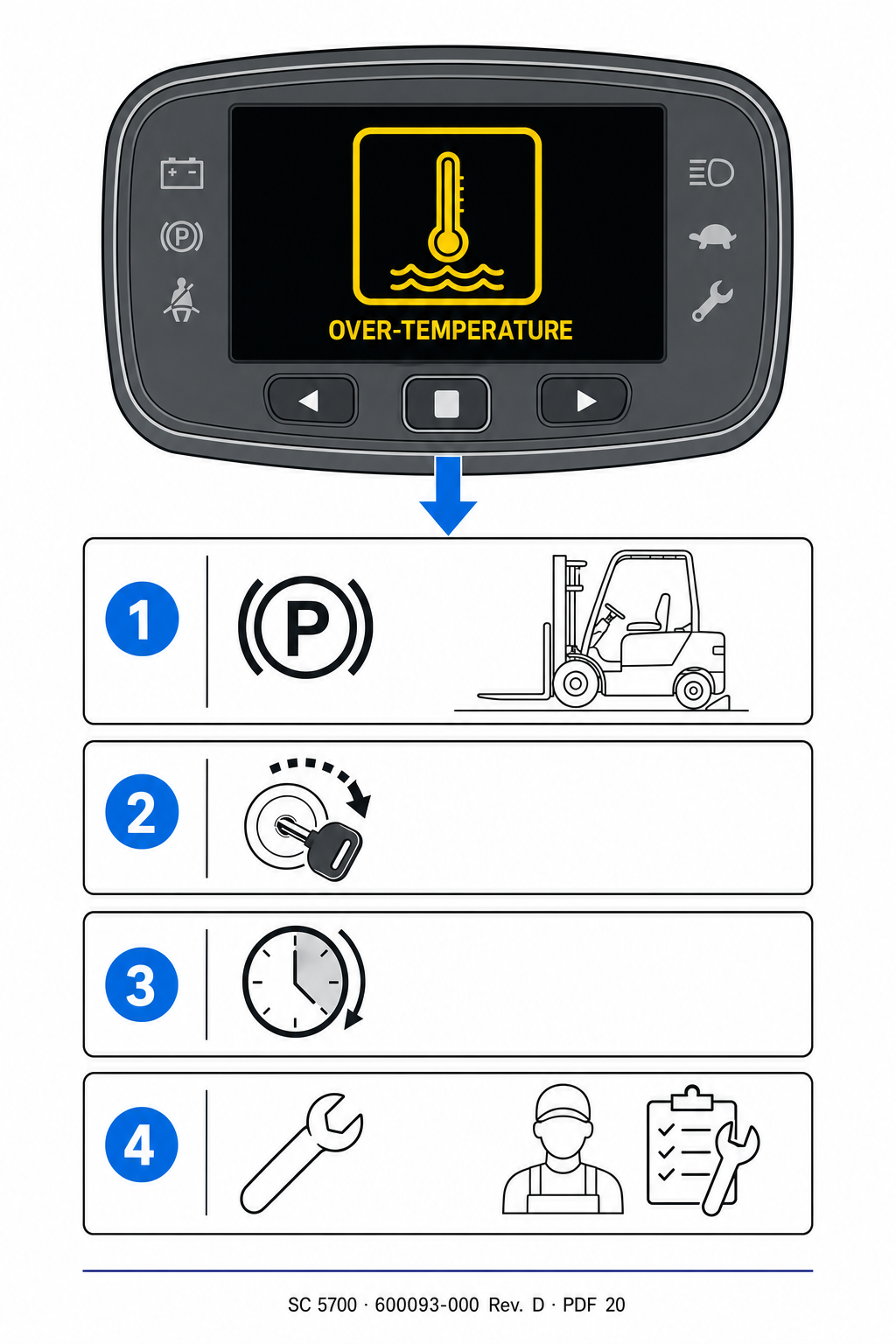
Original reconstructed display and response sequence for the over-temperature boundary documented in Crown SC 5700 Operator Manual 600093-000 Rev. D, page 20. Open the official PDF in the evidence card to inspect the controlling source.
The yellow thermometer light establishes one operational fact: the truck has reported an over-temperature condition. It does not identify which component or operating condition produced it. Crown’s page gives the operator a short response and leaves diagnosis to service.
1
Park under the site procedure
Move only as needed to follow the applicable operator-manual and site safety procedure. Lower the forks, secure the truck, and protect the area.
2
Shut the truck off
Preserve the warning state with a full display photo first if that can be done safely, then follow Crown’s shutdown instruction.
3
Keep it out of service
Record who controlled the key or access, where the truck is parked, and which site contact owns the safety state.
4
Send service the primary evidence
Include the model and serial plate, complete display, hour meter, battery state, active function, load, grade, ambient conditions, and repeat history.
What the manual establishes—and what still requires qualified diagnosis
Evidence
Supported conclusion
Not established
Yellow thermometer light
The truck reports an over-temperature condition
Which component caused it
Crown operator instruction
Park, shut off, obtain service
Permission to continue after cooling
One display photo
Exact warning state at that moment
A repair or return-to-service decision
Read the icon and the instruction as one unit
The original diagram makes the page locator easier to use: the arrow identifies the thermometer symbol described by Crown, while the evidence card takes the reader to the exact official page that defines it. This avoids a common failure in remote intake—naming a warning from memory while losing the controlling source.
The page uses a yellow indicator for the over-temperature condition. The operational direction is still explicit: park, shut down, and obtain service. The light color should not be treated as a license to finish the shift.
Capture the condition without inventing the cause
A useful service request separates observation from diagnosis. Record when the light appeared, which function was active, whether the truck was loaded, the travel or lift pattern, grade, ambient temperature, battery state, hour meter, and whether the warning remained after shutdown. Photograph the entire display and the data plate rather than sending a cropped icon.
Those facts help qualified service select the correct serial-specific information and reproduce the operating context safely. They do not prove a motor, controller, connection, sensor, brake, battery, or cooling-related failure. The manual page itself makes no such assignment.
Exact model, serial number, fleet asset number, and hour meter
Full display photo with the warning, message, and battery state visible
Function, load, grade, ambient condition, and shift timeline
Recent impact, maintenance, charging, or repeat-event history
Truck location, shutdown state, and reachable site contact
The service boundary is the valuable answer
An online article cannot confirm that a truck has cooled sufficiently, identify a failed component, authorize inspection, or return equipment to service. Those decisions depend on the exact truck, current documentation, site controls, qualified inspection, and measurements.
The fast path is therefore not a speculative troubleshooting tree. It is a clean handoff: preserve the warning, obey the operator instruction, identify the machine, retain the operating context, and let qualified service decide the next safe test.
Sources and limits
Crown SC 5700 Operator ManualOfficial Crown PDF, manual 600093-000 Rev. D. The cited PDF and printed page are identified in each article.
OSHA 29 CFR 1910.178Powered-industrial-truck inspection, operating, maintenance, and removal-from-service requirements.
Scope: Crown SC 5700 Series operator guidance shown in manual 600093-000 Rev. D, PDF page 20. The original diagram explains the source locator without reproducing the manual; it does not replace current serial-specific documentation, employer procedures, or qualified service.