Crown SC 5700 Event Light vs Service Light: The Manual’s Escalation Boundary
One SC 5700 page separates an operator-correctable event from a service-required event. Here is how to preserve that boundary in a work order without guessing at the fault.
STORMY Editorial · · 8 min read
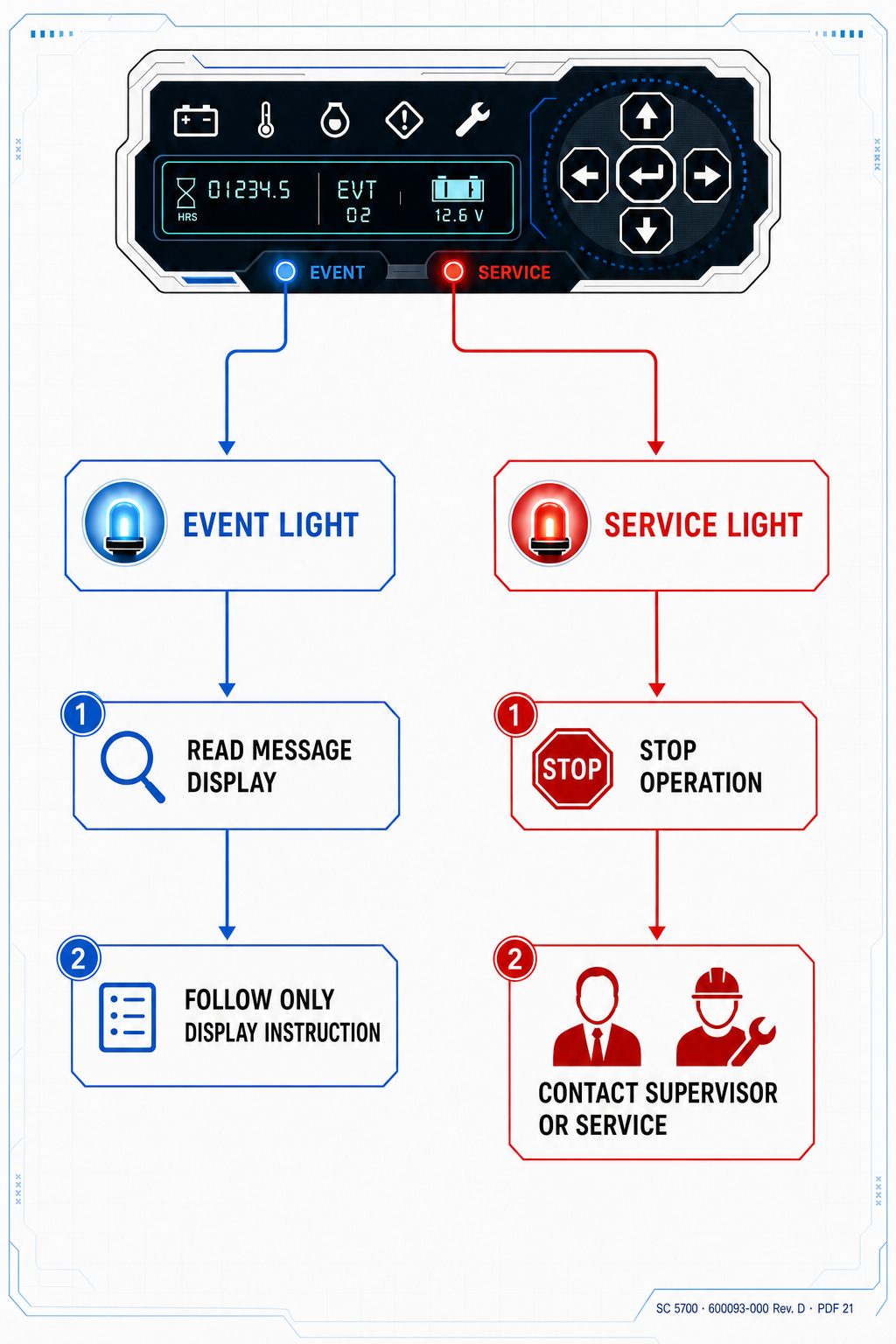
Original reconstructed display and split-path diagram for the event-versus-service boundary documented in Crown SC 5700 Operator Manual 600093-000 Rev. D, page 21. The official PDF is linked in the evidence card.
“An event light came on” is incomplete intake. Crown page 21 shows two different indicators: one directs the operator to the message display for corrective instructions; the other marks a condition that requires service. The message and icon must stay together.
1
Identify which indicator is present
Capture a full display photo that shows the icon, message window, event text or code, battery state, and hour meter in the same frame.
2
Read the message display
For an operator-correctable event, follow only the exact operator instruction presented for that truck and event under the site procedure.
3
Escalate a service-required event
Contact the responsible supervisor or service department. Keep the service light, message, event conditions, and safety state attached to one work order.
4
Close the loop with evidence
Do not mark the truck available because an icon disappeared. Retain the qualified finding and the employer’s return-to-service evidence.
The operator/service boundary shown on Crown manual PDF page 21
Indicator
Manual classification
Next source of truth
Event light
Operator correctable
Exact instructions in the message display
Service light
Service required
Supervisor or qualified service department
Message display
Event-specific information
Read verbatim; do not translate from memory
The icon alone is not the whole instruction
The event-light block tells the operator to look at the message display for instructions. The service-light block tells the operator that service is required. In both cases, a cropped warning icon throws away decisive context. A useful record keeps the indicator and the display message together.
The annotated page makes the boundary visible without inventing a code table. Blue marks the operator-correctable branch. Red marks the service-required branch. The underlying words, diagram, and display remain the primary evidence.
Record the event before it becomes folklore
Photograph the complete display and transcribe the message verbatim. Add the data plate, serial number, hour meter, battery state, operator request, load, attachment, location, and the conditions immediately before the event. Record whether the condition repeated and which manual-directed operator step was attempted, if any.
Do not convert a symbol into a remembered code description or a suspected failed component. Display meanings, installed options, serial ranges, and service information can differ. The original evidence gives the qualified technician a reliable starting point.
Indicator, event text or code, and full message display in one photo
Exact model, serial, hour meter, battery state, and asset number
Requested function, load, attachment, grade, aisle, and ambient context
Any operator instruction shown and the observed result
Truck safety state, location, supervisor, and service contact
Operator correctable does not mean operator repairable
An operator-correctable event means the operator follows the message-display instruction within training and site procedure. It does not create authority to open the truck, adjust a switch, bypass a presence system, clear an undocumented code, or select a repair.
Similarly, a service-required event is a routing decision, not a diagnosis. The manual page tells the operator whom to involve. Qualified service still needs the exact event evidence, machine identity, current documentation, inspection, and measurements.
Make the work order preserve the boundary
The work order should explicitly name the indicator branch and attach the original display evidence. If information is missing, keep the callback open instead of replacing it with a guess. If the service light is present, the ticket should make the escalation owner and truck safety state visible.
After qualified service acts, retain the confirmed finding, work performed, verification, and return-to-service decision. That creates a trustworthy equipment history; a screenshot of a vanished light does not.
Sources and limits
Crown SC 5700 Operator ManualOfficial Crown PDF, manual 600093-000 Rev. D. The cited PDF and printed page are identified in each article.
OSHA 29 CFR 1910.178Powered-industrial-truck inspection, operating, maintenance, and removal-from-service requirements.
Scope: the event-light, service-light, and message-display distinctions on Crown SC 5700 manual 600093-000 Rev. D, PDF page 21. This article does not decode event codes, authorize repairs, or replace current truck-specific documentation and qualified service.