Crown PE 4500 COAST ON Light and Beep: Why Releasing the Handle Does Not Apply the Brake
When COAST ON illuminates on the display, or QuickCoast emits a warning beep, Coast is selected on a Crown PE 4500 pallet truck and releasing the control handle does not apply the brake. Learn the exact selector behavior, operating boundaries, and reporting requirements.
STORMY Editorial · · 8 min read
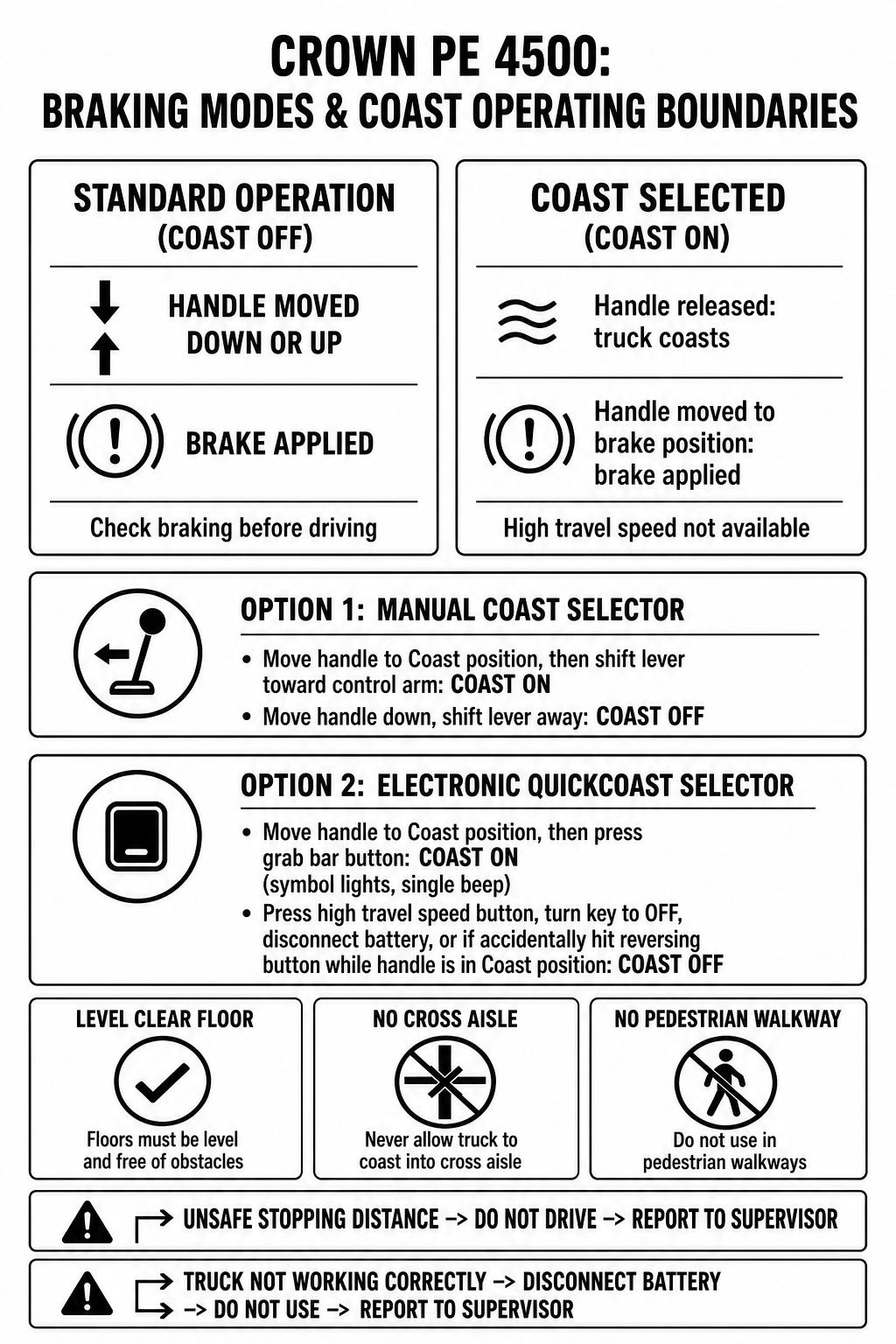
Editorial technical workflow diagram comparing standard braking with Coast selected mode, manual and electronic selector options, published operating limits, and brake check reporting rules on the Crown PE 4500.
Crown PE 4500 Series End-Control Rider Pallet Trucks
Document
Operator Manual
Locator
Crown PE 4500 Operator Manual PF14692-B Rev. 5/19: printed page 13 / PDF page 14, COAST ON indicator; printed pages 15-16 / PDF pages 16-17, power disconnect and brake check; printed pages 22-24 / PDF pages 23-25, optional manual Coast Control and electronic QuickCoast behavior and operating limits.
Manual ID
PF14692-B Rev. 5/19
On a Crown PE 4500 Series end-control rider pallet truck equipped with optional manual Coast Control or electronic QuickCoast, releasing the control handle does not apply the brake when Coast is selected. Instead, the truck continues to coast to make it easier to pick loads while walking short distances. The yellow COAST ON indicator on the display illuminates when coast has been selected. On trucks equipped with electronic QuickCoast, selecting coast also illuminates the no-brake symbol on the display and sounds a single warning beep, followed by a continuous beep as long as the control handle is held in a brake position. Operators must operate only on level floors free of obstacles, never allow the truck to coast into a cross aisle, and do not use Coast in pedestrian walkways. If stopping distance is too long to stop safely, do not drive the truck and report the problem to a supervisor. If the truck is not working right, disconnect the battery by pulling the connector, do not use the truck, and report the issue to your supervisor.
1
1. Identify the Display Indicators and Active Selector Type
Inspect the display panel. The yellow COAST ON indicator identifies selected Coast and does not diagnose a malfunction. On trucks equipped with electronic QuickCoast, observe whether the no-brake display symbol is illuminated and whether a single warning beep sounded, which occurs after moving the control handle to the Coast position and pressing the selector button on the back of the grab bar.
2
2. Verify Published Operational and Environmental Limits
Ensure the floor is level and free of obstacles, and travel power unit first only. Never allow the truck to coast into a cross aisle, and do not use Coast in pedestrian walkways. Walk to the side of the truck with your arm extended and feet clear of the truck.
3
3. Verify Handle-Applied Braking and Selector Disengagement
Move the control handle into an upper or lower brake position to verify the brake stops the truck. To turn Coast off, move handle down and shift the manual lever away from the control arm (Option 1). On Option 2, turn QuickCoast off by pressing the high travel speed button, turning the key switch to OFF, or disconnecting the battery. QuickCoast is also disabled if the reversing button is accidentally hit while the handle is in the Coast position. On QuickCoast models, ensure your body is not in the path of the handle as it returns to vertical.
4
4. Apply Mandatory Escalation Branches if Truck Is Abnormal
Follow the exact operator manual escalation branch: if stopping distance is too long to stop safely, do not drive the truck and report the problem to your supervisor; if the truck is not working right, pull the connector to disconnect the battery, do not use the truck, and report the problem to your supervisor.
Crown PE 4500 Operational States: Standard Braking vs. Coast Selector Options
Operating State
Activation Method & Display / Audio Feedback
Braking Behavior & Operating Requirements
Standard Operation
Control handle operated without Coast selected.
Moving the control handle either down or up to one of the braking positions applies the brake.
Option 1: Manual Coast Selector
Move control handle to coast position and shift coast selector lever toward control arm; yellow COAST ON indicator lights.
Truck coasts when handle is released; must move handle to a brake position to apply the brake. High travel speed is not available.
Option 2: Electronic QuickCoast
Move control handle to coast position and press coast selector button on back of grab bar; yellow COAST ON indicator and no-brake symbol light; single beep sounds.
Truck coasts when handle is released; must move handle to a brake position to apply the brake. Continuous beep sounds while handle is in brake position. Turn QuickCoast off by pressing the high travel speed button, turning the key switch to OFF, or disconnecting the battery. QuickCoast is also disabled if the reversing button is accidentally hit while the handle is in the Coast position. High travel speed is not available.
Brake / Operating Abnormality
Stopping distance too long to stop safely during brake test, or truck not working right.
Two exact branches: if stopping distance is too long to stop safely, do not drive and report to supervisor; if truck is not working right, disconnect battery connector, do not use, and report to supervisor.
Manual Coast Control vs. Electronic QuickCoast Behavior
Crown PE 4500 Series end-control pallet trucks offer two optional walkalong coast configurations. When Coast is selected, releasing the control handle does not apply the brake; the truck continues to coast to make it easier to pick loads while walking short distances.
Option 1 uses a manual selector lever on the control arm: move the handle to the coast position and shift the lever toward the control arm to engage Coast, or move handle down and shift the lever away from the control arm to turn Coast off. Option 2 uses an electronic QuickCoast button on the back of the grab bar: move the handle to the coast position and press the button. QuickCoast selection illuminates the no-brake symbol on the display and sounds a single warning beep, followed by a continuous beep whenever the handle is held in a brake position.
Option 1 (Manual Coast): Requires moving handle to coast position and shifting lever toward control arm; yellow COAST ON indicator lights. Move handle down and shift lever away from control arm to turn Coast off.
Option 2 (Electronic QuickCoast): Requires moving handle to coast position and pressing grab-bar button; yellow COAST ON indicator and no-brake symbol light; single warning beep sounds, and continuous beep sounds while handle is in a brake position.
Disengaging QuickCoast: Turn QuickCoast off by pressing the high travel speed button, turning the key switch to OFF, or disconnecting the battery. QuickCoast is also disabled if the reversing button is accidentally hit while the handle is in the Coast position.
Published Operating Limits and Environmental Boundaries
Because Coast mode disables automatic handle-release braking, the operator manual mandates strict environmental and positional boundaries to protect the operator and surrounding warehouse personnel.
The manual explicitly restricts Coast operation to level floors free of obstacles, traveling power unit first only. The operator must stay to the side of the truck with their arm extended, keep feet clear of the truck, and always turn Coast off when leaving the vehicle.
Floor and travel direction: Operate only on level floors free of obstacles; travel power unit first only.
Traffic boundaries: Never allow the truck to coast into a cross aisle; do not use Coast in pedestrian walkways.
QuickCoast handle path: When turning QuickCoast off or turning the truck off, make certain your body is not in the path of the control handle as it returns to vertical.
Brake Check Procedure and Supervisor Escalation Rules
Operators must test the brake at the start of each shift and know the distance it takes to stop before starting work. Moving the control handle either down or up to one of the braking positions applies the brake.
If stopping distance is too long to stop safely, do not drive the truck and report the problem to your supervisor. If the truck is not working right, pull the connector to disconnect the battery, do not use the truck, and report the problem to your supervisor.
Unsafe stopping distance: If stopping distance is too long to stop safely, do not drive the truck and report the problem to your supervisor.
Truck not working right: If at any time the truck is not working right, pull the connector to disconnect the battery, do not use the truck, and report the problem to your supervisor.
Speed restriction: High travel speed is not available while Coast is selected on either selector option.
Sources and limits
Crown PE 4500 Operator Manual (PF14692-B Rev. 5/19)Official operator manual covering display indicators, power disconnect, brake check, optional manual Coast Control, electronic QuickCoast, and operating limits.
This guide applies specifically to Crown PE 4500 Series end-control rider pallet trucks equipped with optional manual Coast Control or electronic QuickCoast. It describes documented operator display indicators, normal coast behavior, published operating boundaries, daily brake check requirements, and supervisor escalation rules from manual PF14692-B. It does not provide maintenance, wiring, switch adjustment, or mechanical repair procedures.