In 2026, the era of "renting" an audience on third-party social platforms is officially ending. While Instagram and TikTok remain vital for discovery, the most successful influencers have realized that true longevity requires platform ownership. The creator economy 2026 landscape is shifting away from generic link-in-bio tools toward custom-built, white-labeled fan ecosystems. With the recent launch of Google Firebase Studio, building these custom tools is no longer reserved for those with six-figure engineering budgets. Today, a creator with a vision can vibe-code a community app in an afternoon.
The Shift from Rented Real Estate to Owned Infrastructure
For years, creators were at the mercy of algorithm changes and unpredictable platform fees. In 2026, the strategy has evolved. Influencers are using high-traffic platforms as the "top of the funnel" while driving their most loyal fans into custom-built tools where they own 100% of the data. This isn't just about avoiding a 30% platform cut; it's about influencer marketing technology that allows for direct communication without an algorithm gatekeeper.
"In 2026, your most valuable asset isn't your follower count—it's your ability to build and own the infrastructure where those followers live."
By building custom fan engagement tools, creators can collect first-party data, offer exclusive experiences, and create unique user-generated content (UGC) loops that aren't possible on standard social apps. Whether it's a private scouting app for fitness coaches or a custom submission portal for a gaming streamer, the barrier to entry has vanished thanks to AI-powered prototyping.
What is Google Firebase Studio?
 0:00
0:00Google Firebase Studio is a free, AI-powered app creation and prototyping product launched by Google to democratize software development. Unlike traditional IDEs (Integrated Development Environments), it is deeply integrated with the Google Firebase ecosystem, allowing for one-click deployments to the cloud. It utilizes Gemini 2.5 Pro—Google's latest AI model—to generate agentic code based on natural language prompts.
When you first enter the workspace, you aren't met with a blank screen. Google provides a variety of templates, including Next.js, React, and Flutter boilerplates. This allows creators to skip the "setup" phase and move straight into the logic of their fan tool. For instance, if you are an app developer looking to manage a fleet of UGC creators, you could use Stormy AI to discover the talent and then build a custom dashboard in Firebase Studio for them to upload their raw footage directly to your database.
Building a Custom UGC Submission Tool: A Step-by-Step Playbook
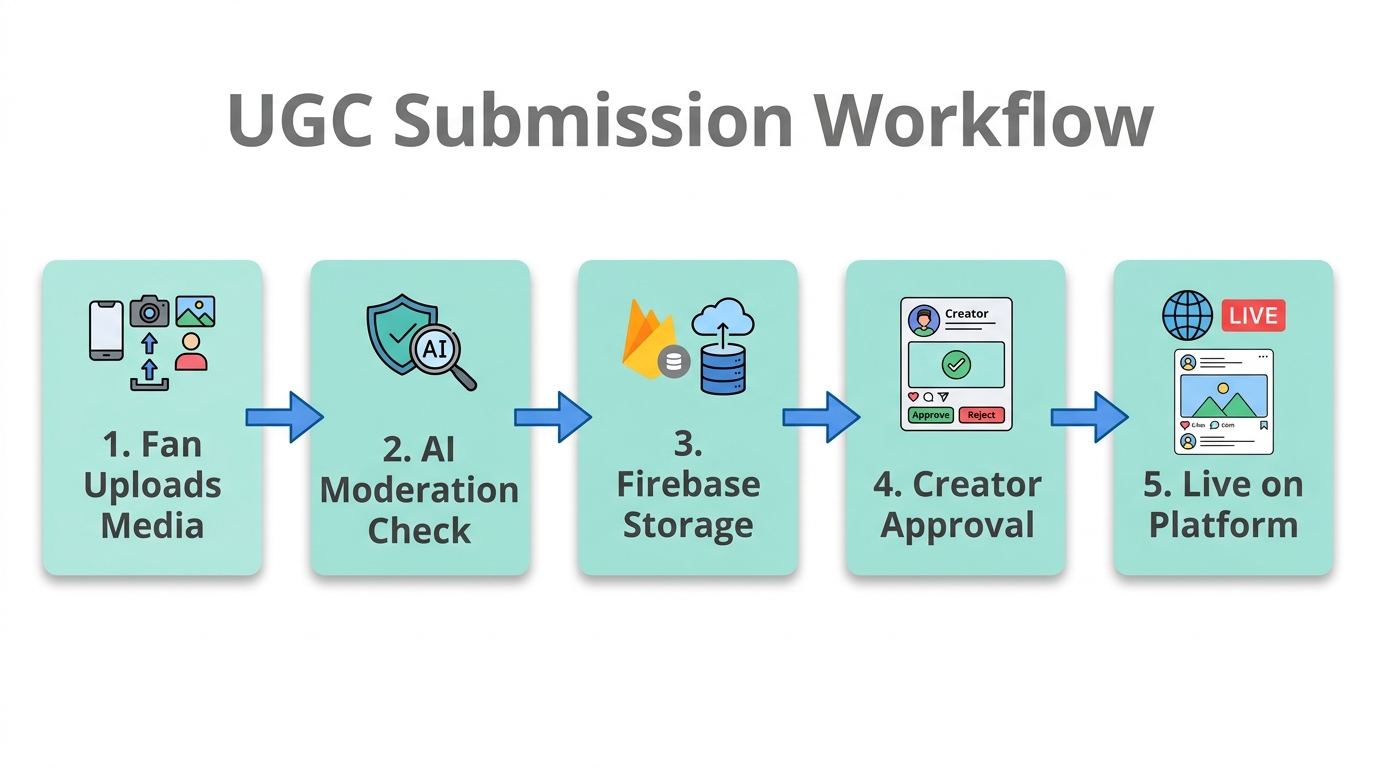
One of the most popular building community apps use cases in 2026 is the UGC submission portal. Instead of having fans DM you videos or email large files, you can build a dedicated app where they can upload content, sign releases, and receive rewards. Here is how to do it using the Firebase Studio "App Prototyping Agent."
Step 1: Define the Prototype
Navigate to the App Prototyping Agent in Firebase Studio. Instead of touching a line of code, you start with a prompt. For a UGC tool, you might say: "Build a mobile-responsive React app that allows users to upload video files to Firebase Storage, includes a form for their social handles, and displays a gallery of recent submissions."
Step 2: Refine the UI with AI
The agent will generate a plan, often naming the app something like "UGC-Hub." At this stage, the UI might look a bit plain—very "Googley" and functional. To improve the aesthetics, you can feed the AI screenshots of designs you like from platforms like Mobbin. By prompting "Make the UI look modern and screenshot-worthy like this reference image," the Gemini model will update the CSS and layout to match contemporary design standards.
Step 3: Connect to the Backend
Because you are in the Firebase ecosystem, connecting to a database is seamless. You can initialize Cloud Firestore with a single click inside the Studio. This is where your fan data and content metadata will live. For creators who want more control over their PostgreSQL instances, some still prefer connecting to Supabase, but Firebase Studio's native integration is the fastest path for most.
Google Firebase Studio vs. Lovable: Which Should You Use?
31:50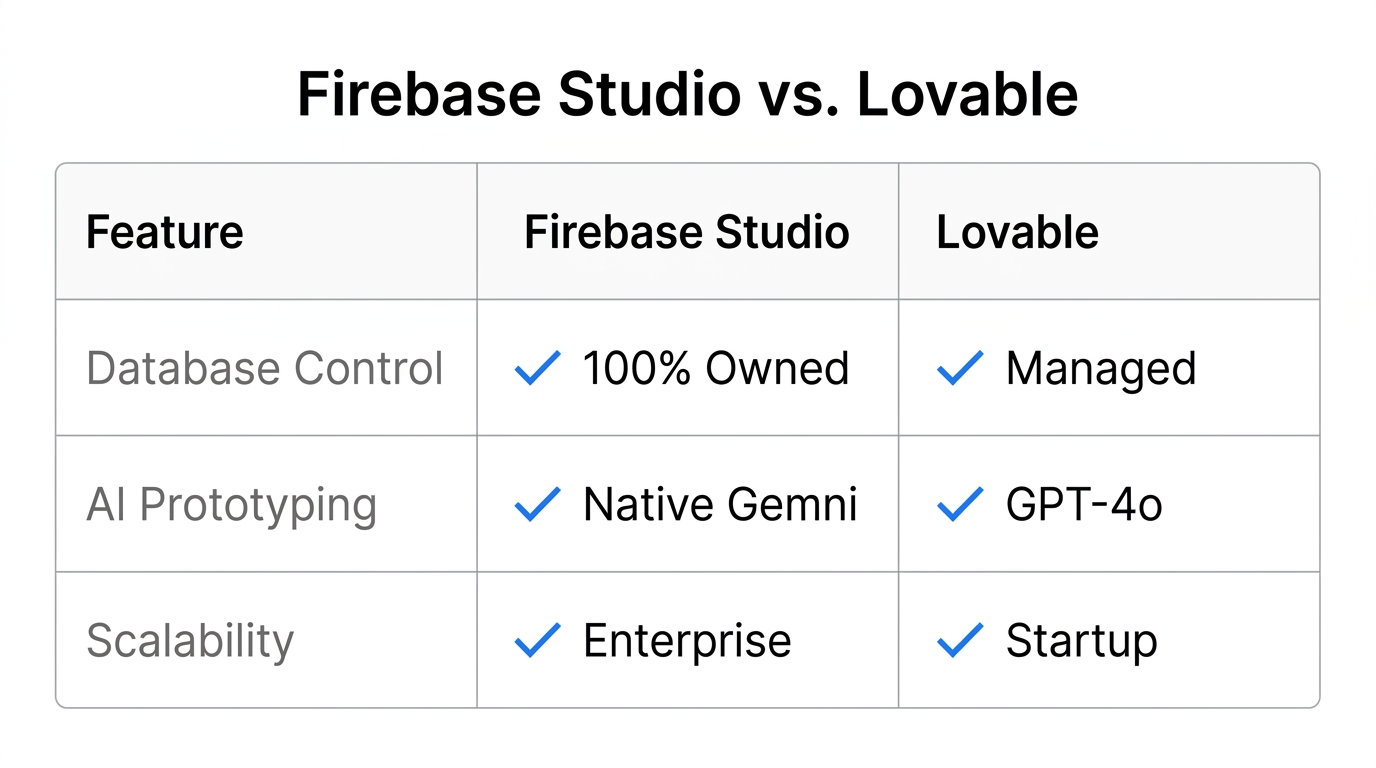
The choice between these two powerful tools often comes down to your comfort with code. While Lovable (formerly GPT Engineer) has taken the market by storm with its UI-first approach and incredible speed, Firebase Studio offers a more "advanced developer" experience.
| Feature | Google Firebase Studio | Lovable.dev |
|---|---|---|
| Learning Curve | Medium (Developer-friendly) | Low (Vibe-coder friendly) |
| UI Polish | Functional / Plain | High / Professional |
| Ecosystem | Google Cloud / Firebase | Supabase / GitHub |
| Cost | Free (Alpha/Preview) | Paid tiers available |
| Code Control | High (Full IDE access) | Moderate (Abstracted) |
If you are an influencer who wants an app that looks stunning out of the box, Lovable is likely your best bet. However, if you are building a tool that needs to scale within the Google ecosystem or requires deep technical customization, Google Firebase Studio is the superior long-term choice.
"Lovable is like Apple—it's beautiful and it just works. Firebase Studio is like Android—it's for the person who wants to get under the hood and customize every variable."
Owning the Data: User Authentication in 2026
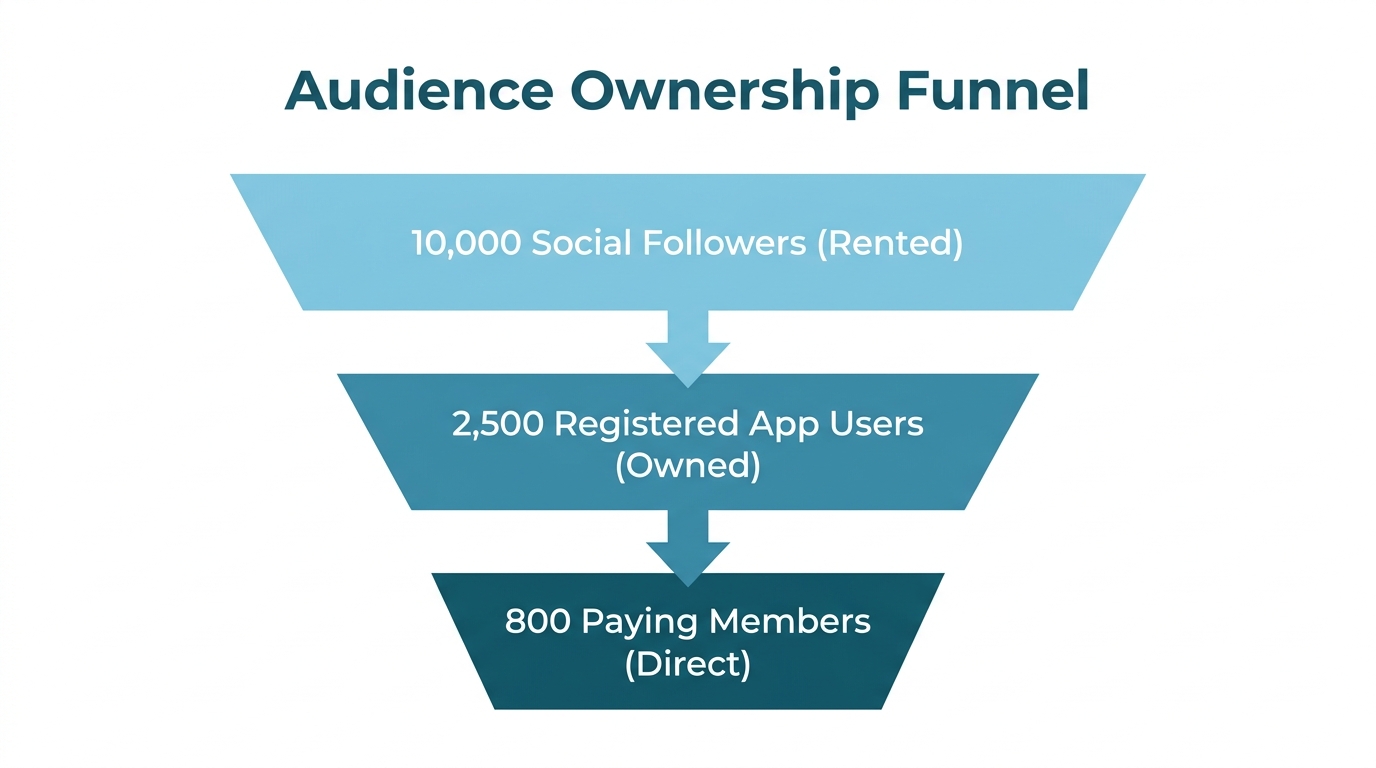
The most dangerous thing a creator can do in 2026 is rely on a third-party login without having access to the underlying email list. When building your community app, setting up User Authentication is non-negotiable. Firebase Studio makes this easy by integrating with Firebase Auth. This allows fans to sign in via Google, Apple, or Email.
By owning the authentication flow, you are building a first-party database. If a social media platform disappears tomorrow, you still have the direct line to your fans. Many creators are also using Stormy AI to cross-reference their community app sign-ups with social media engagement metrics to identify who their "super-fans" really are. This level of influencer marketing technology was once limited to enterprise brands, but now it's accessible to any individual creator.
Monetization: Adding the Stripe "Pay" Button
18:33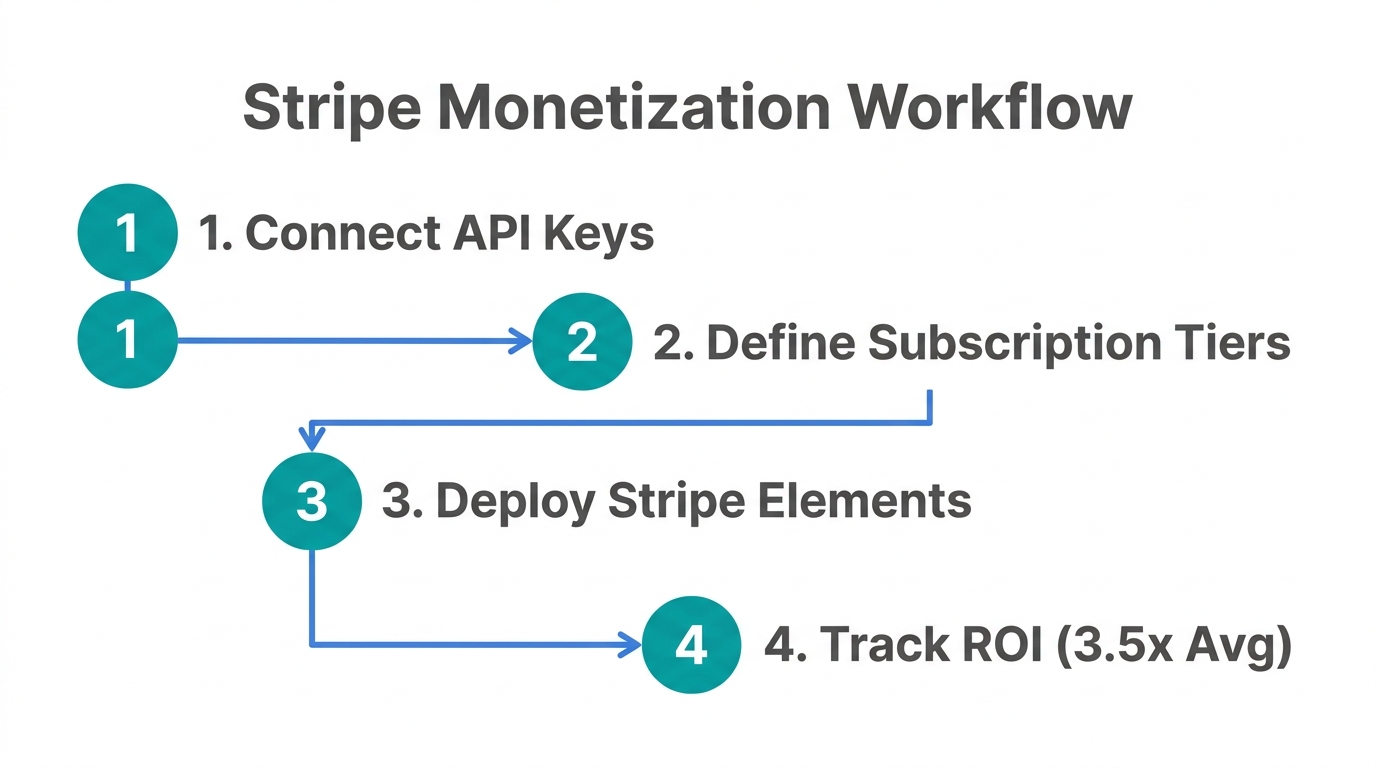
A community tool isn't a business until it generates revenue. In 2026, the creator economy has moved past simple ad-revenue sharing. Custom apps allow for direct monetization through subscriptions, digital products, or exclusive access. Adding a payment gateway is surprisingly simple in the current AI landscape.
You can prompt the Firebase Studio agent to: "Integrate a Stripe payment button that triggers a checkout flow for a $10/month community tier." The AI can generate the necessary server-side logic and frontend components to connect with Stripe. This turns your simple prototype into a full-stack business. Unlike platforms that take a massive cut of every transaction, using your own Stripe account means you only pay the standard 2.9% + 30¢ processing fee.
The Future is Full-Stack: Why You Should Start Building Today
29:05As we move through 2026, the distinction between "creator" and "founder" continues to blur. The tools available today—from the automated creator sourcing of Stormy AI to the free app prototyping of Google Firebase Studio—have removed every excuse for not owning your platform.
Whether you are building a simple budgeting tracker for your finance fans or a complex UGC management system, the steps are the same:
- Prototype your idea using natural language prompts.
- Refine the UI by feeding the AI design references.
- Own the data by setting up custom authentication.
- Monetize directly by integrating payment gateways.
Google Firebase Studio is currently in its early stages (Alpha/Preview), which means the models will only get smarter from here. By starting now, you are positioning yourself at the forefront of the creator economy 2026 movement. Stop renting your audience and start building your empire.
Ready to scale your creator operations? Use Stormy AI to find the perfect creators to help grow your new custom community app today.