In the high-stakes world of 2026 B2B sales, walking into a networking dinner or a Discovery call without deep, real-time intelligence is a relic of the past. Founders and sales leaders no longer have the luxury of spending hours scouring LinkedIn or legacy CRM notes. Instead, the most successful teams are leveraging AI sales automation 2026 strategies to create what industry insiders call the "Gary from Veep" effect: having an invisible assistant whispering every critical detail—from a prospect’s recent promotion to their company’s fluctuating usage data—directly into their workflow.
The secret sauce to this efficiency isn't just one tool; it’s the orchestration of Claude, Zapier, and your existing CRM. By utilizing the Model Context Protocol (MCP), sales teams can now bridge the gap between Large Language Models and private data silos like Salesforce and ZoomInfo. This article provides the complete playbook for automating high-level lead research and networking preparation, ensuring you never go into a meeting "cold" again.
"In 2026, the competitive advantage isn't having the data—it's having the AI orchestration to make that data actionable in seconds during a conversation."
The MCP Revolution: Bridging LLMs and CRM Data
 8:15
8:15For years, the biggest hurdle in Claude for sales teams was context. Claude was brilliant at reasoning but blind to your internal data unless you manually uploaded CSVs. In 2026, the Model Context Protocol (MCP) has changed the game. MCP is an open-standard protocol that allows AI agents to securely "talk" to your data sources without custom API integrations for every single task.
When you connect Claude to your Zapier account via an MCP server, you are giving the LLM a pair of eyes into your entire tech stack. It can see your Salesforce deals, your ZoomInfo enrichment data, and even your internal product usage metrics stored in Snowflake or Databricks. This isn't just about search; it's about autonomous reasoning across platforms.
Building the 2026 Sales Intelligence Stack
To build an instant dossier generator, you need a stack that prioritizes AI lead enrichment playbook principles. The goal is to move from "searching for info" to "receiving a brief." Your 2026 stack should look like this:
- Intelligence Engine: Claude 3.5 Sonnet or higher (for its superior reasoning and MCP support).
- Orchestration Layer: Zapier (to connect Claude to 8,000+ tools).
- CRM: Salesforce or other legacy CRMs for customer history.
- Enrichment: ZoomInfo for real-time contact details and firmographics.
- Internal Knowledge: Glean for searching internal Slack threads and Google Drive memos.
While this stack handles the deep research for known leads, platforms like Stormy AI are essential for the Search & Discovery phase. Before you can build a dossier, you need to find the right creators or prospects. Stormy AI allows you to search across TikTok, YouTube, and LinkedIn using natural language, which can then be fed into your automated workflow for enrichment.
Step-by-Step Playbook: The Instant Dossier Generator
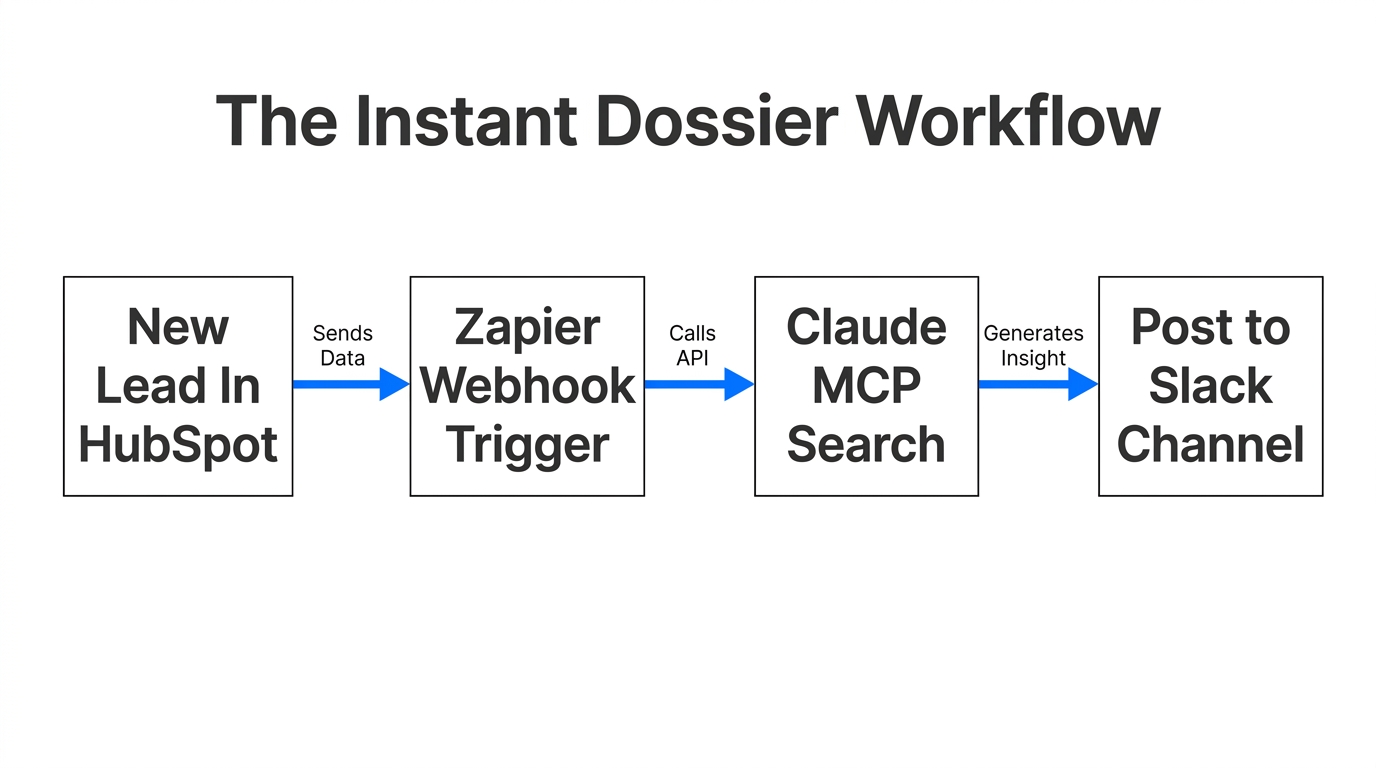
Follow these steps to set up your automated research assistant. This workflow is designed for founders who need to prep for a dinner or sales reps who need to qualify a lead in under 60 seconds.
Step 1: Set Up the Zapier MCP Server
First, navigate to the Claude interface and access the MCP settings. You will need to install the Zapier MCP server. This requires a Zapier Modern account. Once installed, you can authorize specific "Tools" from your Zapier account to be visible to Claude. For a sales dossier, you must authorize:
- CRM: Find Contact
- CRM: Get Deal
- ZoomInfo: Get Company Details
- Google Search (via Zapier)
Step 2: Authenticate Your Data Sources
Inside Zapier, ensure your CRM and ZoomInfo accounts are connected with the correct permissions. You want Claude to be able to see not just the contact name, but also the "Lifecycle Stage" and any "Recent Notes" left by other team members. This is critical for avoiding the embarrassment of asking a question the prospect answered six months ago.
Step 3: Create the "Gary" System Prompt
In Claude, create a new "Project" specifically for Sales Research. Use the following system prompt to refine its output style:
"You are Gary, a high-level executive assistant. Your goal is to provide a succinct, 1-page dossier for any name or company I provide. Use your connected tools to: 1. Find them in the CRM and check for existing deals or friction points. 2. Use ZoomInfo for current title and company size. 3. Search the web for recent news or podcast appearances. Format the output with clear headers: 'The Hook' (a personal icebreaker), 'The Business' (what they do), and 'The Relationship' (our history with them). Be 100x more specific than a general summary."
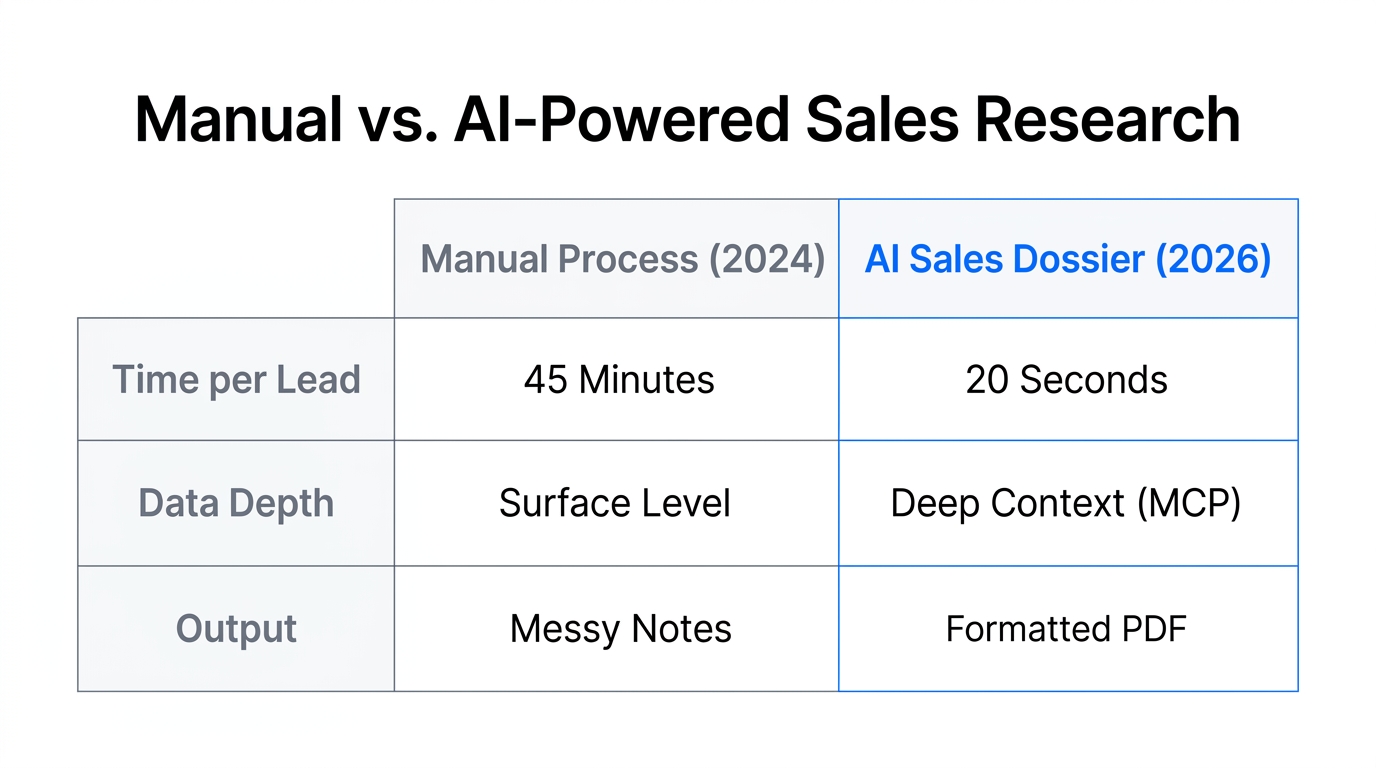
| Research Method | Manual (Old Way) | AI Automated (2026 Way) |
|---|---|---|
| Time Spent | 15-30 Minutes | 10-15 Seconds |
| Data Depth | Surface level LinkedIn info | CRM + Web + Enrichment + Usage |
| Consistency | Varies by rep | Standardized high-quality briefs |
| Context | Often outdated | Real-time API pulls |
Automating Lead Enrichment for Sales Teams
9:39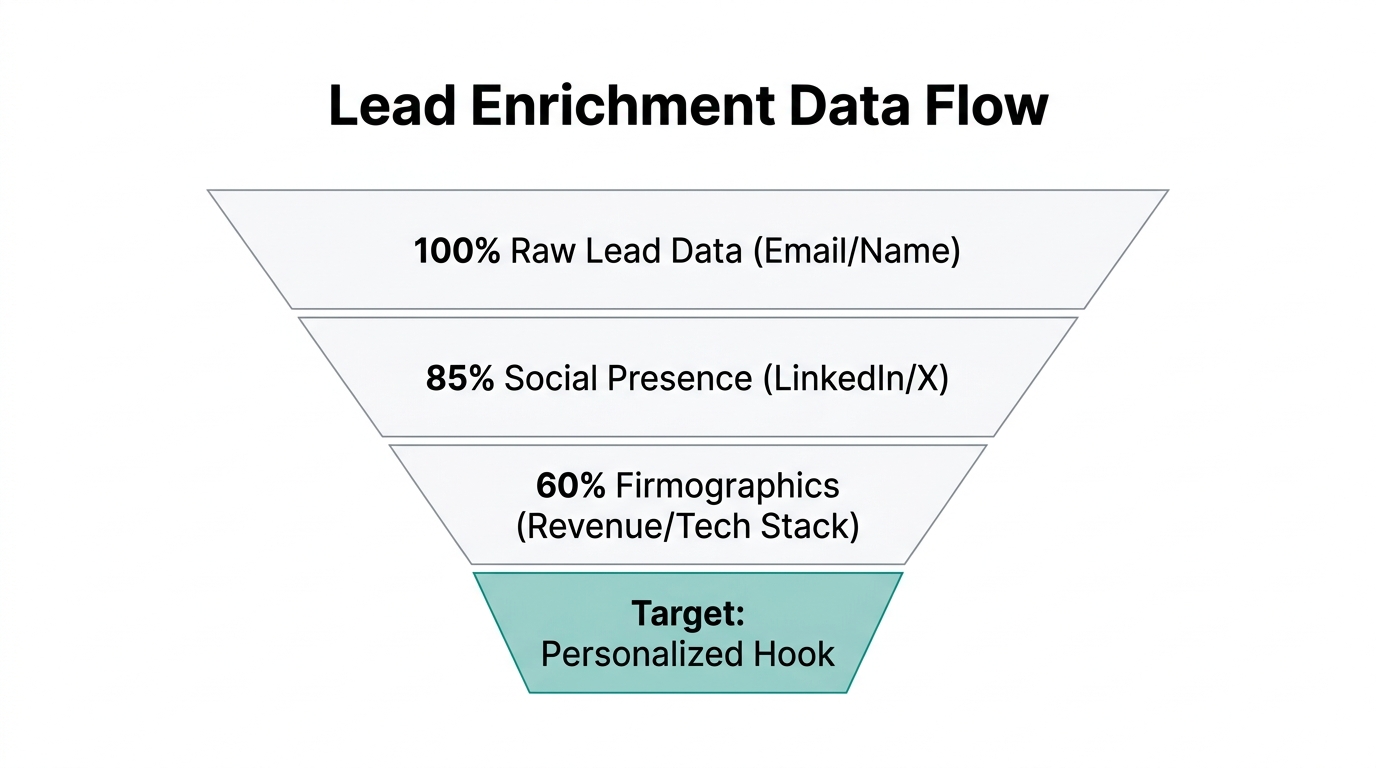
While on-demand dossiers are great for dinners, scale requires automation. By using Zapier Interfaces, you can build an internal "Research Portal" where any employee can enter a domain name and receive a structured HTML brief.
As the team at Zapier noted in their latest automation research, these internal tools use agents to wake up whenever a new lead is created. The agent doesn't just wait for a prompt; it proactively runs the research and posts the dossier into a Slack channel or a Notion page. This automation eliminates the "research tax" that typically eats up significant portions of a sales rep's week.
"The goal isn't just to save time; it's to ensure your team has the highest possible 'Context Quotient' before they ever pick up the phone."
Leveraging Internal Data: The Glean Integration
15:31One of the most advanced moves in the AI lead enrichment playbook is integrating Glean. Glean acts as an internal Google, indexing your Slack, Google Drive, and Jira. When Claude has access to Glean via Zapier, it can tell you: "Hey, your Lead Engineer actually chatted with this prospect on a developer forum last year." This level of organizational memory is impossible for humans to maintain manually but trivial for an AI agent.
For example, if you are meeting with a prospect from Netflix, Claude can pull public financial data from the web, usage data from your internal Databricks instance, and any internal strategy memos your team has written about the account. The result is a brief that feels like it was written by a tenured staffer who has been with the company for a decade.
Prompt Engineering Hacks for Sales Dossiers
25:44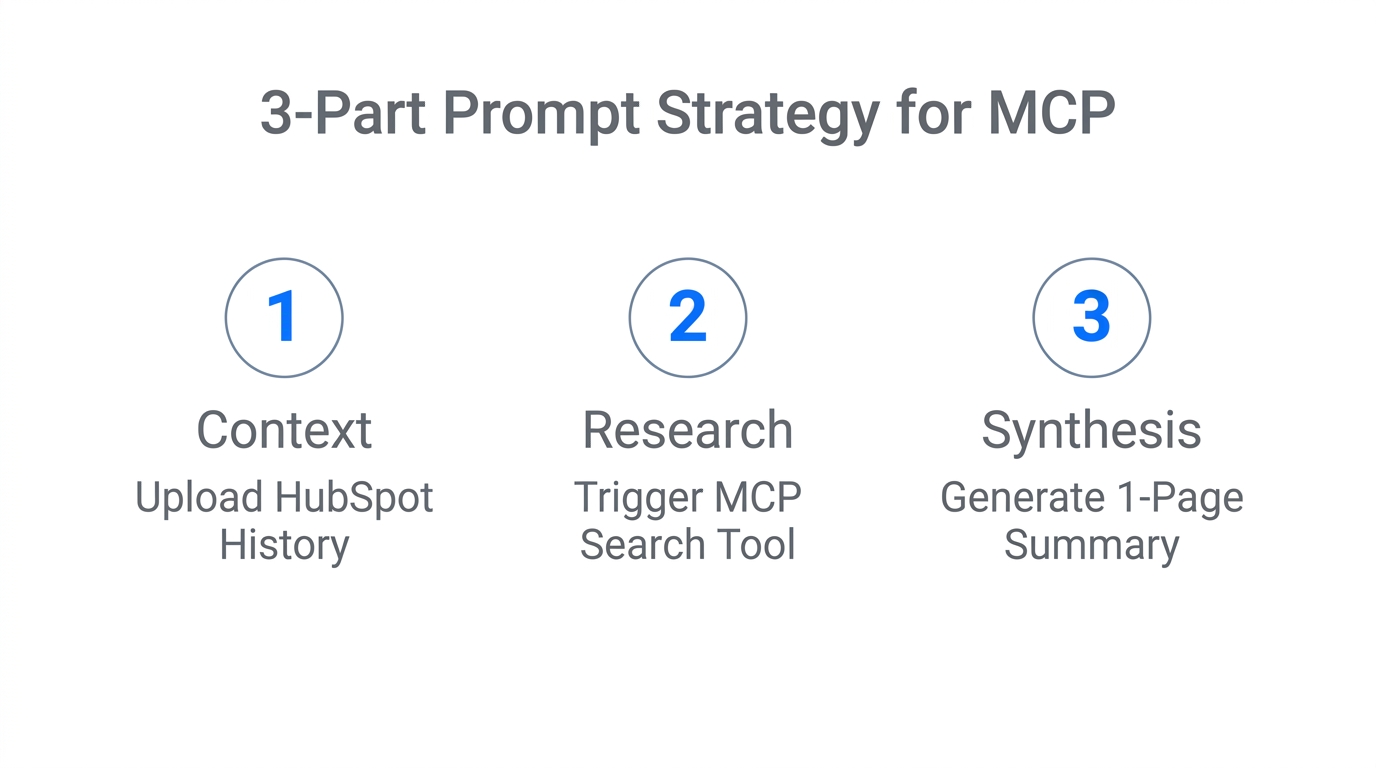
To get the most out of Claude for sales teams, you need to use specific prompting techniques. Don't just ask for a summary. Use these three "warm-up" hacks:
- The Meta-Prompt: Tell Claude, "I want to build a sales dossier for [Name]. Before you begin, ask me the 5 most important questions you need answered to make this brief exceptional."
- The "100x Specific" Rule: Always append "Be 100x more specific and avoid generic marketing speak" to your prompts. This forces the AI to look for granular data points like specific revenue numbers or niche product features.
- The Blind Spot Check: After the dossier is generated, ask, "What are the potential blind spots in this research? What is missing that could cause a meeting to go poorly?"
By treating Claude as a thought partner rather than a search engine, you unlock insights that go beyond simple data retrieval. This is the heart of AI sales automation 2026.
The Future of Autonomous Sales Intelligence
By the end of 2026, manual lead research will be considered a sign of a struggling organization. The tools available today—Claude's MCP, Zapier's autonomous agents, and CRM integrations—allow founders to operate with a level of intelligence previously reserved for Fortune 500 CEOs with massive research staffs.
Start small: set up one Claude Project, connect your CRM via Zapier, and try the "Gary" prompt for your next three meetings. Once you see the power of instant context, you’ll never look back. And if you need to find the creators and influencers to fill that pipeline in the first place, remember that Stormy AI can handle the discovery and outreach, feeding high-quality leads directly into your automated dossier workflow.
The era of the "informed-at-the-last-minute" salesperson is over. The era of the AI-orchestrated sales leader has begun. Use these tools to just do stuff, iterate fast, and build a research culture that your competitors can't match.