The era of the 'spreadsheet warrior' in digital advertising is rapidly coming to an end. For years, PPC managers have been tethered to the Google Ads dashboard, exporting endless CSV files and manually cross-referencing data in Excel. But as we move into 2025, a new paradigm is emerging: vibe querying. By leveraging the Model Context Protocol (MCP), marketers can now have real-time, natural language conversations with their live advertising data. This isn't just about efficiency; it's about shifting from reactive data entry to proactive strategy.
What is Claude MCP for Google Ads?
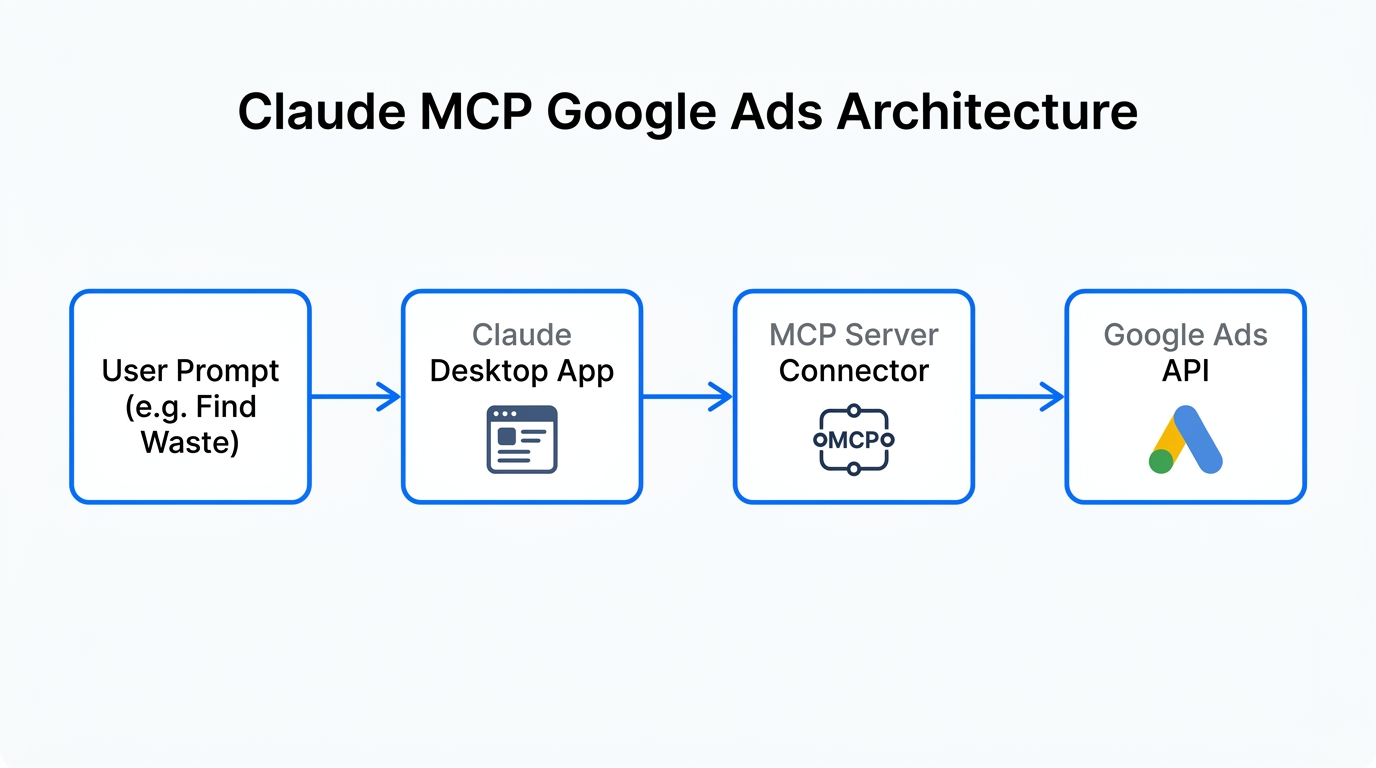
The Model Context Protocol (MCP) is an open standard developed by Anthropic that allows Claude to securely connect to external data sources. In the context of Google Ads management automation, an MCP server acts as a secure, real-time bridge between the LLM and the Google Ads API. Instead of pasting data into a chat window—which is often outdated by the time you hit enter—Claude can "reach out" and pull the exact metrics it needs to answer your questions.
This shift is critical because the search landscape is becoming more volatile. With Google’s AI Overviews causing a 35% reduction in organic clicks, as reported by WordStream, the competition in paid auctions is reaching a fever pitch. Marketers who use Claude MCP Google Ads setups can identify these shifts in minutes rather than days.
"The barrier to high-level data science in digital advertising is effectively disappearing as tools like Claude become the primary interface for account management." — Clicktrust Academy
The Playbook: Setting Up Your AI Marketing Workflow
Transitioning to an AI marketing workflow requires a few foundational tools. While you can build your own server, several no-code and low-code options have emerged to bridge the gap for non-developers.
Step 1: Install Claude Desktop
To use MCP servers, you must use the local Claude Desktop client. The web version currently does not support local MCP configurations. Once installed, you will need to locate your claude_desktop_config.json file, which is where you will define your connections.
Step 2: Choose Your Connection Method
Depending on your technical comfort level, you have three primary paths to connect your Google Ads account:
- The Official Route: Google has released an experimental Google Ads MCP repository on GitHub. This is ideal for those comfortable with Python and developer tokens.
- The No-Code Route: Tools like Adzviser or GAQL.app provide hosted endpoints. You simply authenticate your Google account, and they provide the snippet to paste into your Claude config.
- The Automation Route: You can use n8n to build a custom MCP server node, allowing you to chain Google Ads data with other tools like your CRM or Slack.
| Feature | Manual (Legacy) | Looker Studio | Claude MCP |
|---|---|---|---|
| Data Freshness | Static (CSV) | Real-time | Real-time + Context |
| Analysis Speed | Hours | Minutes (Visual) | Seconds (Natural Language) |
| Actionability | Manual execution | Manual execution | Suggested Scripts/Actions |
| Complexity | High | Medium | Low (Conversational) |
Playbook 1: Semantic Negative Keyword Discovery
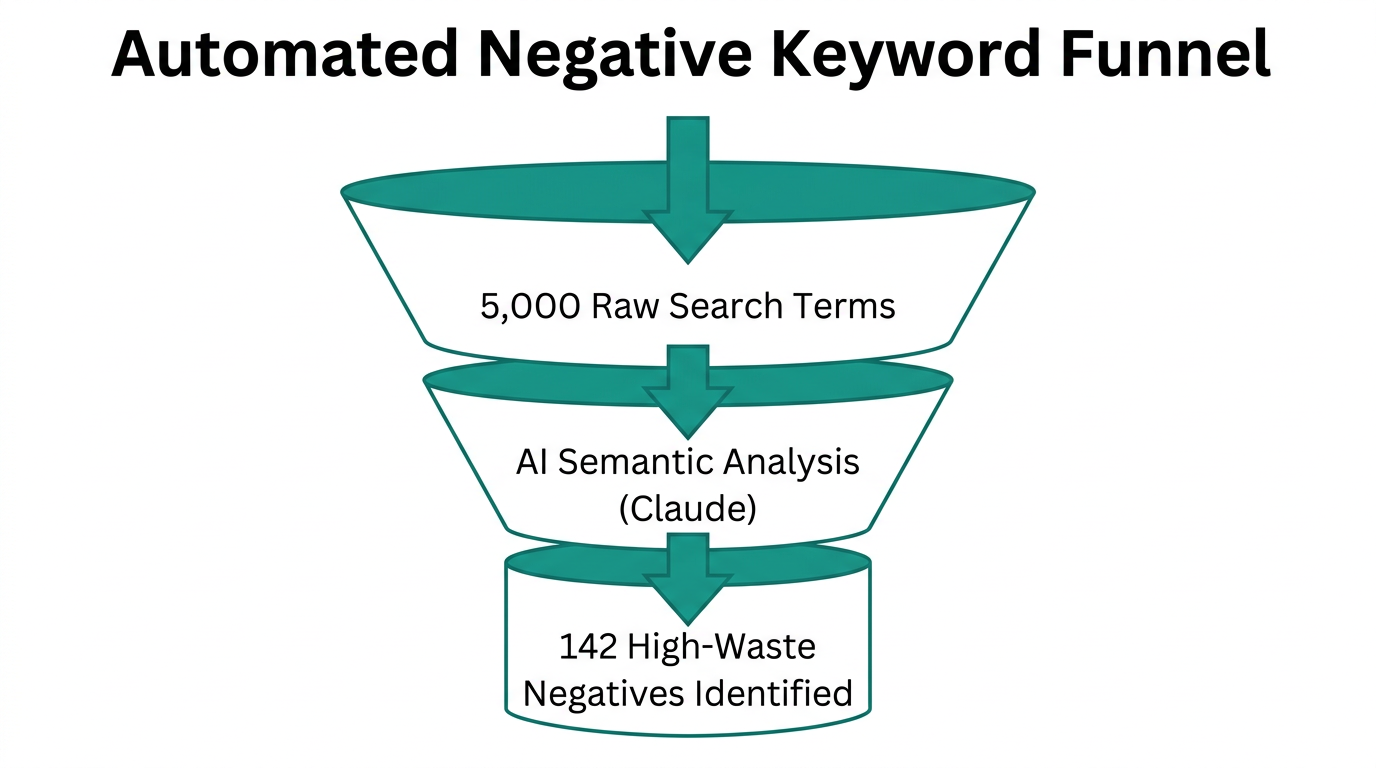
Traditional negative keyword discovery involves filtering for "zero conversions" and scanning lists for irrelevant terms. With AI for paid search, you can perform semantic intent analysis. Instead of just looking for specific words, Claude understands the *intent* behind the query.
The Strategy: Ask Claude to analyze search terms from the last 30 days. Specifically, prompt it to: "Identify high-spend queries with zero conversions that do not match our brand intent. Focus on users looking for 'free' versions or competitors we don't want to target, and format them as a negative keyword list for a 'Broad Match' campaign."
Because Claude understands context, it can catch variations that traditional filters miss, potentially saving you thousands in wasted ad spend. Advertisers using AI-driven optimization like this report an average 25% increase in conversions (Marketing LTB).
Playbook 2: Automating Weekly Performance Reports
Executive reporting often feels like a chore. Most managers spend hours in Google Ads or Looker Studio just to summarize what happened. Claude MCP allows you to generate these summaries instantly using "Vibe Querying."
By asking, "Compare our performance this week vs. last week. Which 3 ad groups saw the biggest jump in CPA, and what was the likely cause based on CTR and Search Lost IS (budget)?", you get an executive summary ready for Slack or email in seconds.
For agencies managing multiple clients, tools like Stormy AI can complement this workflow. While Claude handles the technical PPC data, Stormy AI helps you source the UGC creators and influencers needed to refresh your ad creatives—ensuring the 'creative' side of your campaign is as automated and high-performing as your 'technical' side.
"The official Google Ads MCP acts as a bridge that ensures your sensitive data remains local and secure, unlike older 'glue-code' integrations." — Malcolm Gibb, PPC Expert
Playbook 3: Strategic Budget Reallocation
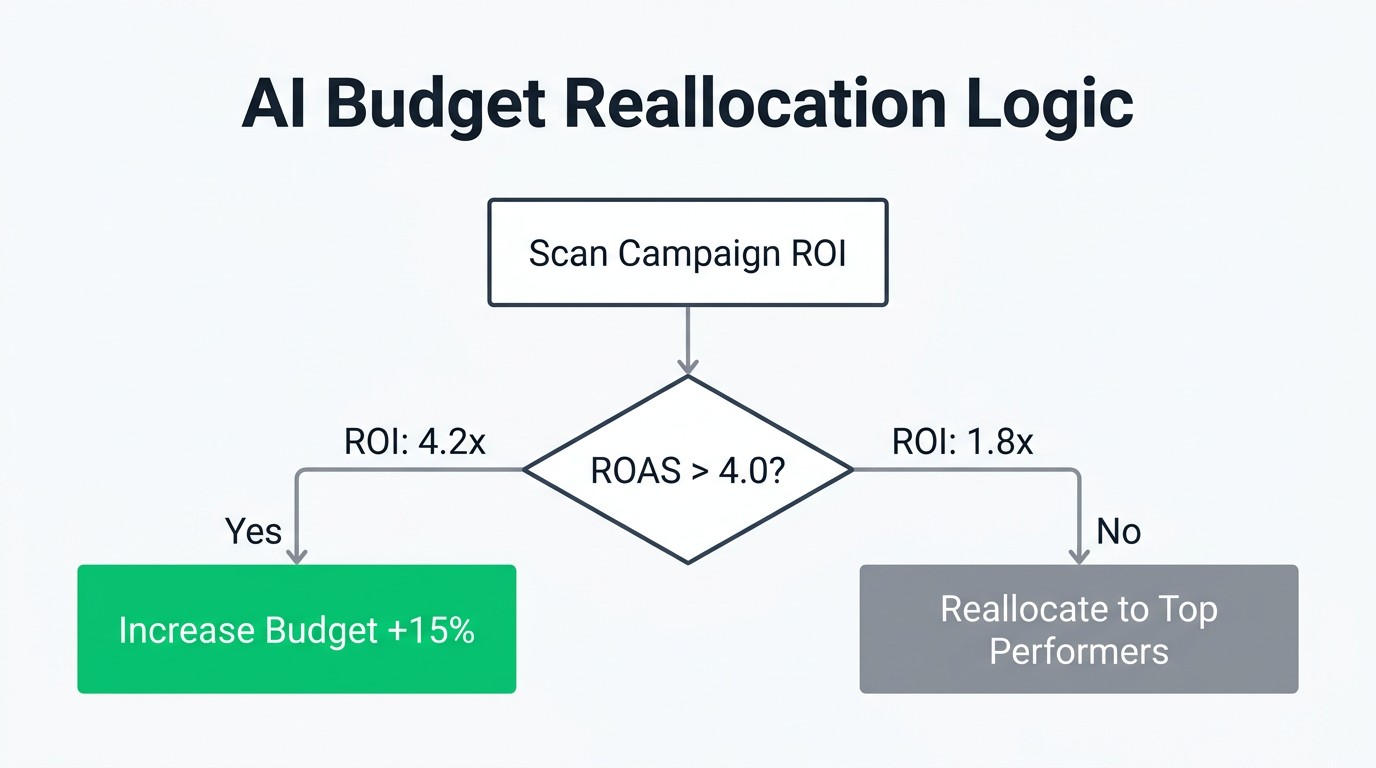
Budget management is where many PPC managers struggle with "analysis paralysis." Claude can act as a fractional strategist by looking at ROAS across your entire account. PPC automation 2025 isn't just about setting a target CPA; it's about understanding marginal returns.
Use a prompt like: "Analyze my current ROAS across 'Brand' and 'Generic' campaigns. If I have an additional $5,000 this month, which specific campaigns are currently limited by budget but maintaining a ROAS above 4.0?"
Claude can instantly calculate where that next dollar will do the most work, allowing you to move budget with confidence rather than guesswork.
Security and Common Pitfalls
While the potential for Google Ads management automation is massive, there are critical security considerations. As noted by experts like Malcolm Gibb, you must be careful with third-party servers. Always prefer official or well-vetted enterprise connectors to avoid exposing your developer tokens.
- Read-Only vs. Write Access: Most current MCP setups are "read-only" for security. This means Claude can analyze data but cannot change your bids. Treat Claude as an analytical partner, not a hands-off pilot.
- Account Scalability: Many open-source MCPs are tied to a single user's authentication. Agencies should look for enterprise-grade solutions if they need to switch between dozens of client accounts.
- Creative Synergy: Don't forget the ads themselves. Use Meta Ads Manager or TikTok Ads Manager data alongside Google Ads for a holistic view of your AI marketing workflow.
The Future: Toward Agentic Workflows
We are currently in the "Read" phase of AI automation. The next step is the agentic workflow, where Claude will not only suggest a bid change but—with your approval—execute it via a "Write" server. This will turn PPC managers into "Account Architects," focusing on high-level strategy and creative direction while the AI handles the tactical heavy lifting.
To stay ahead, start by integrating Claude into your daily routine. Connect your account, ask the "vibe" questions you've always wanted to know, and watch as your 10-hour-per-week manual processing task vanishes into a 10-second conversation. The future of PPC is conversational; make sure you're the one holding the microphone.