Enter Claude Code. Unlike the standard web interface most marketers are familiar with, Claude Code is a developer-centric CLI (Command Line Interface) agent that can interact directly with your file system, execute code, and—most importantly—connect to external APIs via the Model Context Protocol (MCP). This playbook will guide you through using this powerful tool to automate your Meta Ads automation 2025 workflows, from building "vibe-coded" analytics dashboards to implementing automated "Kill/Scale" reports.
The "Thinking Partner" Paradigm in Growth Marketing
Anthropic’s approach to AI emphasizes the concept of a "Thinking Partner." For a growth marketer, this means Claude isn't just generating a catchy headline; it is amplifying human problem-solving by handling the heavy lifting of data processing and technical integration. According to research from MarketingLTB, using Claude can reduce ad copy and blog drafting time by 40–65%, while improving overall marketing workflow speed by up to 44%.
By shifting to a CLI-based workflow, you enable a more technical approach to AI media buying tools. You can now feed your terminal direct exports from Meta Ads Manager, ask it to identify patterns across thousands of rows of data, and even write scripts that automate the generation of creative testing matrices.
"The advertisers who win in 2025 aren't those with the biggest budgets, but those who can test 11x more creatives to find the 11x variance in ROAS."
Step 1: Setting Up Claude Code for Marketing Operations
Before you can automate your media buying, you need to establish your technical foundation. Claude Code requires a basic understanding of the terminal, but its "agentic" nature means it can actually help you install its own dependencies if you get stuck.
- Install Node.js: Ensure you have a modern version of Node.js installed on your machine.
- Install the CLI: Open your terminal and run the command:
npm install -g @anthropic-ai/claude-code. - Authentication: Run
claudein your terminal and follow the prompts to link your Anthropic Console account. - Review the Documentation: Familiarize yourself with the official Claude Code CLI documentation to understand the permission levels for file editing and command execution.
Once installed, you should initialize a dedicated folder for your marketing projects. Inside this folder, Claude can maintain context of your active campaigns, branding assets, and performance spreadsheets.
Step 2: Connecting the Model Context Protocol (MCP) to Meta Ads
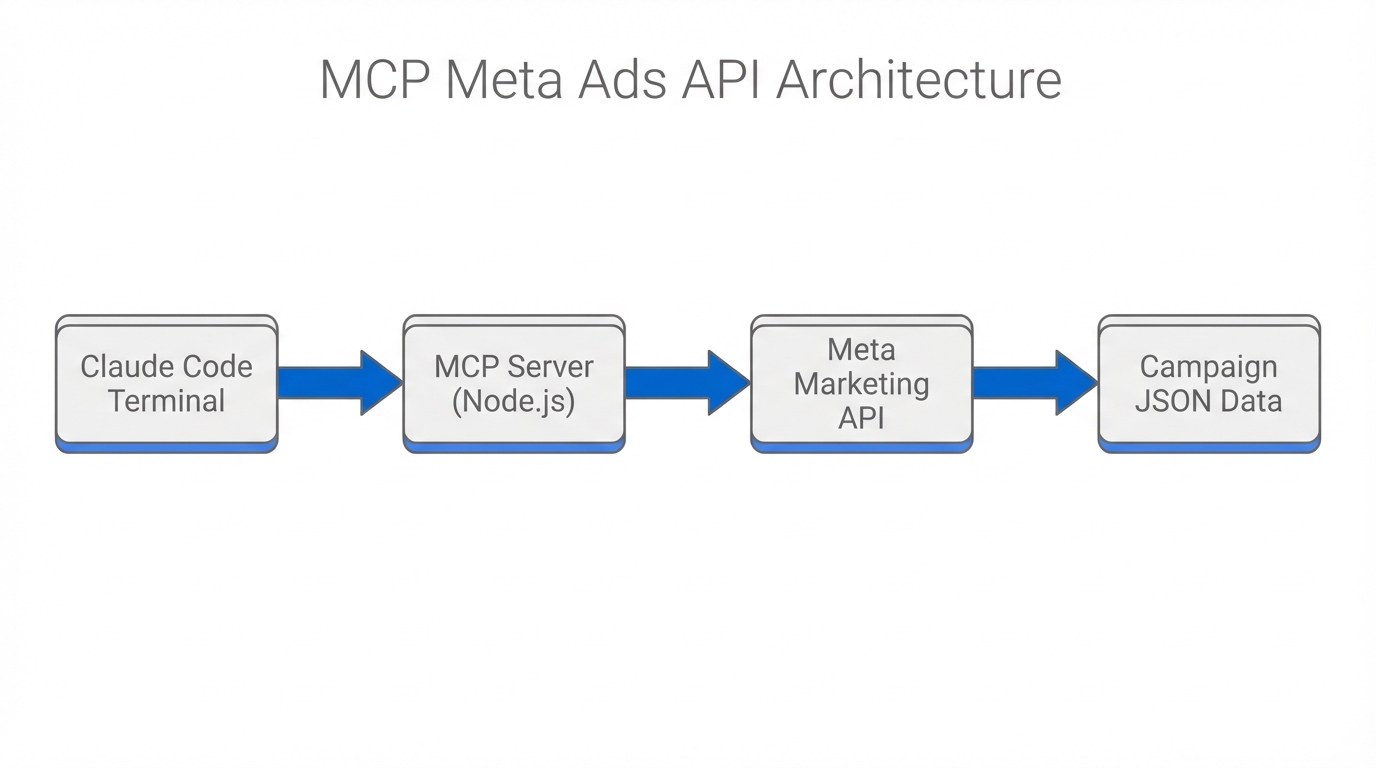
The true power of Claude Code lies in the Model Context Protocol (MCP). This allows the AI to "step outside" its training data and interact with live tools. To automate your Meta Ads workflow, you need a bridge between the Meta Marketing API and your Claude CLI.
Tools like Pipeboard provide a dedicated MCP connector for Meta Ads, allowing Claude to query live data without you having to manually export CSVs. Alternatively, more advanced users can use n8n to build a custom webhook that feeds campaign performance data directly into a Claude Code session. This connection enables Claude to perform comprehensive PPC audits with over 180 automated checks in seconds.
| Feature | Manual Workflow | Claude Code + MCP |
|---|---|---|
| Data Collection | Manual CSV Exports | Direct API Querying |
| Creative Analysis | Subjective Review | Automated Hook/Hold Calculation |
| Reporting | Static Dashboards | Conversational "Vibe" Audits |
| Optimization | Periodic Adjustments | Real-time fatigue detection |
Step 3: Building a 'Vibe Coded' Creative Analytics Tool
One of the most exciting use cases for Claude Code is "vibe coding"—the process of describing a functional tool in natural language and having the AI build the logic for you. For growth marketers, the holy grail is creative resonance analytics.
You can instruct Claude Code to build a Python script that calculates your Hook Rate (3-second views / Impressions) and Hold Rate (ThruPlays / 3-second views) for every video asset in your account. As shown in Mike Futia's technical demos, you can simply ask Claude: "Build a script that reads my Meta Ads CSV and generates a markdown table showing the top 5 videos by Hook Rate, then flag any video where the CTR has dropped more than 20% in the last 7 days."
This type of marketing API automation allows you to move from guessing which creative works to having a data-backed "Kill/Scale" report ready every Monday morning. While these scripts are running, platforms like Stormy AI can help you source new UGC creators to replace those fatigued assets, ensuring your creative pipeline never runs dry.
"In 2025, the competitive advantage is no longer the media buy itself, but the speed at which you can interpret creative performance data and iterate."
Step 4: Implementing Automated Fatigue Detection
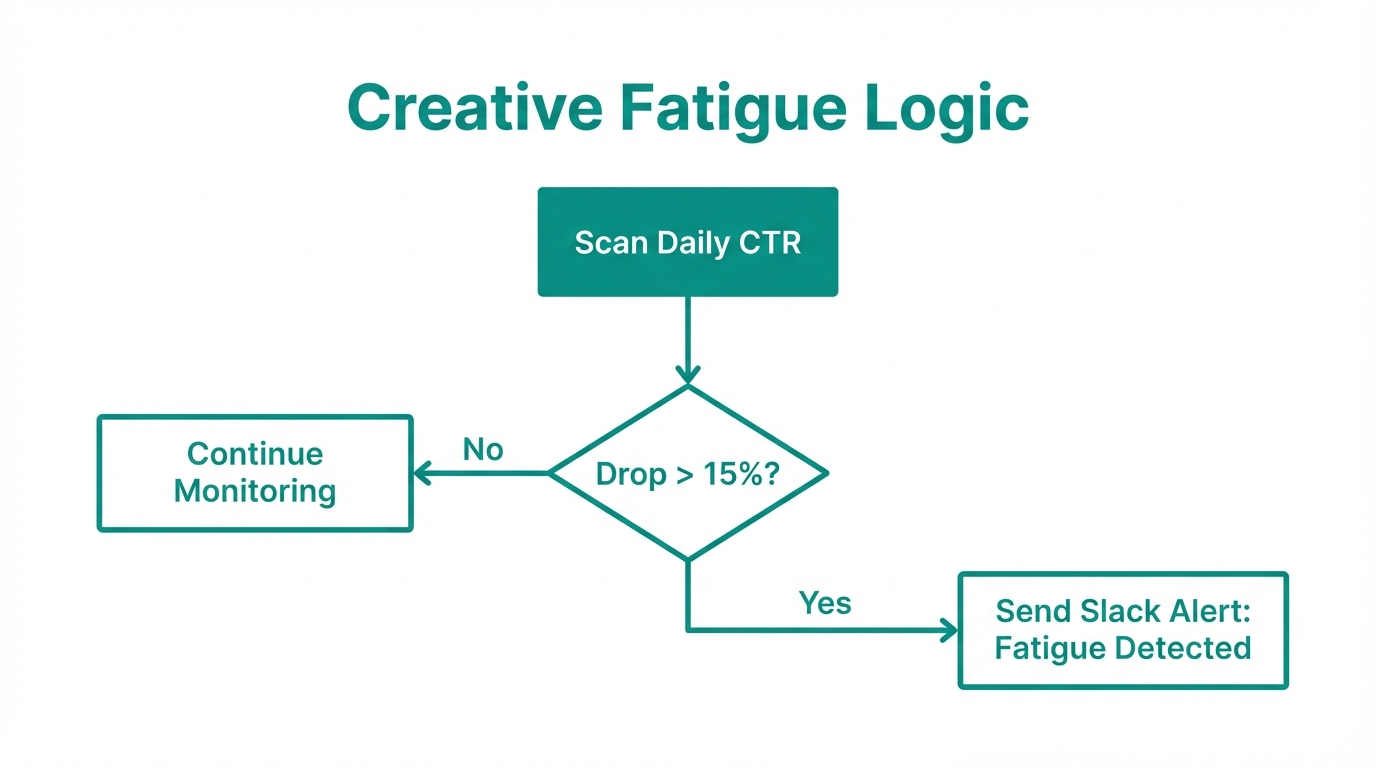
Creative fatigue is the silent killer of ROAS. By feeding your live data into Claude, you can run a "Fatigue Audit" using a standardized logic set. Industry benchmarks from Social Media Examiner suggest that if your Frequency is > 2.5 and your CTR has dropped > 20% over the last week, your creative is likely stale.
Using the /plan command in Claude Code, you can map out a 30-day testing matrix to combat this. Ask Claude: "/plan a 30-day creative testing cycle. We need to test 3 new hooks for our best-selling product. Suggest the messaging angles based on our top-performing historical ads in the CLAUDE.md file." Claude will then draft a structured plan that includes budget allocation recommendations, following the "Rule of 20%": never editing budgets by more than 20% at once to avoid resetting Meta's learning phase.
Step 5: Maintaining Brand Memory with CLAUDE.md
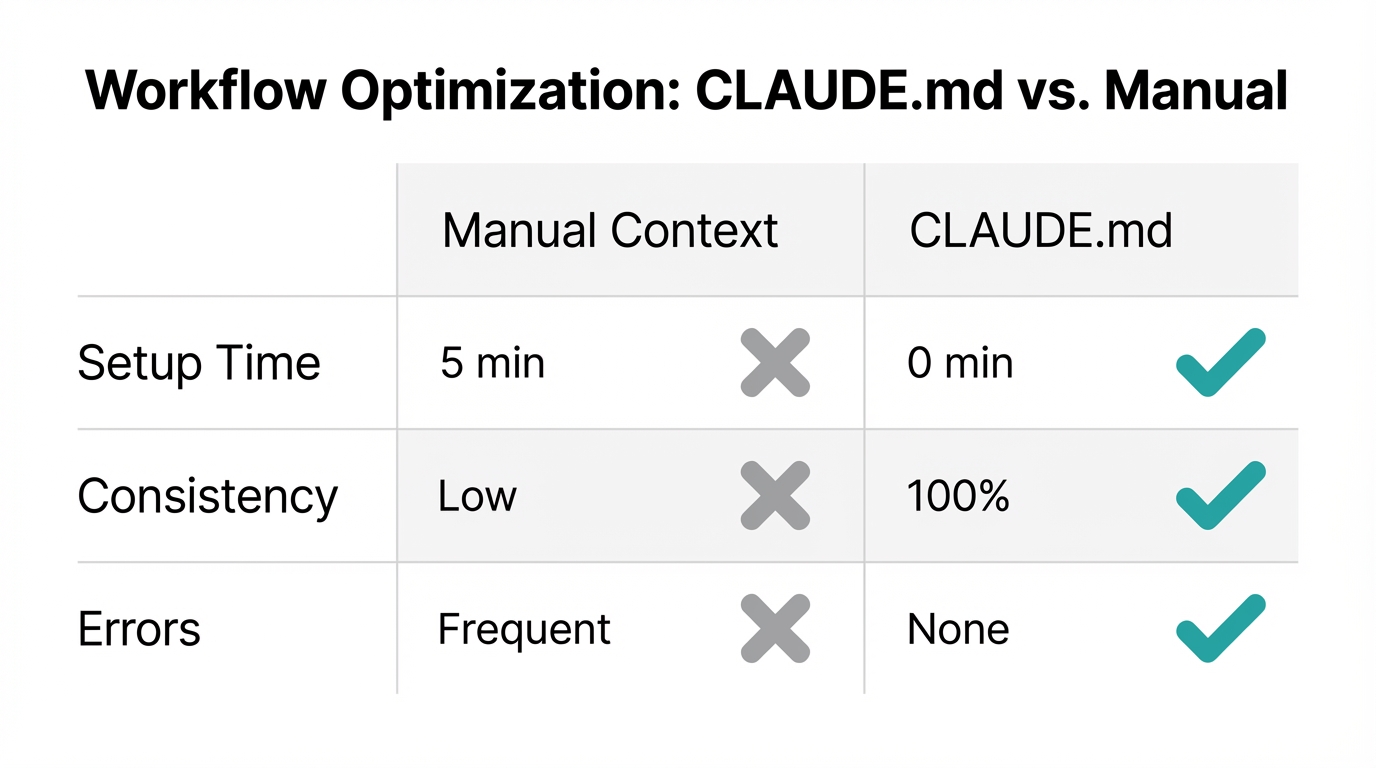
A common mistake in AI automation is "Prompt Bloat"—repeatedly telling the AI who your target persona is and what your brand voice sounds like. Claude Code solves this with the CLAUDE.md file.
This file acts as the agent's persistent memory. You should populate it with:
- Target Personas: Detailed demographics and psychographics.
- Brand Style Guide: Tone of voice, forbidden words, and preferred formatting.
- Winning Hooks: A running list of hooks that have historically achieved a high ROAS.
- Technical Specs: API keys (stored securely) or file paths for your data exports.
When you start a session, Claude reads this file and immediately understands the context. This ensures that when it suggests a creative refresh for a fatigued ad, the new copy aligns perfectly with your established brand identity.
Best Practices for 2025 Meta Ads Automation
While Claude Code provides incredible power, it requires human guardrails. As documented by DesignRush, audiences in 2025 have stopped tolerating low-quality, pure AI content. The "AI Granny" incident, reported by The Verge, where Meta's automated tools replaced a luxury brand's creative with a low-res AI image, serves as a warning: never disable human review for AI-generated assets.
To avoid common pitfalls:
- Avoid Literalism: AI can be too literal. If you optimize for "Traffic" instead of "Conversions," Claude and Meta will find you the cheapest possible clicks (often bots), not customers.
- Sub-Agent Strategy: Don't ask one Claude session to do everything. Use one agent for technical API analysis, one for hook writing, and a final "Brand QA" agent to review everything.
- UGC Over AI: Despite the rise of generative visuals, real human content from platforms like Stormy AI consistently outperforms 100% AI-generated video in Meta's algorithm.
Conclusion: Building Your AI Growth Engine
The future of growth marketing automation isn't about finding a "set it and forget it" button. It's about building a robust infrastructure where AI handles the data processing, reporting, and initial creative drafting, while the human marketer provides the strategic vision and emotional resonance.
By implementing Claude Code into your workflow, you can drop your average CPC from $1.72 to $1.38 through better predictive targeting and more frequent creative testing, according to latest ad cost benchmarks. Start by installing the CLI, setting up your CLAUDE.md file, and automating just one report next Monday. Once you experience the speed of "vibe coding" your own marketing tools, you'll never go back to manual spreadsheets again.