For years, growth marketers have been locked in a manual struggle against the rising costs of digital advertising. We’ve all been there: staring at spreadsheets, trying to figure out why the Cost Per Acquisition (CPA) is climbing despite a "healthy" click-through rate. In 2025, the game has changed. Eliminating wasted Google Ads spend is no longer just about adding negative keywords once a week; it’s about agentic orchestration. We are moving from the era of manual "prompt engineering" to autonomous "action AI" using tools like Claude Code.
This playbook will walk you through how to use the Claude Code CLI and specialized Model Context Protocol (MCP) servers to identify the "silent killers" in your ad account—from invalid traffic to double-counting conversions—and how to automate the remediation process entirely using modern tools like Zapier and n8n.
The Financial Reality: Why Your Google Ads Budgets Bleed
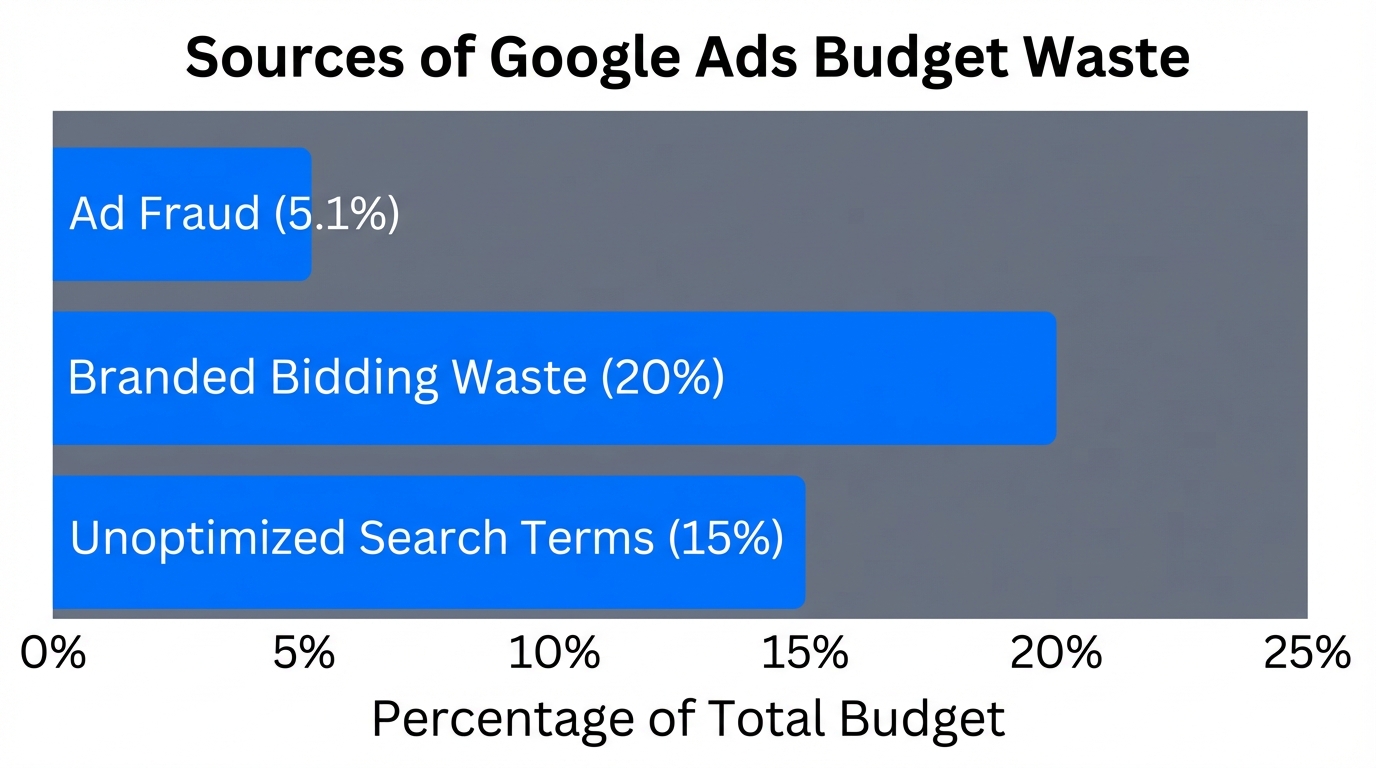
Wasted spend in Google Ads is rarely the result of one catastrophic mistake. Instead, it occurs in the tiny gaps of human management. According to recent industry data from Pixalate, approximately 5.1% of all ad clicks were fraudulent in 2024, leading to staggering global losses of nearly $38 billion annually. If you aren't auditing for invalid traffic, you are likely handing over 5% of your budget to bots.
Furthermore, many brands fall into the trap of "uncontested branded bidding." Research from WordStream indicates that 20-30% of branded search ads run in auctions with zero competition. This means brands are paying for clicks they would have received organically for free. Finally, it is estimated that over 25% of spend in the average account is lost to poor targeting and "set-and-forget" bidding strategies that fail to adapt to real-time market shifts.
"The most expensive click is the one you didn't need to buy in the first place—branded bidding on zero-competition terms is a primary culprit."
The Shift to Agentic Marketing: AI as the Auditor
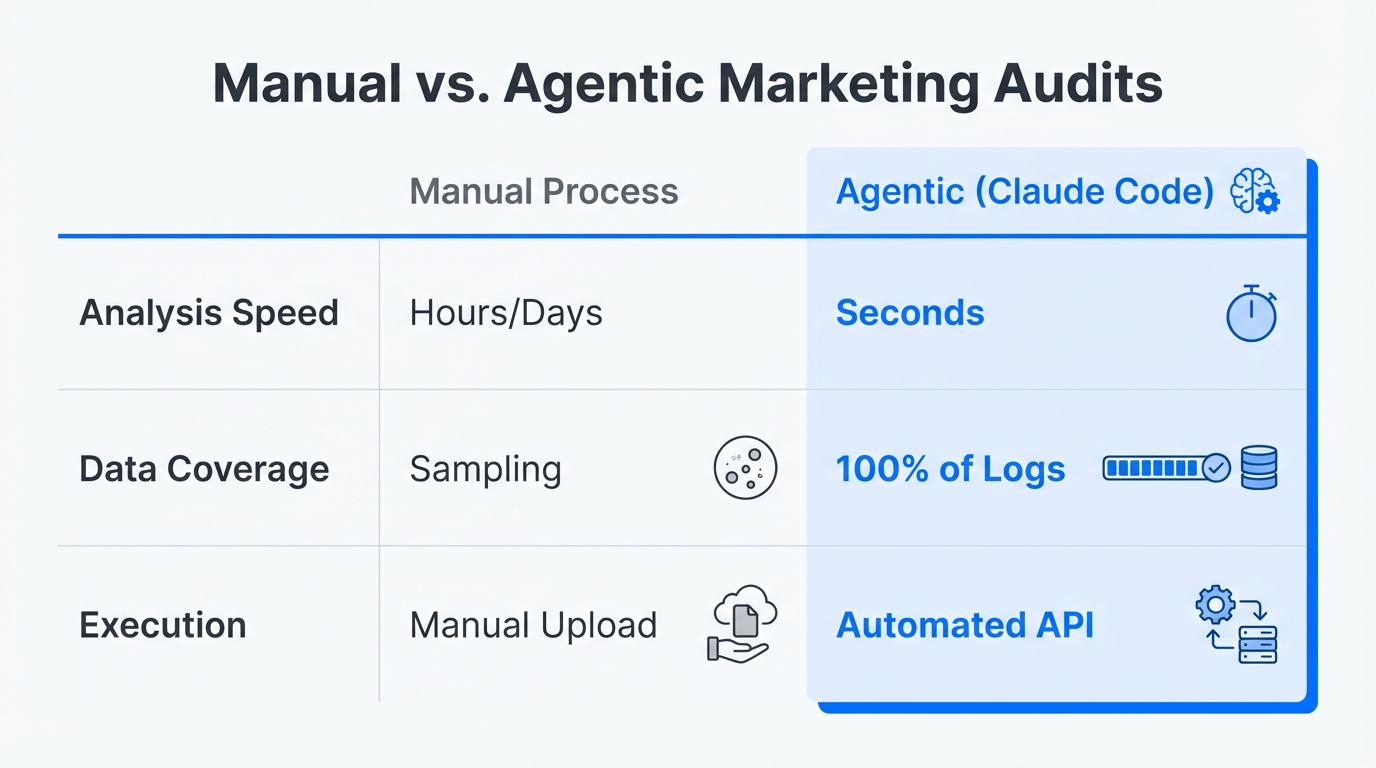
The industry is rapidly shifting from using AI as a simple copywriter to using it as a technical auditor. This transition is powered by the Model Context Protocol (MCP), the new gold standard for connecting Large Language Models (LLMs) to live data. MCP allows Claude to "talk" directly to the Google Ads API without requiring manual CSV exports or tedious data cleaning.
As 62% of CMOs reallocate budget toward Generative Engine Optimization (GEO), Google Ads are being audited specifically for how they align with LLM-driven search patterns. Experts are now using Claude Code to build "autonomous watchdogs" that monitor CPAs 24/7. These agents can pivot budgets in real-time, reducing campaign launch times by as much as 65% by handling the heavy lifting of structural setup and initial optimization.
| Feature | Manual Audit | Claude Code Audit |
|---|---|---|
| Speed | 4-8 Hours | < 5 Minutes |
| Data Depth | Surface-level spreadsheets | Deep API-level analysis |
| Consistency | Prone to human error | 190+ automated checks |
| Remediation | Manual adjustments | Automated code commits |
Step-by-Step Setup: Installing Your AI Auditor
To run a technical audit, you need to treat your Google Ads account like a codebase. Claude Code is a command-line tool that acts as your technical marketing engineer. Follow these steps to get started:
Step 1: Install the Claude Code CLI
You will need Node.js installed on your machine. Open your terminal and run the following command to install the CLI globally:
npm install -g @anthropic-ai/claude-code
Step 2: Connect via MCP Servers
Claude needs a bridge to reach your Google Ads data. You can use an open-source framework like LobeHub's Google Ads MCP or a no-code connector like Adzviser. This allows Claude to query your performance metrics directly through the API.
Step 3: Initialize the Audit Skill
Download and initialize specialized scripts like Claude Ads, which contains over 190 automated checks for account health. You can find these community-driven scripts on repositories like Claude Ads GitHub.
Executing the Audit: Identifying the Silent Killers
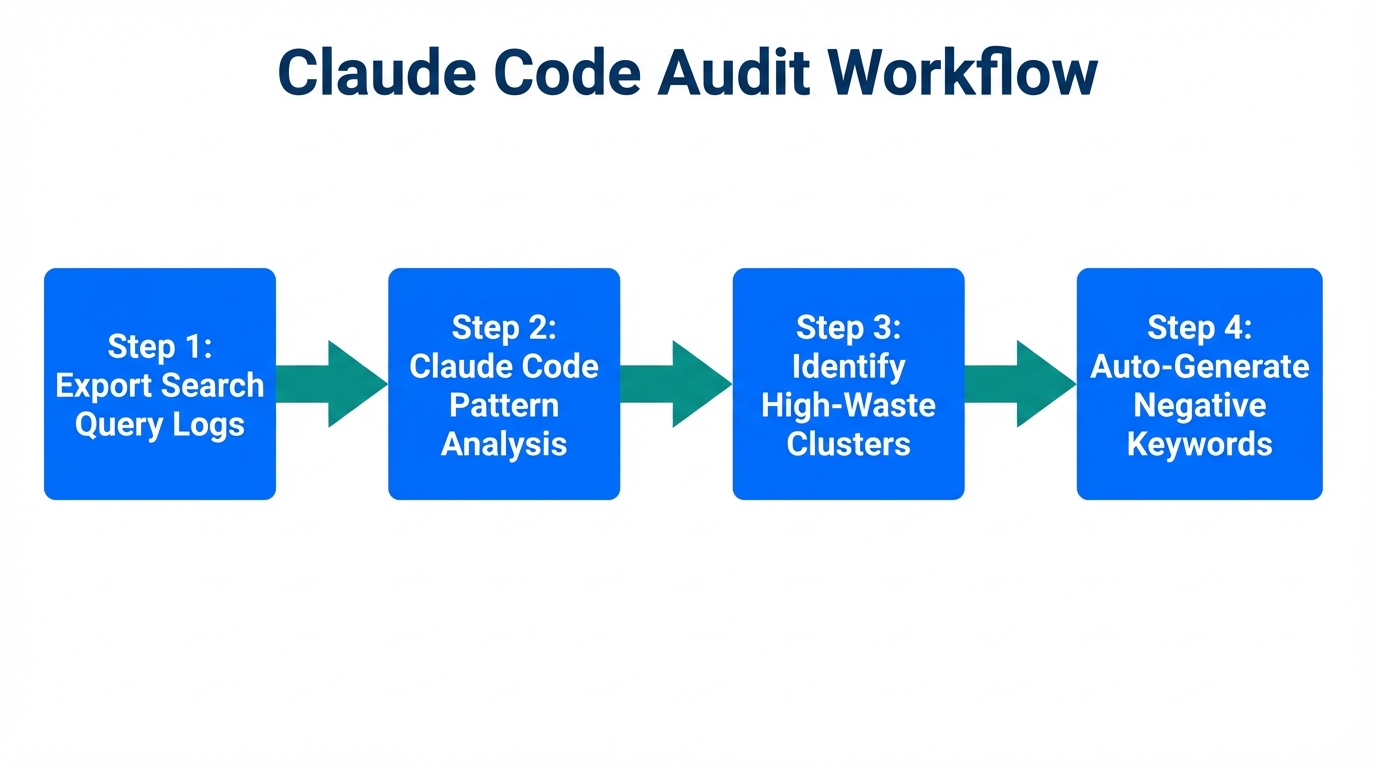
Once your environment is set up, you can command Claude to perform specific deep-dives into your account. Here are the three most critical areas to audit immediately:
1. Detecting Conversion Tracking Inflation
One of the most common mistakes found in Google Ads audits is double-counting conversions. This often happens when legacy tracking tags fire alongside new ones (e.g., an old GA3 tag and a new GA4/GTM event). Claude can scan your conversion actions and identify tags that share the same trigger logic, preventing you from making budget decisions based on 2x inflated performance data.
2. Performance Max Asset Gaps
Performance Max (PMax) is a black box, but Claude can shine a light on its inefficiencies. Ask Claude to audit your asset groups. If you aren't using all 15 headlines and 20 images, Google often penalizes your ad strength, leading to a 50%+ CPC premium. To improve these campaigns, you might consider sourcing authentic Stormy AI creators to ensure your asset groups are always fresh and high-performing with real UGC.
3. The "Maximize Clicks" Trap
For B2B or lead-gen accounts, the "Maximize Clicks" strategy is often a budget killer. It prioritizes low-cost, low-intent mobile traffic (often from accidental clicks in mobile apps) that rarely converts. Claude can flag campaigns using this strategy and suggest a pivot to "Maximize Conversions" or "Target CPA" based on historical intent data found in your Google Ads Editor logs.
"If your AI audit flags 'Maximize Clicks' on a lead-gen campaign, you've likely found where 30% of your budget is disappearing into the void."
The "Ralph Wiggum" Technique: Automating Negatives
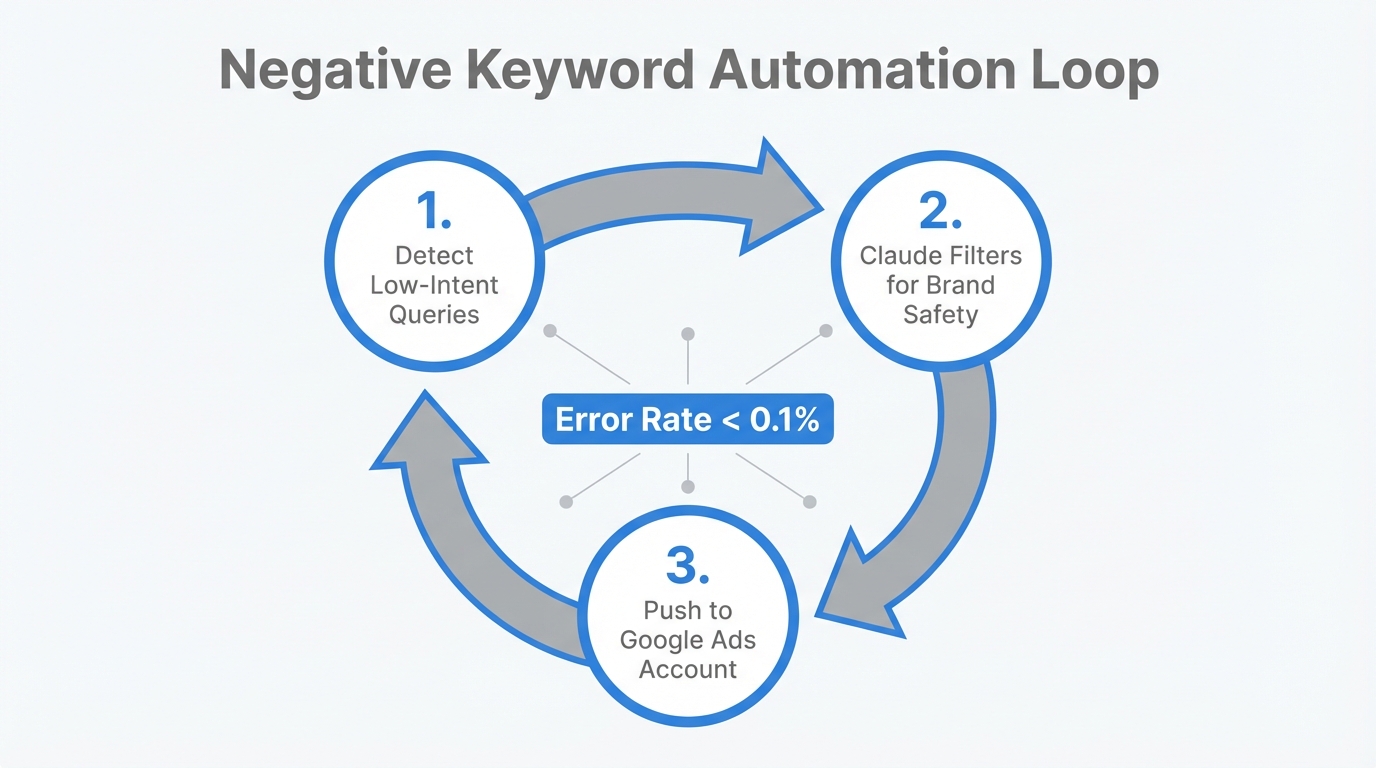
The true power of Claude Code lies in its ability to not just find problems, but fix them. Using what marketers call the "Ralph Wiggum" optimization loop, you can give Claude a success criterion—such as "Reduce CPA below $50"—and let it execute the following bash loop:
- Identify: Claude scans for high-cost keywords with zero conversions over the last 30 days.
- Check: It identifies "keyword cannibalization" where multiple ads are triggering for the same search term, driving up internal auction costs.
- Commit: Instead of you manually copy-pasting into Google Ads Editor, Claude automatically generates and commits new negative keyword lists to your repository or applies them via the API.
This workflow, popularized by developers on Medium, transforms an afternoon of tedious work into a 30-second automated task.
Real-World Results: AI Audits in Action
The results of moving to an AI-driven audit framework are significant. Anthropic’s own growth team used Claude Code to build workflows that brainstorm ad copy and check character counts simultaneously, reducing ad creation time from 30 minutes to 30 seconds.
In the automotive sector, Strong Automotive leveraged AI-driven audience segmentation to achieve a 40% increase in CTR. Similarly, a B2B SaaS case study conducted by technical marketer Daniel Agrici showed that a 5-day AI-assisted audit identified that 35% of the budget was being wasted on non-converting traffic, eventually leading to a 35% lower CPC after structural optimization.
Managing the creative side of these high-performance accounts is equally important. Once the technical waste is eliminated, using a Stormy AI platform allows you to manage the influx of new creator content and influencer relationships needed to keep your optimized campaigns running at peak efficiency.
Conclusion: From Manual Management to Agentic Growth
Running a Google Ads audit with Claude Code isn't just a way to save time—it's a way to ensure your marketing budget is actually working for you. By connecting Claude to your account via MCP, you can eliminate the 5.1% fraud loss, stop paying for uncontested branded clicks, and fix the tracking errors that skew your data. The future of PPC management is agentic, where the role of the marketer shifts from "doer" to "orchestrator." Start by installing the CLI today and let AI find the money you didn't even know you were losing.