The era of manual dashboard-hopping is coming to an end. For years, performance marketers have been tethered to complex UIs, clicking through endless sub-menus in Google Ads and Meta Ads Manager to find a single outlier metric. But as we move into 2025, the industry is witnessing a seismic shift from generative AI—where we ask a chatbot to write an ad headline—to agentic AI, where AI agents actually execute workflows, analyze live data, and manage accounts autonomously. This transition isn't just about convenience; it's about unlocking 20% to 30% higher ROI by operating at a speed humans simply cannot match.
According to McKinsey, organizations that embrace AI-driven campaign management are already seeing these massive performance gains. If you are a growth marketer looking to scale, learning how to leverage Claude Code for marketing is the single most important technical skill you can acquire this year. This playbook will take you from a standard dashboard user to a high-speed "agentic" operator using Anthropic’s CLI tools and the Model Context Protocol (MCP).
The Shift to Agentic Marketing: Why 2025 is Different
In 2024, everyone was talking about ChatGPT. In 2025, the conversation has moved to agents. As of this year, 88% of marketers use AI tools daily, a staggering jump from just 37% in 2024, as reported by Social Media Examiner. But the real winners are those moving beyond simple prompting.
The core of this revolution is "Vibe Querying"—the ability to ask natural language questions directly to your ad data via a Command-Line Interface (CLI). Instead of building a custom report in Looker Studio, you simply type a command. This is why tools like Claude Code are becoming the primary interface for growth teams. By using specialized AI sub-agents, as highlighted by Digital Applied, you can automate the drudgery and focus entirely on strategy.
"The shift from simple generative AI to agentic AI is the single most important technology trend for agencies this year." — Cloud Campaign TeamThe Tech Stack: Claude Code and MCP
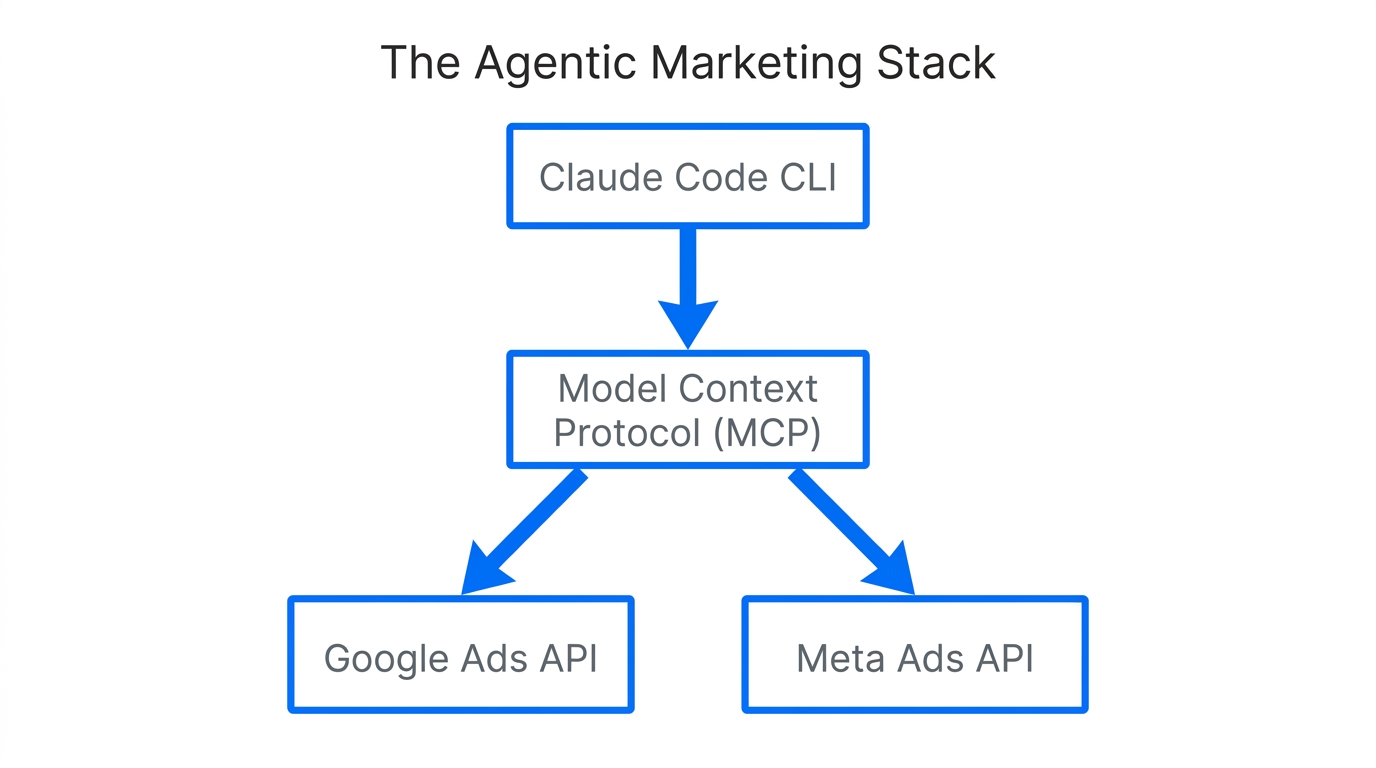
To automate Google Ads with AI, you need more than just a chat window. You need a way for the AI to "see" and "touch" your live account data. This is made possible by the Model Context Protocol (MCP), an open standard that allows Claude to connect to external APIs seamlessly.
| Tool | Role in Your Stack | Key Benefit |
|---|---|---|
| Claude Code | Primary AI CLI Agent | Executes commands and manages files locally. |
| MCP | Connectivity Layer | The bridge between Claude and your ad accounts. |
| GAQL.app | Token Generator | Converts Google Ads Query Language into AI-friendly tokens. |
| TrueClicks | Google Ads MCP Server | Provides pre-built connectors for deep account analysis. |
| n8n.io | Custom Automation | A low-code way to build unique ad-management logic. |
Think of Claude Code as your autonomous junior media buyer. It doesn't just suggest changes; it can read your creative performance, analyze bid history, and—if configured—make adjustments. To get started, you'll need to install the Claude CLI and configure your MCP servers to point at your ad platforms. Platforms like GAQL.app and TrueClicks are essential here because they bridge the gap between complex advertising APIs and the natural language capabilities of Claude. For custom workflow logic, integrating n8n.io provides a powerful way to connect these AI agents to your CRM or internal databases.
Step-by-Step Playbook: Setting Up Your AI Ad Command Center
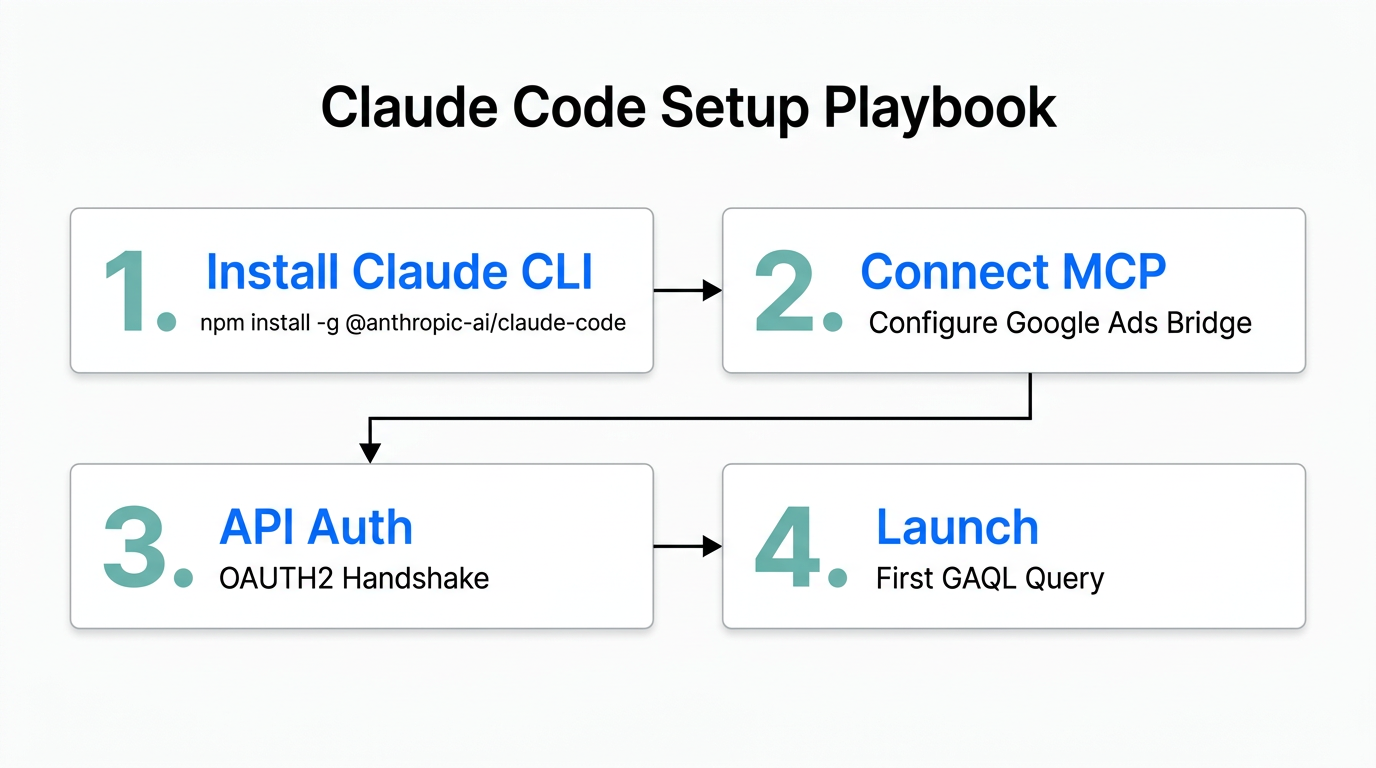
Transitioning to agentic marketing tools requires a specific setup. Follow these steps to move your operations into the terminal.
Step 1: Install Claude Code
Begin by installing the Claude CLI on your machine. This gives you a persistent agent that understands your local project files and can run terminal commands. You'll use this as your primary interface instead of the standard web browser.
Step 2: Connect the Model Context Protocol (MCP)
To allow Claude to fetch live data, you must configure your claude_desktop_config.json file to include the Google Ads or Meta Ads MCP servers. You can use the TrueClicks Google Ads MCP setup guide to authorize your account. This ensures that when you ask, "What is my CPA?", Claude isn't guessing—it's pulling the real number.
Step 3: Integrate GAQL.app for Meta and Google
Google Ads uses a specific query language (GAQL). GAQL.app helps generate the necessary tokens that allow Claude to translate your English questions into precise database queries. This step is critical to prevent "hallucinations" where the AI makes up performance data.
"Marketers are evolving from content creators to strategic architects. You aren't playing every instrument; you're conducting the AI orchestra."Workflow 1: "Vibe Querying" for Instant Performance Summaries
One of the most powerful features of Claude Code for marketing is the ability to bypass the reporting UI entirely. In the terminal, you can perform "Vibe Querying." Instead of building a pivot table, you simply ask:
"Analyze our Google Ads spend for the last 7 days. Which 3 ad groups saw the biggest jump in CPA, and what was the likely cause based on Search Lost IS (budget)?"
By using the TrueClicks MCP, Claude will:
- Fetch the raw performance data for all ad groups.
- Cross-reference the CPA with the previous 7-day period.
- Analyze the "Search Lost IS (budget)" metric to see if the CPA spike was caused by budget throttling.
- Output a concise summary you can paste directly into Slack.
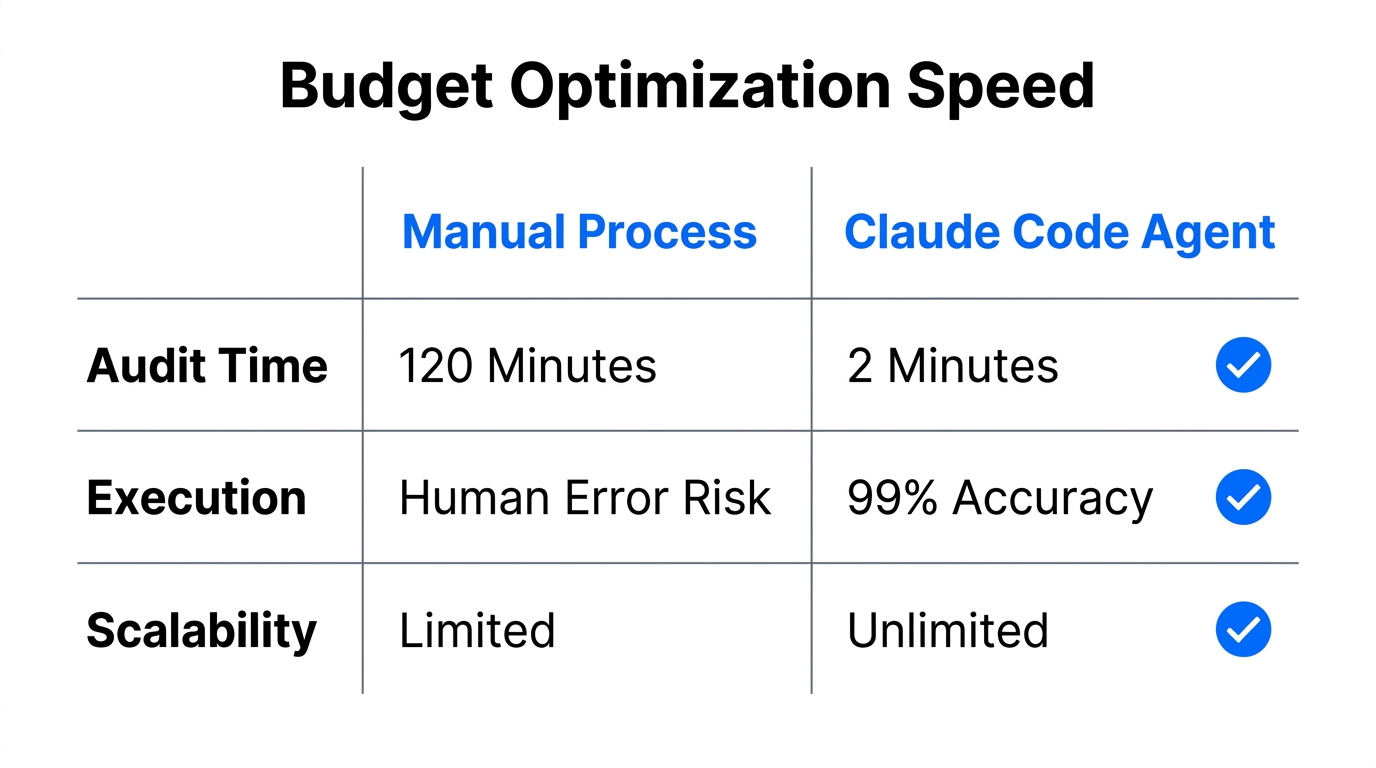
This workflow turns a 30-minute investigation into a 15-second query. Just as Stormy AI allows you to discover the perfect influencers via natural language prompts, Claude Code allows you to discover the hidden truths in your ad data without touching a single spreadsheet.
Workflow 2: Automated Multi-Platform Audits
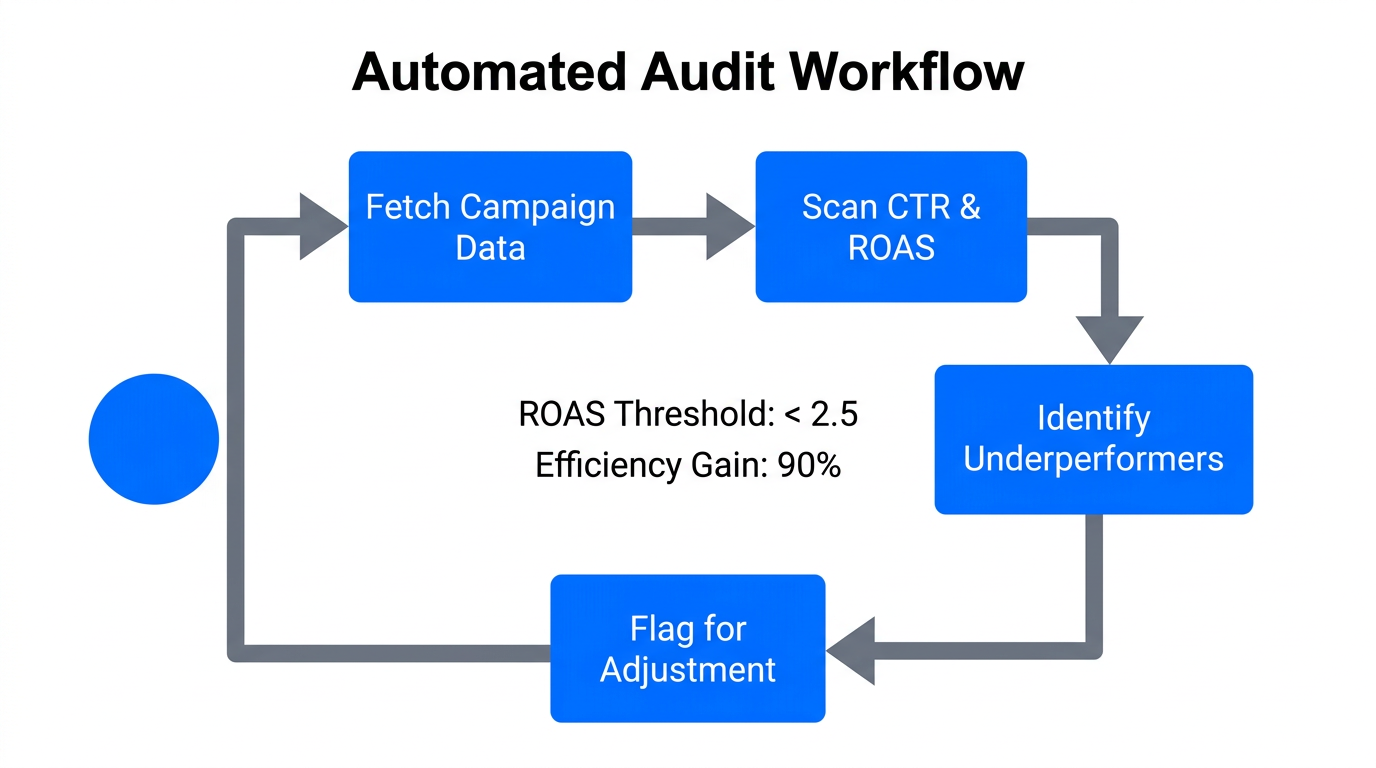
Running a comprehensive audit across Google, Meta, and LinkedIn is usually a full-day task for a senior media buyer. With agentic tools, you can run these in parallel. You can leverage pre-built skills like the Claude Ads Skill developed by Daniel Agrici, which features over 190 PPC checks.
By running a command like /ads audit, the agent will check for:
- Wasted spend on non-converting search terms.
- Tracking errors or broken conversion pixels.
- Creative fatigue in Meta Ads (analyzing frequency vs. CTR).
- Account structure violations (e.g., too many active ads per ad group).
Workflow 3: Strategic Budget Reallocation
Google's automated recommendations often prioritize reach and spend over actual profit. Claude acts as a "Fractional Strategist" by looking at marginal returns. You can provide Claude with your specific LTV (Lifetime Value) data and ask it to reallocate budget based on true business value, not just platform-level ROAS.
Ask Claude: "I have an extra $5,000 this month. Analyze my current ROAS across 'Brand' and 'Generic' campaigns and identify where that budget will have the highest marginal return based on our 90-day LTV."
Because Claude can process local files containing your LTV data alongside live ad data via MCP, it provides a much more sophisticated recommendation than the standard "Increase budget" notification in the Google Ads dashboard.
Real-World Success Stories: Agentic Marketing in Action
This isn't theoretical. Growth leaders are already documenting their results with these tools. For instance, marketer Giorgio Liapakis conducted a 30-day experiment letting Claude Code run a Meta Ads account autonomously via the Meta Marketing API and the Nano Banana Pro API. The agent handled everything from ICP research to pausing underperforming creatives, proving that growth marketing automation is ready for prime time.
Similarly, Mike Futia of Scale AI used Claude Code to "vibe code" a custom Meta Ads Creative Analytics tool. This custom script syncs with ad accounts and uses AI to analyze video hooks and hold rates, identifying exactly which seconds of a video cause users to drop off. This level of granular analysis was previously reserved for enterprise-level data science teams.
"Treat Claude as an analytical partner, not a hands-off pilot. Security requires your data to remain local and well-permissioned." — Malcolm Gibb, PPC SpecialistSecurity and Best Practices: Managing the Risks
While the potential for AI ad management is massive, you must manage the security risks associated with giving an AI agent access to your financial accounts. Managing creator relationships and ad spend both require high levels of trust and verification.
- Use Read-Only Barriers: Most current MCP configurations are read-only by default. This is a feature, not a bug. It allows Claude to analyze your data without the risk of it accidentally spending $100k overnight. For any "Write" actions, ensure you have a manual approval step in your CLI.
- Vet 3rd-Party MCP Servers: Avoid using unvetted servers. Expert Malcolm Gibb recommends using official connectors to keep your developer tokens secure.
- Never Forget "Plan Mode": In Claude Code, always use
Plan Mode(Shift+Tab) before execution. This allows you to see exactly what commands the AI intends to run before it touches your live environment. - Stormy-Style Vetting: Just as you would use Stormy AI to vet an influencer's audience for fake followers before a campaign, you should use Claude to vet your own ad traffic for bot activity and click fraud.
Conclusion: The Future of the Growth Marketer
The transition to Claude Code for performance marketing represents more than just a new tool; it represents a new philosophy. The marketers who succeed in the next 24 months will be those who stop "doing" the work and start "conducting" the agents. By automating the repetitive tasks of auditing and reporting, you free yourself to focus on what matters: creative strategy, market positioning, and high-level growth architecture.
As noted by Writer.com, the role of the marketer is evolving. You are no longer just a content creator; you are a strategic architect. Whether you are using Stormy AI to scale your UGC creator outreach or using Claude Code to automate Google Ads with AI, the goal is the same: move faster, work smarter, and drive higher ROI.
Ready to start? Begin by installing Claude Code and setting up your first MCP server today. The command line is waiting.