In 2026, the traditional boundary between a "marketer" and a "developer" has effectively dissolved. The rise of agentic AI has transformed technical implementation from a bottleneck into a competitive advantage. If you have ever felt "terminal anxiety"—that specific dread when looking at a blinking cursor in a black command-line box—you are not alone. However, avoiding these tools in the current landscape means leaving significant growth on the table. Companies implementing AI-driven marketing automation are now seeing a 15–20% reduction in Customer Acquisition Cost (CAC), according to data from McKinsey & Company. This guide is designed to help you master Claude Code in one day, moving you from manual spreadsheets to automated marketing engines without requiring a computer science degree.
The 2026 Marketing Landscape: Why Agentic is the New No-Code
The global AI code assistant market has exploded, reaching a valuation of over $27 billion this year as reported by Fortune Business Insights. While "No-Code" tools like Zapier once ruled the roost, the 2026 trend is "AI-Code." As Scott Brinker of Chiefmartec famously noted, the no-code revolution is being swallowed by agents that can write, test, and deploy custom scripts on the fly. Today, 92% of professional developers use AI tools, but the fastest-growing cohort is actually "shadow IT"—marketers and analysts using tools like Claude Code to bypass slow IT tickets, as highlighted in the latest GitHub Octoverse report.
"The hottest new programming language is English. Marketers who learn to speak to agents will outpace those who only know how to click buttons."
The Gradual Complexity Ladder: Moving from Sandbox to CLI
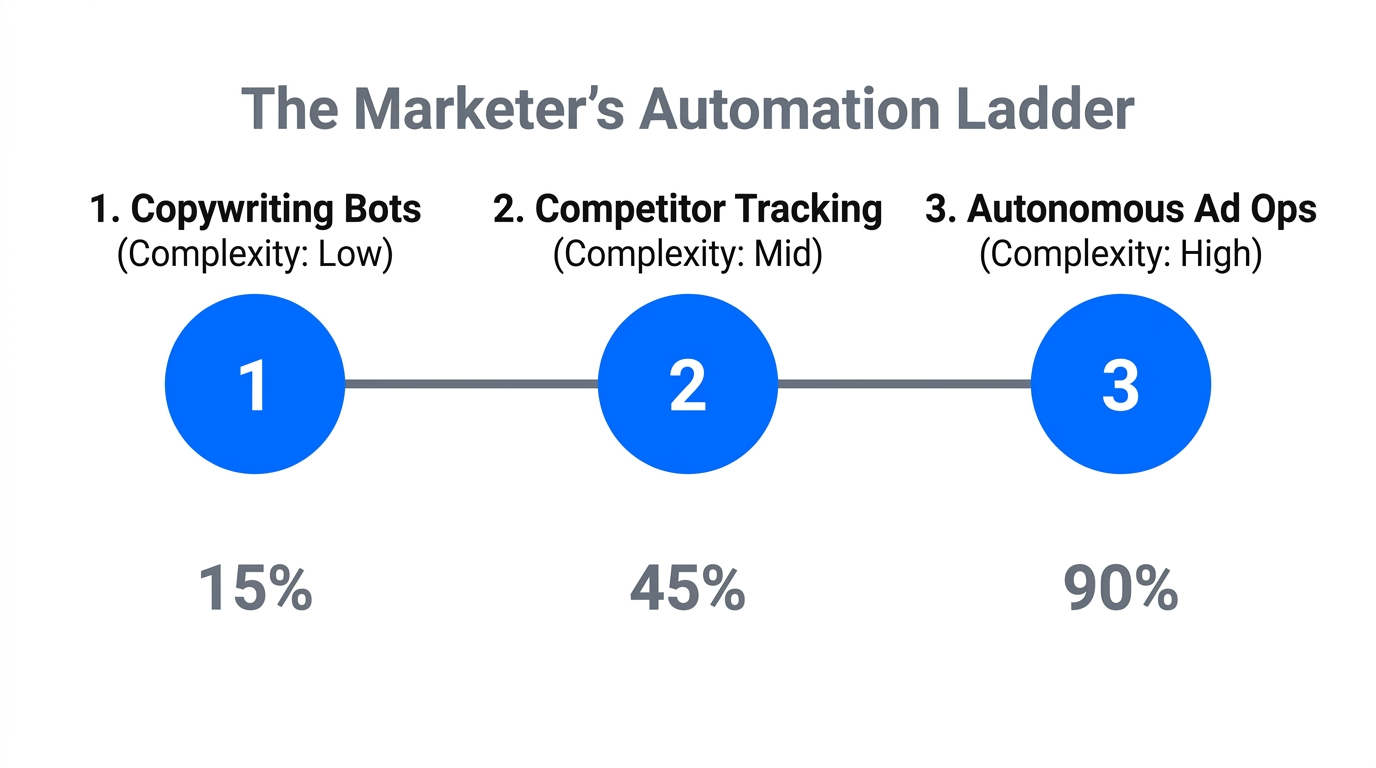
For most marketers, the jump to a Command Line Interface (CLI) is too steep. To succeed with Claude Code for marketers, we recommend a "Gradual Complexity" ladder that builds confidence through three distinct stages.
Step 1: The Sandbox Phase (Claude Artifacts)
Before installing anything, use the browser-based Claude.ai. Use the "Artifacts" feature to generate simple HTML/CSS for landing pages or data visualizations. It’s a safe, visual environment where you can see the code working in a side-by-side window.
Step 2: The Guided Phase (Cursor)
If you are still hesitant about the terminal, download Cursor. It is an AI-first code editor that looks like a standard app but includes a "Composer" feature (Cmd+I). You can chat with it to build web apps or marketing scripts without ever typing a terminal command. It’s the perfect bridge for non-technical AI coding in 2026.
Step 3: The Agentic Phase (Claude Code)
This is where the real power lies. Claude Code isn't just a chatbot; it's an agent that can see your local files, run commands, and fix its own bugs. It resides in your Terminal and acts as a senior developer sitting right next to you. According to Builder.io, Claude Code is up to 5.5x more efficient than standard AI editors for complex refactoring tasks.
Step-by-Step: How to Install Claude Code Without Knowing Terminal
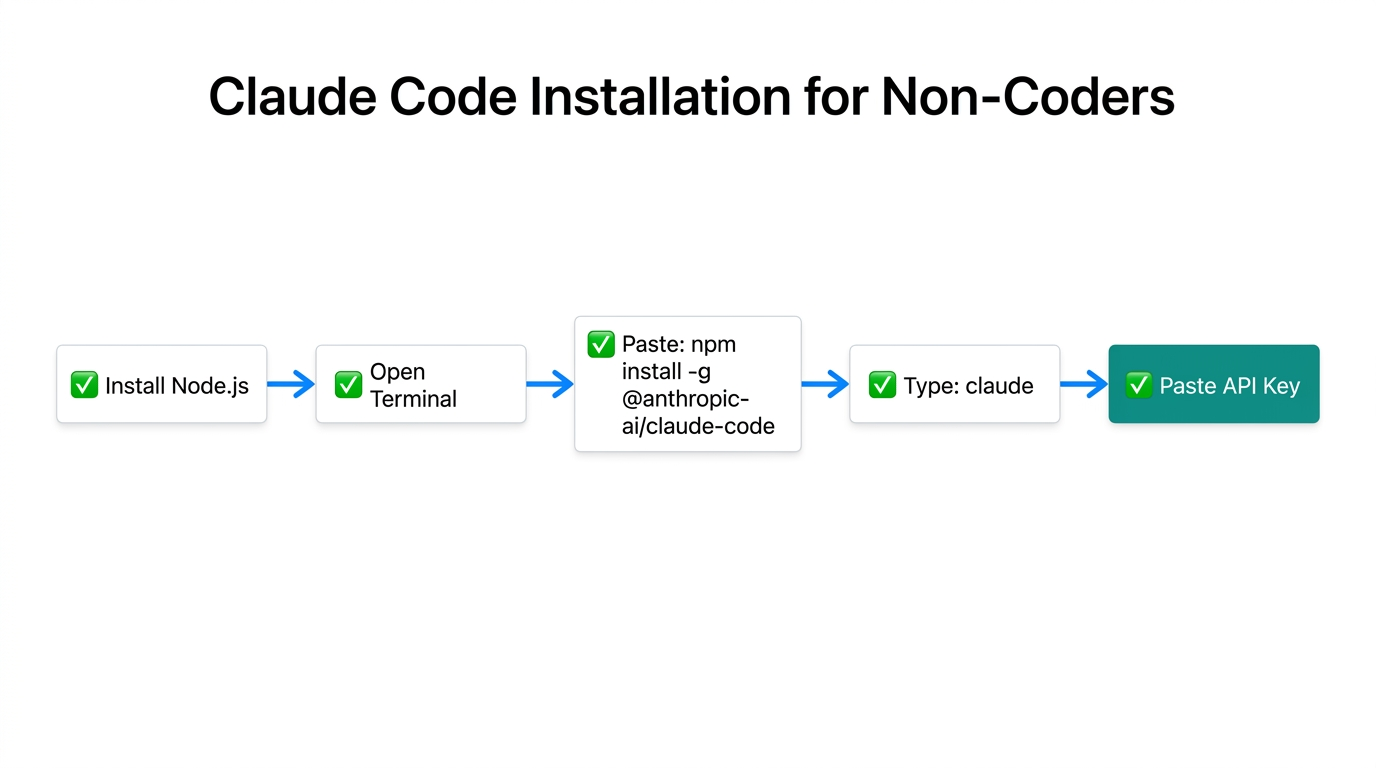
The biggest hurdle to how to install Claude Code without knowing Terminal is actually the "pre-work." Once you have the right environment, the installation is a single line of text. Follow these steps precisely to overcome the "Terminal Wall."
- Install Node.js: Claude Code requires Node.js (version 18 or higher). Go to the official Node.js website and download the "LTS" version. It installs just like any other program on your Mac or PC.
- Open Your Terminal: On a Mac, press Cmd+Space and type "Terminal." On Windows, search for "PowerShell."
- The Magic Command: Copy and paste this command and hit Enter:
npm install -g @anthropic-ai/claude-code. This tells your computer to go and get the latest version of Claude Code from Anthropic. - Authenticate: Type
claudeand follow the prompts to log in with your Claude Pro or Max account.
If you run into issues, you can use the command claude /doctor to let the AI self-diagnose your setup. For a more detailed walkthrough, expert blogs like Blake Crosley or CC for Everyone provide deep-dives into troubleshooting common installation errors.
"The barrier to entry isn't intelligence; it's just the activation energy to open the terminal for the first time."
Intent-Based Deployment: Building Marketing Engines via Conversation
Once installed, you stop "writing code" and start using "Intent-Based Deployment." You describe the outcome, and Claude Code handles the logic. For example, a growth marketer at a Series A startup recently used Claude Code to build a multi-touch attribution dashboard in just 3 days, saving a $15,000 agency fee and increasing budget efficiency by 22%.
Example: Building a Lead Magnet Integration
Instead of manually connecting forms, you can tell Claude: "Build a lead magnet page for my new e-book and connect the form to my Klaviyo list via API." Claude will create the frontend, write the backend script to talk to Klaviyo, and even set up the server. If an error occurs, Claude will read the error log and fix it automatically.
Example: Automated PPC Reporting
You can use marketing automation scripts to handle the grunt work of data entry. Ask Claude: "Research the Google Ads API and write a script to export yesterday's spend to this Google Sheet." This workflow is becoming standard; digital agencies are already saving $1,200+ per campaign by automating data cross-referencing between GA4 and Search Console using these agentic layers, as reported by AdVenture Media.
Platforms like Stormy AI are often the starting point for these automations, where marketers identify high-performing creators and then use Claude Code to build custom tracking links or automated outreach sequences that sync directly with their CRM.
The Hidden Costs: Managing API Tokens and Runaway Loops
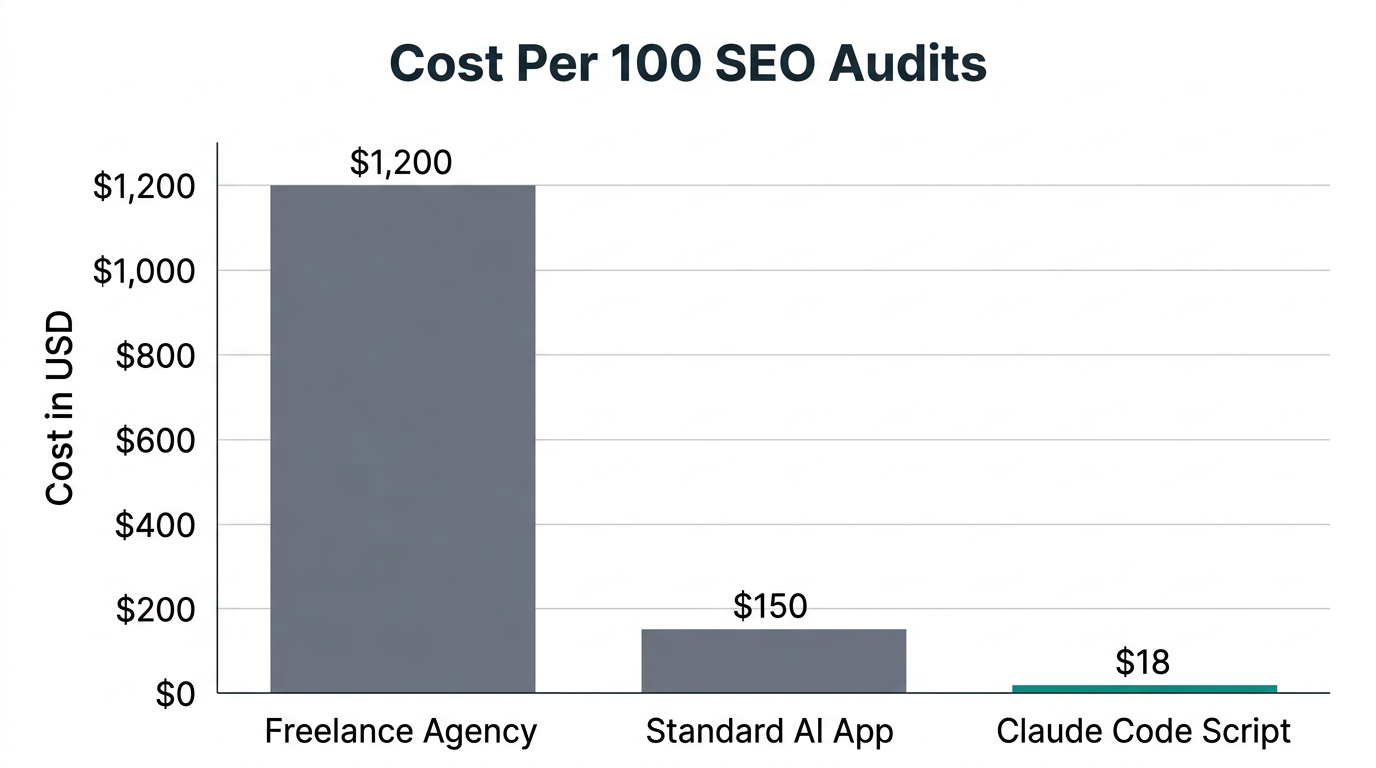
While Claude Code is powerful, it is not free. In 2026, the pricing for Claude 3.7 Sonnet is roughly $3 per 1M input tokens and $15 per 1M output tokens. For marketers, the biggest risk is the "runaway loop." This happens when the AI gets stuck trying to fix a bug and keeps running commands, potentially burning through $50 of credits in minutes.
| AI Tool | Pricing Model | Agentic Ability | Best For |
|---|---|---|---|
| Claude Code (CLI) | Pay-per-token | High | Complex Automation |
| Cursor (Editor) | $20/month | Medium | Building Web Apps |
| Replit Agent | $120/year | High | Rapid Prototyping |
| ChatGPT Canvas | $20/month | Low | Simple Scripts |
To prevent cost overruns, always set a "budget cap" in your Anthropic console. Furthermore, monitor Claude when it is performing complex tasks. If you see it repeating the same command more than three times, interrupt it (Ctrl+C) and provide more context. According to a study by Fractional CTO, Claude succeeds on the first attempt 33% of the time, meaning you must stay "in the loop" for the other 67% to ensure efficiency.
CLAUDE.md: Giving Your AI Agent a Brand Soul
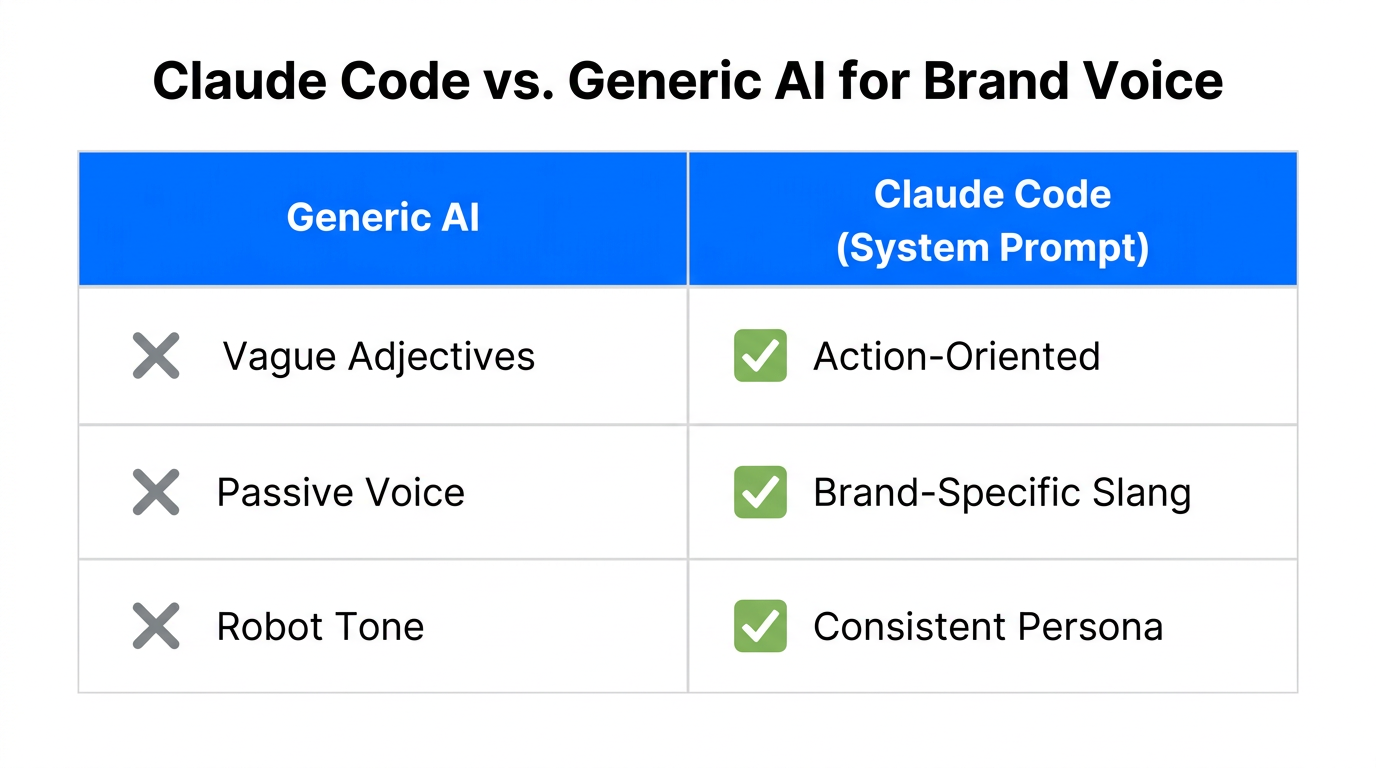
One of the most advanced features of Claude Code for marketers is the CLAUDE.md file. Think of this as your brand’s permanent memory. Without it, the AI can suffer from "context rot," losing track of your brand voice or campaign history over long sessions, a risk noted by Stormy AI's research.
Create a file named CLAUDE.md in your project folder and include:
- Brand Guidelines: Your tone of voice (e.g., "Professional but accessible").
- Technical Stack: The tools you use (e.g., "We use Shopify and Stripe").
- Campaign History: A log of what the agent has already built so it doesn't duplicate work.
By maintaining this file, every marketing automation script Claude writes will align with your broader strategy, ensuring that a script for a TikTok Ads Manager integration doesn't use outdated naming conventions.
Security and Risks for Marketing Teams
Giving an AI agent permission to run commands on your machine is a significant security responsibility. In early 2026, researchers found vulnerabilities (like CVE-2025-59536) that could allow remote code execution if a user opened a malicious repository, as detailed by IT Pro. Additionally, "prompt injection"—where the AI is tricked by malicious text in a tool's documentation—remains a threat, according to CPI Consulting.
--dangerously-skip-permissions flag unless you are an expert. Always review the commands Claude suggests before hitting "Y" to execute.Conclusion: Master Claude Code in One Day
The transition to a "Marketing Engineer" is no longer optional for high-growth roles. By moving up the complexity ladder—starting with Claude.ai artifacts, moving to Cursor, and eventually mastering the Claude Code CLI—you can automate the repetitive strategic analysis that currently eats 75% of your time, according to Stormy AI. Whether you are building custom SEO audit tools or connecting Stormy AI creator data to your CRM, the non-technical AI coding of 2026 is your superpower. Open your terminal, paste that installation command, and start building your first automation today.