In 2026, the market for AI-driven customer service has evolved from an experimental luxury into a core infrastructure requirement for e-commerce. According to recent market projections, the global AI customer service market is expected to reach $15.12 billion this year. While platforms like Gorgias and Shopify Magic offer incredible out-of-the-box automation, many high-growth DTC brands are moving toward self-hosted solutions to maintain 100% control over customer data privacy.
The efficiency gap is undeniable: AI-native platforms now achieve a cost per resolution of $1.00 to $3.00, while traditional agent-assisted contacts still hover around $13.50 per interaction, according to industry benchmarks. However, as Gartner reports, a "Trust Gap" has emerged, with 64% of customers preferring that companies do not use AI if it risks their personal information. This is where an AI ecommerce employee like Stormy AI comes in—or, if you are a technical operator, why you should build your own private agent using n8n.
"The 2026 era of e-commerce isn't about human vs. bot; it's about the transition from simple ticket deflection to autonomous resolution while safeguarding the most valuable asset you own: customer trust."
Why a Private Shopify AI Agent Matters in 2026
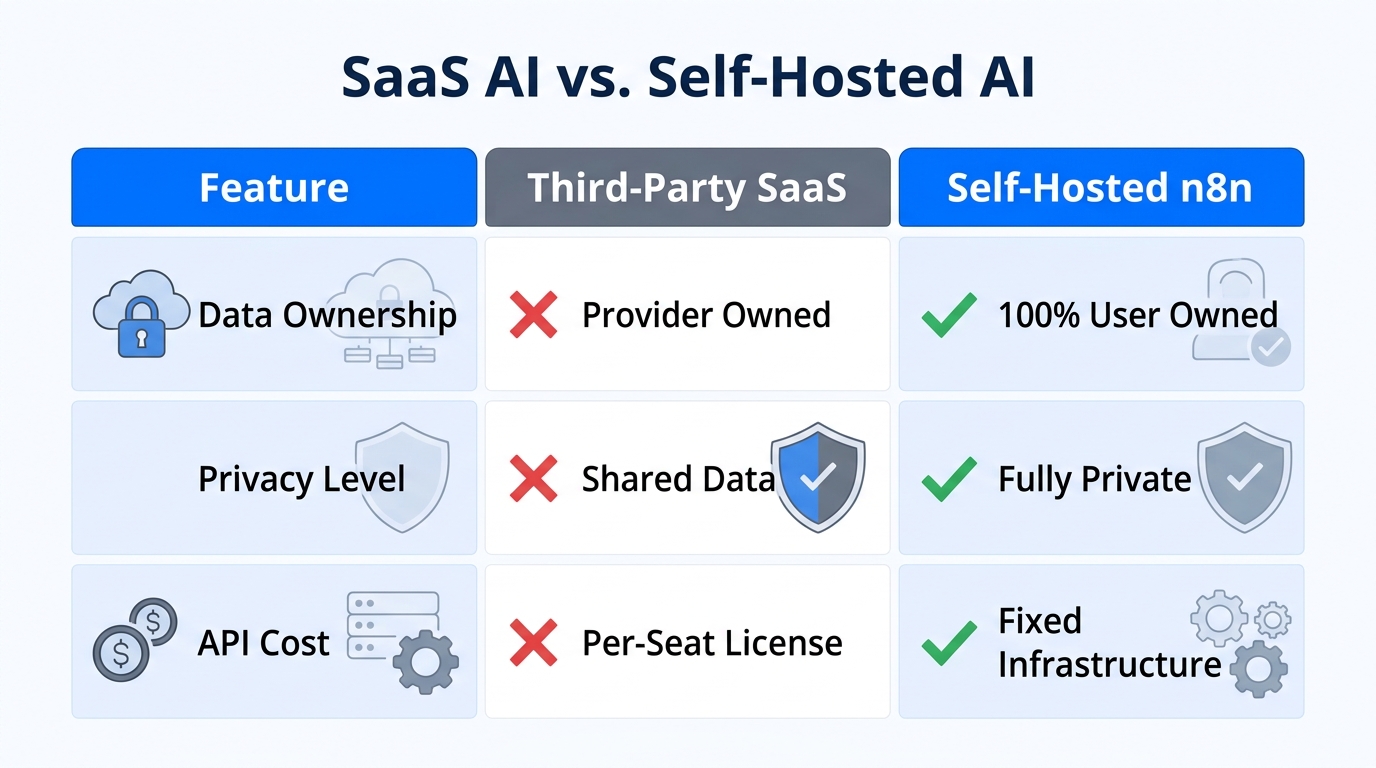
Most third-party AI chatbots require you to sync your entire customer database to their cloud. This exposes sensitive PII (Personally Identifiable Information) like home addresses, purchase history, and email segments to public models. By building a self-hosted agent using n8n and OpenAI via their API (which, per OpenAI’s data privacy policy, does not use API data for training), you create a secure perimeter around your store.
Beyond privacy, building your own agent allows you to implement specific guardrails against hallucinations. Generative models can still hallucinate policy answers, promising refunds that violate your terms. A custom n8n workflow lets you pipe in your exact Shopify policies from a controlled vector store like Supabase Vector.
The Tech Stack: What You Need to Build This
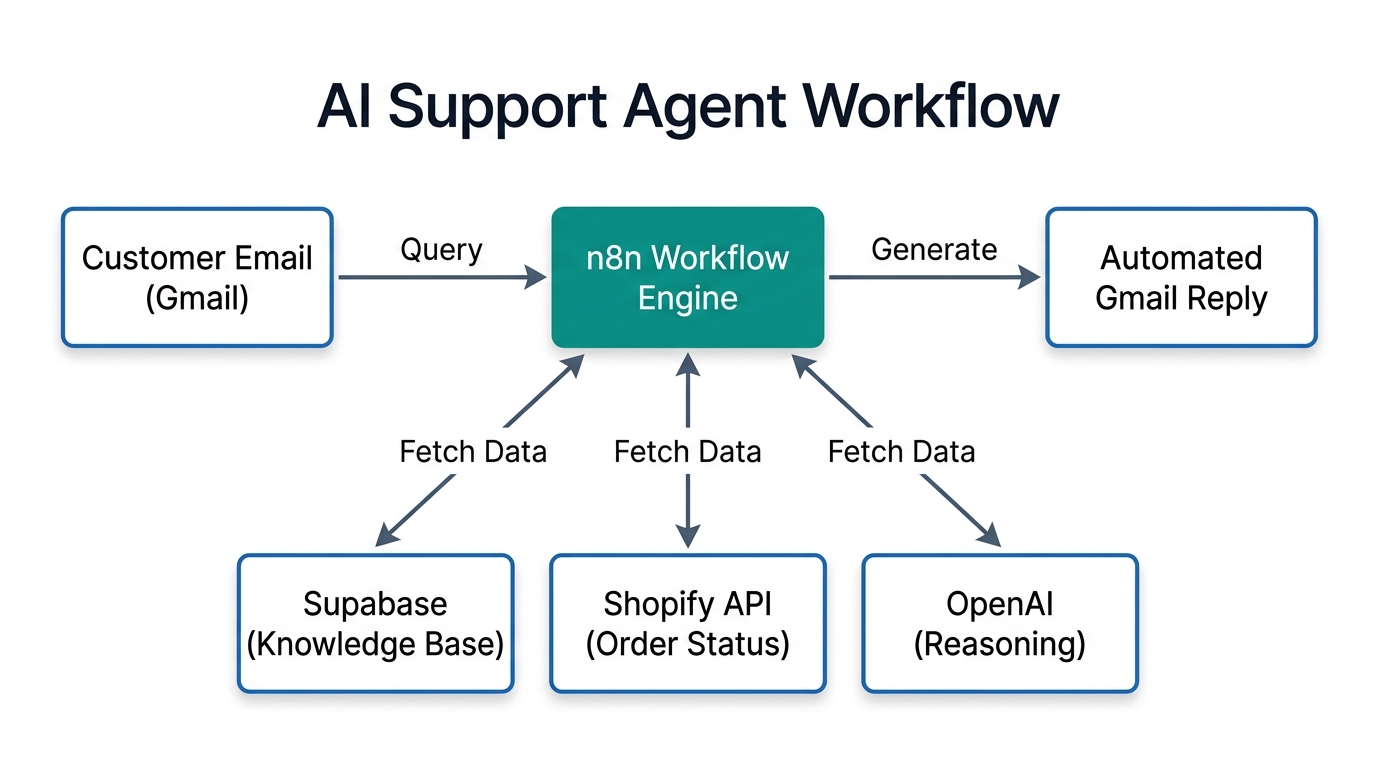
To follow this n8n Shopify automation tutorial, you will need the following tools in your stack:
- n8n (Self-hosted): The orchestration engine that connects your apps.
- OpenAI API: Using GPT-4o or GPT-4.5 (the 2026 standard for logic).
- Supabase: An open-source Firebase alternative used to store your "Vector Knowledge Base."
- Shopify Admin API: To pull real-time order data via GraphQL.
- Gmail or Gorgias API: To send the final response.
For brands that don't have the time to build this from scratch, Stormy AI can act as your autonomous teammate, handling these inventory checks, supplier follow-ups, and support triaging in the background so you can focus on growth.
| Metric | Traditional Support | Private AI Agent (n8n) |
|---|---|---|
| Cost per Ticket | $8.00 - $15.00 | $0.10 - $0.50 |
| Availability | 9-5 Business Hours | 24/7/365 |
| Response Time | 2-12 Hours | < 5 Seconds |
| Data Privacy | Third-party Shared Cloud | 100% Private / Self-hosted |
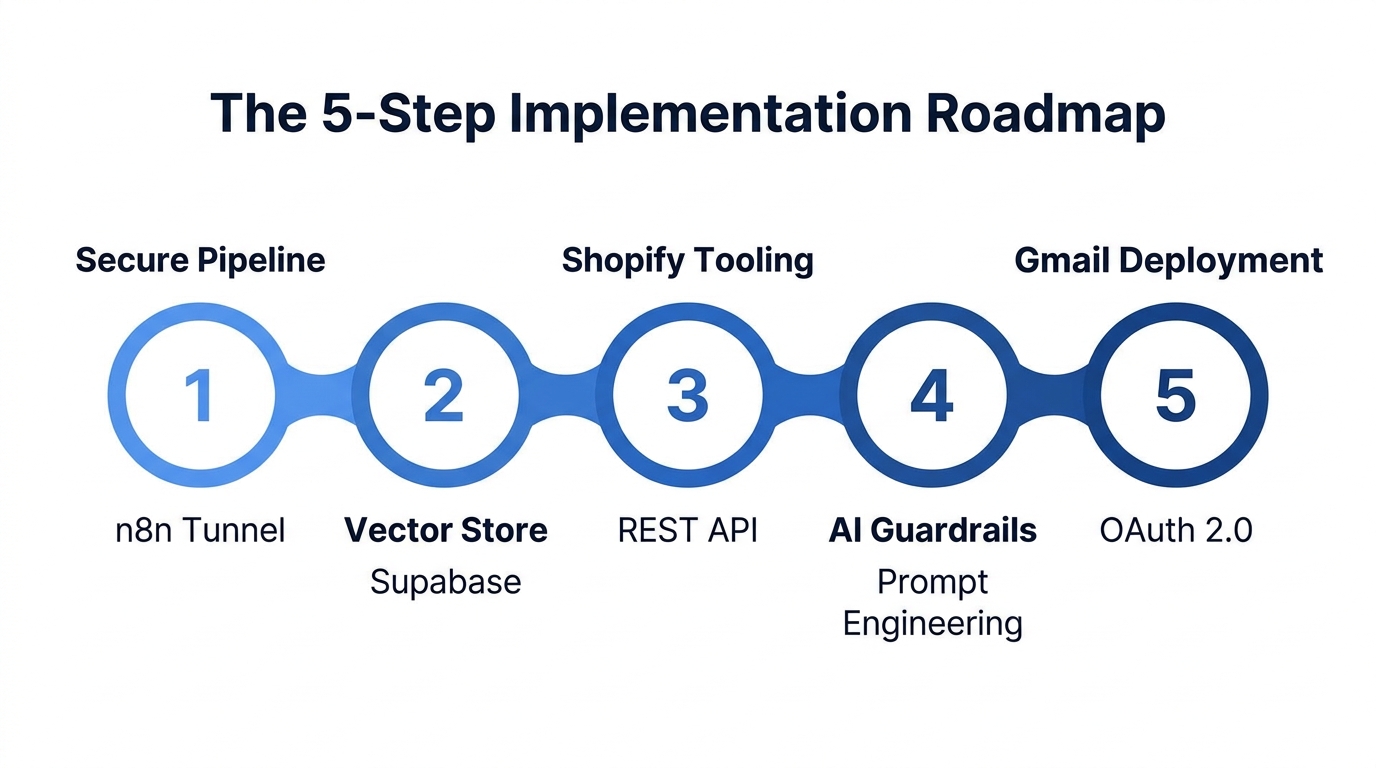
Step 1: Building a Secure Data Pipeline with Token IDs
The first rule of private AI is: Never send a raw email address to the LLM. Instead, we use a Tokenization strategy. When an email hits your n8n trigger (via Gmail or Gorgias), you generate a unique Token ID for that specific interaction.
The Tokenization Logic
- Trigger: Receive an email from a customer.
- Set Node: Create a short unique ID (e.g., using n8n’s `$uuid` expression).
- Log to Sheet: Map the Token ID to the real Customer Email in a private Google Sheet or internal DB.
- Pass to AI: Only pass the Email Body and the Order Number to OpenAI.
By following this Shopify API automation guide, if the AI agent ever has a data breach, the only information exposed is the context of a specific support question—never the customer's identity.
"Privacy is not just a feature; it is the foundation of the 2026 customer experience. If you leak data, you lose the customer forever."
Step 2: Setting up the Knowledge Base with Supabase SQL
To ensure your agent doesn't hallucinate, you must ground it in your actual store policies. We use a Vector Store in Supabase to house your PDFs and FAQs. This is often called RAG (Retrieval-Augmented Generation).
SQL Setup for Supabase
Inside your Supabase SQL editor, run the following command to create a table compatible with n8n’s vector storage nodes:
CREATE TABLE customer_support (
  id uuid PRIMARY KEY DEFAULT uuid_generate_v4(),
  content text,
  metadata jsonb,
  embedding vector(1536)
);
This creates a table capable of holding 1536-dimension vectors (standard for OpenAI's `text-embedding-3-small` model). You can then use the n8n "Supabase Vector Store" node to upload your shipping, return, and warranty PDFs. This ensures that when a customer asks about a return, the AI pulls your specific policy rather than making one up.
Step 3: Connecting n8n to Shopify’s Order API
The most common support query is WISMO ("Where Is My Order"). To handle this autonomously, your agent needs real-time access to Shopify. Platforms like eesel AI and Tidio Lyro do this well, but for a private build, we use the Shopify Admin GraphQL API.
The Tooling Approach
In n8n, use the Shopify Node with the following settings:
- Resource: Order
- Operation: Get Many (Filtered by the extracted Order Number)
- Fields to Return: `financial_status`, `fulfillment_status`, `tracking_url`
Your OpenAI agent will act as an "orchestrator." When it detects an order number in the customer's email, it will trigger this tool, retrieve the status, and then draft a personalized reply based on the live data. This is exactly how Stormy AI operates—acting as a teammate who knows when to look at the "browser" (Shopify) to get the answer.
Step 4: Implementing AI Guardrails & System Prompts
A frequent error in building a Shopify AI agent is giving the AI too much freedom. You must restrict its personality and authority through a System Prompt. Here is a high-performance prompt structure for 2026:
"You are an AI support assistant for [Store Name]. You have access to the Return Policy via Supabase and Order Data via Shopify.
RULES:
1. NEVER offer a refund if the order was placed more than 30 days ago.
2. If a customer is angry (Sentiment: Negative), escalate to a human immediately by setting 'handoff' to TRUE.
3. Do NOT mention customer email addresses in your replies.
4. Use a friendly, neutral tone."
By defining these boundaries, you prevent the AI from making legal promises you can't keep. As Forrester reports suggest, over-automating emotional inquiries can erode satisfaction, so always include a human-in-the-loop fallback using tools like Zendesk or Gorgias.
Step 5: Deploying Professional HTML Responses
Finally, you want your agent to look professional. Instead of sending plain text, use the Gmail API node in n8n to send a structured HTML email. You can use a template designed in Canva or Klaviyo that includes your brand logo and a tracking link button.
Mapping the Response Back
- The AI generates the Email Body.
- The n8n workflow looks up the Token ID in your Google Sheet.
- It retrieves the Real Customer Email.
- It sends the HTML email to that address.
This completes the "Privacy Loop." The AI never saw the email address, yet the customer receives a perfectly addressed support ticket.
Scale Your Ops with an AI Ecommerce Employee
While building a private n8n agent is a great technical project, maintaining it as your store scales can be a full-time job. This is why many founders are hiring Stormy AI as their first AI employee.
Stormy doesn't just answer emails; it runs the messy back office. It can:
- Monitor Inventory: Stormy checks Shopify stock levels and flags stockout risks.
- Ad Audits: Pull performance from Meta Ads and Google Ads to build ROAS reports.
- Supplier Follow-up: Automatically email suppliers if a shipment is overdue.
- Support Triage: Detect refund requests in Gorgias and draft on-brand replies for your approval.
Think of Stormy as the teammate who uses the tools you already have like Notion, spreadsheets, and email to keep the engine running while you focus on the vision.
Conclusion: The Future of Private Support
Building a self-hosted ecommerce AI support system is the ultimate competitive advantage for 2026. By combining the flexibility of n8n, the power of OpenAI, and the security of Supabase, you can reduce support costs by 80% without sacrificing customer privacy.
Whether you build it yourself or hire an AI employee like Stormy AI, the goal remains the same: autonomous resolution, not just deflection. Start with your WISMO tickets, ground your agent in your policies, and watch your CSAT scores climb as response times drop to seconds.