How to Build an AI Executive Assistant with Claude Code and Codex in 2026
Learn how to build a local AI executive assistant in 2026 using Claude Code and Codex. Save 2+ hours daily with our playbook on MCP, agents.md, and autonomous loops.
In 2026, the digital divide isn't between those who use AI and those who don't—it is between those who are still "ping-ponging" with chat interfaces and those who have deployed autonomous agents. If you are an entrepreneur still copy-pasting prompts into a web browser, you are leaving 10 to 20 times the productivity on the table. The shift from chat models to goal-oriented agents represents the biggest leap in business operations since the cloud. This guide provides a complete playbook to building a local AI executive assistant using Claude Code and Codex, allowing you to reclaim two or more hours of your day by automating inbox triage, meeting summaries, and specialized workflows.
The Great Shift: From Chat to Goal-Oriented Agents
Learn why moving from simple chat to goal-oriented agents is a game-changer.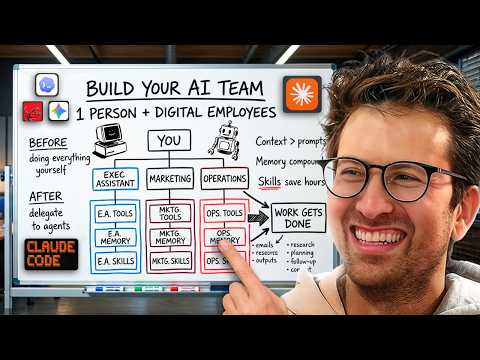
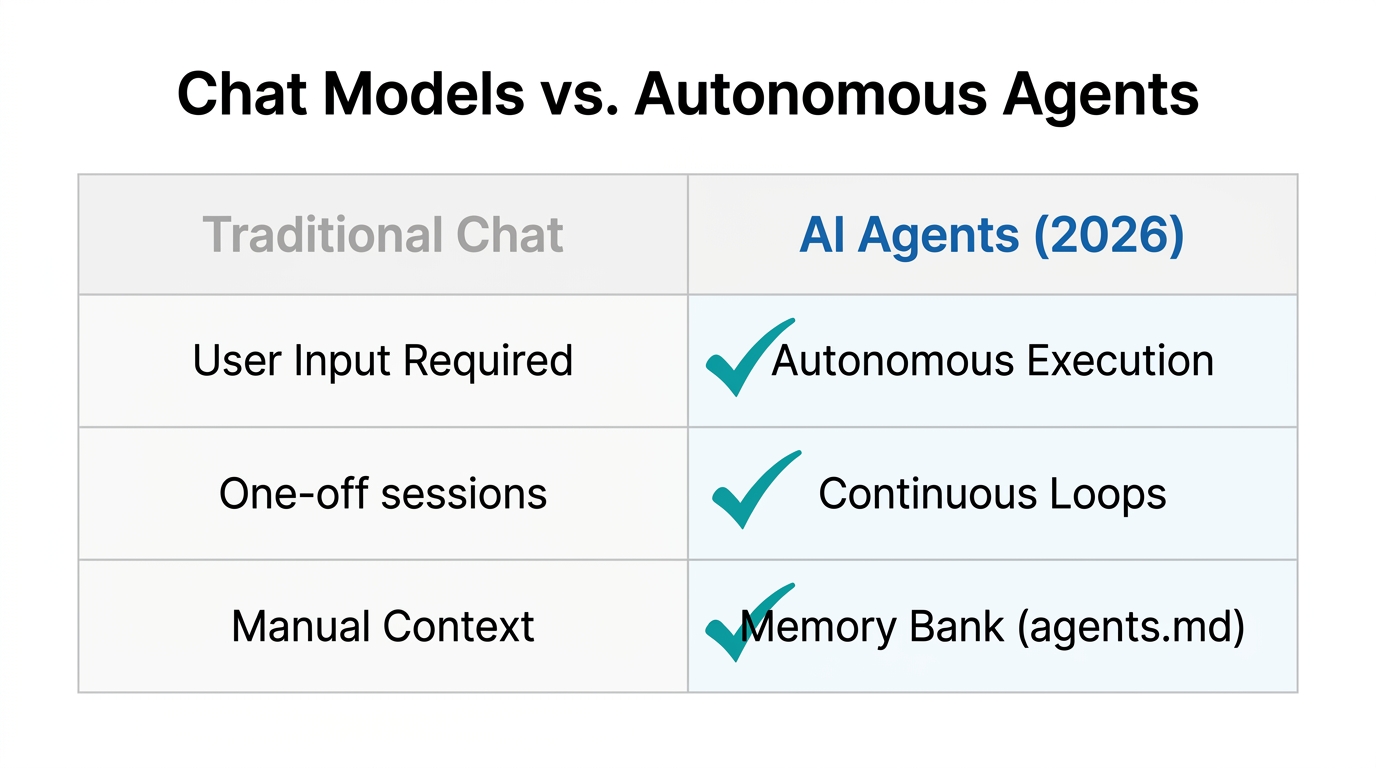
To master AI agents for entrepreneurs, you must first understand the fundamental difference between the tools of 2024 and the agentic systems of 2026. A chat model is question-to-answer. You ask, it replies, and then you do the manual work of implementing the answer. An agent, however, is goal-to-result. You give it a task, and it plans, executes, and delivers a completed outcome.
| Feature | Chat Models (Legacy) | AI Agents (2026) |
|---|---|---|
| Interaction Style | Ping-pong (Back and forth) | Set-and-forget (Autonomous) |
| Workflow | Manual execution by user | Observe-Think-Act Loop |
| Tool Access | Limited to web search | Full API integration via MCP |
| Memory | Session-based only | Persistent memory.md files |
Inside every agent platform—whether you prefer Claude Code, Codex, or Manus—is what developers call the "agent loop." When you tell your assistant to "build a marketing report," it doesn't just hallucinate a response. It observes your workspace files, thinks about the research needed, acts by searching the web or your CRM, and repeats this cycle until the task is concluded. This is the foundation of high-leverage Codex AI productivity.
"Chat is question to answer, but an agent is goal to result. It's the difference between asking for a recipe and having a chef cook the meal for you."
The Context Engineering Framework: Onboarding Your AI Employee
One of the most common mistakes beginners make is failing to "onboard" their AI. In 2026, prompt engineering is dead; it has been replaced by context engineering. If you hire a human executive assistant, you don't just point to a desk and say "work." You explain the business, the clients, and your preferences. Your AI agent requires the same courtesy via markdown files.
To build your assistant, start by creating a local folder on your computer titled Executive Assistant. Inside, you will maintain two critical files:
- agents.md (or claude.md): This is your assistant's "identity card." It includes your role description, business context, preferred tone, and an overview of your tech stack. It acts as a permanent system prompt that is loaded into every session.
- memory.md: This is the persistent log of your preferences. If you tell the agent once that you prefer "Warm regards" over "Cheers" in emails, it records that preference here so you never have to repeat yourself.
agents.md file. Ask Claude to "interview me to extract all necessary business context to be a world-class executive assistant," then save the output to your local folder.Model Context Protocol (MCP): The Universal Translator
Discover how MCP acts as a universal translator connecting agents to your tools.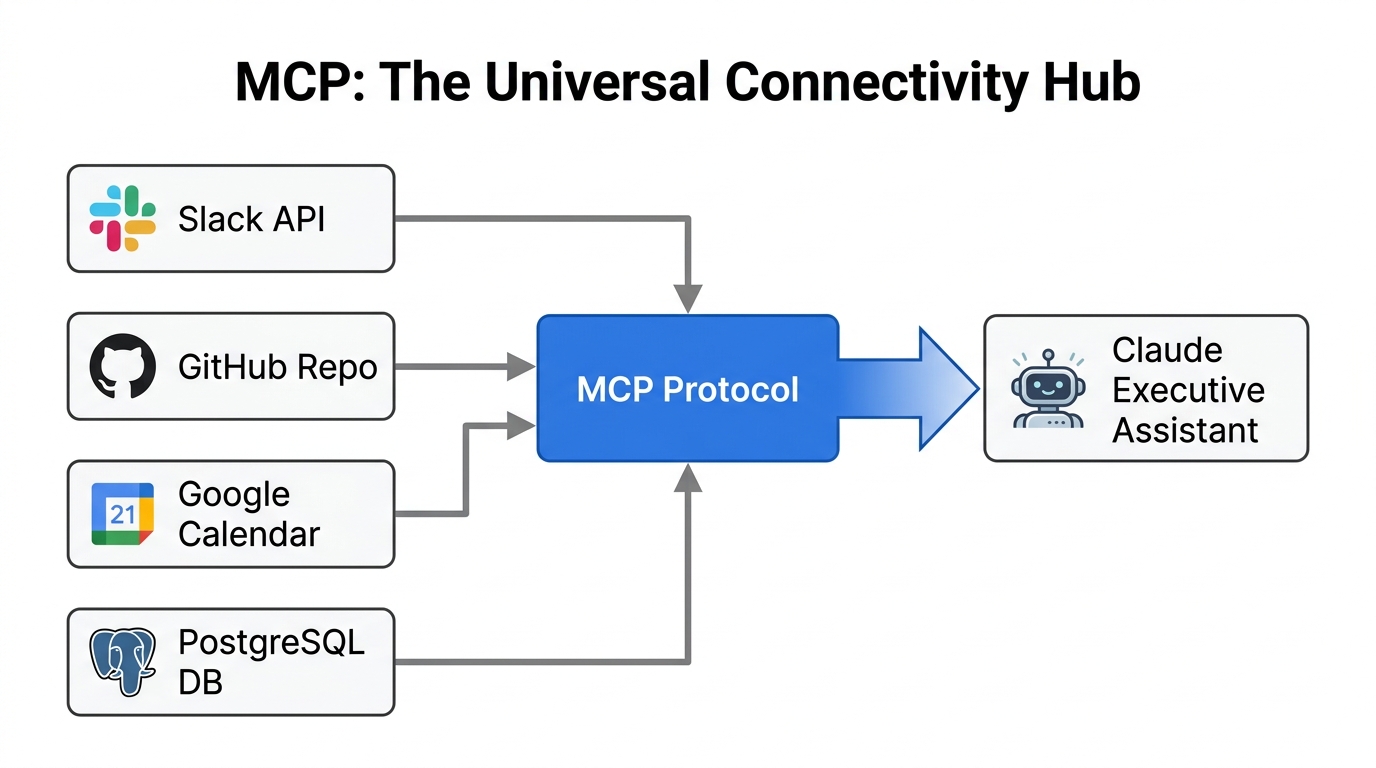
Connecting your assistant to the real world requires Model Context Protocol (MCP) business implementation. Before MCP, connecting an AI to Notion, Gmail, or Slack required complex custom code. In 2026, MCP acts as a universal translator, allowing Claude or Codex to "speak" to all your tools simultaneously.
When setting up your assistant in a harness like Perplexity or Claude Code, you can enable connectors for your entire growth stack. This allows the agent to pull data from Google Calendar, check tasks in Linear, and even manage payments in Stripe. For businesses leveraging influencer marketing, you might even have your agent interface with platforms like Stormy AI to discover and vet creators automatically based on a natural-language brief.
Building a Self-Improving Memory Loop
See how a memory.md file allows your agent to remember and improve over time.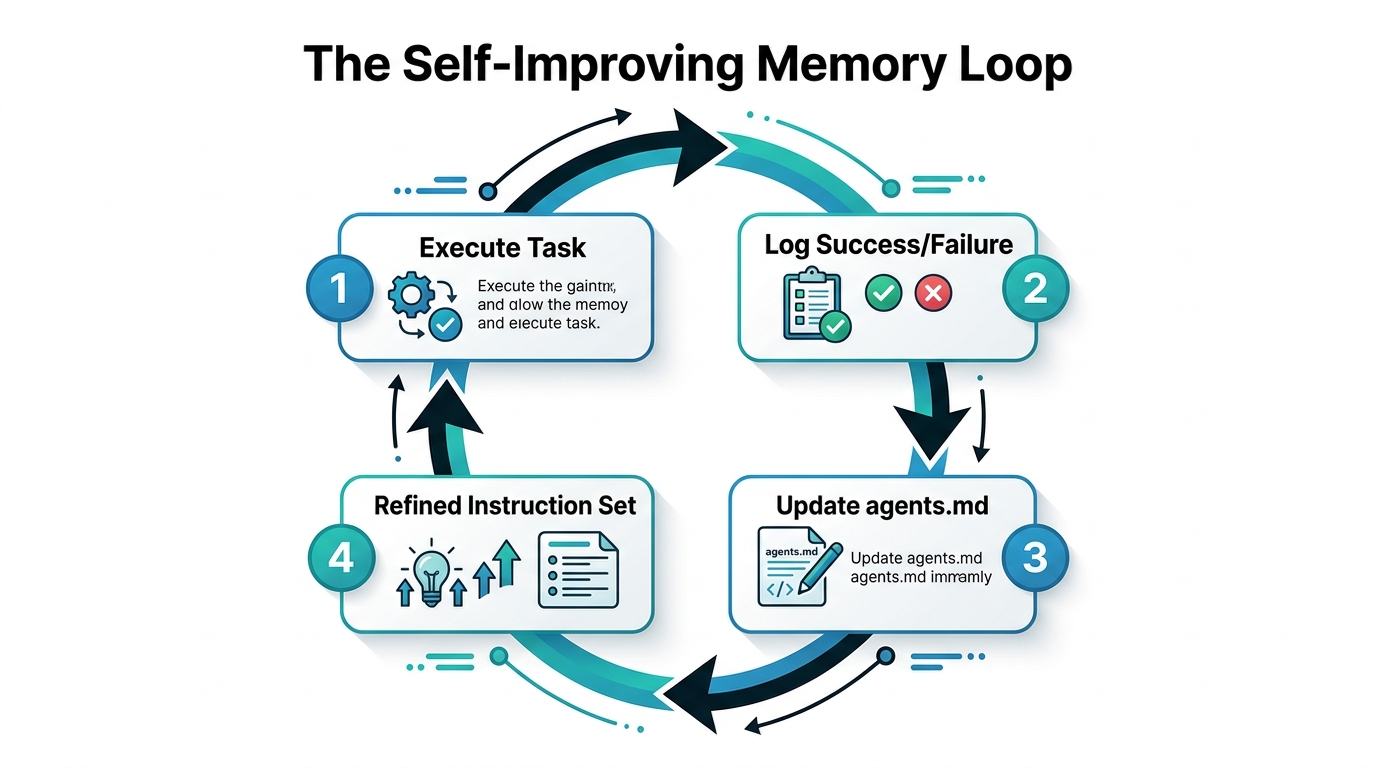
A true executive assistant gets smarter over time. By using a memory.md file combined with a specific instruction in your agents.md, you can create a self-improving loop. Add the following instruction to your system file:
"Whenever I correct you or provide a new preference (e.g., tone, tool usage, or scheduling), immediately update the relevant section in memory.md. Before starting any new task, read memory.md to ensure you are operating with the latest preferences."
This simple instruction prevents the "Groundhog Day" effect where the AI forgets your corrections in a new session. Over weeks and months, this file becomes an AI Operating System (AI OS) specifically tuned to your unique business DNA. For example, if you frequently run meta-ads for app installs, your agent will eventually remember your specific Meta Ads Manager campaign naming conventions without being told.
"The future of work isn't about managing people; it's about managing the markdown files that run your agents."
The Daily Brief Playbook: Automating Your Morning
Build a morning brief skill to automate your calendar and inbox summaries daily.The most impactful "skill" you can build for your assistant is the Daily Brief. This sequence saves the average entrepreneur 30-45 minutes of mental overhead every morning by synthesizing information across disparate tools. Here is the Claude Code tutorial step-by-step to set this up:
- Connect MCP Tools: Ensure Gmail, Google Calendar, and Notion are linked to your agent harness.
- Define the Skill: Create a
daily_brief.skillfile in your.claude/skillsdirectory. This file should contain the logic: "Check calendar for meetings → Scrape relevant Gmail threads for those attendees → Pull latest project status from Notion → Output a 3nd-grade-level summary." - Schedule the Task: Use a cron job or the built-in scheduler in tools like Co-work to run this skill at 8:30 AM daily.
- Refine via Feedback: If the summary is too long, tell the agent. Because of your memory loop, it will update
memory.mdand the next day's brief will be more concise.
Scaling Your AI Operating System: Global vs. Project Skills
As you get comfortable with your executive assistant, you will likely want to build agents for other departments: a Head of Marketing, a CFO, or a UGC Outreach Manager. In 2026, the best way to manage this is through a hierarchical folder structure. Tools like Monologue can help you transcribe these complex SOPs into markdown files for your agents to follow.
Distinguish between Global Skills (things you want every agent to know, like your brand's voice) and Project-Level Skills (things specific to a role, like how to refer a lead to a specific partner). This prevents "context clutter" and ensures your assistant remains fast and accurate. For specialized marketing tasks, your Head of Marketing agent can use Stormy AI to handle the discovery and outreach of hundreds of influencers while you sleep, reporting back only when a creator has accepted a deal.
Conclusion: The Autonomous Entrepreneur
Building an AI executive assistant in 2026 is no longer a futuristic dream—it is a technical requirement for staying competitive. By moving from simple chat interfaces to local, markdown-driven agents powered by Claude Code and Codex, you are building an asset that grows more valuable every day. The goal is to automate the mundane so you can focus on the creative and strategic decisions that drive growth. Start today by creating your agents.md file, connecting your tools via MCP, and letting your new AI employee take the first two hours of work off your plate. The productivity gains are not incremental; they are exponential.