In 2026, the ecommerce landscape has shifted from static storefronts to dynamic, high-performance engines. The legacy 'Stencil' themes that dominated for years have been eclipsed by Catalyst, BigCommerce’s Next.js-based framework designed for sub-second page loads and 90+ Lighthouse scores. For merchants scaling past $10M ARR, the goal is no longer just 'having a site'—it is about building a headless architecture that supports Agentic Commerce and global scalability. This guide provides the tactical playbook for setting up a BigCommerce store in 2026, from the first command line prompt to automating the messy back office with an AI employee like Stormy AI.
The 2026 Ecommerce Landscape: Why Catalyst Matters
The global ecommerce platform market is projected to reach $13.92 billion in 2026, according to Fortune Business Insights. Within this massive growth, BigCommerce (now operating under the parent brand Commerce.com) has pivoted its entire ecosystem toward headless maturity. As of early 2026, over 64% of enterprise merchants have shifted to composable architectures.
Legacy themes are increasingly seen as a bottleneck. While they are easier to launch, they lack the API-first flexibility required for 2026's newest trend: Agentic Commerce. This shift allows autonomous AI agents to research and purchase products directly from your store manifest. To play in this league, your store needs to be fast, data-rich, and headless. While you focus on building the frontend, you can ask Stormy AI to handle the heavy lifting of monitoring your inventory levels across these high-speed storefronts in the background.
Step 1: Initializing Your Store with Catalyst (Next.js)
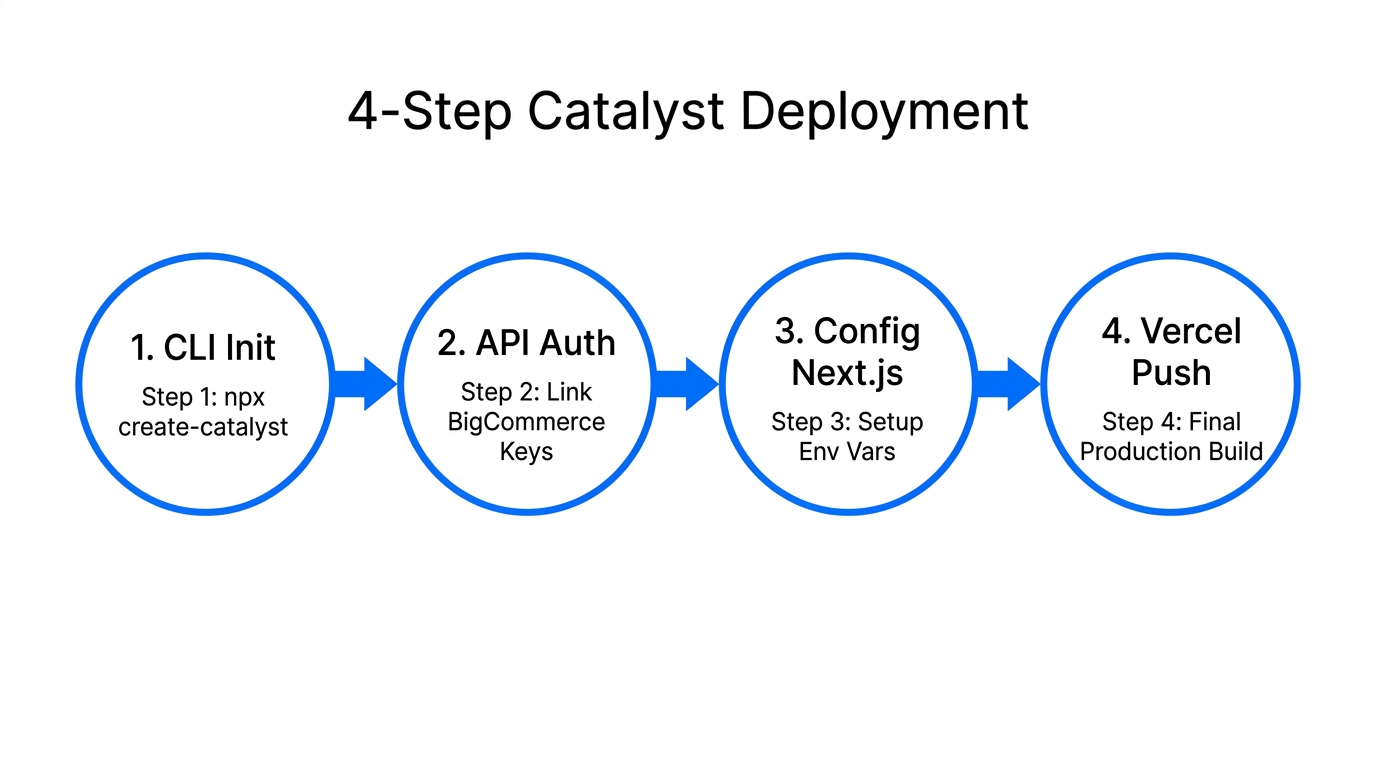
In 2026, we no longer browse a theme marketplace to start a project. Instead, we use the Catalyst CLI to spin up a high-performance Next.js 14 environment. This ensures your store is optimized for Vercel deployment from day one.
Technical Requirements
- Node.js 20.x or higher
- A BigCommerce Performance (formerly Enterprise) or Scale (formerly Pro) account
- API credentials with 'Manage' scopes for Cart, Checkout, and Site Settings
The Deployment Command
Open your terminal and run the following command to create your project:
"npm create @bigcommerce/catalyst@latest --integration=makeswift"
This command does more than just copy files. It integrates Makeswift, the visual composer that solves BigCommerce's historical weakness in native content editing. By using this stack, you achieve the developer ergonomics of a custom build with the 'no-code' flexibility your marketing team needs. Vercel templates now make this deployment nearly instantaneous, reducing the time-to-market for complex headless builds by weeks.
Step 2: Configuring Multi-Storefront (MSF) for 2026 Scale
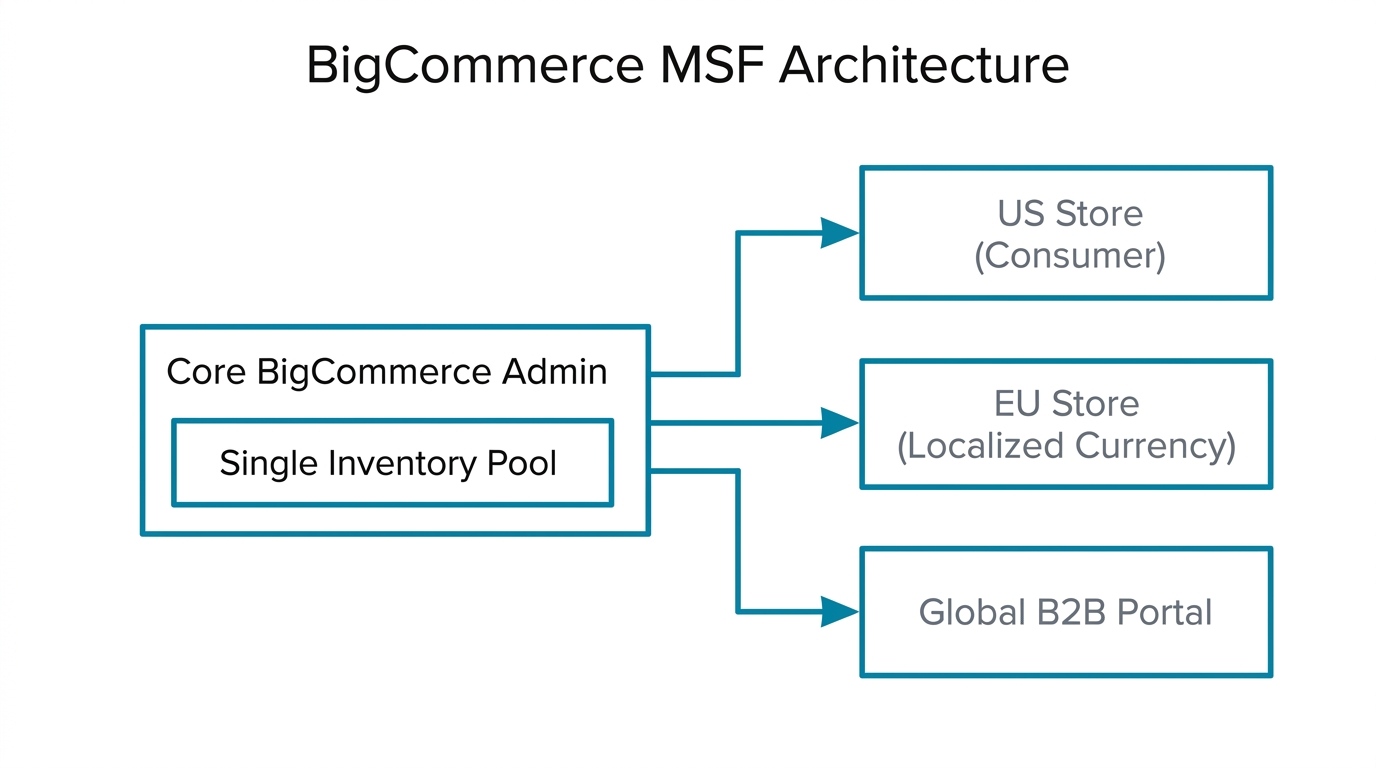
One of BigCommerce's strongest competitive advantages over Shopify in 2026 is its native Multi-Storefront (MSF) capability. This allows you to run separate B2B and B2C storefronts, or different regional sites (e.g., .co.uk and .com), from a single backend. However, MSF comes with specific technical constraints you must plan for during setup.
| Feature | Technical Limit (2026) | Impact on Strategy | 250 variants per product | Reduces from 600 when MSF is active. Critical for apparel brands. | Up to 15 storefronts | Significantly higher than the 8-storefront limit in the Stencil era. | <100ms | Catalyst maintains lower latency even with 100k+ SKUs. |
|---|
When setting up your storefronts in the BigCommerce Control Panel, navigate to Channel Manager and create a new 'Headless' channel. Link this channel to your Catalyst environment variables. If you are managing multiple regions, Stormy AI can be set up to wake up every morning, pull the previous day's sales from each storefront, and consolidate them into a unified performance report so you don't have to manually toggle between channels.
Step 3: Navigating the 2026 API Rate Limits
Scaling a BigCommerce store requires a deep understanding of the v3 API rate limits. As of 2026, standard plans are capped at 450 requests per 30 seconds. If your architecture is too 'chatty'—meaning your frontend makes too many individual requests to the backend—you will trigger '429 Too Many Requests' errors.
To avoid the dreaded 'API Ceiling' that critics often cite on Reddit, implement the following:
- GraphQL for Everything: Catalyst uses GraphQL by default. This allows you to fetch multiple data points (price, inventory, description) in a single request, drastically reducing the load on your rate limit.
- Webhooks for Syncs: Instead of polling the API for inventory changes, use webhooks. This pushes data to your middleware only when a change occurs.
- Batch Processing: For high-volume data syncs from suppliers, ensure your scripts use the batch update endpoints.
This is where Stormy AI becomes an essential part of your stack. Because Stormy is an AI ecommerce employee with its own task scheduler, it can be programmed to respect these 450/30s limits. You can ask Stormy to 'Update these 5,000 SKUs from our supplier CSV, but throttle the requests to stay under the BigCommerce API limit.' It monitors the status and restarts if it detects a bottleneck, effectively managing the 'messy' side of headless operations.
"The API ceiling is only a barrier for those with unoptimized code. In 2026, GraphQL and intelligent middleware turn that ceiling into a launchpad."
Step 4: AI Data Readiness and the UCP Manifest
As BigCommerce CEO Travis Hess noted in early 2026, "When product discovery begins with a prompt, not a homepage, quality of data determines whether you get purchased." To prepare for this, you must look beyond your storefront and focus on your Product Feed.
Integrate Feedonomics (now part of the Commerce.com suite) to enrich your product attributes. In 2026, shoppers use AI 'Answer Engines' like Perplexity and ChatGPT to find products. These agents don't care about your pretty UI; they care about structured data like material density, specific compatibility, and real-time availability.
ucp.json manifest to your /.well-known/ folder. This follows the Universal Commerce Protocol, allowing Google and OpenAI agents to 'crawl and buy' autonomously from your store.You can learn more about the technical specs for this at UCPtools. If you aren't sure if your product descriptions are 'Agent-ready,' Stormy AI can audit your catalog, flagging any SKUs that lack the structured data required for AI discovery.
Step 5: Payment Optimization and the 2% Fee
One of the most controversial updates in mid-2026 is the new 2% Open Payment Provider Fee. Similar to Shopify’s transaction fees, BigCommerce now penalizes merchants for using non-approved gateways.
To keep your margins healthy, you should stick to Approved Embedded Providers like Stripe or the newly launched BigCommerce Payments. These providers are 'agentic-ready,' meaning they support the 1-click checkout flows required for AI-driven transactions. By using these approved partners, you maintain a 0% transaction fee, which can lead to 12-15% better long-term margins compared to Shopify for merchants doing over $10M ARR.
Comparison: BigCommerce vs. The Field (2026 Edition)
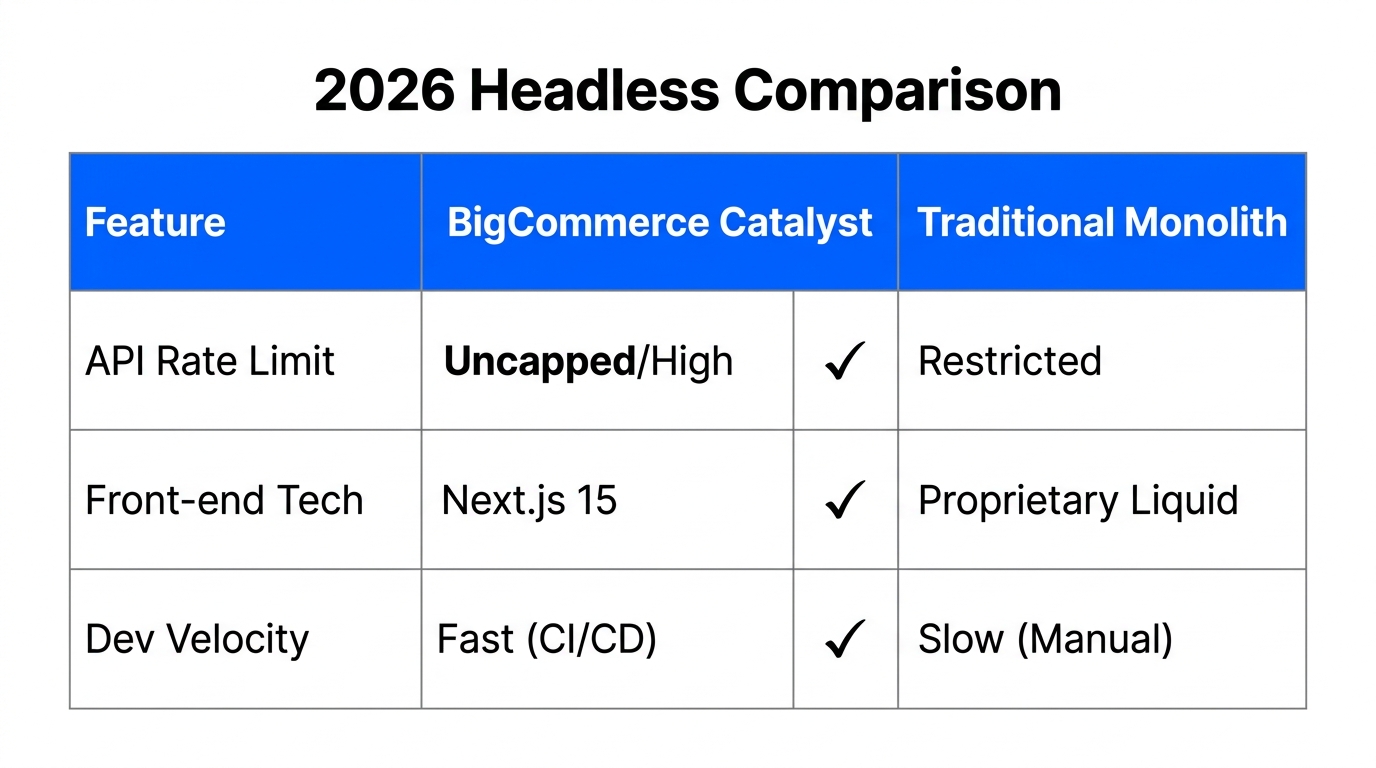
Choosing the right platform depends on your business model. While Shopify is still the king of rapid launches, BigCommerce has secured its spot as the go-to for complex B2B and mid-market headless builds.
| Metric | BigCommerce (2026) | Shopify (2026) | Adobe Commerce (2026) | 0% (on approved gateways) | 0.5% - 2.0% | 0% (High Annual Fee) | Native B2B Edition (High) | Requires Plus ($2.3k/mo) | Extremely High (Complex) | Next.js (Catalyst) | Hydrogen (Remix) | PHP / Luma (Legacy) | Excellent (Headless-first) | Moderate (App-heavy) | Varies (Self-hosted) |
|---|
Merchants like MKM Building Supplies have already seen an 82% revenue growth by migrating to BigCommerce's headless architecture, according to BigCommerce Case Studies. The ability to handle complex pricing and multi-tier approvals natively—rather than through 15 different apps—reduces 'App Debt' and keeps the site lightning-fast.
The Final Piece: Automating Your Back Office with Stormy AI
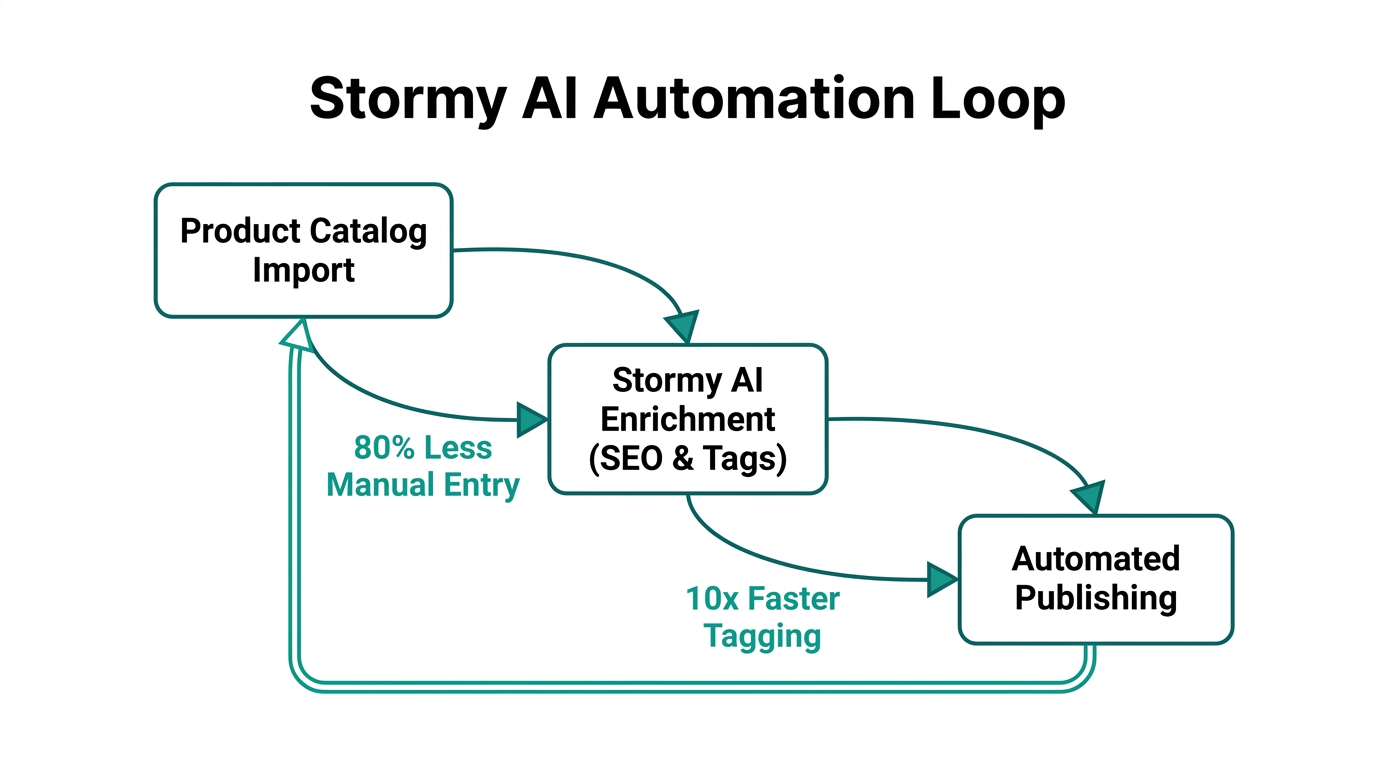
Building a high-performance Catalyst store is only half the battle. Once the site is live, the 'messy' back-office tasks of running an ecommerce business can become overwhelming. This is where Stormy AI acts as your AI ecommerce employee. While Catalyst handles the customer experience, Stormy handles the operations.
Here is how Stormy integrates into your 2026 BigCommerce playbook:
- Inventory Pulse: Stormy connects to your BigCommerce backend, monitors stock levels across all storefronts, and automatically emails your suppliers when a SKU hits its reorder point.
- Ad Performance: Stormy pulls spend from Meta Ads Manager and Google Ads, matches it against BigCommerce revenue, and flags underperforming campaigns in a shared spreadsheet.
- Supplier Follow-up: If a shipment is late, Stormy AI can track the lead times and send polite follow-up emails to vendors, keeping your fulfillment status updated without you lifting a finger.
- Customer Support Triage: Stormy can organize tickets from Gorgias, detect refund requests, and draft on-brand replies for your approval.
Conclusion: Building for the Future of Commerce
Setting up a BigCommerce store in 2026 is a technical endeavor that yields massive competitive advantages. By choosing Catalyst over Stencil, you are future-proofing your site for the era of Agentic Commerce and sub-second performance. You aren't just building a website; you are building an API-driven business that is ready to be discovered and purchased from by both humans and AI agents.
The key to success is leveraging the right teammates. While your developers work on the Next.js frontend, an AI employee like Stormy AI can run the back office, ensuring your inventory is managed, your ads are tracked, and your suppliers are held accountable. In 2026, the brands that win are the ones that automate the boring parts so they can focus on the creative ones.