Beyond ROAS: Using Google Merchant Center COGS to Scale Shopify Profit in 2026
Learn how to use Google Merchant Center COGS to switch from ROAS to profit-based scaling in 2026. Audit your feed and automate Shopify profit with Stormy AI.
In 2026, the ecommerce landscape has shifted from a land grab of raw revenue to a surgical battle for net margin. For years, performance marketers lived and died by Return on Ad Spend (ROAS). But as acquisition costs climb and global supply chains remain volatile, the brands that are actually scaling are those that look beyond the top line. If you have ever reviewed your Google Ads dashboard and wondered why a "winning" campaign isn't reflected in your bank account, you are likely missing the most critical data point in your stack: Cost of Goods Sold (COGS).
Scaling Google Ads for profit requires more than just high-converting creative; it requires a deep integration between your Shopify product costs and your advertising algorithms. By feeding real-time COGS data into Google Merchant Center, you transition from ROAS-based bidding to Profit on Ad Spend (POAS). This playbook details how to audit your feed, calculate your true Marketing Efficiency Ratio (MER), and leverage an AI ecommerce employee like Stormy AI to automate the operational responses to these profit trends.
Why ROAS is a Misleading Metric in 2026
Understand why high-revenue campaigns can still be unprofitable without proper margin context.
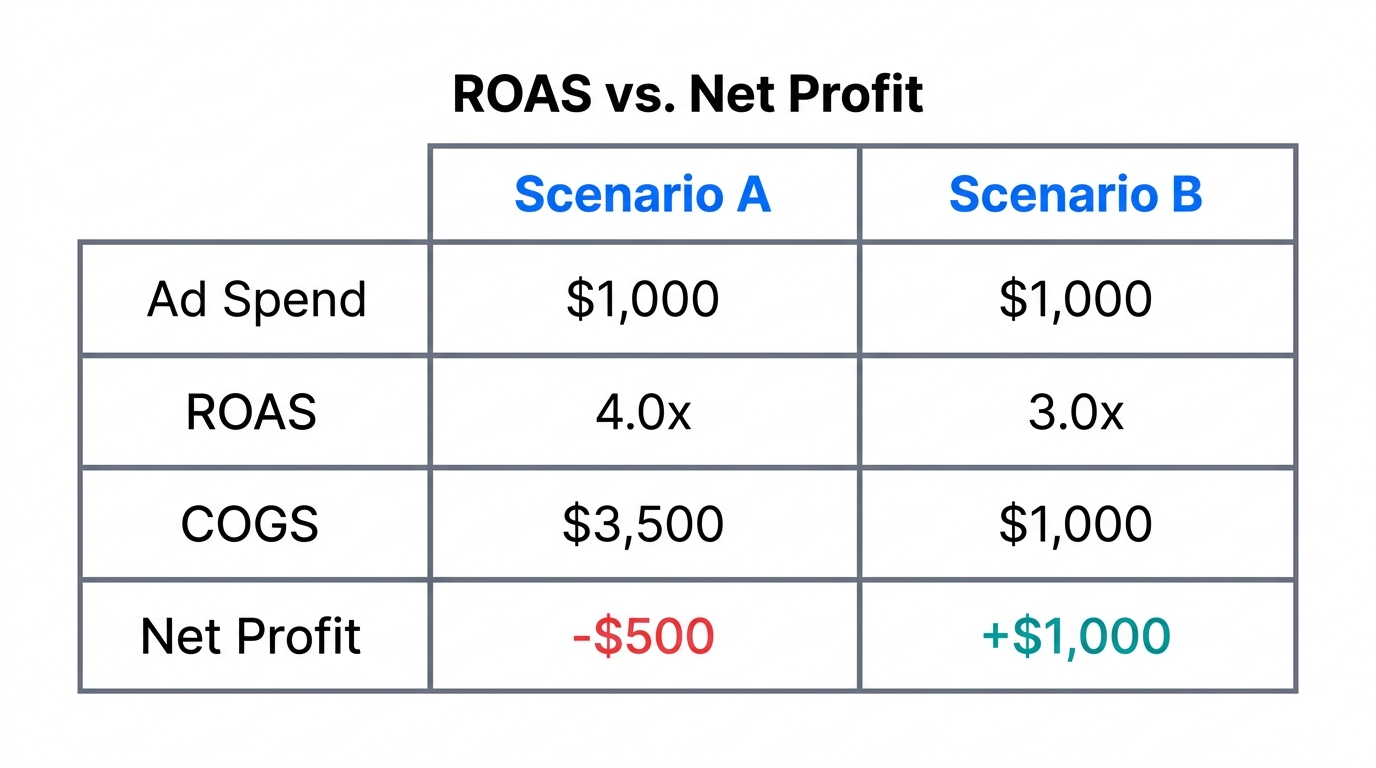
The fundamental flaw of ROAS is that it treats every dollar of revenue as equal. In reality, a $100 sale of a high-margin private label product is worth significantly more than a $100 sale of a low-margin third-party item. According to recent research, many Shopify merchants discover that their best-selling products are often their lowest-margin items. Without COGS data, Google Ads has no way of knowing this, leading you to optimize for revenue while unintentionally draining your margins.
This is why the shift toward POAS (Profit on Ad Spend) is essential. POAS accounts for the cost of the item, allowing you to bid more aggressively on products that actually contribute to your bottom line. Transitioning to profit-based scaling ensures that your ad spend is an investment in margin, not just a way to inflate top-line numbers for investors or vanity reports.
"The moment you subtract what it actually costs to sell your products, your ad performance looks completely different. COGS is the missing link between marketing activity and actual bank balance."
Auditing Your Google Merchant Center COGS Feed
Learn the technical requirements for currency codes and cart data inside Merchant Center.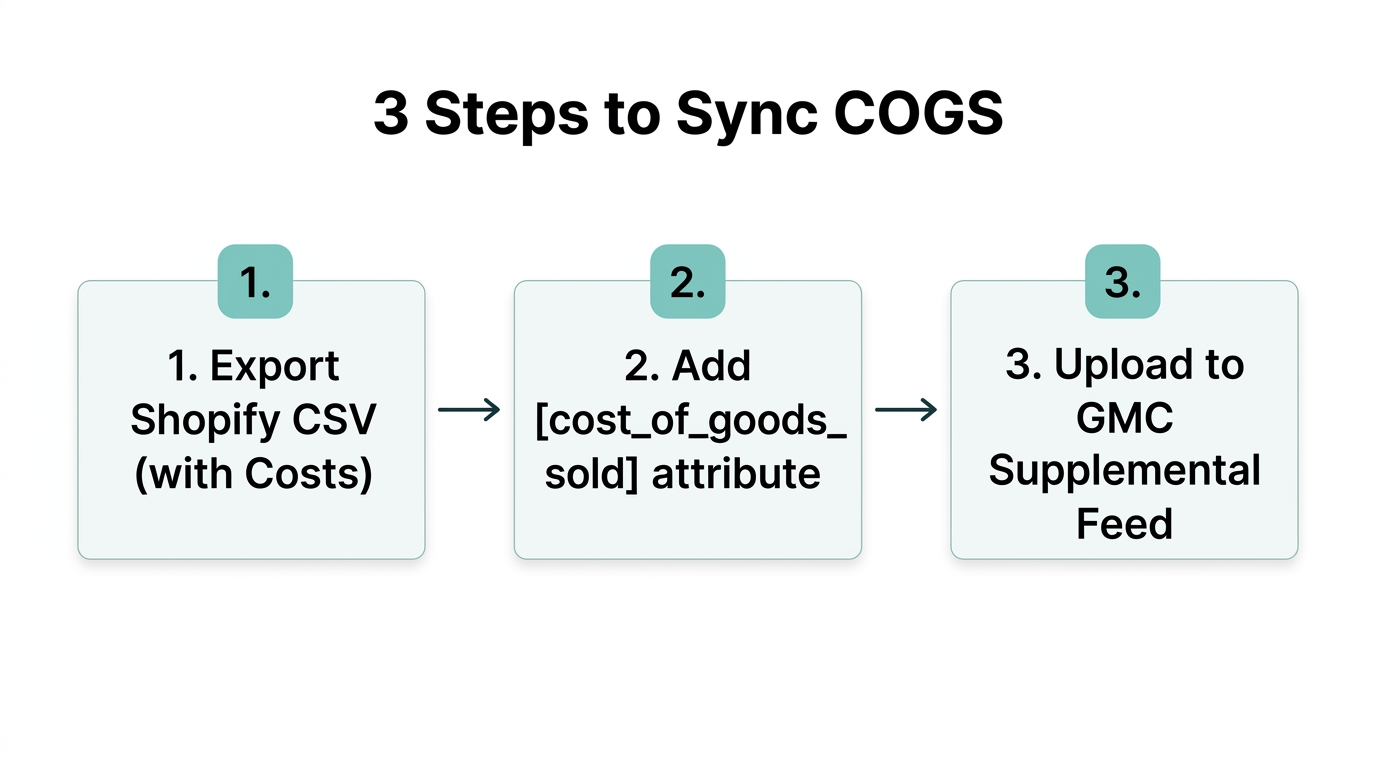
To begin profit-based scaling, your Google Merchant Center feed must be the "source of truth" for your product costs. COGS represents the direct costs of producing or purchasing each product, including raw materials, packaging, and freight to your warehouse. Crucially, it does not include operating expenses like rent or software subscriptions.
The Technical Requirements for Profit Reporting
Even if you enter costs into Shopify, they won't automatically appear in Google Ads reports. To make this work in 2026, you need a specific chain of data to remain unbroken:
- The COGS Value: This must be included in your product feed using the
cost_of_goods_soldattribute. - ISO 4217 Currency Codes: Ensure your formatting is consistent (e.g., "25.00 USD") by following the official ISO 4217 standard.
- Item ID Matching: The ID sent with each purchase conversion must perfectly match the ID in your Merchant Center feed.
- Conversions with Cart Data: You must enable "conversions with cart data" in your Google Ads settings to allow the platform to link specific sales to their respective costs.
For many merchants, this technical bridge is the hardest part. Tools like Analyzify can handle the data flow, ensuring that item-level purchase details are sent to Google Ads in a structure it understands. Once this connection is live, you can view gross profit per product directly inside your ad reports.
Calculating MER with Margin Context
Marketing Efficiency Ratio (MER), also known as "Blended ROAS," is a high-level metric (Total Revenue / Total Ad Spend). However, in 2026, a high MER can still hide a business that is trending toward zero cash. When you integrate COGS, your MER gains vital context. Instead of just looking at revenue, you should track your Gross Margin MER.
| Metric | Traditional MER | Profit-Adjusted MER (2026 Standard) |
|---|---|---|
| Calculation | Total Revenue / Total Ad Spend | (Total Revenue - COGS) / Total Ad Spend |
| Focus | Sales Volume | Cash Contribution |
| Risk | High; ignores product cost spikes | Low; accounts for margin compression |
| Action | Scale based on top-line growth | Scale based on net profitability |
Using Stormy AI, you can automate the monitoring of these metrics. Stormy can pull spend from Meta Ads Manager and Google Ads, compare it against the product costs in your Shopify store, and drop a daily "True Profit" report into a shared workbook. If your margin-adjusted MER drops below a specific threshold, Stormy can flag the trend before you spend thousands on unprofitable clicks.
Identifying 'Profit-Killer' Products
Discover how to identify products that consume your budget versus those generating sustainable profit.Once your COGS data is flowing into Google Ads, you will likely find "profit killers"—products with high revenue and high ROAS that actually have low net margins. These products consume your budget and distract from the true winners.
How to Spot Them
Look for campaigns where the conversion rate is high but the Gross Profit per Conversion is low. For example, if a product costs $40 to make and sells for $50, even a 5.0 ROAS might result in a loss after you factor in shipping, transaction fees, and ad spend. Conversely, a product that costs $10 to make and sells for $50 can be highly profitable even at a 2.5 ROAS.
By identifying these killers, you can reallocate budget toward high-margin SKUs. This is the essence of scaling Google Ads for profit: feeding the winners that feed your bank account.
"Scaling a 2.0 ROAS high-margin product is often more sustainable than scaling a 5.0 ROAS low-margin product. Profit-centricity is the ultimate competitive advantage."
Automating the Back Office with Stormy AI
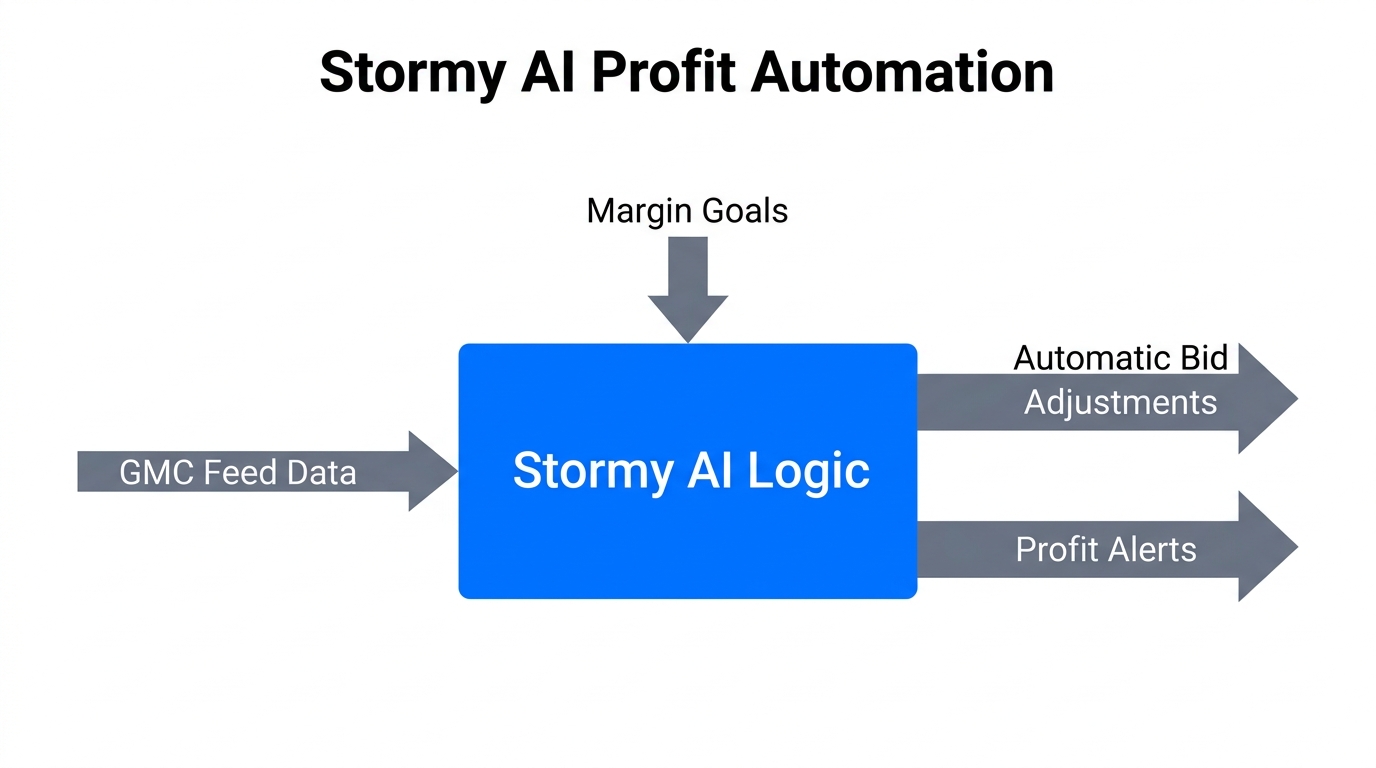
Profit-based scaling isn't just about the ads; it's about the operations that support them. If you scale a high-profit SKU and it goes out of stock, your efficiency drops to zero. This is where Stormy AI acts as your AI ecommerce employee, managing the "messy middle" of the business.
Automated Supplier and Inventory Follow-ups
Stormy AI monitors your Shopify inventory levels and sales velocity in real-time. When it detects that a high-profit product is selling faster than expected due to your new Google Ads strategy, it doesn't just send a notification—it takes action:
- Supplier Check-ins: Stormy can automatically email your supplier to check on the status of a pending PO if inventory is running low.
- Lead Time Monitoring: It tracks how long it takes for a supplier to ship and flags risk if the lead time will result in a stockout.
- Performance Reporting: Every week, Stormy builds a polished XLSX report summarizing what changed in your profit margins and which SKUs are at risk.
By handling these scheduled tasks, Stormy allows you to focus on high-level strategy while the AI ensures that your operational engine is keeping up with your marketing growth. This integration of Shopify profit margin automation and AI-driven ops is the standard for successful brands in 2026.
Conclusion: The Profit-First Playbook
Switching from ROAS to POAS is a fundamental shift in mindset. It requires technical discipline to maintain your Google Merchant Center COGS data and strategic patience to optimize for margin over volume. However, the rewards are clear: a more resilient business, a healthier cash flow, and the ability to outspend competitors who are still chasing vanity metrics.
As you move forward in 2026, remember that your data is only as good as the actions you take on it. Audit your feed, connect your cart data, and let an AI teammate like Stormy AI handle the manual follow-ups and inventory monitoring that keep your profit-generating engine running smoothly. Stop guessing if you're profitable and start scaling with the certainty that every click is contributing to your bottom line.