The era of manually clicking through the Meta Ads Manager dashboard to launch every single creative variation is rapidly coming to an end. As we enter 2025, the global AI marketing market has surged to $20.4 billion, and the most sophisticated growth teams are abandoning graphic user interfaces (GUIs) in favor of the terminal. The shift isn't just about speed; it's about programmable growth. By connecting AI agents directly to the Meta Marketing API through tools like ZuckerBot and the Model Context Protocol (MCP), marketers are achieving levels of efficiency that were previously reserved for enterprise-level engineering teams.
Understanding ZuckerBot and the Meta Ads MCP Server
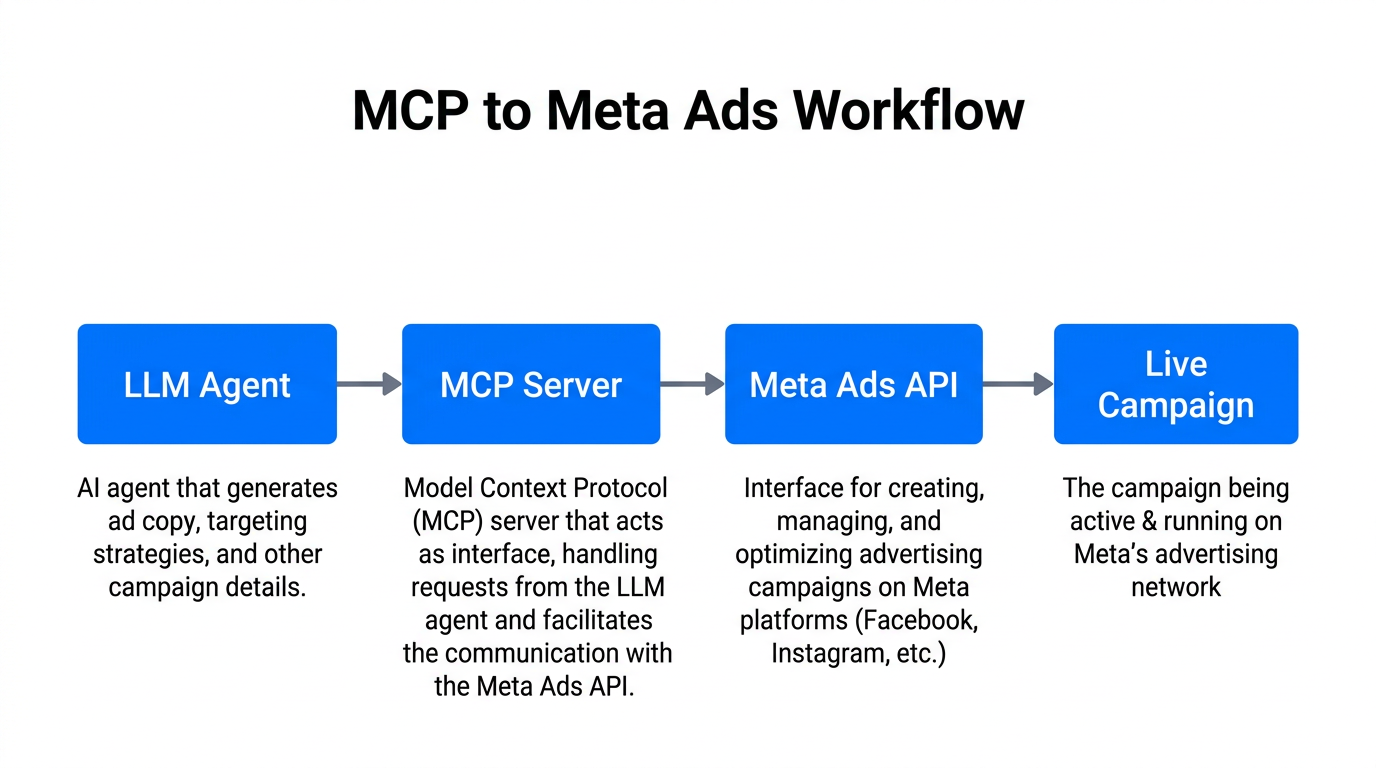
To understand the power of modern Meta Ads automation, one must first understand the Model Context Protocol (MCP). MCP is a standardized framework that allows Large Language Models (LLMs) like Claude or Gemini to interact seamlessly with external tools and APIs. Essentially, it provides the "context" and the "hands" for an AI to perform real-world tasks. The Meta Ads MCP server, often implemented via projects like ZuckerBot, acts as a bridge between your AI agent and the Meta Marketing API.
Instead of navigating through layers of menus to set a budget or update a headline, you can simply type a command in your terminal or prompt your AI agent: "Create a new campaign targeting small business owners in the UK with a £50 daily budget and these three video assets." The AI interprets the request, uses the MCP server to format the API call, and executes the campaign launch instantly. This technical shift is why 69.1% of marketers have already integrated AI into their operations, moving beyond simple copy generation into full-scale autonomous ad management.
"The transition from GUI to CLI isn't just a technical preference; it's a 'Velocity Advantage' that allows an audit that takes 20 minutes in a dashboard to be completed in 30 seconds via script."
The 2025 Advantage: Unified CLI Standards
Historically, managing Meta and Google Ads meant juggling two completely different ecosystems. In 2025, the introduction of unified protocols means a single terminal interface can manage your entire cross-channel stack. For instance, while ZuckerBot handles your Facebook and Instagram presence, tools like Adscriptly CLI or the Google Ads API Developer Assistant provide similar natural-language control for search campaigns. This allows for cross-platform scripts that can shift budget from Meta to Google automatically if ROAS drops below a certain threshold on one platform.
| Feature | Traditional Dashboard (GUI) | AI-Driven CLI (MCP/ZuckerBot) |
|---|---|---|
| Launch Speed | 5-15 Minutes | < 30 Seconds |
| Scalability | Manual duplication | Automated micro-campaigns |
| Data Integration | Manual CSV uploads | Direct API/CRM loops |
| Error Margin | Human clicking errors | Script-validated entries |
This unification is part of a broader trend toward micro-campaigns. Rather than running one broad campaign, AI agents can launch hundreds of hyper-personalized ad variations that target specific user behaviors. This strategy helped retailers like Trendyol achieve a 180% improvement in ROAS and a 27% reduction in Customer Acquisition Cost (CAC).
Automating Visual Asset Creation and Launching
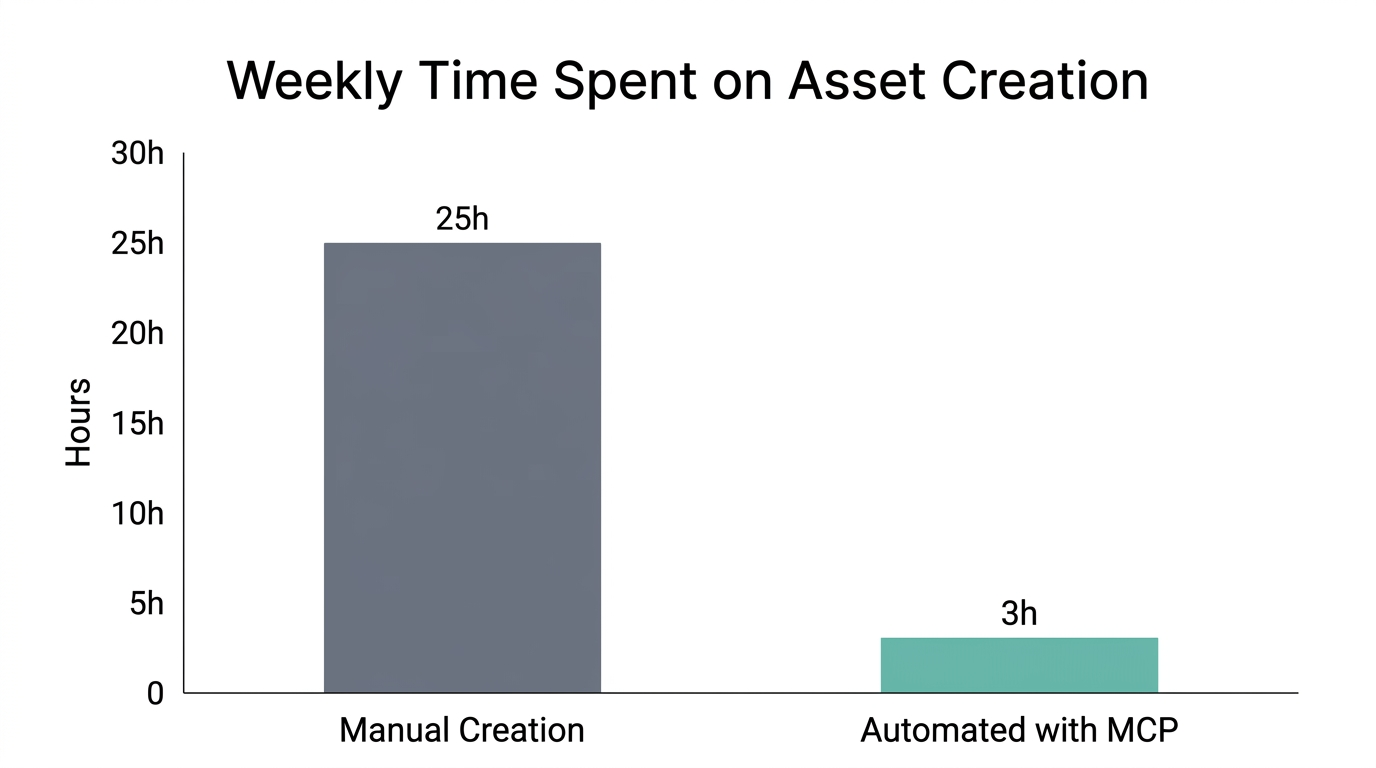
One of the most labor-intensive parts of Meta Ads is the creative. ZuckerBot and similar MCP implementations allow for the automated creation and deployment of visual assets. By integrating with tools like Adobe Express or Canva via API, an AI agent can generate a new batch of creative based on top-performing templates, upload them to the Meta library, and swap them into active ad sets without human intervention.
Consider the example of Carvana, which used AI-driven automation to generate 1.3 million personalized video ads. Attempting this through a web dashboard would be impossible. Using terminal scripts, this level of personalization becomes a standard workflow. To fuel these automated funnels with authentic content, platforms like Stormy AI can help source and manage UGC creators at scale, providing the raw material that your AI agents then deploy across thousands of ad variations.
"Autonomous AI is moving us from 'if-then' rules to goal-based execution, where the agent determines the best path to reach your target ROAS."
The Agent Zero Playbook: Building Autonomous Funnels
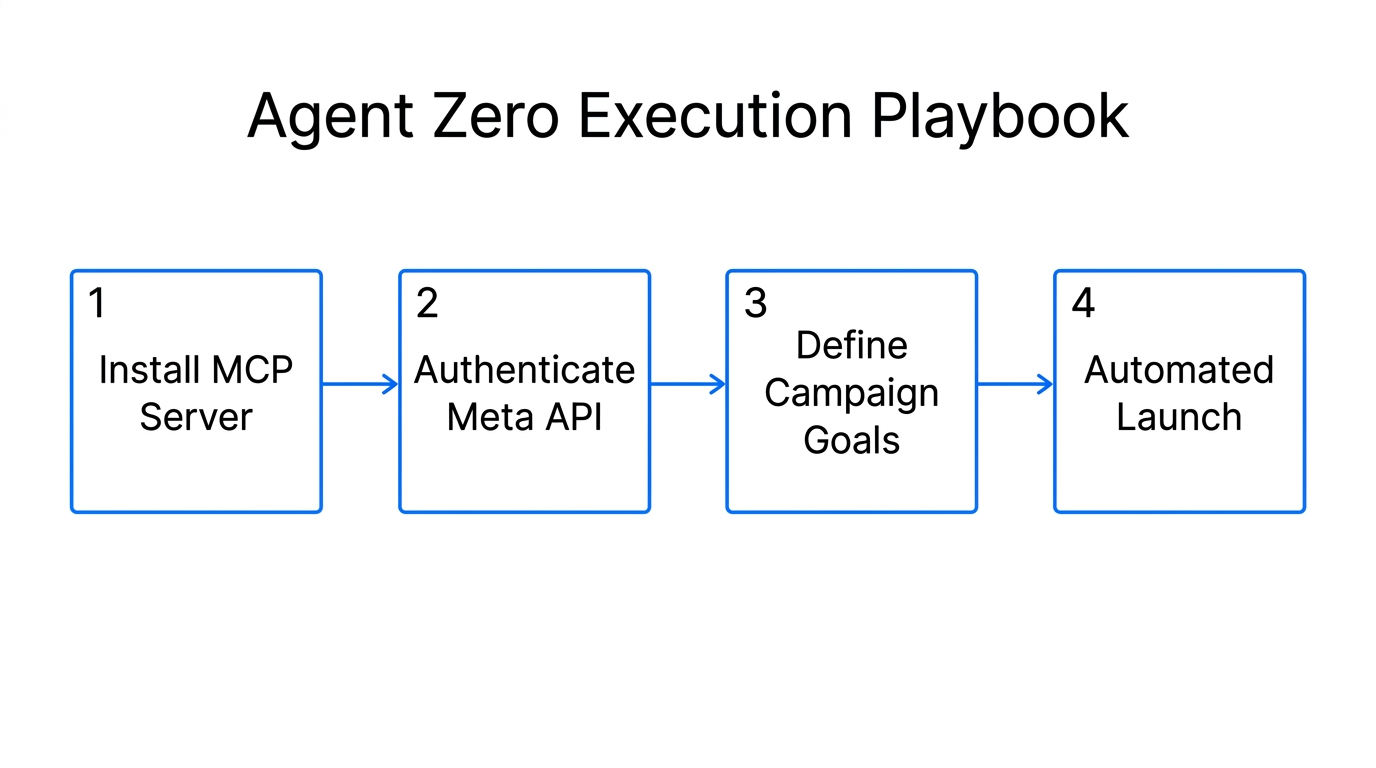
To go beyond simple scripts, many developers are turning to frameworks like Agent Zero. This framework allows you to build a custom autonomous agent that doesn't just launch ads, but manages the entire marketing funnel. Here is a playbook for setting up an autonomous Meta Ads manager:
Step 1: Environment Setup
First, you must install the MCP server for Meta Ads and configure your API credentials. This involves setting up a Meta Developer App and obtaining a Permanent Page Access Token. Documentation for this can often be found on GitHub for tools like Trak-Social CLI.
Step 2: Defining the Goal (The "Why")
Unlike old-school automation, you don't tell the agent to "pause if CPA is $10." Instead, you define the objective. Use a prompt like: "Monitor the 'Summer Sale' campaign. Maintain a minimum ROAS of 3.5. If creative fatigue is detected (frequency > 3.0 and CTR drops), generate two new variations using the 'High-Contrast' template and replace the lowest performer."
Step 3: Integrating the Feedback Loop
The real power of an agent like Agent Zero comes from connecting it to your CRM, such as Salesforce or Pipedrive. By feeding offline conversion data back into the Meta API via the terminal, the AI learns which ads lead to actual closed deals, not just cheap clicks. This is the same logic that led H&R Block to see a 144% increase in conversion rates.
Avoiding the 'Garbage In, Garbage Out' Trap
While automation offers incredible speed, it also amplifies mistakes. Experts at ExtraDigital warn that AI is like a high-speed vehicle; it still requires a "skilled driver" to ensure it doesn't burn through your budget on poor variations. If you feed an AI agent poor conversion data—for instance, tracking "website visits" instead of "purchases"—the agent will become incredibly efficient at finding people who click but never buy.
Furthermore, generic AI-generated copy can flatten a brand's personality. According to Hashmeta, 86% of successful marketers still manually edit or review AI-generated content before it goes live. The best results come from a hybrid model: use the CLI for the heavy lifting of deployment and optimization, but keep a human in the loop for brand strategy and creative direction.
To ensure your ad creative remains high-quality, consider using Stormy AI to discover and vet creators who can provide the human-centric, high-trust content that AI simply cannot replicate. Combining AI's deployment speed with a human's creative spark is the winning formula for 2025.
Conclusion: The Future is Command-Line Driven
The move toward ZuckerBot and Meta Ads MCP isn't just a trend for developers; it is the future of performance marketing. By leveraging terminal-based management, you can audit accounts in seconds, launch thousands of personalized ad variations, and close the loop between your ad spend and your CRM revenue. As the market for AI marketing automation continues to explode, the competitive gap between those using traditional dashboards and those using autonomous agents will only widen.
Start small by exploring the open-source assistants available on GitHub, and gradually build toward a fully autonomous stack. The tools are ready; the question is whether your workflow is prepared to handle the velocity of AI-driven growth. For those ready to scale, pairing these technical automations with a robust creator strategy will ensure that your ads aren't just fast—they're effective.