Every social media manager and YouTube growth expert knows the crushing weight of the "visual bottleneck." You have the perfect script, the ideal hook, and the high-energy edit, but your Click-Through Rate (CTR) is at the mercy of a single static image. Traditionally, thumbnail creation required hours of manual design in Canva or Adobe, or expensive back-and-forth cycles with freelancers. But we have entered the era of agentic design, where the distance between a concept and a finished, high-performing visual is collapsing. By connecting Claude to your creative stack via the Model Context Protocol (MCP) and Glyph app, you can now automate the entire ideation-to-layout process.
This is not just about generating random AI images; it is about building automated visual content creation pipelines that understand your brand aesthetic, reference viral trends, and execute distinct layouts in a single loop. In this guide, we will break down how to treat AI as an "orchestrator" that manages a fleet of specialized design workflows to ensure your videos get the clicks they deserve.
Agents with Tools: The MCP Revolution
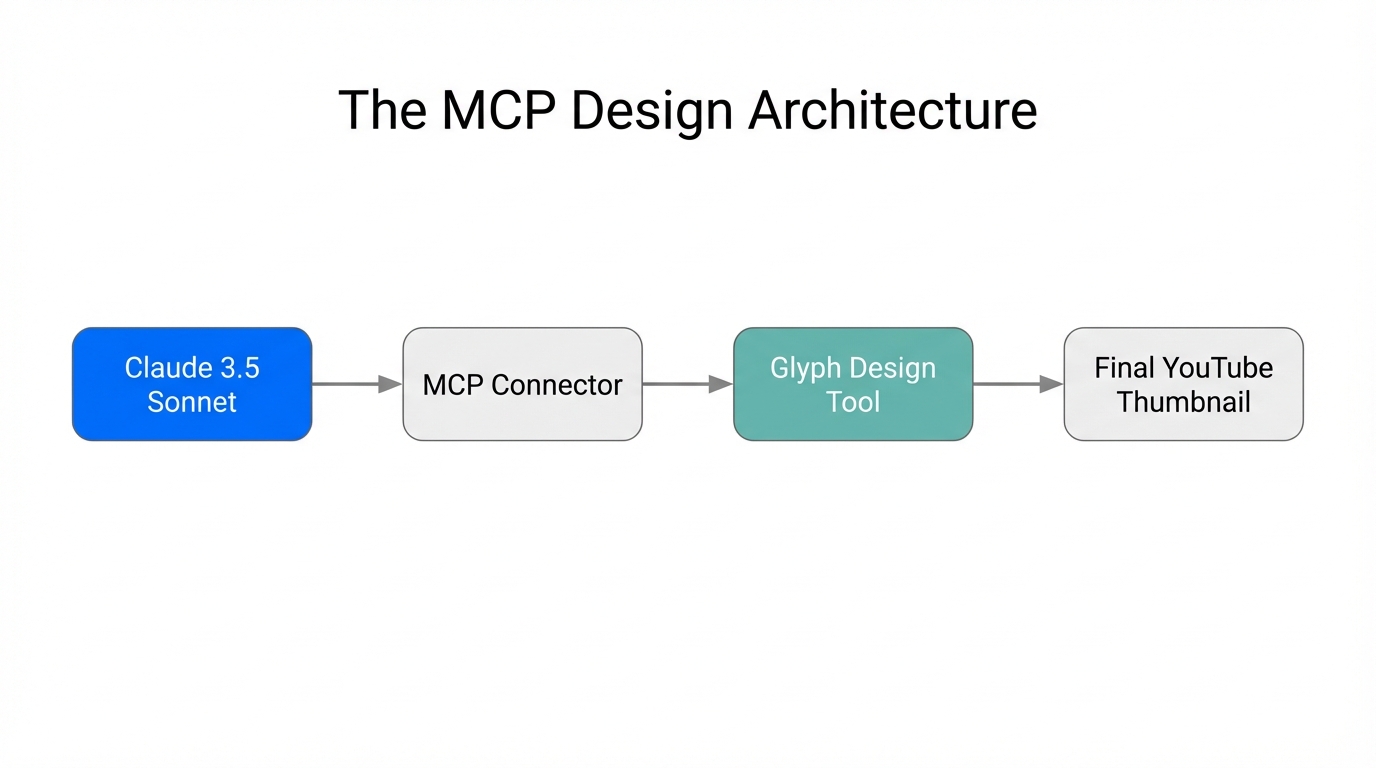
As Riley Brown noted on the Startup Ideas Podcast, the term "MCP" (Model Context Protocol) is often treated as a technical buzzword, but its practical application is simple: it gives AI agents the ability to use tools. In the past, LLMs were limited to the data they were trained on. If you asked for a thumbnail idea, they would hallucinate a generic description. With MCP, Claude becomes an agent that can interact with the internet, your databases, and design apps.
The real "sauce" of Claude AI agents for social media lies in the loop. An AI agent is essentially a model using tools repeatedly until a task is completed. While a standard automation (like a Zapier trigger) follows a linear path (If A, then B), an agentic workflow allows the AI to decide which tool to use, how many times to use it, and whether the output meets the quality standards before presenting it to you. This is how platforms like Perplexity built billion-dollar valuations—by giving an LLM a single, powerful tool: the ability to search the internet before responding.
"AI agents are models using tools in a loop. They can spend as much time as they need in a step, using tools over and over until the result is perfect."
Building 'AI Employees' for Design
The core of this strategy involves using Glyph, a workflow builder that allows you to create "miniature AI employees" for specific visual tasks. Unlike complex coding environments, Glyph uses a node-based interface that even non-technical marketers can master. When you connect Glyph to Claude via a Docker-based MCP toolkit, Claude can see all the creative workflows you've built and run them on demand.
Imagine having an employee who only handles "photo-realistic thumbnail ideation" and another who specializes in "vibe-shifting mobile app screenshots." By referencing these in your Claude project instructions, you can simply type a command like, "I'm making a video about AI agents; use my 'Thumbnail Ideator' glyph to generate 5 concepts," and the model will execute the entire chain in the background.
| Workflow Type | Traditional Process | Agentic Process (Claude + Glyph) |
|---|---|---|
| Ideation | Manual brainstorming & moodboarding | AI searches viral trends & generates 5 distinct layouts |
| Reference Styling | Trying to describe a style in words | AI ingests a PDF of high-performing examples |
| Layout Generation | Back-and-forth with a designer | AI runs a Glyph workflow to output 5 canvas-ready designs |
| Brand Consistency | Constant manual policing of fonts/colors | Remixable templates ensure every output fits the brand |
The 'PDF-to-Visual' Strategy: Training the Agent's Eye
One of the most powerful features of modern LLMs like Claude is their ability to ingest and analyze visual data from documents. The "PDF-to-Visual" strategy is the secret weapon for YouTube thumbnail automation. Instead of writing long, complex prompts trying to describe the "MrBeast style" or the "Cleo Abram aesthetic," you simply provide the agent with a PDF containing 20-30 high-performing thumbnails from your niche.
When Claude analyzes this PDF, it doesn't just see pixels; it understands visual hierarchy, color contrast, and text placement. It notices that high-CTR thumbnails often have a "before/after" split or a specific type of facial expression. When you prompt the agent to create something new, it uses these examples as a grounding context. This ensures that the generated concepts aren't just "cool" images, but are psychologically optimized to drive clicks based on what is already working in the market.
"The secret to great AI output is great examples. Collect what works, put it in a PDF, and let the agent 'rip' from the best in the business."
The Playbook: Automating Your Thumbnail Workflow
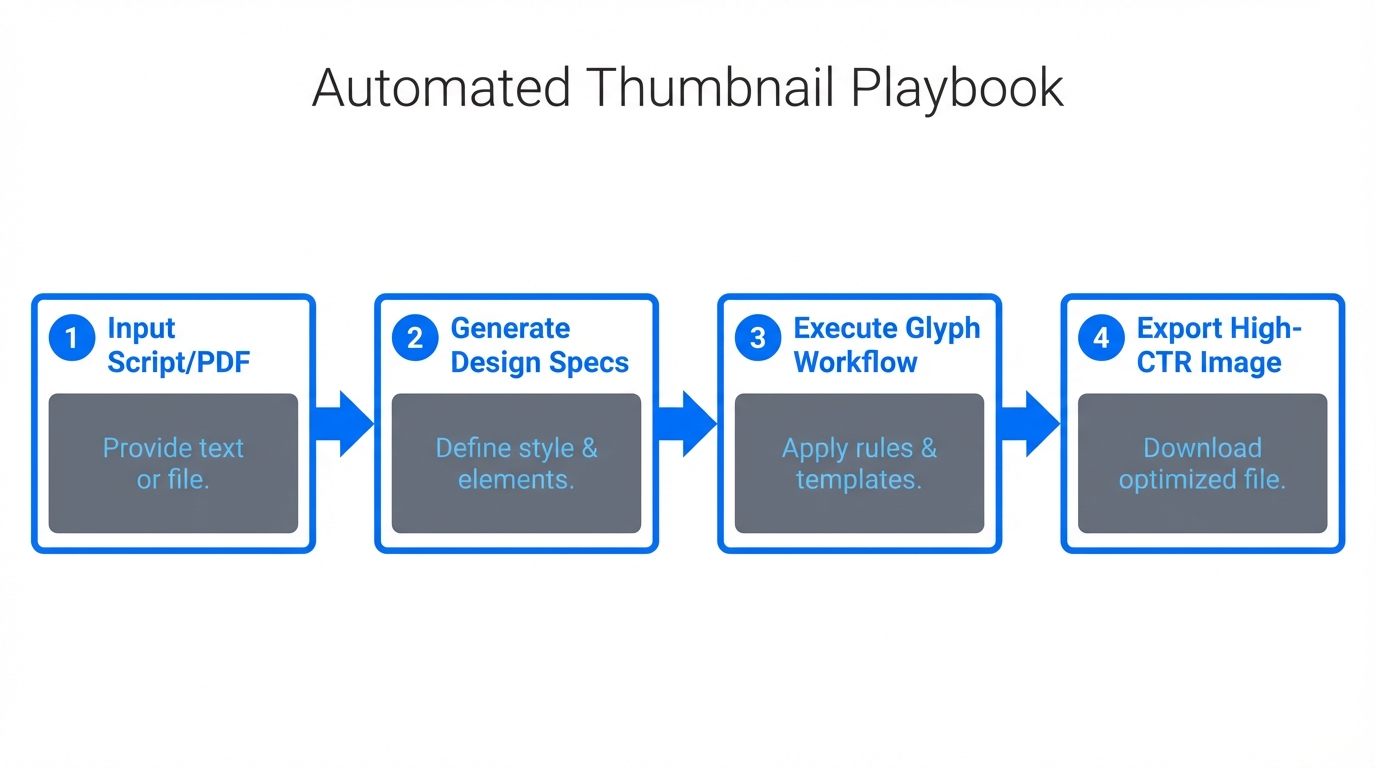
To implement this for your own brand or agency, follow this step-by-step sequence to bridge the gap between technical setup and creative output.
Step 1: Set Up the MCP Infrastructure
You need a bridge between Claude and your tools. Currently, the most stable way to do this is using the Docker Desktop MCP toolkit. Once installed, you can add integrations for tools like Notion (for your SOPs) and Glyph (for your visuals). You will need an API key from Notion and your Glyph integration token to link the accounts.
Step 2: Create Your Glyph Workflows
In Glyph, build a workflow that takes a text prompt as an input and outputs a grid of images. You can remix existing public glyphs—like the "Thumbnail Ideator"—to save time. The goal is to have a workflow that fixes aspect ratios, applies your brand's color grading, and overlays text automatically. This ensures that the "AI employee" always delivers a consistent product.
Step 3: Feed the Agent Context
Upload your PDF of high-CTR references to a Claude Project. In the "Project Instructions," tell Claude to always reference this PDF before running a visual workflow. This prevents the AI from drifting into generic styles and keeps it focused on your specific AI design workflows for marketers.
Step 4: Execute the 'Loop'
Use a prompt that combines research and execution: "Search the internet for the top 3 viral topics in the AI agent space today. Based on these topics, use the Glyph MCP to generate 5 thumbnail concepts that match the visual style of the attached PDF." Claude will then browse the web (using its search tool), brainstorm the hook, and trigger the Glyph workflow to create the final assets.
Remixing Workflows to Maintain Brand Aesthetic
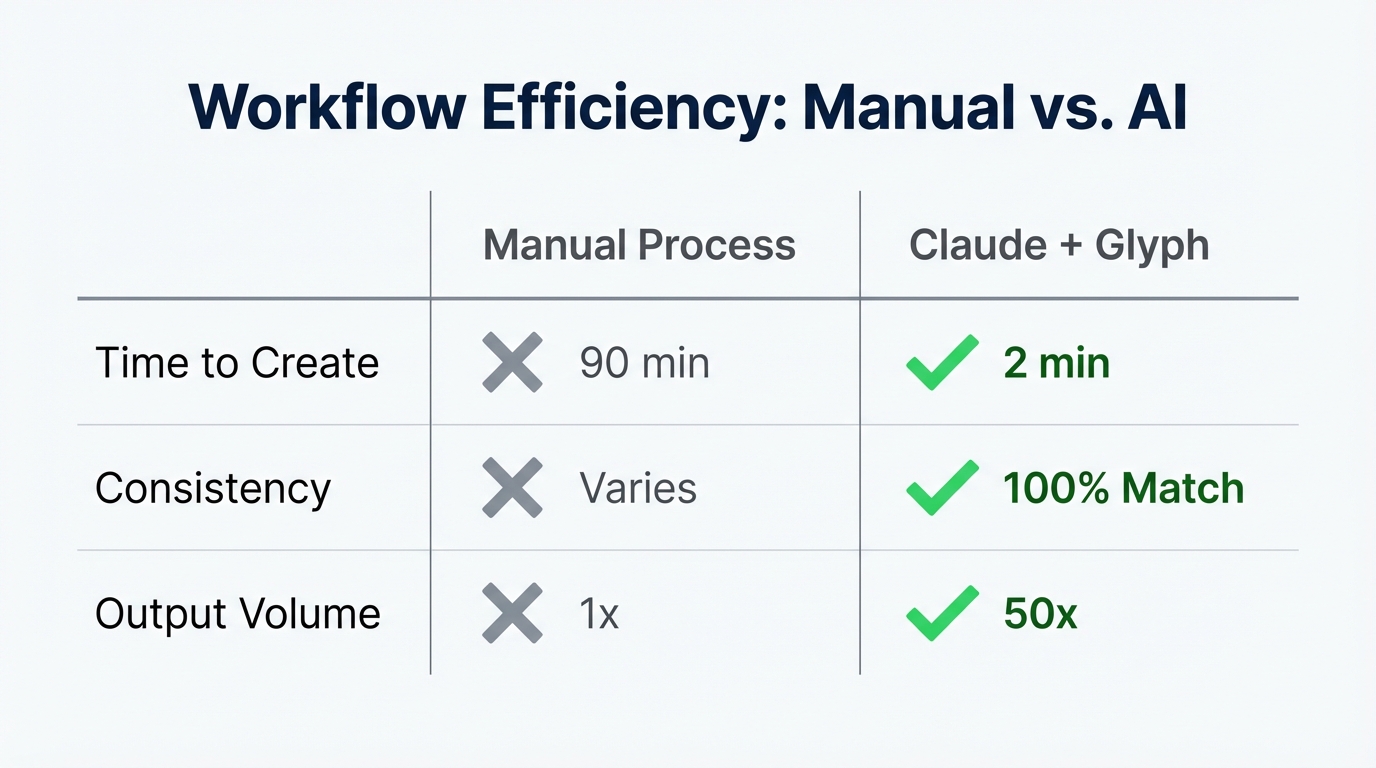
A common fear with automated visual content creation is that everything will look "too AI." The solution is remixing. Glyph allows you to take an existing high-performing workflow and swap out specific nodes. For example, you can keep the layout logic of a successful viral creator but replace the "Style" node with your own custom-trained aesthetic. This allows you to scale production without sacrificing the unique "vibe" that makes your brand recognizable on a crowded feed.
While these automated workflows handle the asset creation, growing a brand often requires social proof and authentic storytelling. Platforms like Stormy AI can complement this by helping you discover the right creators to feature in these thumbnails or to run your UGC campaigns. Once you find the perfect creator on Stormy AI, you can use your automated workflows to design the exact visual assets they need for their posts, ensuring maximum performance across the board.
The Power of Real-Time Viral Relevance
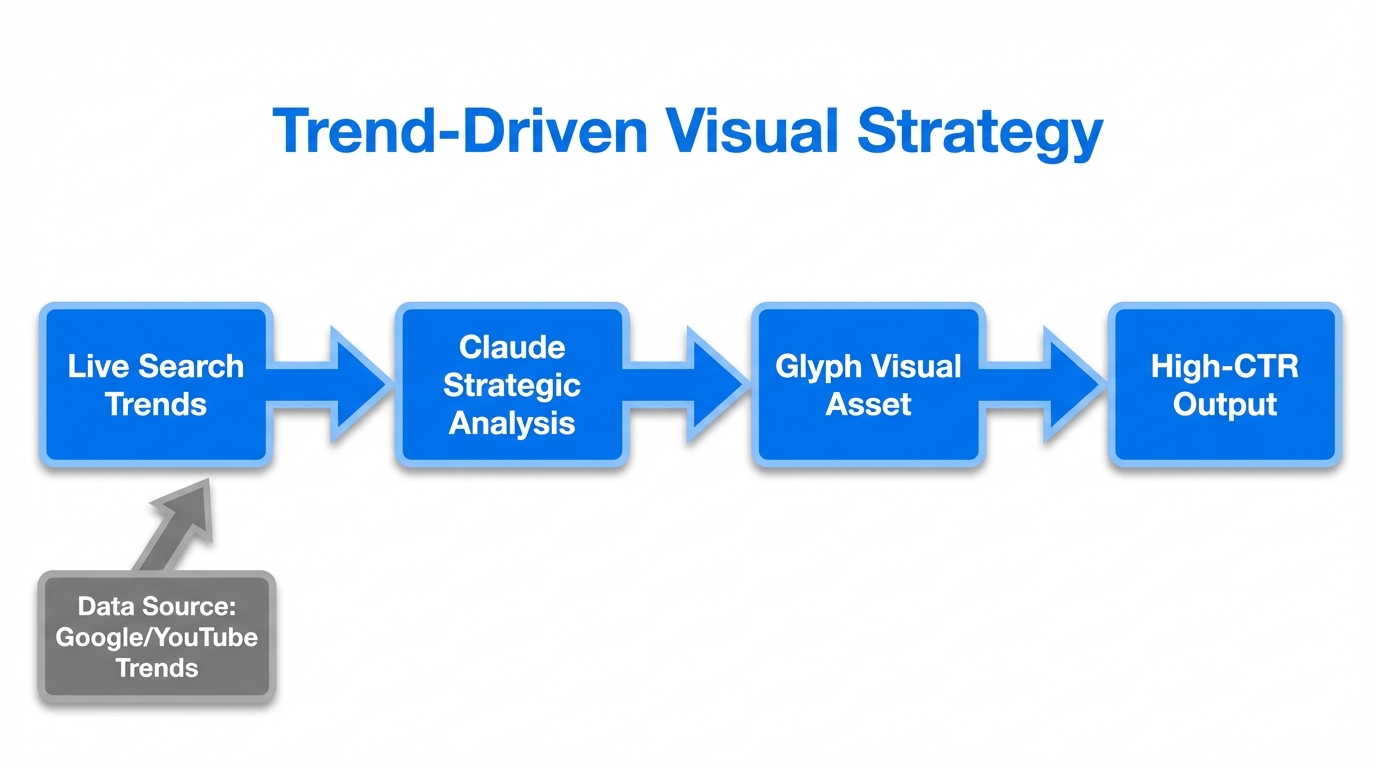
A thumbnail designed in a vacuum is rarely successful. The most viral content often hitches a ride on current news, memes, or tech breakthroughs. By using Claude’s built-in search capabilities—or external tools like Firecrawl—your agent can check Google Trends or X/Twitter before it even starts the design process.
For example, if a new AI model like Claude 4 launches, your agent can automatically pull the latest documentation, summarize the most "clickable" feature, and generate a thumbnail featuring the official logos and colors of that launch. This level of speed and relevance is impossible for a manual design team to maintain 24/7, but it is standard for an agentic workflow.
"Most of the leverage from these tools comes from doing things when they are janky and new. By the time the interface is perfect, the competitive advantage is gone."
Conclusion: Moving from Designer to Orchestrator
The transition to automated visual content creation requires a mindset shift. You are no longer the one pixel-pushing in a design app; you are the quarterback of an AI agent. Your job is to curate the best examples, refine the system instructions, and decide which tools the agent has access to. The setup may feel "janky" today—requiring Docker, API keys, and server restarts—but the leverage it provides is undeniable.
By mastering the connection between Claude, Glyph, and MCP, you are building a system that can out-produce and out-think the competition while you sleep. Whether you are scaling a YouTube channel or managing a fleet of UGC creators, the ability to turn a simple idea into a high-CTR visual in seconds is the ultimate growth hack. Stop being the bottleneck and start being the orchestrator.