Performance marketing is undergoing a seismic shift. The days of spending $20,000 on a single studio shoot for a 15-second social media spot are rapidly coming to an end. Today, growth teams and solo entrepreneurs are using a new generation of creative tools to produce high-fidelity, studio-quality assets in a fraction of the time. This AI video ads tutorial will walk you through the exact stack used by world-class designers like Brett from Designjoy to generate millions in value using tools like Midjourney, Runway, and ChatGPT. As the landscape for high converting social media ads AI evolves, the competitive advantage belongs to those who can iterate faster than their competitors.
The current era of marketing is defined by "Vibe Design." It’s no longer about having 10 years of experience in After Effects; it’s about having the taste to recognize what moves the needle and the knowledge of how to guide AI to produce it. Whether you are building a new fintech app or scaling an e-commerce brand, the ability to generate AI video generation for growth is the most lucrative skill you can develop this year. By combining the cinematic power of Midjourney with the motion capabilities of Runway, you can create ads that stop the scroll and drive conversions at scale.
"Prompting is no longer a gated skill; it is about having the taste to recognize what looks like a million-dollar ad and the tools to bring it to life in minutes."
Developing Ad Concepts by Prompting ChatGPT to Describe Cinematic Scenes
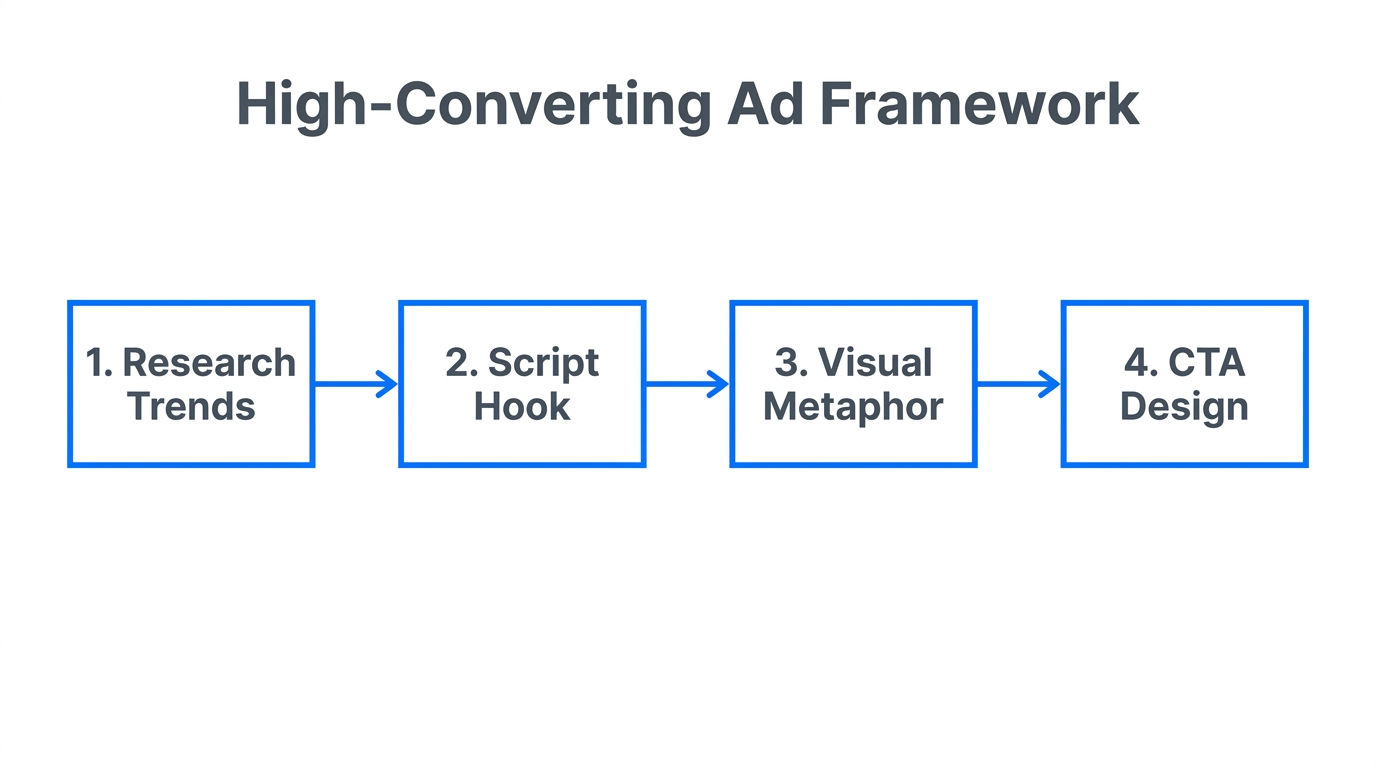
The first step in any successful campaign is the conceptual phase. Most marketers fail here because they don’t "speak director." If you want high-quality video, you need to use cinematic language—terms like dolly in, pan left, rack focus, and bokeh. If you don’t have a film degree, don’t worry: ChatGPT is your new Creative Director. You can find inspiration for new startup concepts on IdeaBrowser and then feed those ideas into ChatGPT to generate specific visual prompts. When you prompt the AI, tell it exactly which tool you are using. For example, tell it: "I am using Runway to add motion to an image. Give me a prompt that describes subtle ripples in water and a slow camera zoom."
By using ChatGPT to translate your basic ideas into sophisticated descriptions, you avoid the "generic AI look." Brett’s secret is asking the AI to imagine rich, textural details—like the way light hits a vintage Kodak film stock or the specific isometric 3D world of a modern SaaS product. If you are building a product, you might even use Bolt.new to generate the underlying software and then use this AI creative stack to market it. The goal is to create a cohesive narrative before you ever open an image generator. Midjourney for ad creative starts with a clear, text-based vision that defines the lighting, environment, and mood of the scene.
Generating Base Ad Creatives in Midjourney with Specific Aspect Ratios
Once you have your cinematic prompt, it’s time to move to Midjourney. This is where you generate the high-resolution static images that will serve as the foundation for your video ads. For growth marketers, consistency is king. One of the best ways to maintain a brand vibe is by using Style References (--sref). If you find a beautiful image on Pinterest, you can upload it to Midjourney and tell the AI to match that exact color palette and shadow depth. This ensures that every ad in your campaign feels like it belongs to the same brand family.
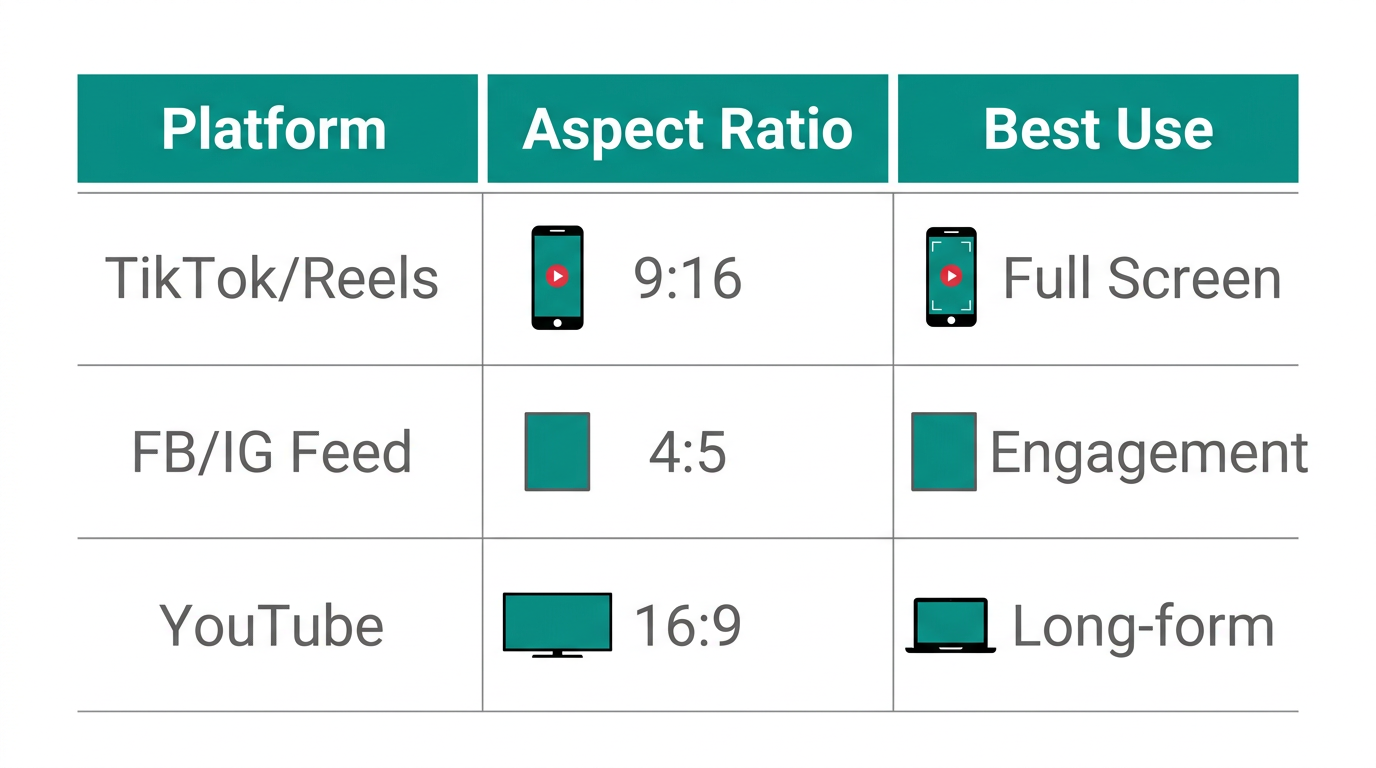
Aspect ratios are critical for performance. If you are running ads on TikTok Ads Manager, you need a 9:16 vertical ratio. If you are focusing on X (formerly Twitter) or Instagram feeds, a 1:1 square or 4:5 vertical usually performs best. Square media often catches the eye more effectively on desktop feeds because it takes up more vertical real estate without requiring a full-screen commitment. In Midjourney, always append your prompt with --ar 1:1 or --ar 9:16 to ensure the composition is correct from the start. This prevents awkward cropping later in the production process.
| Platform | Recommended Aspect Ratio | Best Ad Type |
|---|---|---|
| Instagram/TikTok Stories | 9:16 | UGC-Style Video Ads |
| X (Twitter) Feed | 1:1 Square | Cinematic Product Loops |
| Facebook Feed | 4:5 Vertical | Dynamic Creative Optimization |
| YouTube Shorts | 9:16 | Tutorials & Walkthroughs |
Using Runway’s Motion Brush and Camera Controls to Animate Shots
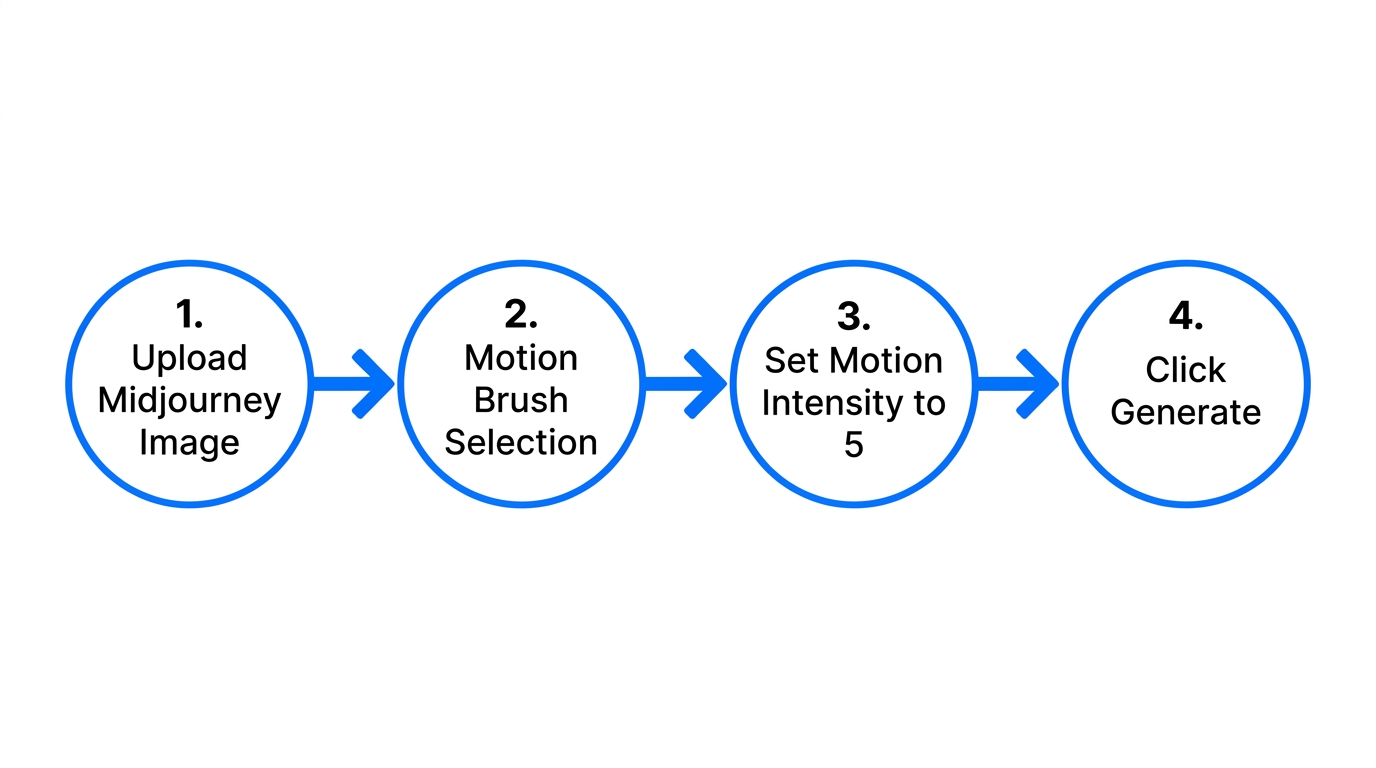
Static images are great, but motion is what converts. This is where Runway motion graphics marketing comes into play. You don't need to be an animator; you just need to upload your Midjourney image and use the Motion Brush. This tool allows you to literally "paint" the areas of the image you want to move. If you have a shot of a cabin in the woods, you can paint the smoke coming out of the chimney and the trees in the background. Runway will then generate realistic motion for just those areas while keeping the cabin perfectly still. This selective animation creates a professional, high-end feel that is common in high converting social media ads AI.
Beyond the motion brush, Runway’s camera controls allow you to add "active" movement to a "passive" scene. You can tell the AI to perform a slow dolly in toward a product or a horizontal pan across a landscape. This mimics the work of a professional camera crew. When you combine these movements with high-resolution upscaling (Runway offers a 4K upscale feature), the result is indistinguishable from traditional film. For growth marketers running campaigns on Meta Ads Manager, these 5-to-10 second "living photos" often outperform traditional high-production videos because they feel more native to the platform’s aesthetic.
"The hardest part about AI generation is no longer the technical skill—it is simply waiting for the video to render. The barrier to entry has officially been demolished."
The 'Looping Secret': Creating Infinite Video Ads with Cling
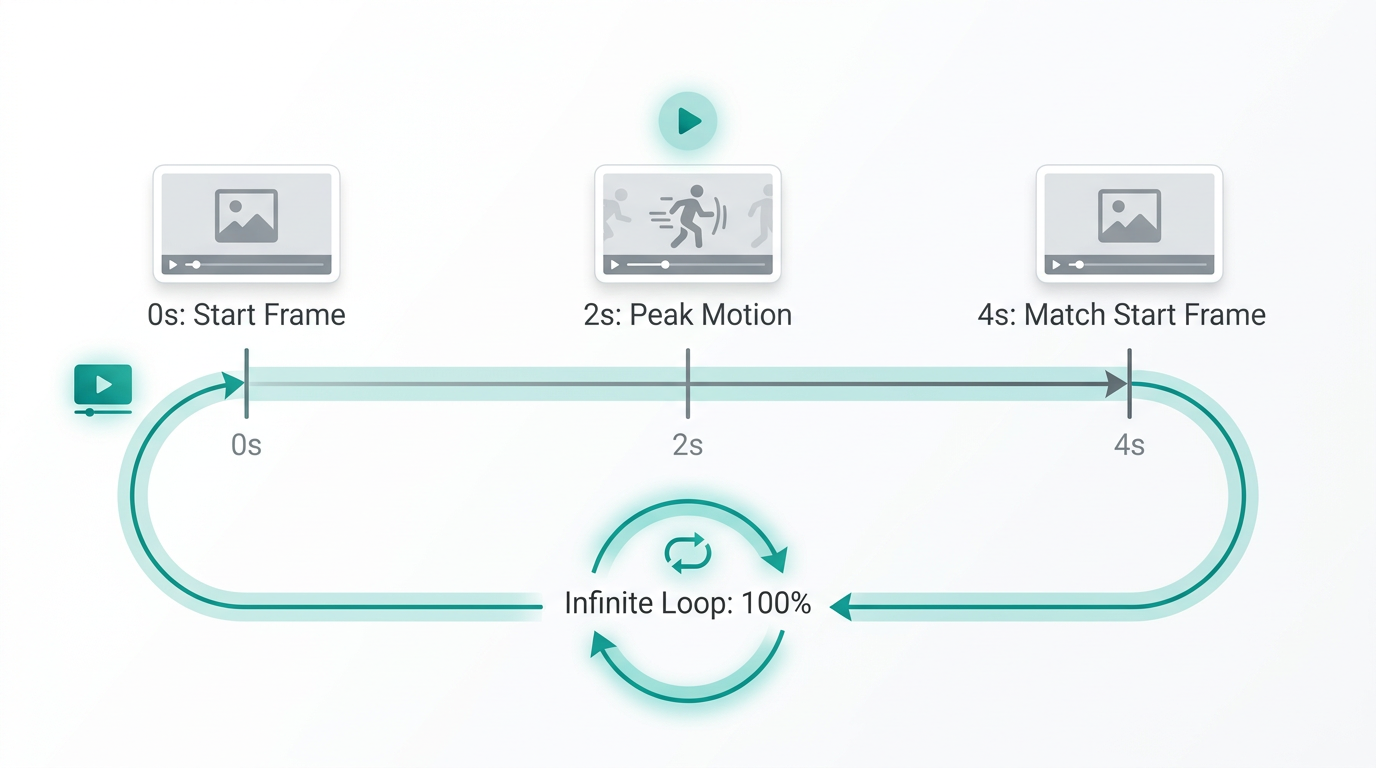
One of the most powerful tools for web design and social media headers is the infinite loop. This is a video that starts and ends on the exact same frame, creating a seamless, never-ending motion. Tools like Kling AI (often referred to as Cling) are specifically designed for this. By setting the "Start Frame" and "End Frame" as the same Midjourney image, Kling AI will fill in the motion in between. This is perfect for social media banners, product landing pages, or background videos for a SaaS platform. It keeps the user engaged without the jarring "reset" that happens with standard video clips.
Cling also offers an AI Sound feature that analyzes your video content and generates matching sound effects (SFX). If your video features a rushing river or a windy mountaintop, Cling will generate the ambient audio to match. This adds a layer of sensory immersion that is vital for AI video ads tutorials. When you have a perfectly looped video with matching AI-generated audio, you have a piece of content that can live on a website or an ad feed indefinitely, providing a premium feel for a fraction of the cost of traditional sound design.
Finalizing Creatives in CapCut with Text and Sound Layers
The final step in the workflow is post-production. While AI is great at generating the "soul" of the ad, you still need traditional tools for the final polish. CapCut is the industry standard for growth marketers because of its ease of use and library of templates. You can take your Runway or Cling clips into CapCut and layer on UGC-style text overlays. This is where you add your call-to-action (CTA), your value propositions, and your brand logo. Because the video background is so high-quality, the simple addition of clean, modern text makes the entire ad feel like it was produced by a full-service agency.
When scaling these campaigns, remember that AI-generated visuals work best when paired with human authenticity. Platforms like Stormy AI can help growth teams discover and manage the right UGC creators to pair with these high-fidelity visual assets. For example, you might use a Runway-generated cinematic background and then overlay a creator's testimonial found through Stormy AI to create a hybrid ad that combines "prestige" visuals with "trust"-based human content. This combination is the gold standard for AI video generation for growth in 2024.
The Future of Performance Creative
The democratization of high-end video production means that the winner of the marketing game is no longer the one with the biggest budget, but the one with the best taste and the fastest iteration cycle. By following this AI video ads tutorial, you can move from a concept in ChatGPT to a finished 4K cinematic ad in under 15 minutes. Start by generating your vibe in Midjourney, add motion in Runway, loop it in Cling, and finalize the conversion-focused elements in CapCut.
As you scale, don't forget to organize your assets and manage your creator relationships efficiently. Using tools like Canva for static branding and Stormy AI for creator sourcing will ensure that your AI-powered creative engine stays fueled with fresh ideas and authentic voices. The tools are here—the only thing left to do is get your hands dirty and start generating.