The era of "Chat AI"—where we treat large language models like glorified search engines—is rapidly coming to a close. In its place, 2026 has ushered in the age of Agentic AI. This shift represents a transition from models that simply talk to models that act. For social media marketers, this isn't just a technical upgrade; it is a fundamental shift in how we process engagement data and execute strategy. With the AI-driven social media market projected to hit $12 billion by 2031, up from just $2.1 billion a few years ago according to Allied Market Research, the stakes for staying ahead of the curve have never been higher.
By 2025, the market had already reached $3.34 billion, driven by teams seeking a way out of the manual reporting grind. Today, marketing departments using agentic workflows generate reports 30–40% faster and with significantly higher accuracy than traditional manual methods, as noted by researchers at Templated. The solution lies in a new stack: Claude Code and the Model Context Protocol (MCP). This guide will walk you through how to build an autonomous social listening and reporting engine that moves beyond static CSV exports into the world of live, terminal-based intelligence.
"The shift from 'Chat AI' to 'Agentic AI' (Action AI) is the defining theme of 2026. It is no longer about asking questions; it is about deploying agents that execute tasks autonomously."
The Model Context Protocol (MCP): Your Bridge to Live Social Data
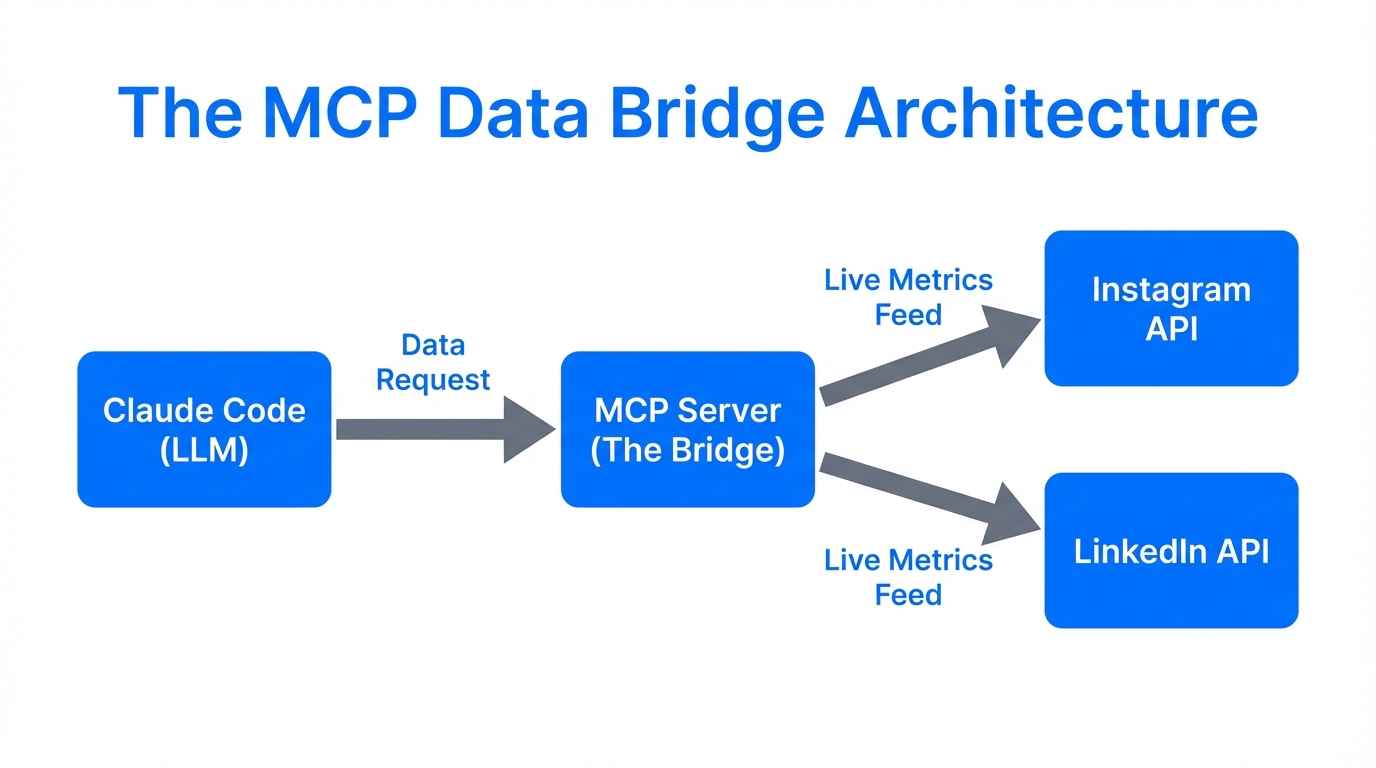
For years, the biggest hurdle in AI social media management was the "data wall." You could ask an AI to analyze your performance, but you first had to manually export a CSV from Meta Business Suite or Google Ads and upload it. By the time the AI processed it, the data was already stale. The Model Context Protocol (MCP) changes this by providing an open standard that allows AI models to communicate directly with external data sources.
Think of MCP as a universal translator. Instead of Claude needing a custom integration for every single tool, an MCP server acts as a standardized interface. This allows Claude Code (the CLI-based agent) to reach out to your Meta Ads Manager, X (Twitter) API, or even internal databases to pull real-time metrics. This capability is why 61% of organizations now cite "reducing staff workload" as the primary reason for adopting AI, with 90% of marketers relying on these tools for fast decision-making according to SurveyMonkey.
From Browser to Terminal: The Rise of Claude Code
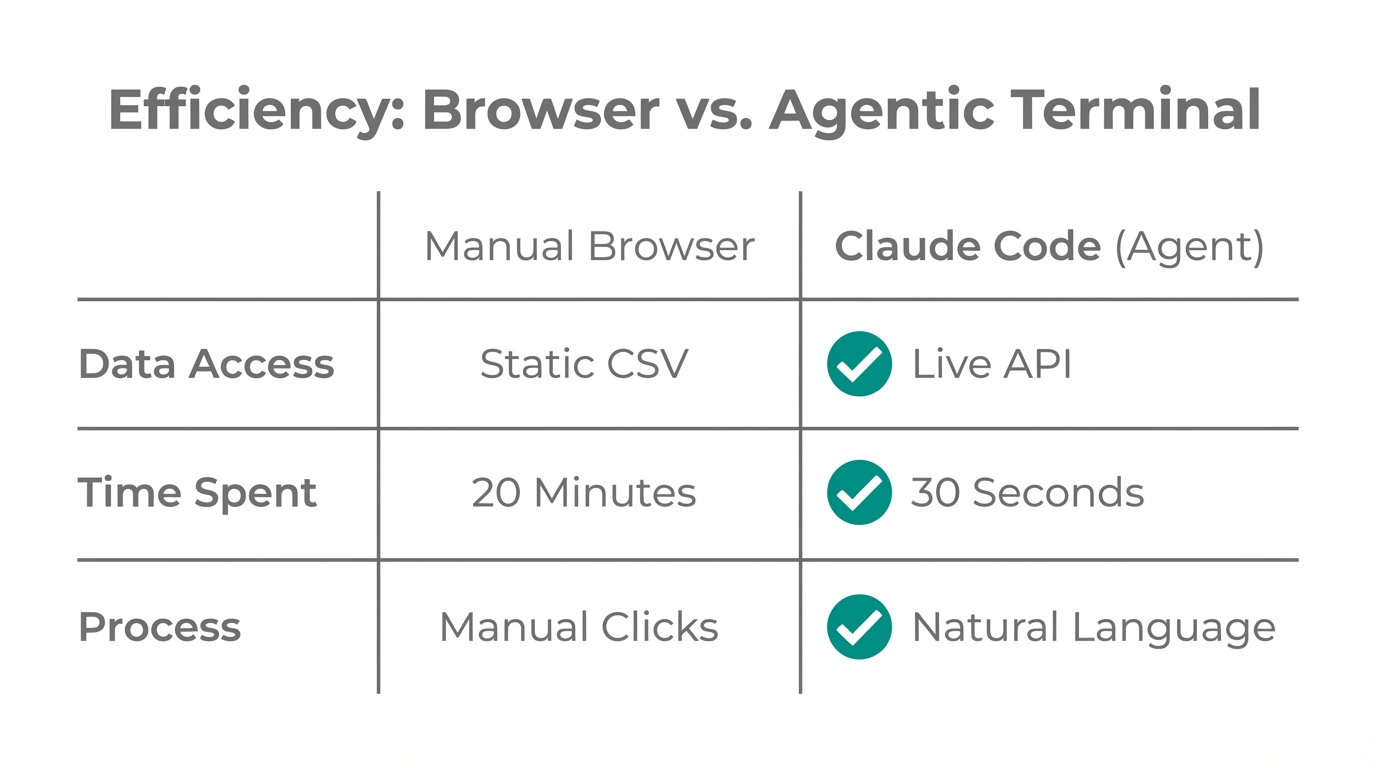
While most marketers are used to interacting with AI in a browser window, the power user's workflow is moving to the terminal. Claude Code is a Command Line Interface (CLI) agent that can execute code, manage files, and interact with APIs autonomously. This is a game-changer for agentic social media management because it allows for multi-step logic and file-system access that a browser-based chat simply cannot handle.
As of early 2026, the Claude ecosystem reached 176 million monthly visitors, with a massive 39% of interactions focused on direct automation rather than simple text generation, according to SimilarWeb data. This trend toward technical, agentic interactions is fueled by Claude’s 200k+ token context window, which experts at Data Studios cite as an "unfair advantage" in analytics, as it can ingest an entire year’s worth of engagement data in a single session.
| Feature | Traditional Browser AI | Agentic CLI (Claude Code) |
|---|---|---|
| Data Input | Manual CSV Uploads | Live API Access via MCP |
| Execution | Text suggestions only | Runs code and manages files |
| Workflow | Single-prompt responses | Multi-step "Plan Mode" |
| Context Window | Limited by chat UI | 200k+ tokens for full datasets |
Multi-Agent Orchestration: Separating Sentiment from Scraping
One of the biggest mistakes in AI social listening is trying to make one prompt do everything. In a professional Claude Code analytics workflow, we use multi-agent orchestration. This means deploying specialized agents for specific tasks, a strategy widely discussed on the DEV Community. Instead of one "assistant," you build a team:
- The Scraper Agent: Uses tools like Apify to pull trending topics from TikTok and LinkedIn.
- The Analyst Agent: Performs sentiment analysis on the raw data, identifying if the brand mentions are positive or negative.
- The Reporter Agent: Takes the analysis and formats it into a brand-safe report or a Slack notification.
This modular approach ensures that the "AI fingerprint" is minimized. Marketers are increasingly choosing Claude for its "Constitutional AI" framework, which produces more human-like and nuanced reporting than other models that can sound overly robotic or hyped, as noted in Anthropic's research.
"Multi-agent orchestration allows marketers to separate high-level strategy from the technical grunt work of data scraping and cleaning."
Building Your Unified Social Listening Command Center
To move from theory to practice, you need to connect your agent to the right bridges. For real-time social listening, integrating with Xpoz allows your AI agent to monitor OSINT (Open Source Intelligence) data across X and other platforms without you ever opening a browser. When you find a trend worth acting on, you can use the Buffer API to post content directly.
For brands working with influencers and UGC creators, platforms like Stormy AI can help source and manage creators at scale, providing the human element that feeds into your automated analytics stack. While the AI handles the data, Stormy AI ensures you are finding the right creators to generate that data in the first place.
skill.md file in your repository to document your brand's specific KPIs and tone of voice. This serves as the "manual" for Claude Code to follow during every session, according to Vibe Sales.The '1ClickReport' Playbook for Growth Leads
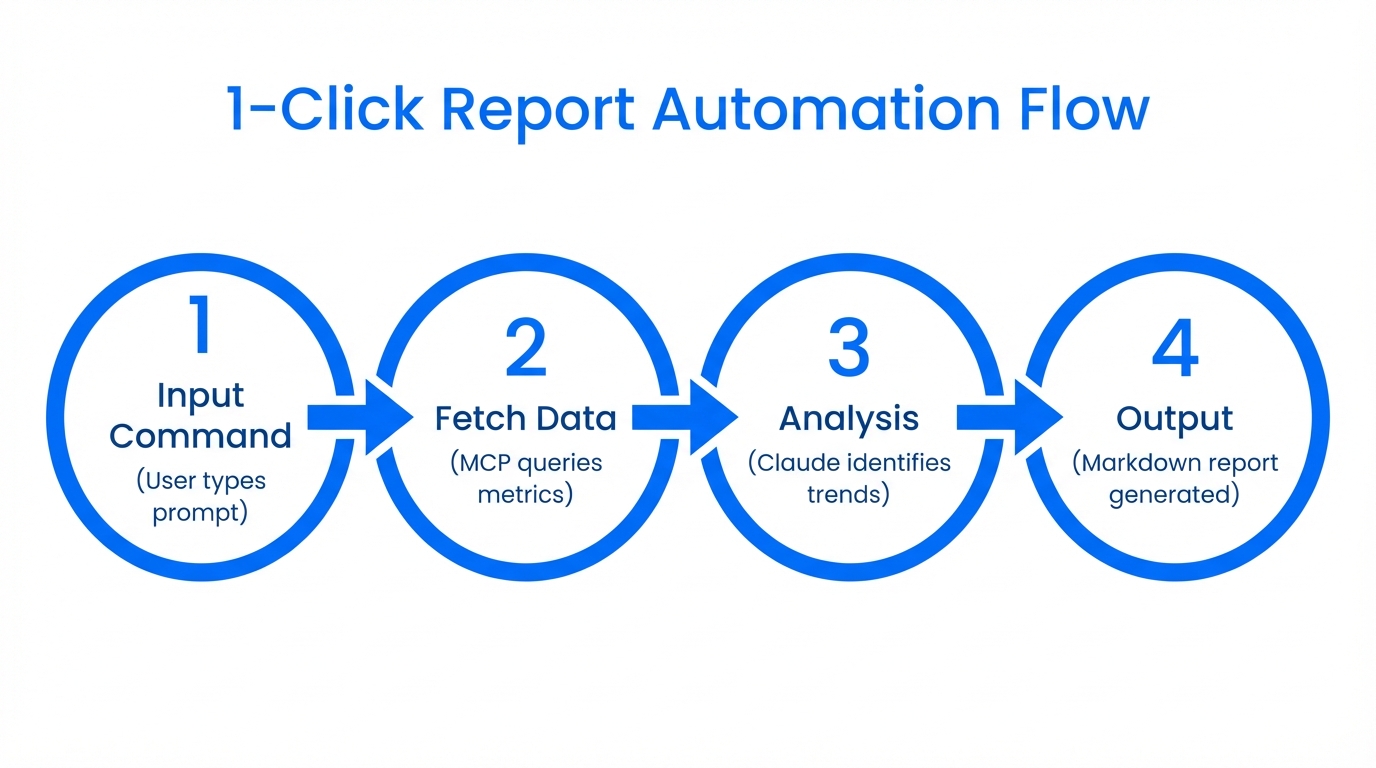
You don't need to be a software engineer to use AI social listening tools effectively. By building an internal "1ClickReport" style tool, non-technical growth leads can query complex data using plain English. A developer can build this using Claude to connect GA4 and Meta via MCP, allowing anyone on the team to ask, "Which ad had the lowest CPA last week?" and get an instant, data-backed answer as seen on 1ClickReport.
Step 1: Initialize Your Environment
Install Claude Code via your terminal. Ensure you have your API keys for SocialBee and Xpoz ready. Create a CLAUDE.md file in your root directory to define your project structure; failing to do this is a common mistake that leads to irrelevant insights, according to WayMore.
Step 2: Enter Plan Mode
Instead of single prompts, use the `Shift + Tab` shortcut in the CLI to enter Plan Mode. This allows Claude to architect a multi-step workflow. For example: "Scrape LinkedIn engagement from the last 7 days, compare it to our goals in kpis.xlsx, and draft a summary for the team."
Step 3: Connect MCP Servers
Add MCP servers for the tools you use. You can find community-maintained servers for social media at mcp.so. This allows Claude to "see" your live data from SocialBee or Buffer.
Step 4: Automate the Output
Use an AI-native automation hub like Latenode or n8n to schedule these agentic runs. The goal is to have the data waiting for you in Slack or email before you even start your workday.
Common Pitfalls in Agentic Analytics
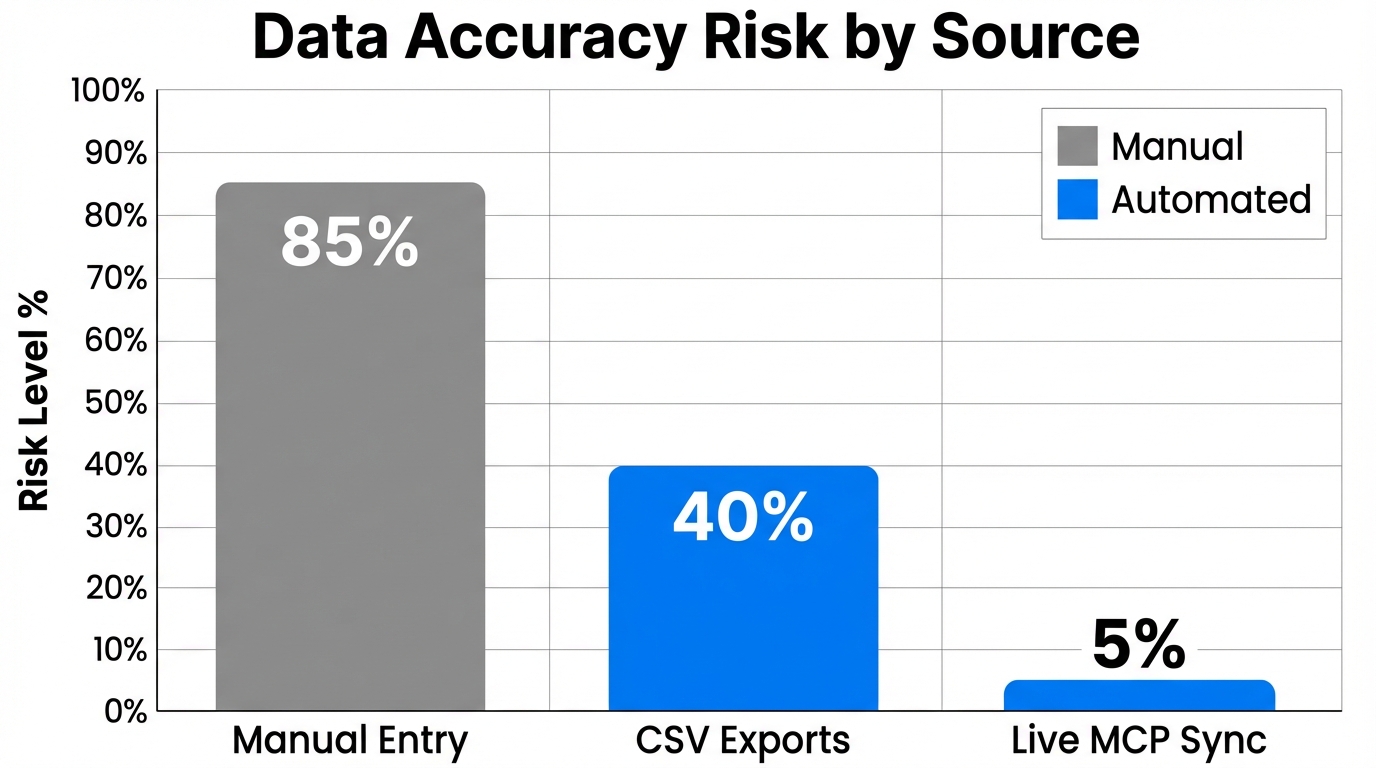
While the potential for automation is massive, there are several traps that can derail your progress. The most significant is over-automation. Relying 100% on AI without human-in-the-loop validation often results in "robotic" content that triggers algorithm penalties and alienates your audience, as warned by Obbserv.
Additionally, beware of data silos. If your LinkedIn data is in a spreadsheet, your Meta data is in the Business Suite, and your site analytics are in GA4, the agent will struggle to find a single source of truth. Experts at NappAI suggest centralizing data into a unified MCP server or a single database before pointing your AI agents at it. Finally, remember platform nuance; never post the exact same report or content across LinkedIn and TikTok without using the AI to transform the data for each specific audience.
"The most successful marketers in 2026 aren't the ones who automate everything; they are the ones who use AI to amplify human insight."
Conclusion: Your Path to Agentic Mastery
The transition to Model Context Protocol marketing and agentic workflows is no longer optional for brands that want to compete at scale. By leveraging Claude Code and MCP, you can move from reactive reporting to proactive, real-time strategy. Whether you are a solo growth lead or part of a large agency, the ability to query live social data through a terminal-based agent will be the defining skill of the next two years.
Start small: automate one weekly report using Plan Mode. Once you've mastered the basics, integrate tools like Xpoz for listening and Stormy AI for creator management to build a truly autonomous marketing engine. The tools are here; the only question is how quickly you'll deploy them.