In 2026, the barrier between a bedroom startup and a global luxury brand has completely evaporated. We are no longer in the era where a $5,000 professional photoshoot is the prerequisite for a high-converting store. Today, the most successful brands on Shopify are leveraging native AI tools to build world-class visual assets in milliseconds. At the center of this revolution is Shopify Tinker, a dedicated space where entrepreneurs can play with AI to transform raw ideas into polished commerce artifacts. This playbook will show you how to move beyond basic product photos and embrace a future where 360-degree views and viral-ready video ads are generated with a single click, while an AI teammate like Stormy AI handles the inventory monitoring and listing audits in the background.
The Shift to AI-First Visualization
 0:30
0:30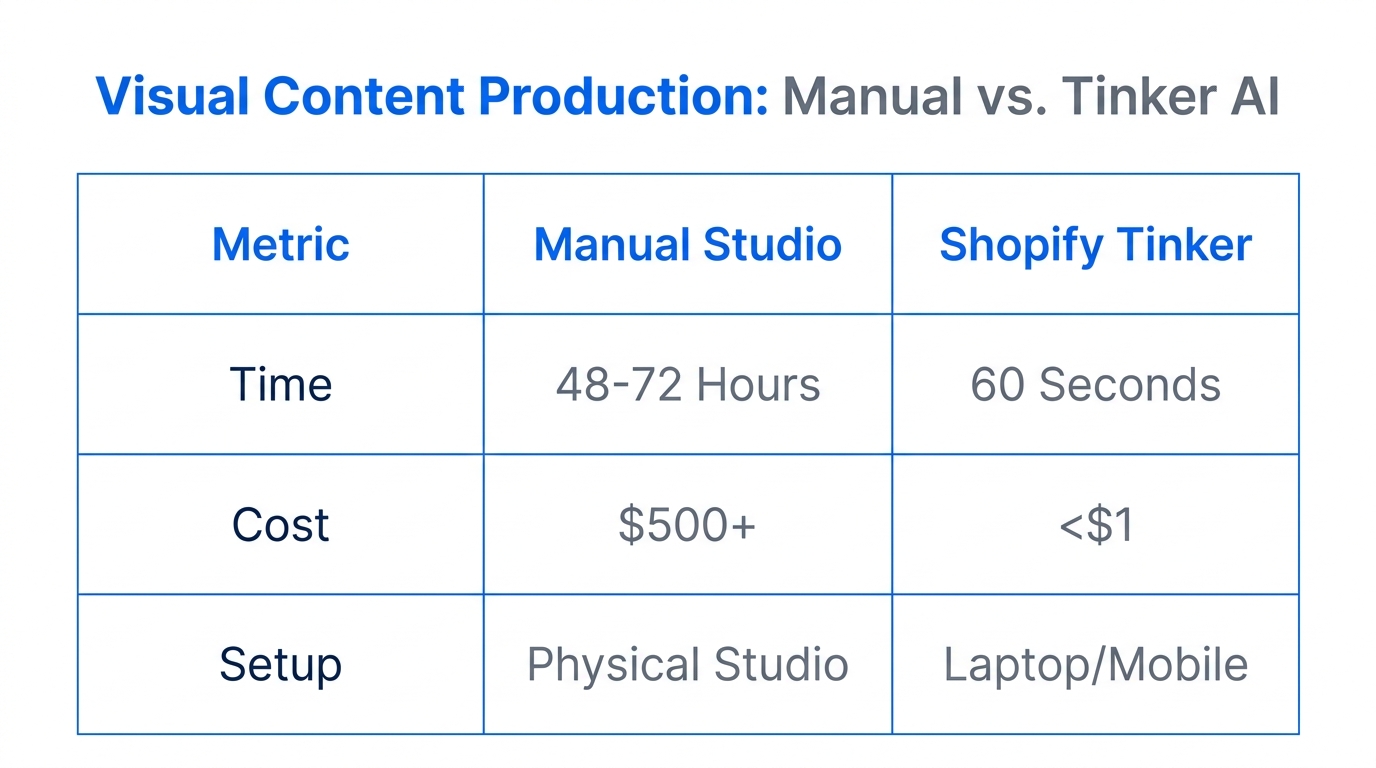
Traditional product photography is officially a legacy cost. In the current 2026 landscape, customers expect deep interactivity. Static images are no longer enough to win the trust of shoppers on TikTok Shop or Instagram. They want to see the texture of the fabric, the shine of the ceramic, and how the light hits the product from every angle. Shopify Tinker has consolidated the world's most powerful AI models into a single interface, making it possible to execute high-end creative tasks that used to require a team of specialists.
While Tinker handles the creative execution, savvy founders are using Stormy AI to ensure these new assets actually make it onto the product pages. Stormy acts as your AI ecommerce employee, checking for suppressed listings, missing images, or broken variants across Amazon Seller Central and Shopify, ensuring your new high-end visuals are live and driving revenue 24/7.
Generating 360-Degree Views from a Single Photo
3:30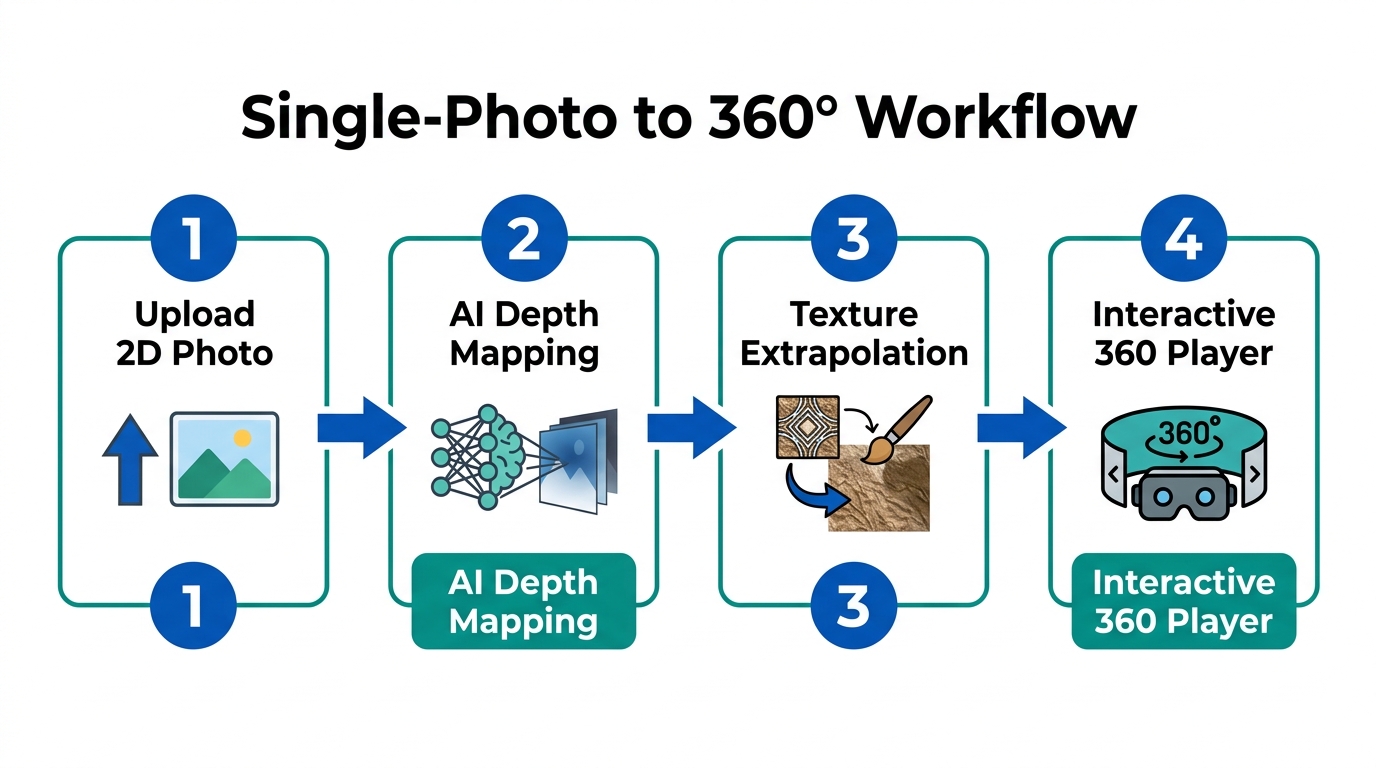
The crown jewel of the Shopify Tinker app is the 360-degree viewer creator. In 2024, you needed a turntable and a stabilized camera rig to achieve this. Now, you only need one decent smartphone photo. This automated product visualization tool uses generative AI to map the geometry of your item and render the hidden sides with startling accuracy.
"The leap from a single smartphone snap to a fully interactive 360-degree render is the single biggest ROI move a Shopify merchant can make in 2026."
The 360-View Playbook
- Capture a Clean Base: Take a photo of your product (like a ceramic tray or a sneaker) in neutral lighting. You don't need a studio; your kitchen counter works fine if the light is even.
- Upload to Tinker: Within the Shopify Magic Tinker interface, select the 360 Viewer app.
- Select Your Environment: Choose a luxury backdrop. Tinker allows you to place your product in a "luxurious apartment," "minimalist studio," or "nature-inspired loft."
- Generate and Refine: Slide to generate. The AI will build the rotation. You can then ask the Image Editor to add props—like placing jewelry on a tray—to create a more lifestyle-oriented 360 view.
Creating Luxury Lifestyle Backgrounds with AI
One of the most difficult parts of ecommerce was always the "lifestyle shoot." Renting a location and hiring models was a logistical nightmare. In 2026, the Shopify product photography AI inside Tinker's Image Editor handles this by using advanced background rendering that matches current luxury aesthetics, similar to the precision seen in Adobe Firefly.
Whether you are selling high-end pottery or organic pet treats, you can instantly change the context of your product. If you have a photo of a dog in a Halloween costume, as demonstrated in the Tinker lab, you can use the Image Editor to swap environments or costumes in milliseconds. This allows for rapid A/B testing of ad creatives without ever picking up a camera again.
| Feature | Traditional Studio (2023) | Shopify Tinker AI (2026) |
|---|---|---|
| Turnaround Time | 2-3 Weeks | Seconds |
| Cost per Asset | $150 - $500 | Included in Shopify Plan |
| Scalability | Limited by physical space | Unlimited variations |
| Flexibility | Requires reshoots for changes | Instant AI editing/swapping |
Building Viral-Ready Social Media Montages
4:00Creating content for TikTok Ads Manager and Instagram has moved from manual video editing to automated montage generation. Tinker’s Product Montage app takes your static AI-generated artifacts and stitches them into high-energy video creative.
This isn't just a slideshow. The AI analyzes the rhythm of trending audio and syncs your product’s 360 rotations, close-up details, and lifestyle shots to the beat. To scale this, you can ask Stormy AI to track creator affiliate posts and performance metrics. While Tinker builds the videos, Stormy monitors which ones are actually driving sales and flags the winners for your next budget move in Meta Ads Manager.
"Social commerce is no longer about the best camera; it's about the fastest iteration cycle. AI montages allow you to test 50 hooks in the time it used to take to edit one."
Syncing Creative Assets to Increase Conversion
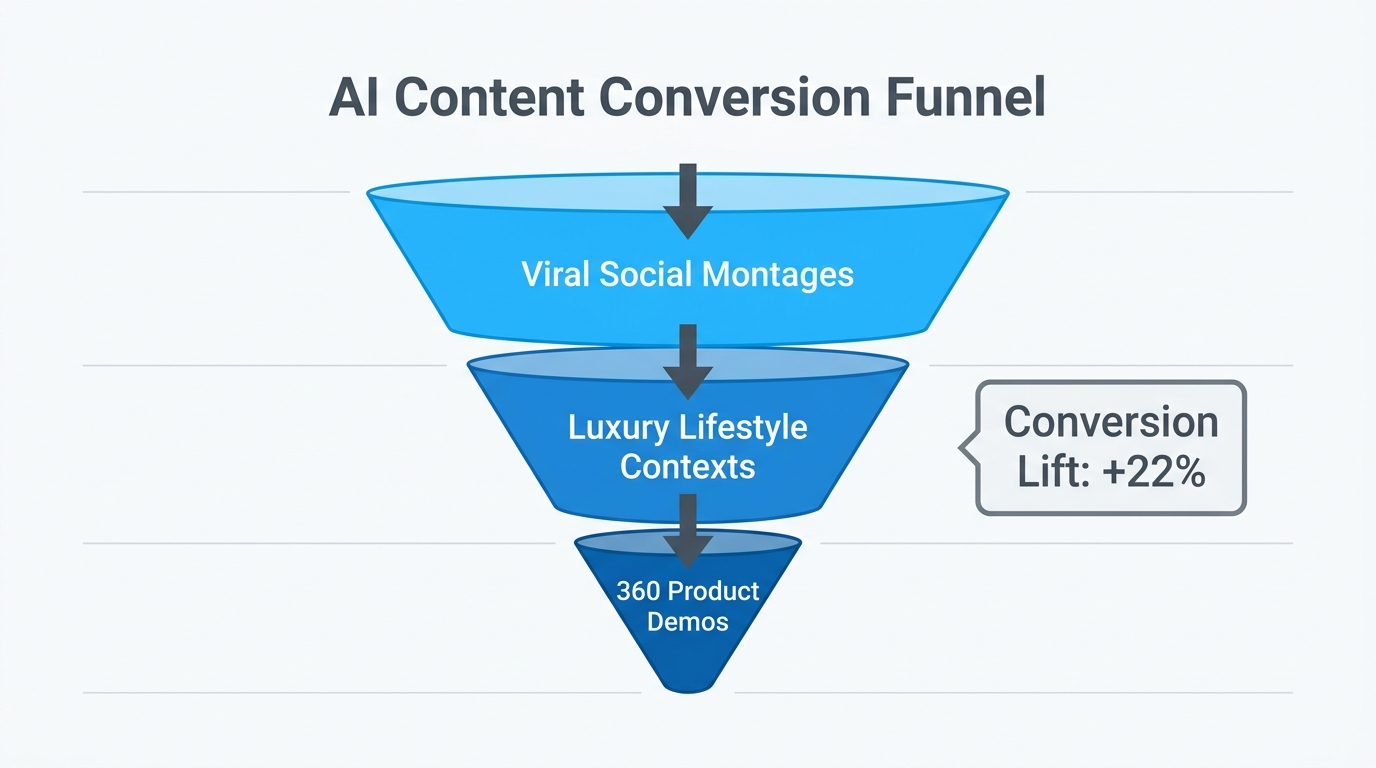
Generating the assets is only half the battle. The final step in the 2026 playbook is integration. Once you have your 360-degree views and AI montages, they need to be live on your Shopify product pages and synced with your marketing channels.
This is where the "Projects" feature in Tinker becomes vital. It allows you to collect all your AI artifacts—from the Product Name Generator results to the final video renders—into a single folder. You can then publish these directly to your store. To ensure nothing breaks during this process, Stormy AI runs daily audits. If a high-performing video goes offline or a product listing is suppressed on Amazon Ads, Stormy wakes up, alerts you, and can even draft a fix for your approval.
How an AI Ecommerce Employee Scales Your Content
Running a high-growth brand in 2026 means managing thousands of assets. It is no longer a human-scale task. This is why an AI teammate is essential for the back office. While you are inside Tinker being the "Creative Director," Stormy AI is handling the messy operational work:
- Monitoring Ad Performance: Stormy pulls spend and revenue from Google Ads and TikTok, flagging which AI-generated montages have the lowest CPA.
- Supplier Follow-ups: If a product is trending thanks to your new 360-views, Stormy checks inventory levels and automatically emails your supplier to initiate a reorder before you stock out.
- Customer Support Triage: As new customers flood in, Stormy organizes tickets in Gorgias and drafts replies, keeping your focus on the brand vision.
Conclusion: The Future is Tinker
4:30The era of the "random idea" turning into a global brand has never been more accessible. By using Shopify Tinker, you aren't just using another app; you are gaining a full-scale creative studio that lives inside your browser. Whether it is transforming a basic photo of a pottery tray into a luxury lifestyle video or using the Shopify tinker tutorial methods to automate your social ads, the tools are now in your hands. Combine this creative power with the operational autonomy of Stormy AI, and you have a lean, 2026-ready ecommerce machine that runs on intelligence, not just elbow grease. Start playing with Tinker today and let your AI employee handle the rest.